Instagram's Free Desktop Editor Launches: AI Agent Integration and 4K Watermark-Free Export
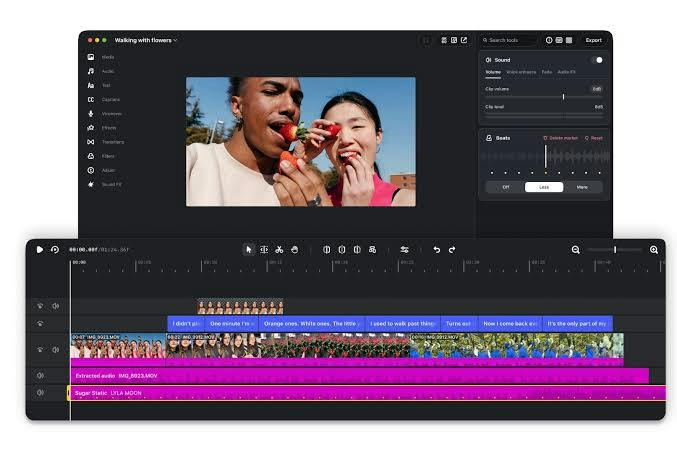
Instagram Edits launches on Mac with free pro editing tools and MCP-based AI rough cuts.
Instagram has launched a Mac desktop version of its Edits video editor, offering multi-track timelines, keyframes, color grading, precise audio control, 4K watermark-free export, Instagram music library access, and one-click publishing, with the core editor completely free. Its standout feature is MCP-based integration with compatible AI assistants for rough cuts, while humans handle pacing, color grading, and sound. The free strategy aims to lower creation barriers and lock creators into Instagram's ecosystem, though Product Hunt traction is modest, AI rough-cut quality remains unverified, and it supports Mac only.
Instagram has brought its video editor to desktop. The tool, called Instagram Edits, previously existed only on mobile, and now it has launched a Mac version with a rather bold design choice: letting AI agents into the editing workflow.
From Phone to Desktop: A Full Upgrade in Editing Capabilities
The common complaint about mobile editing tools is that the timeline is too narrow and precise control is too difficult. The desktop version of Instagram Edits clearly aims to break free from that limitation, offering a multi-track timeline, keyframes, color grading, and precise audio control—the standard configuration of professional editing software, which feels quite generous in a free tool.
For export, it supports 4K without watermarks, can directly access Instagram's music library, and offers one-click publishing to Instagram. The core editor is completely free with no subscription required. This is worth noting: most "free" editing tools on the market set up paywalls at the export stage, such as limiting resolution or forcing watermarks. Instagram Edits does not take that route.
Keyframes are a foundational concept in video editing: they mark the value of a parameter (such as position, scale, opacity, or volume) at a specific point in time, and the software automatically interpolates between two keyframes to generate smooth animation or gradual effects. For example, to make a text title go from transparent to fully opaque over 3 seconds, you only need to set one keyframe at the start and one at the end. Keyframes are the core means of achieving dynamic subtitles, camera push-ins and pull-outs, visual transitions, and audio fade-ins and fade-outs, and they are also one of the important markers that distinguish amateur editing tools from professional software. Due to screen and timeline limitations, mobile tools often provide only preset animations, whereas the desktop version's open keyframe editing means creators can produce more refined and more customizable visual effects.
MCP Protocol Connects AI Agents, Rough Cuts Can Be Handed to the Machine
The most distinctive feature of this product is AI agent integration. Through MCP (Model Context Protocol), users can connect compatible AI assistants and let AI complete rough cuts and some editing operations, then take over themselves for fine adjustments.
This division of labor is quite pragmatic. The most time-consuming part of editing is often not creative decision-making but material screening and initial assembly—going through a large number of clips, picking out the usable ones, and arranging them in order. Handing this part to AI and letting human editors focus their energy on pacing, color grading, and sound effects can indeed compress the workflow considerably. The fact that MCP is an open protocol rather than a private interface also means that, in theory, multiple AI assistants can be connected, without being locked in to a single vendor.
However, the Product Hunt page does not disclose how good the actual quality of AI rough cuts is, such as whether it can understand narrative logic or whether it might mistakenly delete key shots. The effectiveness of such features depends heavily on the underlying model and prompt design, and actual use is needed to judge.
MCP (Model Context Protocol) is a standardized protocol proposed and open-sourced by Anthropic at the end of 2024, designed to let AI models connect to external tools, data sources, and services in a unified way. You can think of it as the "USB-C port" of the AI world: previously, every time an AI assistant wanted to call a piece of software, a separate private plugin had to be developed; with MCP, software only needs to implement the protocol once, and any compatible AI client can discover and invoke its capabilities. In editing scenarios, this means AI assistants can read the timeline, analyze materials, and perform operations such as splitting and sorting. MCP uses a client-server architecture and supports both local and remote connections. It has now been adopted by multiple developer tools and AI platforms, and the ecosystem is still expanding rapidly.
The Platform Logic Behind the Free Strategy
It is not hard to understand why Instagram launched a free professional-grade editing tool. Video content is the platform's core asset, and lowering the creation barrier is equivalent to increasing supply. Once creators are accustomed to finishing edits in Edits and publishing with one click, the entire production pipeline becomes locked into the Instagram ecosystem.
The combination of 4K watermark-free export and free use is quite attractive to casual creators and social media operators. Compared with subscription-based professional editing software, what it sacrifices is some advanced features (not mentioned on the product page), in exchange for zero cost and seamless integration with Instagram.
Judging from the Product Hunt data, this product received 70 upvotes, ranked 15th, and has only 1 comment. Its popularity is not particularly notable, which may be related to its targeting Mac users and having just launched.
Who It Is For
If you mainly publish content on Instagram, need to produce videos quickly, and do not want to pay for editing software, this tool is worth trying. The AI rough-cut feature is especially practical for creators with large amounts of footage and high publishing frequency. But if you need complex effects, multi-platform distribution, or team collaboration features, professional editing software remains the safer choice.
The desktop version of Instagram Edits currently supports Mac only, and Windows users will have to wait.
One-line Summary
Instagram Edits launches a Mac desktop version, offering professional editing features for free and integrating MCP-based AI rough cuts.
Paragraph Summary
Instagram has brought its mobile video editing tool Edits to desktop with a Mac version, offering professional-grade features such as a multi-track timeline, keyframes, color grading, and precise audio control, while also supporting 4K watermark-free export, access to Instagram's music library, and one-click publishing. The core editor is completely free. The product's biggest highlight is connecting compatible AI assistants through the MCP protocol, with AI handling rough-cut work such as material screening and initial assembly while humans handle fine adjustments such as pacing, color grading, and sound effects. This free strategy is intended to lower the creation barrier and lock creators into the Instagram ecosystem. However, its Product Hunt traction is modest (70 upvotes, ranked 15th), the actual quality of AI rough cuts remains to be verified, and it currently supports Mac only.
Related articles
 Tech Frontiers
Edge AI on Microcontrollers: When Is It Actually Worth Deploying?
Drawing on Reddit discussions and Arm case studies, this article analyzes the real-world use cases for edge AI on microcontrollers: when each device needs independent inference, when a gateway or cloud is more reasonable, and the costs and boundaries of specialized hardware.
 Tech Frontiers
Pushing the Limits of Extreme Sudoku on a 16GB GPU: Insights from Depth and Flow Matching
A researcher trained a 16.54M-parameter model on a 16GB GPU to solve extreme Sudoku, finding effective depth breaks the 60% plateau and flow matching with improved sampling pushes accuracy past 99% with ~50× lower layer-evaluation budget.
 Tech Frontiers
AI Agent Approval Workflows: Why Human Confirmations Always Get Mindlessly Clicked
Why do AI agent approval workflows always get mindlessly clicked? A Reddit discussion shows that separating rules from keys, low-frequency high-risk approvals, and GitHub Environments-style gates are the keys to effective approvals.