Integrating Nano Banana 2 with Claude Code: A Hands-On Tutorial for Fully Automated Batch AI Image Generation

Integrate Nano Banana 2 with Claude Code for fully automated batch AI image generation in the terminal.
This tutorial explains how to integrate the Nano Banana 2 image generation model into Claude Code via Google AI Studio API, creating a fully automated image generation workflow within the terminal. Core steps include obtaining a Gemini API key with spending limits, installing JSON structured prompt generation skills, and configuring the Nano Banana generation skill. Once set up, you can batch-generate images concurrently, edit reference images, and create complete websites with AI illustrations from a single command.
Why Integrate an Image Generation Model with Claude Code
If you've used image generation models like Nano Banana Pro or Nano Banana 2, you've probably been through this workflow: open the webpage, type a prompt, wait for generation, download the image, switch back to your workspace... The entire process is fragmented and inefficient. Once you need to batch-generate multiple images with a consistent style, the time cost of manual operations skyrockets.
Nano Banana Pro and Nano Banana 2 are image generation systems based on a Diffusion Model architecture, falling under the category of Text-to-Image generation tools. Diffusion models work by progressively adding Gaussian noise to an image until it becomes completely random noise, then training a neural network to learn the reverse denoising process—enabling it to gradually "restore" an image matching the text description from pure noise. These models belong to the same technical lineage as Stable Diffusion, DALL·E, and Midjourney, though each differs in training data, model architecture, and inference optimization. The distinguishing feature of the Nano Banana series is its standardized API interface, which facilitates programmatic access and integration into automated workflows.
The solution presented in this article directly addresses this problem—integrating Nano Banana 2 into Claude Code via API, letting the AI agent handle the entire process from prompt generation to image output.
Claude Code is a command-line AI programming agent tool developed by Anthropic that allows developers to interact with Claude models through natural language in the terminal, completing tasks like code writing, file operations, and project management. Unlike traditional chat-based AI assistants, Claude Code has "agent" capabilities—it can autonomously plan multi-step tasks, call external tools and APIs, read and write to the local file system, and dynamically adjust subsequent actions based on execution results. This agent paradigm is one of the core directions in the 2024-2025 AI toolchain evolution, essentially upgrading large language models from "Q&A machines" to "task executors."
Once integrated, you can:
- Launch 20 generation tasks simultaneously without queuing them one by one
- Skip writing complex image prompts yourself—Claude automatically generates structured JSON prompts
- Complete all operations in a single terminal interface, eliminating multi-window switching
- Embed generated images directly into websites, presentations, and other projects
The concept of "launching 20 generation tasks simultaneously" involves concurrent programming and asynchronous task scheduling. In traditional serial execution, each image must wait for the previous one to finish before generation begins, while concurrent execution allows multiple API requests to be sent and processed in parallel. In Python, this is typically implemented using the asyncio framework or concurrent.futures thread pools; in Node.js, it leverages the native event loop and Promise.all mechanism. It's important to note that API services usually have Rate Limiting—a maximum number of requests allowed per unit of time—exceeding which returns a 429 error. Therefore, actual batch generation requires finding a balance between concurrency and rate limits, typically handled through an Exponential Backoff strategy for throttled responses.
Prerequisites: Obtaining a Google AI Studio API Key
The entire workflow uses Google AI Studio's API to call Gemini models, which in turn drive Nano Banana's image generation capabilities.
Google AI Studio is Google's developer-facing AI model access platform, where developers can obtain API keys to call Google's Gemini series of large models. Gemini is a multimodal large language model developed by Google DeepMind, with native support for text, image, audio, video, and other modalities as both input and output. Versions like Gemini 3.1 Pro mentioned in this article have image generation capabilities, meaning they can not only understand image content but also directly generate or edit images based on text instructions. In this workflow, the Gemini model essentially serves as the underlying engine for Nano Banana image generation, converting structured prompts into final images through API calls.
Here are the specific configuration steps.
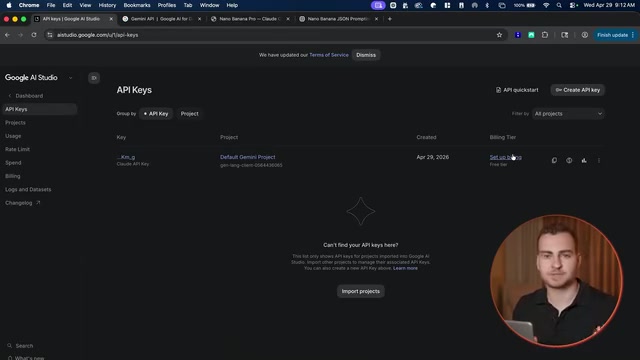
Creating an API Key
- Visit the Google AI Studio website and register or log in with your Google account
- Enter the Playground interface; first-time users need to accept the terms of service
- Click "Get API Key" → "Create API Key"
- Place the key in the default project, name it, and click Create
- Copy the key and store it securely—never share it with anyone
Setting Billing and Spending Limits
Calling Nano Banana through the API is a paid service. Google typically provides a certain free tier, but advanced image generation incurs actual costs.
It's strongly recommended to set a spending limit—especially when handing your API key to an AI agent in the terminal. Here's how:
- Go to Project Settings → Spending Limits
- Start with a limit of around $10
- You can check cost details at any time on the Usage page
This step is crucial for preventing the AI agent from accidentally running up a massive bill during batch generation.
Installing the JSON Prompt Generation Skill
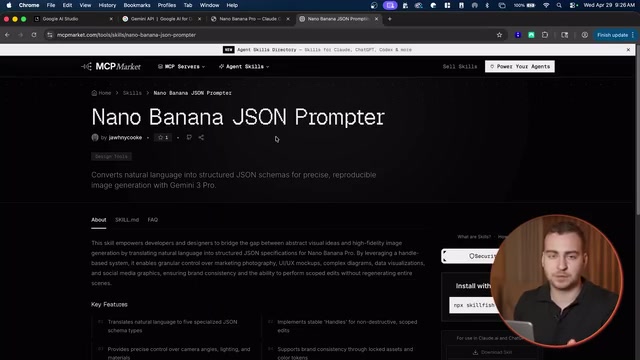
The first key component of the workflow is the Nano Banana JSON Prompt Generator. Its role is to convert simple natural language descriptions into structured JSON-format prompts, significantly improving the quality and controllability of generated images.
Why JSON Prompts Are Better Than Plain Prompts
Prompt Engineering refers to the technique of carefully designing input text to guide AI models toward desired outputs. In image generation, prompt quality directly determines output image quality and controllability. Traditional natural language prompts suffer from high ambiguity and incomplete dimensional coverage, while JSON-format structured prompts use predefined key-value pairs to enforce coverage of all critical dimensions in image generation. This approach borrows from the Schema validation concept in software engineering—using fixed data structures to ensure information completeness and consistency.
A plain prompt like "a perfume bottle" gives only vague instructions, while JSON format can precisely specify multiple dimensions:
- Composition: medium shot, close-up, full shot, etc.
- Lighting: natural light, studio lighting, golden hour, etc.
- Surface material: matte, glossy, metallic finish, etc.
- Environment: indoor, outdoor, abstract background, etc.
- Type & description: product photography, concept art, UI prototype, etc.
This kind of structured description isn't something humans would typically write manually, but Claude Code can auto-generate it in seconds, far exceeding hand-written prompt quality. JSON Schemas can also be customized for different use cases (such as e-commerce product images or social media assets), forming a reusable prompt template library that provides a solid foundation for team collaboration and style consistency.
Installation Steps
Run the following NPM command in your terminal to complete the installation:
npm install @developer/claude-code-nano-banana-skills
Select "Global Installation" so all agents can access it. Once installed, you can use the skill by entering a slash command in Claude Code.
Installing the Image Generation Skill: Connecting to the Nano Banana API
The second skill handles the actual Nano Banana API calls for image generation. The execution logic of the entire workflow is as follows:
- JSON Prompt Skill: Converts natural language into structured JSON
- Nano Banana Generation Skill: Passes the JSON to the API and returns the generated image
- Stacking Additional Skills: Embeds images into websites, documents, and other projects
Configuration Process
After downloading the skill files, hand all files to Claude Code and tell it:
"Use these files to create a new skill for generating images with Nano Banana. Don't make any modifications—just package it as a skill and make sure it's globally available."
Claude will automatically complete the skill creation. Next, you need to:
- Run the install command to install all dependencies
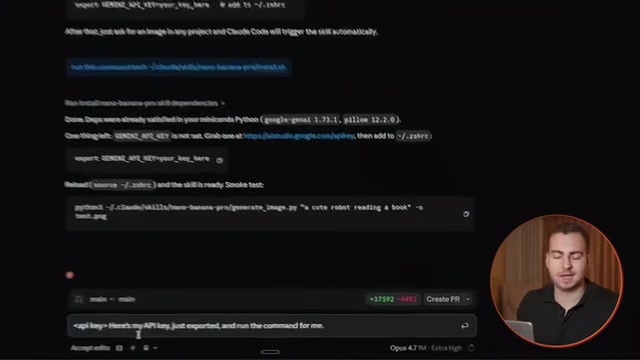
- Export the Gemini API key:
export GEMINI_API_KEY=your_key
An API key is an identity credential for accessing cloud services—once leaked, others can use your key to call paid services and incur charges. In AI agent scenarios, the security risk is especially acute: the agent might write the key to log files, include it in code commits, or have it synced to the cloud via chat history. Using the export command to set environment variables in a terminal session is an industry-standard key management practice—the key exists only in the current terminal process's memory and won't be persisted to the file system. More advanced approaches include using .env files with .gitignore to prevent keys from being committed to version control, or using professional secrets management services like HashiCorp Vault or AWS Secrets Manager.
This skill's underlying implementation uses Python API calls to Gemini 3.1 Pro and other models for image generation, with support for advanced features like multi-turn image editing, reference image input, and different aspect ratio settings.
Hands-On Demo: From Zero to Batch Image Generation
Basic Generation Test
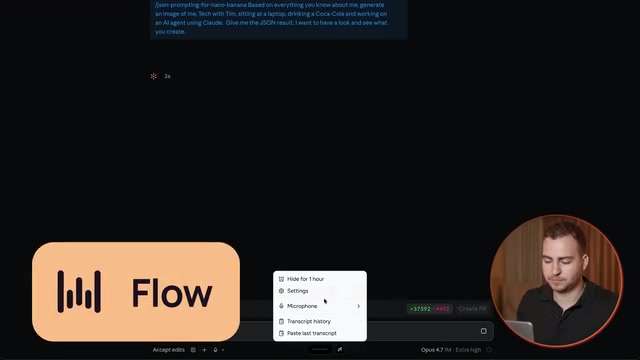
Once configured, simply enter instructions in Claude Code to test. For example:
"Using the Nano Banana Pro skill and JSON prompt technique, generate a 9:16 image of a person standing full-body, holding a Sprite bottle in one hand and a Mac mini in the other."
Claude will first invoke the JSON prompt skill to generate a structured description, then pass it to the Nano Banana API to complete image generation. The entire process happens without leaving the terminal window.
Reference Image Editing
An even more practical feature is reference image-based editing. You can upload an existing image and tell Claude:
"In this image, replace the Cloud logo with the ChatGPT logo, using the Nano Banana Pro skill."
The skill has built-in file reference functionality that passes the reference image as input to the Python script, enabling partial replacement or style adjustments. This reference image-based editing capability technically relies on Inpainting and Image-to-Image generation—the model doesn't generate from scratch but instead regenerates only the specified region while preserving most of the original image. This is highly efficient for scenarios like brand asset iteration and product image modifications.
Batch Generating Website Images
The most noteworthy use case is generating a complete website with AI images from a single sentence. In the actual demo, you simply tell Claude:
"Build a super smooth, clean website and include four different images we generate."
Claude automatically calls Nano Banana to generate all images and directly embeds them into the website code—the entire process takes just a minute or two. This demonstrates the core advantage of AI agents: they can chain multiple otherwise independent tools (image generation API, frontend code writing, file system operations) into a coherent automated pipeline, where developers only need to describe the end goal and the agent handles task decomposition and step-by-step execution.
Workflow Extensibility and Security Considerations
Security Reminders
- Never paste API keys directly in chat—chat history may be logged or synced
- Setting keys via the terminal
exportcommand is a safer approach - Always set spending limits to prevent unexpected costs from batch tasks
Extension Possibilities
The real value of this workflow lies in its composability. Here are some directions worth exploring:
- Combine image generation with website building skills for one-click generation of image-rich websites
- Combine with document skills to auto-generate reports or presentation assets with illustrations
- Customize JSON Schemas to optimize prompt templates for specific scenarios like e-commerce product photos or social media assets
- Assign the most suitable model for different tasks: Gemini for image generation, Claude for text and code
This "composable skills" architectural philosophy is closely aligned with Microservices in software engineering—each skill is an independent functional unit with well-defined input/output interfaces that can be flexibly orchestrated and combined. As the AI agent ecosystem matures, platforms similar to "skill marketplaces" may emerge, where developers can install and combine various AI skills like npm packages to build increasingly complex automated workflows.
The core idea of this approach is letting the AI agent serve as a middleware layer for image generation, compressing operations that previously required manual switching between multiple tools into a single unified terminal interface. For developers and content creators who frequently generate AI images, spending half an hour on initial setup saves significant time on every subsequent generation task.
Key Takeaways
- Integrating Nano Banana 2 with Claude Code enables fully automated batch image generation within the terminal, eliminating multi-window manual operations
- The JSON structured prompt skill automatically generates high-quality prompts with detailed parameters for composition, lighting, materials, and more—significantly outperforming hand-written descriptions
- The complete setup process includes obtaining a Google AI Studio API key, setting spending limits, and installing both the JSON prompt generator and Nano Banana generation skills
- Advanced features include reference image editing, multiple aspect ratios, and batch generation—you can generate a complete website with AI illustrations from a single sentence
- The workflow is highly extensible and can be freely combined with other skills like website building and document generation
Related articles
 Tutorials
ChatGPT Plus Subscription Guide: Are GPT-5.5, image-2, and Codex Worth the Upgrade?
A detailed look at ChatGPT Plus features — GPT-5.5, image-2, and Codex — with a Plus vs Pro comparison and a complete step-by-step subscription guide for users outside the US.
 Tutorials
Harness AI Engineering in Practice: Using Claude Code to Master Enterprise-Level E-Commerce Development
Deep dive into Harness AI Engineering: master enterprise e-commerce development with Claude Code using the Rules, Skills, Wiki, and Changes framework.
 Tutorials
Cursor + Codex Dual-IDE Collaboration: A Practical Methodology for Open-Source Project Customization
A complete methodology for open-source project customization based on real-world experience, detailing the Cursor+Codex dual-IDE workflow, seven-stage process, MVP validation, and AI source code reading techniques.