InvokeAI In-Depth Review: Can It Replace SD WebUI and ComfyUI?

InvokeAI offers zero-barrier setup, better VRAM efficiency, and an integrated infinite canvas as a compelling SD WebUI alternative.
InvokeAI is a free, open-source local AI image generation platform that aims to solve the plugin conflicts, VRAM issues, and workflow reproducibility problems common in SD WebUI and ComfyUI. This review covers its one-click installer, VRAM optimizations for mid-range GPUs, unified infinite canvas with inpainting and outpainting, node-based workflows, and built-in model management — along with an honest look at its limitations.
For AI image generation users who have long relied on Stable Diffusion WebUI or ComfyUI, plugin conflicts, sluggish interfaces, VRAM overflows, and workflows that can't be reliably reproduced have become everyday frustrations. InvokeAI, a free and open-source local AI image generation platform, is attempting to offer a better alternative along two dimensions: ease of use and workflow completeness. Based on a comprehensive feature demonstration from a Bilibili content creator, this article offers an objective breakdown of InvokeAI's core capabilities along with its real-world strengths and limitations.
Background: The Technical Debt of the SD WebUI Ecosystem Stable Diffusion WebUI (also known as AUTOMATIC1111) is currently the most widely used local SD deployment interface, built on a Python/Gradio framework. Its early-mover advantage helped it accumulate thousands of community plugins. However, this "plugin stacking" model has introduced significant problems — dependencies across plugins often conflict over Python versions, CUDA versions, and PyTorch versions, creating what's commonly called "dependency hell." ComfyUI took a different approach by centering everything on a node-based workflow, offering tremendous flexibility but a steeper learning curve for beginners. InvokeAI represents a third path: preserving professional node-based capabilities while making installation experience and interface usability core design priorities.
Installation Experience: Truly Zero-Barrier Local Deployment
InvokeAI's most immediately noticeable improvement is its low installation barrier. Deploying traditional SD WebUI typically requires manually configuring a Python environment, installing runtime libraries, and wrestling with virtual environments — a process where one wrong step can result in cascading error messages and missing dependency failures.
InvokeAI's new installer automates the entire process. After downloading the appropriate Windows / macOS / Linux package from the official download page, Windows users simply unzip and double-click to run. The program automatically deploys dependencies, configures the runtime environment, and sets up a local port — no user intervention required.
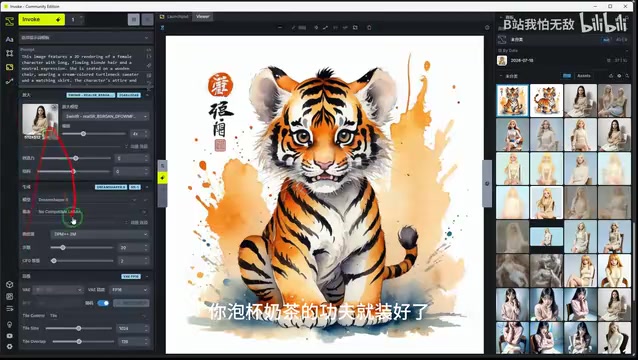
If a system security alert appears during installation, simply click "More info → Run anyway." This is Windows SmartScreen doing its job — a feature built into Windows since version 8 that checks executable files against Microsoft's cloud database of "app reputation scores" to assess risk. Programs without an Authenticode code signing certificate, or those that haven't yet accumulated enough download history for a reputation score, will trigger this warning even when completely safe. For open-source community software like InvokeAI, obtaining formal code signing certification involves non-trivial commercial costs, so triggering this prompt is a systemic quirk rather than a security red flag. After installation, a desktop shortcut is created automatically. Double-click to open the web-based interface — it's ready to use immediately, with one-click start and stop. Notably, InvokeAI runs entirely offline and locally, with no asset uploads, ensuring solid privacy and data security.
Interface and VRAM Optimization: Run Large Models on Older GPUs
Anyone familiar with SD WebUI knows its interface is packed with dense nested menus and plugin options, making it a chore for newcomers to locate any given feature. InvokeAI adopts a clean, minimal design philosophy with a native Chinese interface included out of the box — no separate language pack needed, and no risk of plugin conflicts.
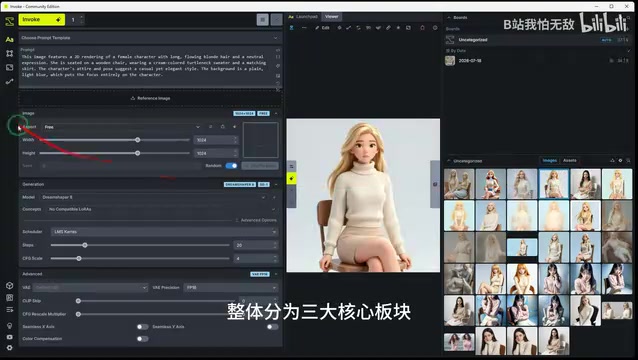
The overall interface is organized into three core sections: a basic quick-generation panel, a unified infinite canvas, and a professional node workflow editor. The sidebar houses a visual model library, while the top toolbar integrates high-frequency functions like inpainting, outpainting, local editing, and ControlNet — all accessible in one click, without digging through nested menus.
On the VRAM front, InvokeAI includes low-level optimizations specifically targeting mid-to-low-end GPUs like the GTX 1060 and RTX 3060. According to the demonstrator, generating images at the same resolution consumes roughly half the VRAM compared to SD WebUI, enabling relatively stable operation of large models like SDXL and Flux. For users with limited hardware, this is a critical selling point.
Technical Background: How VRAM Optimization Works AI image generation places extreme demands on VRAM — the SDXL base model alone requires 6–8GB just to load, and the newer Flux model demands even more. InvokeAI's VRAM optimizations rely on several key techniques: dynamic model offloading (temporarily unloading unused model components to system RAM or disk), attention slicing (splitting large attention computations into smaller sequential batches), xFormers efficient attention (reducing peak VRAM usage via memory-efficient attention algorithms), and model chunk loading strategies. The combination of these techniques significantly reduces VRAM consumption for equivalent generation tasks, making it feasible for GPUs with as little as 6GB or even 4GB of VRAM to run large models. It's worth noting that VRAM savings typically come at the cost of some generation speed, and real-world results vary depending on hardware and task type.
Flagship Feature: The Unified Infinite Canvas
InvokeAI's most distinctive capability is its unified infinite canvas. With traditional WebUI, if any part of a generated image has flaws — distorted hands, an incorrect background — the only option is typically to regenerate the entire image and hope the composition and quality work out.
InvokeAI's canvas uses an infinite, layer-based design with an interaction model similar to Photoshop: free zoom, pan, rotate, and crop are all supported. You can zoom into pixel-level detail for fine-tuning or zoom out to evaluate overall composition, with smooth performance throughout.
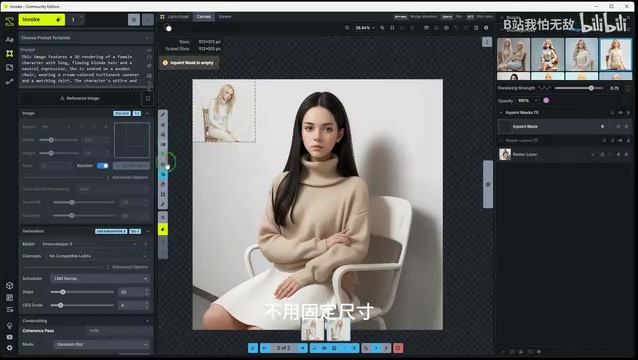
More practically useful are its local editing and canvas expansion capabilities. To modify any area of an image, simply draw a selection around it and regenerate — this leverages Inpainting technology: after the user draws a mask, the diffusion model applies noise only to the masked region during the forward noising step, then continuously blends unmasked pixel values back in during the denoising sampling phase, precisely constraining the model's effect to the selected area with natural edge transitions. Want to extend a scene mid-creation, adding a background or distant landscape? Just drag the canvas boundary to expand infinitely — this is Outpainting: using the original image as a conditional input to generate semantically coherent new content beyond the image boundaries. Modern implementations typically use a sliding window overlap-and-blend strategy to eliminate seam artifacts, achieving seamless expansion without a fixed canvas size. Having generation and refinement in one unified space eliminates the constant back-and-forth between SD and Photoshop, significantly boosting creative efficiency.
Node Workflow and Model Management
InvokeAI also holds its own on the professional side. Its node workflow system is designed to accommodate both beginners and experts — newcomers can generate images in one click using the basic panel, while advanced users can build fine-grained pipelines, batch generation workflows, and custom effects using individual nodes. Every step in the process is visible, making it easy to pinpoint problems when they arise, completely eliminating the "black box" experience.
Technical Background: The Design Philosophy of Node Workflows Node-based workflows are a visual programming paradigm that breaks complex processes into independent functional modules (nodes) connected by wires, widely used in Blender's material editor, Nuke compositing software, and Unreal Engine's Blueprint system. In AI image generation, each node represents an independent processing step — such as a "text encoder," "sampler," "VAE decoder," or "ControlNet conditioning input" — and users define the data flow by visually connecting nodes to build pipelines ranging from simple to highly complex. Compared to SD WebUI's "black box" parameter panels, node systems offer a key advantage: process transparency. Every node's inputs and outputs can be monitored, and when errors occur, they can be pinpointed to the specific node, dramatically improving debugging efficiency. Workflow files are essentially structured data describing node connections (typically in JSON format), making them fully serializable for saving and restoring across different devices.
Crucially, completed workflows can be saved, exported, and shared in one click. They reproduce 1:1 on different machines — no missing LoRAs, invalidated parameters, or broken pipelines when switching environments. For content creators and studios working on serialized comics, multi-style batch poster generation, or multi-layer effect compositing, this capability is particularly valuable.
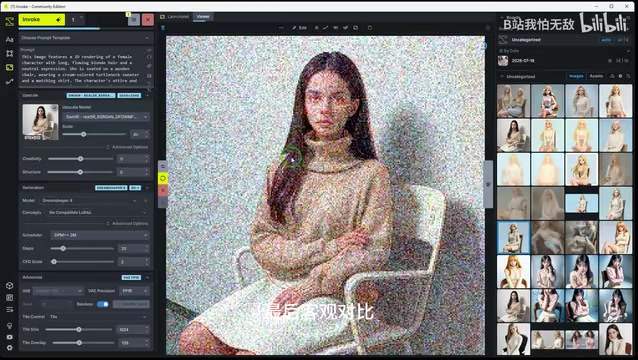
For model management, InvokeAI includes a built-in model management system that automatically scans local models and supports custom categorization, tags, groupings, and favorites. SD 1.5, SDXL, and the full Flux model family can all be switched with one click, with cache optimization that makes loading large models fast — no more sitting through long waits when switching between models.
Background: An Overview of the AI Image Generation Model Ecosystem The current AI image generation ecosystem is primarily organized around three generations of base model architectures. SD 1.5 is the most mature early architecture — compact models (around 2GB), the richest plugin ecosystem, but with a ceiling on resolution and detail quality. SDXL raised the base resolution to 1024×1024 and introduced a dual text encoder architecture, significantly improving detail and composition quality, though with proportionally higher VRAM demands. Flux is a next-generation model based on the Diffusion Transformer (DiT) architecture — a fundamentally different path from the U-Net architecture used by the SD series. DiT serializes image patches and processes them through standard Transformer blocks, theoretically enabling stronger global context understanding. It significantly outperforms SDXL in text rendering accuracy, complex multi-subject compositions, and lighting realism. The full version requires approximately 24GB of VRAM; quantized versions can be compressed to around 8GB. LoRA (Low-Rank Adaptation) is a universal fine-tuning technique applicable across all three model generations. Mathematically, it freezes the full pretrained model weights and injects two low-rank matrices into specific layers, dramatically compressing the number of trainable parameters. File sizes typically range from a few MB to tens of MB. At inference time, the LoRA matrix product is added back onto the original weights, and multiple LoRAs can be blended at adjustable intensity coefficients for style mixing — making it the core tool for personalizing AI image generation. InvokeAI's unified compatibility with all three model generations gives it strong forward-looking adaptability.
Objective Comparison: InvokeAI's Strengths and Limitations
Overall, InvokeAI's advantages over SD WebUI are most evident in the following areas:
- Zero-barrier installation: Fully automated deployment with no error-prone setup
- Excellent VRAM optimization: Mid- and low-end GPUs can run large models smoothly
- Infinite layered canvas: Editing and generation in one integrated environment
- Dual operation modes: Accessible for beginners while supporting professional depth
- Reproducible workflows: Lossless migration across devices
- Intuitive model management: Fast and efficient model switching
That said, InvokeAI is not without its shortcomings. Its most notable limitation is incompatibility with some less common third-party plugins — SD WebUI's vast early community ecosystem accumulated a long tail of niche plugins (such as specific ControlNet preprocessors for particular styles, or specialized sampling algorithm extensions). For vertical creative use cases that depend on these niche plugins, the migration cost is not negligible. However, for the vast majority of everyday image generation and design needs, InvokeAI's native feature set is more than sufficient.
It's also worth noting that the observations in this article are primarily based on a single content creator's demonstration and hands-on experience. Claims like "half the VRAM usage" and "instant loading" carry a degree of subjective promotional framing. Readers are encouraged to verify actual performance against their own hardware configurations (GPU model, VRAM size, system RAM) through personal testing.
Summary: A Worthy SD WebUI Alternative Worth Trying
For users frustrated by SD WebUI's sluggishness, error-prone setup, and difficult workflow reproduction, InvokeAI offers a more streamlined path: free, open-source, locally secure, zero installation barrier, and comprehensive feature coverage. Whether you're a beginner getting started with AI art or a professional creator needing high-volume batch generation, it deserves serious consideration as a primary or backup tool. Whether it fully replaces your existing setup ultimately depends on how dependent you are on the specific plugin ecosystems of other platforms.
Related articles

Cursor AI in Practice: Weighing Efficiency Gains Against Costs in an AI IDE
An in-depth look at Cursor AI IDE's interface layout, four modes (Agent/Plan/Debug/Ask), model selection, and Git context integration, with hands-on demos weighing subscription costs against going direct to Claude.

Free Landing Page Design Rules Library: A Practical Guide for Claude Code and Cursor
A free landing page design skill for Claude Code and Cursor: MIT licensed, nearly 9,000 stars, asks about offer/audience/action before planning 12 sections with hard font and spacing constraints.

Cursor Keeps Writing Wrong Code? The Problem May Be Context, Not Prompts
Cursor keeps writing wrong code? The problem may be context, not prompts. Learn how to supply relevant files, full error messages, and expected results, plus a plan-first, small-step, test-driven workflow to reduce AI coding errors—while remembering code review remains the developer's job.