Is LM Studio the Best UI for Local LLMs? Pros and Cons Reviewed

LM Studio wraps llama.cpp and MLXLM in a GUI, making local LLMs easier to run.
LM Studio is a free but non-open-source tool for running local LLMs, built on the cross-platform llama.cpp and the Apple-optimized MLXLM. Its core design moves configuration from the CLI and config files into a GUI to lower the barrier to entry. Its biggest highlight is built-in Hugging Face model search with one-click installation, saving the hassle of manually finding repositories and managing files. It is especially friendly to Mac users, with a community package also available for Arch Linux. The trade-offs are its closed-source nature and limited exposure of advanced parameters; users seeking deep customization or an open-source toolchain may prefer alternatives like llama.cpp directly.
Title
Is LM Studio the Best UI for Local LLMs? Pros and Cons Reviewed
Meta Description
LM Studio is a visual wrapper for local LLMs built on llama.cpp and MLXLM, supporting Mac and Linux. This article analyzes its model search highlights, its non-open-source limitations, and its target user base.
Article Content
The demand for running large language models locally is growing, but for most people, the command-line interface (CLI) remains a significant barrier. LM Studio attempts to solve this problem—it wraps the underlying inference engine and replaces configuration files with a graphical interface. According to a review by a YouTube tech channel, this tool is "not open source, but free to use," and "heavily focused on the UI experience."
LM Studio's Positioning: For Users Who Don't Want to Touch the Command Line
LM Studio is essentially a wrapper around llama.cpp and MLXLM. The former is a cross-platform inference engine, while the latter is optimized for Apple chips. This means that on a Mac, it can leverage the MLX framework to boost performance, making it particularly friendly to Apple users.
The review states outright that with this tool, "configuration happens in the UI, not through config files," and the overall design is "built for the typical Mac user." In plain terms, it targets users who prefer a graphical interface and don't want to constantly deal with the terminal.
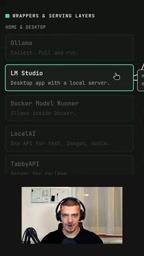
This design orientation brings a direct benefit: low onboarding cost. After downloading and installing, most operations can be completed within the visual interface, without needing to understand concepts like ports, parameters, or quantization formats.
llama.cpp is an open-source C/C++ inference engine initiated by Georgi Gerganov. Its core value lies in efficiently running quantized LLaMA-series models even on pure CPU or low-end GPUs. It was the first to make it possible to run large models on consumer-grade hardware, which subsequently spawned a large number of wrapper tools. llama.cpp supports the GGUF model format, which packages model weights and metadata into a single file for easy distribution and loading. It also introduces multiple quantization schemes (such as Q4_K_M and Q8_0), offering different trade-offs between precision and VRAM usage. The reason LM Studio can work cross-platform is largely because it uses llama.cpp as its backend inference engine.
MLX is an open-source machine learning framework released by Apple in late 2023, designed specifically for the unified memory architecture of Apple Silicon. Unlike the CUDA ecosystem, MLX allows compute tasks to share memory between CPU and GPU, avoiding data transfer overhead. MLXLM is an LLM inference implementation built on MLX that can achieve better performance on M-series chips than generic backends. LM Studio calls MLXLM on Mac precisely to leverage this hardware advantage, which is the technical reason it is especially friendly to Apple users.
Core Selling Point: Model Search and Download
The reviewer considers model search to be LM Studio's biggest feature highlight. Users can search Hugging Face model repositories directly within the interface—for example, by typing a keyword like "Qwen"—to browse and one-click install available models.
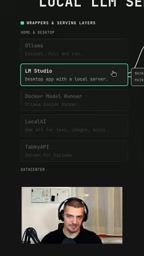
This workflow eliminates the steps of manually going to Hugging Face to find repositories, verifying files, and placing them in the designated directory. For users who frequently try different models, this convenience saves a considerable amount of time. In the reviewer's own words, "the whole UI is just extremely convenient to use."
Hugging Face is currently the largest open-source model hosting platform, gathering hundreds of thousands of model repositories covering text, images, audio, and other modalities. Each repository typically contains model weight files, configuration files (config.json), and tokenizer files, and users must determine which files are necessary and whether the formats are compatible. For those unfamiliar with this ecosystem, every step from search to download to correctly placing files can go wrong. LM Studio's built-in search function connects directly to the Hugging Face API, filters for models compatible with llama.cpp/GGUF, and automatically handles downloads and directory management—this is precisely the key to lowering the barrier to entry.
Installation and Platform Support
LM Studio can be downloaded directly from the official website lmstudio.ai. The reviewer mentions that a corresponding package can also be found on Arch Linux, though he himself can't quite remember how he installed it initially. This suggests it has some community distribution channels in the Linux ecosystem, but not all platforms offer an equally smooth installation experience.

Trade-offs to Consider
This tool is not without its costs. It is not open-source software, which is a drawback for users who value the open-source ecosystem. Although it is free to use, the underlying components that actually do the work are llama.cpp and MLXLM—what LM Studio primarily provides is wrapping and an interface.
Another implicit issue is flexibility. The graphical interface lowers the barrier, but it also means advanced users may be limited by the options exposed in the UI. The reviewer compares it with CLI tools, implying that the latter still have advantages in fine-grained control.
Open-source software generally refers to software whose source code is public and allows users to view, modify, and redistribute it, with common licenses including MIT, Apache 2.0, and GPL. LM Studio is distributed as closed source, meaning users cannot audit its code or build it themselves—something worth noting in privacy-sensitive scenarios. Although inference happens locally, the behavior of the interface layer remains opaque. In contrast, llama.cpp itself is an MIT-licensed open-source project, and the community has spawned open-source frontends or wrappers such as Jan, Ollama, and LocalAI. If an open-source license is a hard requirement, these alternatives are worth including in the comparison.
Who It's For
If you use a Mac, want to get local models running quickly, and don't want to study command-line parameters, LM Studio's convenience is hard to replace. If you need deep customization of inference parameters or insist on an open-source toolchain, then using llama.cpp directly or another open-source frontend may be more suitable.
LM Studio's value lies not in technical innovation but in packaging existing inference capabilities into a product that ordinary people can use. In the local LLM toolchain, this kind of "last mile" experience optimization is exactly what many people truly need.
One-line Summary
LM Studio wraps llama.cpp and MLXLM in a graphical interface, making it easier to run local LLMs.
Paragraph Summary
LM Studio is a free but non-open-source tool for running local large language models, built on the cross-platform llama.cpp and the Apple-chip-optimized MLXLM. Its core design orientation is moving configuration from the command line and config files into a graphical interface to lower the barrier to entry. Its biggest highlight is built-in Hugging Face model search and one-click installation, saving the hassle of manually finding repositories, verifying files, and placing them in directories. It is especially friendly to Mac users, and a community package is also available for Arch Linux. The trade-offs are its closed-source nature and the limited exposure of advanced parameters in the graphical interface; users seeking deep customization or committed to an open-source toolchain may be better off using alternatives like llama.cpp directly.
Related articles

Hermes Agent Beginner's Guide: Hands-On with a Self-Evolving AI Agent
A beginner's guide to Hermes Agent, the open-source self-evolving AI agent that gained 41.7K GitHub stars in two months—covering Harness Engineering, the learning loop, three-layer memory, WSL installation, and hands-on configuration.

AI Agent in Action: Building a Smart Office Assistant with WorkBuddy
A practical case study shows how Tencent WorkBuddy batch-converts and archives files, compares chat LLMs with AI Agents, and analyzes WorkBuddy's credit system, use cases, and positioning for office automation selection.

From Single-GPU Bottlenecks to Hundreds of Billions of Parameters: 6 Key Questions in Large Model Distributed Parallelism
Based on a Bilibili tutorial, this article organizes core knowledge of large model distributed parallelism: starting from decoder-only architecture's token-by-token generation and the essence of X times W computation, it analyzes six key questions including data parallelism, tensor parallelism, and pipeline parallelism under single-GPU bottlenecks. Suitable for learners in private deployment and model training scenarios to build systematic understanding.