Is Ollama Secure by Default? The Truth About GPU Freeloading and a Self-Check Guide

Ollama is safe by default but easily exposed by a single environment variable; its unauthenticated API can be freeloaded and even hijacked.
Ollama binds only to the loopback address 127.0.0.1 by default, but this protection is just a setting, not a password. Changing the listening address to 0.0.0.0, or copying the official Docker command (which defaults to all-zeros listening), exposes the port to the LAN or even the public internet. With no authentication on the local API, attackers can freely run inference and list, download, or delete models, and models that stay in VRAM for five minutes can be kept busy by continuous requests. Public scans show tens of thousands of exposed instances. The article also covers DNS rebinding attacks and offers a layered fix: change binding back to loopback, add a reverse proxy, or use a VPN/SSH tunnel.
Default Listening: Safe, but Only a Thin Layer
Many people assume that installing Ollama means hanging their GPU out on the public internet, but that's not the case. By default, Ollama only binds to the loopback address (127.0.0.1). Requests to this address never actually enter the network cable—other devices on the same LAN and internet scanners can't see this port. In other words, under the default configuration, your model service is locked in a private room.
But this protection isn't a password—it's a single setting. It only listens on one address. Change that line, and the door to the room is open.
Loopback address (127.0.0.1) is a segment specially reserved in the IPv4 address space (127.0.0.0/8) for local machine communication, of which 127.0.0.1 is the most commonly used, with the alias localhost. Packets sent to this address do not go through any physical network card; instead, the operating system kernel loops them back locally, so other devices on the LAN and internet scanners cannot reach it. In contrast, 0.0.0.0 is a wildcard address that, in server listening scenarios, means "bind to all network interfaces on this machine"—including wired network cards, wireless network cards, virtual network cards (such as Docker's bridge interface), and even VPN virtual interfaces. The two have completely different semantics: 127.0.0.1 means "only talk to yourself," while 0.0.0.0 means "open to every network cable." Understanding this distinction is key to determining whether Ollama is exposed.
The Source of Exposure: A Single Environment Variable
To let another device use the model, many people modify the environment variable to set the listening address to 0.0.0.0. This string of zeros doesn't represent a particular address; it means: wired network cards, wireless network cards, virtual machine network cards—all listening. Change this one line, and the port goes from "only this machine" to "anyone on the same network can connect." If this machine also has a public IP address, then the entire internet can connect.
Even fewer people notice that in the official Docker image, this line is already written. When you type a Docker command on your server following the documentation, the container internally defaults to listening on all zeros—you don't need to touch any configuration.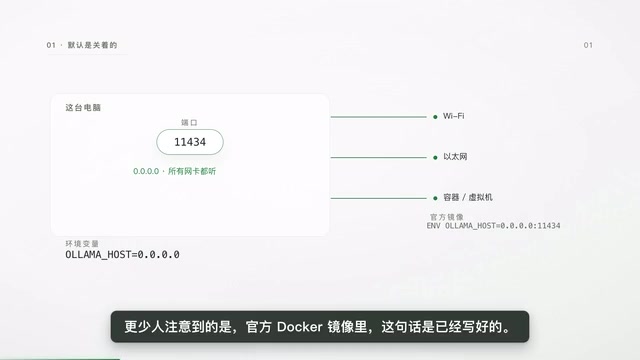
In other words, exposure often isn't because you're reckless, but because you copied an installation command that looks perfectly normal. And Ollama's local interface has no authentication layer. The official documentation states that the local API does not require authentication. No account, no key, no whitelist. Whether it can be used depends on only one thing: whether you can connect to this port.
The problem's location needs to be pinpointed—it's not that the software is dangerous, but that the listening address setting moves it from a private room into the hallway.
What Freeloading Looks Like: An Ordinary Web Request
Someone picks your address from scan results and sends a request to your port, asking a model to answer a question. The request carries no credentials because none are needed. Your machine receives the request, loads the model from disk into VRAM, starts computing, and sends the result back over the network cable. The other party pays nothing, and your GPU is busy for a few seconds.
What makes the cost even uglier is that after computing, the model doesn't immediately exit VRAM—by default, it stays for five minutes waiting for the next request. During these five minutes, subsequent requests don't need to reload the model and can start computing directly. So one request after another can keep extending those five minutes indefinitely. When you open ollama ps and see that table—model name, how much memory it occupies, whether it's running on GPU or RAM, and how much time is left—during freeloading, the table will show models you aren't even using.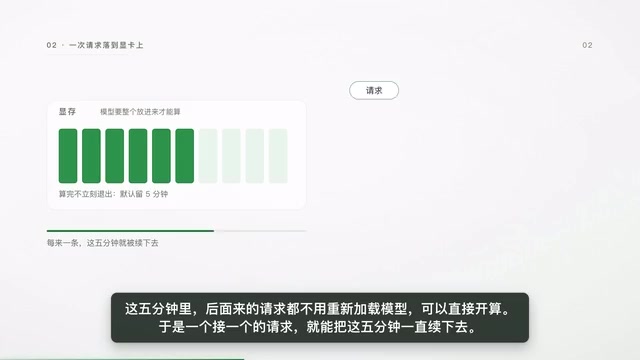
The same port can do more than generate text. Listing which models you have installed, downloading new models to fill up your disk, and deleting your models are all different endpoints on the same interface on this machine. So a more accurate description isn't that the GPU was stolen, but that the free inference service on this machine was treated by others as free quota.
Scale and Paths: From Public Scanning to DNS Rebinding
Public scan data shows this isn't an isolated case. According to observations by security firm Sensys, in 2025, about 10,600 instances open to the public internet were found using high-confidence methods, of which 1,500 would directly answer ordinary questions; another observation over a longer span recorded a cumulative 175,000 instances over 293 days, distributed across 130 countries. The two figures use different methodologies and cannot be added together, but they point to the same thing: a large portion of these machines are on home broadband and ordinary cloud hosts.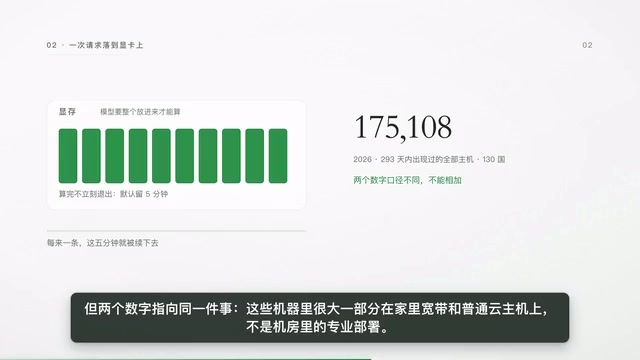
"I don't have a public IP address, and I haven't enabled port forwarding—should be fine, right?" Devices under the same router can directly connect to this port. Once it listens on all network cards, computers, TVs, and compromised machines on the same WiFi need no special tricks. There's also a more convoluted path: you simply opened a website. Browsers normally don't allow a website's script to connect to services on your local machine. The technique to bypass this is called DNS rebinding—the attacker controls a domain name, first resolving it to their own server so the page loads normally, then changing the same domain name to point to your local machine. The browser judges same-origin by domain name; the domain hasn't changed, so it allows the request, which actually lands on the service inside your computer.
According to relevant research records, Ollama once fixed one such vulnerability, but subsequent research pointed out that similar issues remain, with even more everyday trigger conditions: as long as the binding address isn't loopback, it skips validation of the request's hostname. A typical incident occurred with a deployment tool called NemoCloud—to let sandbox containers connect to the host machine, it actively bound Ollama to the all-zeros address. During installation, the screen said "using local Ollama," but it was actually listening on all network cards. Visiting a single webpage could change the conversation template in the model definition, making every subsequent conversation quietly carry an instruction written by the attacker.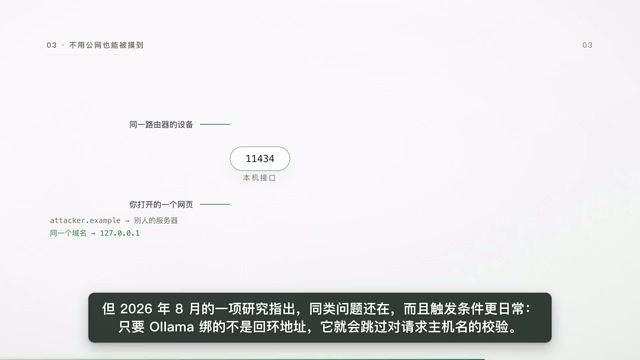
So for "I only use it locally" to hold, two things must both be true: it really only binds to the loopback address, and the version has no known bypasses. Missing either one doesn't count.
DNS Rebinding is an attack technique that bypasses the browser's Same-Origin Policy. The browser's same-origin policy is based on "protocol + domain + port," not the actual IP address, and attackers exploit this weakness. A typical process is: the attacker controls a domain name and sets its TTL (time to live) very short; when a user visits a malicious page, the domain first resolves to the attacker's own server, and the page loads normally; then the domain record is switched to point to the user's local machine (such as 127.0.0.1); since the domain hasn't changed, the browser still considers the request same-origin and allows it, so the script's request actually lands on a service running on the user's local machine. The key to defense is for the server to validate the request's Host header and reject unexpected domain names—this is also the root of the risk mentioned in the article when Ollama skips hostname validation while bound to a non-loopback address.
Three-Step Self-Check and Three-Layer Fix
Self-check takes only two steps. First, see who it's actually listening to: on Linux, use the ss command to filter that port and check whether the address in front is the local loopback or the string of zeros; on Mac, use lsof with the port number—it's the same thing. Second, access this port from another device—if you can connect, it's truly exposed; only if you can't connect is it truly local-only.
Fixing has three layers. The easiest is to change the binding back to the local loopback, or turn off network exposure in the desktop version's settings. If you really need other devices to use it, don't put the machine directly on the internet bare—put a password-protected reverse proxy in front, or simply use a VPN or SSH tunnel to carry the port over. If you use Docker, remember that the environment variable inside the container isn't the default loopback—change it before running, and map ports only to the local loopback.
In the end, what's really being freeloaded isn't the GPU itself, but that interface with no door, opened onto a public hallway. Close the door, or at least don't open it onto the hallway.
Reverse proxy is an intermediary layer deployed between clients and backend services. All external requests first reach the proxy, which then forwards them to the local service. Its value here is to fill in Ollama's missing authentication and access control: a common approach is to use Nginx or Caddy to configure HTTP Basic Auth or token-based authentication, and expose only the proxy port externally while Ollama itself continues to bind to 127.0.0.1. SSH tunnel uses the SSH protocol's port forwarding capability to map a remote machine's port to the local machine, without opening any additional ports—suitable for temporary or point-to-point use; VPN brings devices into the same virtual private network, making access visible only to authenticated members. What all three share is replacing the sole line of defense—"who can connect to the port"—with "only after identity verification can one connect to the port."
One-line Summary
Ollama is safe by default but easily exposed by a single environment variable; its unauthenticated interface can be freeloaded and even manipulated.
Paragraph Summary
The article points out that Ollama by default only binds to the loopback address 127.0.0.1, inaccessible from outside the local machine, but this protection is merely a setting, not a password. Once the listening address is changed to 0.0.0.0, or the official Docker command is copied (the container defaults to all-zeros listening), the port is open to the LAN and even the public internet. Since the local API has no authentication whatsoever, attackers can freely invoke inference, list, download, and delete models, and models that stay in VRAM for five minutes by default can be continuously occupied by successive requests. Public scans show tens of thousands of instances already exposed on the public internet. The article also explains how DNS rebinding bypasses the browser's same-origin policy to manipulate local services, and offers layered remediation advice: self-check the listening address and external connectivity, change the binding back to loopback, and add a reverse proxy or use a VPN/SSH tunnel.
Related articles

Agentic Paper Bomb: Using Multi-Agent Systems to Automatically Generate Enterprise Compliance Documents
A Reddit developer shares the Agentic Paper Bomb experiment: five AI agents play executive roles to auto-generate enterprise compliance, security, and DevOps documents. Explores the potential and concerns of multi-agent collaborative document generation.

Building a Sound Source Localization System with Claude Code to Find a Mysterious Beeping Sound
Simon Willison built Beep Locator with Claude Code: multiple devices as microphones, trilateration pinpointed a mysterious beep to ~40cm, showing how to give coding agents hearing.

Rob Roy Classic Dialogue Analysis: The Price of Leadership and the Choice to Survive
An analysis of the classic confrontation dialogue between Rob Roy and Sibbald in *Rob Roy*, exploring the price of leadership, the balance between survival and dignity, and the human insight behind power games.