JellyDisk: Burn Your Jellyfin Media Library to Physical DVD Discs with One Click

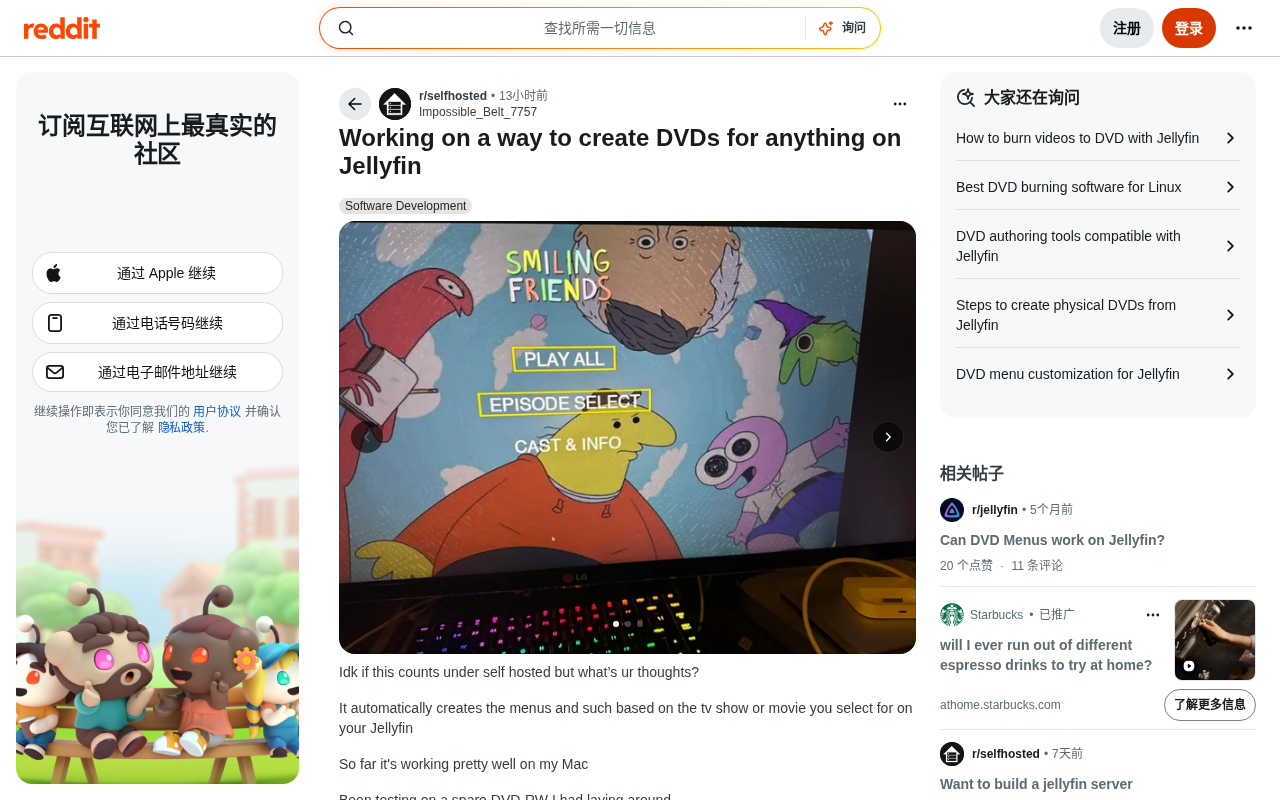
JellyDisk lets you burn any Jellyfin media library content to a real, playable DVD disc.
JellyDisk is an open-source project that bridges your Jellyfin self-hosted media server and physical DVD discs. It automatically generates DVD menus and chapter navigation, then burns the result to a disc playable on any standard DVD player — no manual transcoding or menu design required. It's a fun, countercultural tool for users who value data ownership and offline archiving.
A Countercultural Open-Source Project
Streaming has completely taken over home entertainment — yet some developers deliberately swim against the tide. JellyDisk is exactly that kind of project, one that makes you smile the moment you understand what it does. Its premise sounds decidedly retro: pick any movie or TV show from your self-hosted Jellyfin media server and burn it onto a physical disc that actually plays in a DVD player.
Jellyfin is a fully open-source, subscription-free media server application that grew out of a community fork of the Emby project. Users can deploy Jellyfin on a NAS, home PC, or server to turn locally stored video content into a private streaming platform — all data stays on-premises, with no cloud uploads whatsoever. This "your server, your data" philosophy has made Jellyfin the go-to media solution in the self-hosting community, and it's precisely that ethos that gives tools like JellyDisk room to exist.
It's worth understanding the broader ecosystem behind the self-hosting movement. Driven largely by growing concerns over cloud service privacy, the community is built around the idea of returning data sovereignty to the individual. It congregates on subreddits like r/selfhosted and r/homelab, and has spawned hundreds of open-source alternatives to commercial SaaS products — Nextcloud for private cloud storage, Jellyfin for media serving, Home Assistant for smart home automation, and many more. Jellyfin itself has accumulated over 20,000 GitHub stars since forking from Emby in 2018, thanks to being permanently free, collecting zero telemetry data, and being entirely community-driven. It has become one of the de facto standards for self-hosted media management. It is this vibrant open-source ecosystem that nurtures experimental tools like JellyDisk — projects built simply because someone thought it would be fun.
The developer was candid about it on Reddit: "I realized it's kind of dumb to use Jellyfin to recreate physical media, but it's kinda fun." That sentence perfectly captures the spirit of the self-hosting community — not solving a critical need, but satisfying curiosity and the desire for control over one's own data.
What JellyDisk Can Do
Automatic DVD Menu Generation
This is the project's most impressive centerpiece. Traditional DVD authoring typically requires manually designing menu interfaces and chapter navigation — a tedious process. The standard DVD-Video format has strict file structure requirements: the VIDEO_TS directory must contain VOB video object files, IFO navigation info files, and BUP backup files, all properly organized. The menus themselves are encoded MPEG-2 video streams that must be bound to button interaction logic.
To appreciate how complex this is, it helps to understand the history of the DVD-Video format. Standardized by the DVD Forum in 1995, its rigid file structure was a direct consequence of early optical drive hardware's linear read limitations. VOB files are essentially MPEG Program Stream containers that multiplex video tracks, multiple audio tracks (supporting AC3/DTS/PCM formats), and subpicture streams (subtitles) — all interleaved together, with individual VOB files capped at 1 GB to work around the FAT32 file system's size limit. IFO files serve as the disc's navigation map, storing chapter timecodes, the on-screen coordinate ranges of menu buttons, and playback control instructions (PGCs, or Program Chains) in binary format. These PGCs are essentially a micro virtual machine instruction set that DVD players interpret when reading a disc to handle menu navigation, chapter selection, and other interactive logic — far more complex than most users would ever imagine. For these reasons, creating a spec-compliant DVD-Video disc in the past typically required dedicated commercial software such as DVD Architect or TMPGEnc. JellyDisk handles all of this automatically, generating complete menu structures based on the selected content: TV shows get an episode list; movies get a cover art navigation screen. This dramatically lowers the barrier to creating physical discs.
Deep Integration with the Jellyfin Media Library
The project connects directly to your Jellyfin library, eliminating any need to manually export files, transcode, or organize assets. Anything visible in Jellyfin can theoretically be used as a burn source — a true "what you see is what you get" experience that sets it apart from conventional burning software. Jellyfin exposes a comprehensive REST API covering media library metadata queries, cover image retrieval, and media file streaming, and JellyDisk leverages this API to achieve seamless integration. Users can initiate a burn job without ever leaving their familiar media management interface. Notably, Jellyfin's API design maintains a high degree of compatibility with Emby's interface specification, meaning JellyDisk has potential to expand support to other compatible media servers down the road.
Cross-Platform Validation in Early Stages
JellyDisk currently runs stably on Mac, where the developer completed a full end-to-end test using a spare DVD-RW rewritable disc. DVD-RW supports approximately 1,000 rewrite cycles, making it ideal for the development and debugging phase — burn, test, erase, repeat, without wasting single-use discs.
Why Someone Would Build This
Data Sovereignty: Truly "Owning" Your Content
In the self-hosting community, "ownership" is always the central question. A streaming subscription is fundamentally a rental agreement — platform takedowns, account bans, and service shutdowns can revoke your access at any moment. This is not a hypothetical risk: Netflix has conducted multiple large-scale content purges since the 2010s; Disney+ pulled vast amounts of content from competing platforms when it launched; and during the HBO Max-to-Max rebrand in 2023, some original content permanently vanished from digital catalogs, sparking widespread discussion about the long-term accessibility of streaming content. This phenomenon is known in the industry as "digital content evaporation," driven by expiring licensing agreements between platforms, financial restructuring of streaming services, and even content write-offs for tax purposes — business decisions that can make content you paid to watch disappear without warning. A physical disc represents the most complete form of ownership: once burned, it is yours in a tangible, physical sense, dependent on no network or third-party service.
From this perspective, JellyDisk is not merely a nostalgia toy. It materializes digital media into a physical artifact, offering users who care about long-term preservation an additional offline backup format that is inherently immune to the software-layer risks introduced by subscription services.
Retro Ritual and Sentimental Value
The ritual of designing a DVD menu and sliding a disc into a player is an experience that digital on-demand simply cannot replicate. For users who lived through the DVD golden age, personally "pressing" their own collection onto disc is inherently fun. That golden age — roughly 1997 to the early 2010s — came with an entire culture of physical rituals: browsing disc cases, scanning chapter lists, switching audio tracks. This explains why the developer keeps emphasizing "it's kinda fun" — the enjoyment comes from recreating a complete cultural experience, not just watching content. It's also worth noting that the physical media era of DVD spawned a wealth of bonus content — behind-the-scenes features, director's commentary tracks, deleted scenes — that has largely disappeared in the streaming era, giving film enthusiasts another reason to miss the physical disc.
Real-World Value in Specific Scenarios
Sentiment aside, physical discs remain genuinely irreplaceable in certain contexts: traditional DVD players for elderly family members, environments without network coverage, or media collections that need long-term offline archiving. In digital preservation circles, there is a concern known as the "digital dark ages" — the idea that content stored in proprietary formats, cloud services, or platform-dependent software may become inaccessible as technology evolves. Vint Cerf, one of the principal designers of the Internet Protocol, has repeatedly warned about this publicly, arguing that vast amounts of today's digital content risks permanent loss as the platforms hosting it eventually disappear. Physical media — despite its own aging issues — combined with open standards like DVD-Video offers a more predictable form of long-term accessibility, which is why archival institutions still consider it a backup option even in the digital age. JellyDisk builds a bridge exactly between modern media servers and legacy playback hardware.
Practical Limitations and Challenges
Video Quality: The Hard Ceiling of DVD Specs
The DVD format imposes strict technical constraints: video is MPEG-2 encoded, standard resolution is only 720×480 (NTSC, used in North America and Japan) or 720×576 (PAL, used in Europe and China), with single-layer disc capacity around 4.7 GB and dual-layer DVD-9 around 8.5 GB.
To understand this limitation, it helps to know MPEG-2's historical context. The MPEG-2 standard was published in 1994 and represented the cutting edge of broadcast television and disc storage technology at the time. The DVD specification caps the total audio/video bitrate at approximately 9.8 Mbps. Compared to modern codecs, however, MPEG-2's compression efficiency is severely outdated — achieving equivalent perceived quality requires roughly twice the bitrate of H.264 (AVC) and three to four times that of H.265 (HEVC). This gap reflects thirty years of continuous advances in motion estimation algorithms, rate-distortion optimization, and transform coding: H.264 introduced more flexible macroblock partitioning and multi-reference frame prediction; H.265 extended the coding unit to 64×64 pixels and introduced finer intra-prediction modes; and the latest AV1 encoder improves compression efficiency by another ~30% on top of that. This means that a 1080p H.265 stream at 20 Mbps from a modern streaming service, when transcoded to DVD format, must be downscaled from 1920×1080 to 720×480 (an approximately 83% reduction in pixel count), while the codec efficiency disadvantage further compresses the available bitrate budget. Any high-definition or 4K content must therefore undergo significant quality-degrading transcoding before burning, and users accustomed to high-bitrate streaming may find the viewing experience noticeably inferior.
The Copyright Gray Area
Burning media library content to physical discs raises copyright questions that users must assess for themselves. Tools of this kind typically assume the user holds legitimate rights to the source content, but real-world use requires awareness of applicable laws in your jurisdiction. Legal definitions of "personal backup" vary significantly by country: the U.S. Digital Millennium Copyright Act (DMCA) takes a strict stance on circumventing digital rights protection measures, while some EU member states permit content copying for personal use under certain conditions. Users should ensure that any content they burn is legitimately purchased or licensed material they own — not unauthorized copies of commercially distributed works.
Project Maturity Still a Work in Progress
As an early-stage personal project, JellyDisk is still in testing. Cross-platform support for Windows and Linux, Blu-ray burning capability, and menu customization options all remain on the to-do list. Interested users can keep an eye on the GitHub repository for future progress.
Closing Thoughts
JellyDisk is a quintessential "built it because it sounded fun" open-source project. It may never become a mainstream tool, but it embodies the most cherished spirit of the self-hosting community — complete control over your own data, and the freedom to create without being constrained by commercial logic.
In an era when streaming makes everything frictionlessly simple, someone chose to spend their time turning digital content back into physical objects. That choice, in itself, is a quietly fascinating act of technological defiance. Whether your motivation is backup, nostalgia, or plain curiosity, JellyDisk is worth a look.
Related articles

OpenAI Partners with Shield: How the Astra Agent Revolutionizes IT Troubleshooting
OpenAI and Shield launch the Astra agent, which autonomously logs into computers and legacy systems to fix IT issues in real time, 35-40% faster than traditional models, with humans involved only when judgment is needed.

iPhone Duo Battery Life Tested: One Charge a Day Is Unavoidable, and the Large Screen Is the Culprit
iPhone Duo battery test: heavy use needs at least one charge a day, and about 30% remains after 6.5 hours of screen-on time. How often the large screen is unfolded is key; a MagSafe battery pack helps, and long-term degradation is also worth watching.

Kimi K3.1 Pro Open-Sourced: 2.8 Trillion Parameters Close In on Opus
Moonshot releases the open-source MoE model Kimi K3.1 Pro, with 2.8T total parameters and 104B activated, trailing Opus 5.5 by under 1 point on Terminal Bench 4.0.