JetBrains Incubates ThinkRail: A Pi-Based Agentic IDE with a New Spec-Driven Development Experience

JetBrains-incubated open-source agentic IDE ThinkRail, built on Pi, reshapes AI collaboration with spec-driven development and parallel workspaces.
ThinkRail is an open-source agentic IDE incubated by JetBrains Innovation Hub, built on the Pi coding agent, licensed under Apache 2.0, and completely free. Its core design elevates specs to first-class citizens, using Markdown files to define software goals, architecture, and frontend specs, with the agent implementing them one by one and automatically recognizing nested spec trees. The workspace mechanism maps to Git worktree underneath, supporting isolated branches for parallel development of different features. It also integrates the Monaco editor, supporting code-selection comments, structured questioning, and diff review, while fully inheriting Pi's configuration, API keys, permissions, and skills, resulting in very low migration cost. It is suitable for developers who need to maintain long-term projects, accumulate spec documents, and advance multiple features in parallel.
JetBrains Incubates ThinkRail: A Pi-Based Agentic IDE with a New Spec-Driven Development Experience
While "agentic programming" is still stuck generating code snippets in chat windows, an open-source IDE called ThinkRail is trying to move the entire development workflow on top of agents. It is not just another wrapper editor—it is a JetBrains Innovation Hub incubation project built on top of the Pi coding agent, redefining how humans and AI collaborate through Spec-Driven Development and parallel workspaces.
What Is ThinkRail?
ThinkRail is an open-source agentic IDE built on Pi, licensed under Apache 2.0, completely free, with not even a paid plan entry point. According to the project's official description, its core selling point is that it "gets better the more you use it"—by capturing project knowledge in spec files, it lets the agent understand your intent better with each iteration.
It offers both a Web UI and a desktop client, with a minimalist tech aesthetic throughout, using the JetBrains Mono font and a distinctly "Linux-friendly" feel. Because it is built on Pi, your existing Pi configuration, API keys, permission settings, and skills are inherited directly with no reconfiguration needed.
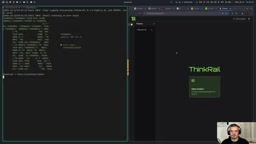
Installation is quite simple: download the installer for your system from the official website, or run a curl command in the terminal to install directly from GitHub. There are also two ways to launch it—run thinkrail in the terminal to use it in the browser, or open the desktop app from the launcher. Note that the tool is sponsored for related content by JetBrains Innovation Hub, but is itself fully open source and free.
Pi coding agent is a programmable, configurable command-line AI programming assistant that supports defining models, permission policies, skill libraries, and tool-calling behavior through configuration files. It has no graphical interface itself; interaction relies entirely on the terminal and prompts. ThinkRail builds a Web/desktop visual shell on top of Pi, wrapping Pi's underlying capabilities (session management, tool approval, skill invocation) into a clickable interface while retaining all of Pi's configuration inheritance. Therefore, understanding Pi's permission model (for example, "ask" mode requires manual confirmation before each tool call) is a prerequisite for understanding ThinkRail's behavior.
Key Highlight: Spec-Driven Development
The most noteworthy design in ThinkRail is that it makes specs first-class citizens. Traditional AI programming often relies on prompts to "make a wish," whereas Spec-Driven Development requires first clearly defining software goals, capability boundaries, architectural decisions, and frontend specs in Markdown files, and then having the agent implement according to those files.
This is somewhat like Test-Driven Development (TDD), except that instead of writing tests, you write spec documents. ThinkRail's advantage is that it has built-in system prompts, so users do not need to write an additional agent.md pointing to spec files—the agent naturally knows what to read.
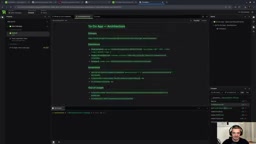
When spec files have nested relationships, ThinkRail's sidebar automatically recognizes and displays the spec tree. For example, a frontend spec's parent is an architecture spec, and the architecture spec in turn belongs to top-level goals and requirements. The user only needs to issue "implement these specs," and the agent will implement and verify them one by one. The more complete the specs, the more structured and predictable the agent's execution becomes.
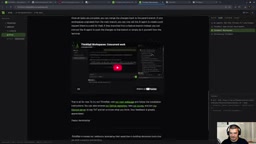
Test-Driven Development (TDD) is a development paradigm in which you first write a failing test and then write implementation code to make it pass; its core is using executable test cases to lock down a behavioral contract. Spec-Driven Development borrows this "define first, implement later" structure, but replaces the object being locked down from test cases to natural-language spec documents (Markdown). Spec files describe goals, boundaries, and architectural decisions rather than line-by-line assertions, making them better suited for large language models to parse and execute. The two are complementary: Spec-Driven Development is good for requirements exploration and architectural constraints, while TDD is good for regression verification of implementation details.
Parallel Workspaces: Developing Multiple Features Simultaneously
Another practical capability of ThinkRail is the Workspace mechanism, which maps to Git worktree underneath. Developers can create multiple isolated workspaces at the same time, each checking out an independent branch without interfering with the others.
In practice, you can have the agent develop a calendar view in one workspace while simultaneously redesigning the overall UI theme in another, advancing both in parallel and merging them when done. The terminal displays the independent directory corresponding to each workspace, preventing accidental operations from polluting the main branch. For teams that need to push multiple features at once, this parallel mode is far more efficient than serially switching branches.
Git worktree allows multiple working directories to be checked out simultaneously from the same Git repository, with each directory corresponding to an independent branch and file state while sharing the same object database. Compared with the traditional approach of "copying the repository" or "frequently switching branches," worktree eliminates the overhead of duplicate cloning and ensures complete isolation of file changes between workspaces. ThinkRail's workspace mechanism is precisely a wrapper around worktree: each workspace automatically creates an independent branch and directory, the agent operates within its own directory, and when merging, you return to the main branch and follow the standard Git merge process.
Interaction Details for Code Understanding
ThinkRail has put considerable polish into the code reading and modification experience. It integrates the Monaco editor; source preview is read-only, but you can select a code snippet, right-click to add a comment, and directly ask the agent to modify the specified location. For example, select a constant on some line and enter "make the constant name more reasonable," and the agent will locate and modify it.
When a requirement description is vague (such as "change the app style to something I like"), the agent proactively pops up a structured questionnaire asking about preferences item by item instead of blindly guessing. This design of turning the clarification process into UI is more intuitive than pure text conversation.
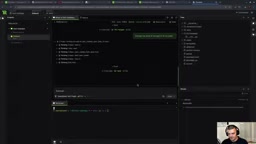
In addition, the diff view displays file changes in a typical Git style, and comments can be marked as TODO issues and tracked for resolution status, making it convenient to review the agent's output.
Monaco editor is Microsoft's open-source browser-side code editor core and the frontend editing component of VS Code. It provides syntax highlighting, code folding, multi-cursor, diff comparison, and other capabilities, and supports injecting custom decorations and context menus through an API. After integrating Monaco, ThinkRail sets the editor to read-only preview mode but retains selection and commenting capabilities—the code snippet selected by the user is attached as context to the agent session, enabling a "point-and-fix" interaction without manually pasting code into the chat box.
Deep Integration with the Pi Ecosystem
ThinkRail does not replace Pi; rather, it adds a visual shell and engineering workflow on top of it. Pi's permission configuration (such as whether tool calls require approval), model selection, and skill library all take effect in ThinkRail. If you change the default permission to "ask" in the Pi configuration, ThinkRail will likewise pop up a permission request when performing file modifications.
This integration means existing Pi users can migrate at zero cost while gaining better preview, spec management, and multitasking parallelism. In terms of positioning, ThinkRail is more like "Pi's graphical workbench" than a competing product.
Who Should Use ThinkRail?
If you are already using Pi and want a more structured development workflow, ThinkRail is worth a try. It is especially suitable for developers who need to maintain long-term projects, accumulate spec documents, and advance multiple features in parallel. For users who have not yet encountered an agentic IDE, it is also a low-barrier entry point—free, open source, and easy to install.
Of course, the benefits of Spec-Driven Development depend on the quality of the specs themselves. In small demos, the advantages of this workflow are not obvious; but in multi-module, multi-role collaborative projects, spec files can significantly reduce the probability of the agent "going off track." ThinkRail turns this path into a clickable interface, which is the key that distinguishes it from other agent tools.
One-line Summary
JetBrains-incubated open-source agentic IDE ThinkRail, built on Pi, reshapes AI collaboration workflows with Spec-Driven Development and parallel workspaces.
Paragraph Summary
ThinkRail is an open-source agentic IDE incubated by JetBrains Innovation Hub, built on the Pi coding agent, licensed under Apache 2.0, and completely free. Its core design elevates specs to first-class citizens, using Markdown files to define software goals, architecture, and frontend specs, with the agent implementing them one by one and automatically recognizing nested spec trees. The workspace mechanism maps to Git worktree underneath, supporting isolated branches for parallel development of different features. It also integrates the Monaco editor, supporting code-selection comments, structured questioning, and diff review, while fully inheriting Pi's configuration, API keys, permissions, and skills, resulting in very low migration cost. It is suitable for developers who need to maintain long-term projects, accumulate spec documents, and advance multiple features in parallel.
Related articles

A Single Prompt Triggers a Global PHP Security Storm: Is AI a Savior or a Hidden Risk?
A single AI prompt triggered a global PHP security crisis affecting Wikipedia and the Internet Archive. This article reviews the incident, analyzes the OpenAI-Amazon controversy, and explores the security paradox of lowered vulnerability discovery barriers in the AI era and developer response strategies.

When AI Is Taken Away: How Reliance on Shortcuts Undermines Your Problem-Solving Resilience
A study of 1,222 people found that after using AI to answer questions, once AI was removed, people gave up on more problems than a control group that never used AI. The article analyzes the impact of AI reliance on learning resilience and metacognition, and explores design implications for AI learning tools.

Carta and NewView Partner to Let Startup Employees Cash Out Equity Early
Carta and NewView Capital partner to simplify startup tender offers, helping employees sell equity early. Analysis of the mechanism, liquidity pain points, and impact.