Jetpack Media3 Major Update: Compose UI, Cast Player, and Editing Pipeline Overhauled

Jetpack Media3 expands into a complete media toolchain covering playback, casting, editing, effects, and streaming formats.
Jetpack Media3 is evolving from a single playback library into a complete media toolchain covering playback, casting, editing, analytics, and streaming format support. Based on a Google technical talk, this article outlines the areas developers should watch most: the new Media3 UI Compose module for building highly customizable player interfaces from composable building blocks; the rewritten CastPlayer that implements the standard Player interface and handles local/remote playback switching automatically, replacing the maintenance-mode legacy Cast SDK; an editing pipeline rebuilt from scratch, decoupled from OpenGL and with MediaCodec directly managing hardware buffers for zero-copy and support for modern graphics frameworks like WebGPU; Media3 1.12 adding video enhancement and Studio Sound audio stem separation; plus Eclipsa Video prescriptive HDR, IAMF-based Eclipsa Audio spatial audio, benchmark-driven CodecDB encoding configuration, and numerous performance and experience improvements.
Jetpack Media3 is evolving from a single playback library into a complete media toolchain covering playback, casting, editing, analytics, and streaming format support. In a recent Google technical talk, three engineers from the Android media team systematically walked through the latest progress of this support library—from declarative UI to a rebuilt editing pipeline to next-generation HDR and spatial audio format support. The information density was considerable.
Based on that talk and cross-verified across multiple sources, this article outlines the areas developers should pay most attention to.
The Underlying Advantages of a Support Library
Media3 is Android's official media support library, bundling ExoPlayer playback, MediaSession sharing, Transformer editing, and frame and metadata extraction into a single library group. The speakers particularly emphasized its "ships with the app" nature: the same code runs on all OS versions and devices, and each bug fix can reach all the way back to API 24, free from the OS release cadence.
As an open-source project on GitHub, all changes are immediately visible, and the team maintains an active issue tracker and accepts PRs. This positioning also lets Media3 offer deep customization that the framework layer struggles to provide—high-level out-of-the-box APIs coexisting with low-level fine-grained control is the throughline of the entire talk. According to cross-verification by several tech bloggers who attended the talk, "out-of-the-box plus deeply customizable" is the core design philosophy of this update.
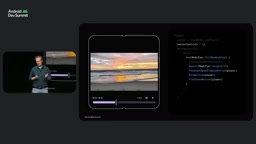
Compose UI: Building Player Interfaces with Building Blocks
The new Media3 UI Compose and Media3 UI Compose Material-Free modules provide a high-level Player composable. Just pass in a Player instance (ExoPlayer, CastPlayer, or MediaController all work), and you get a complete, usable playback interface—Player is the single source of truth, and the composable handles rendering and state wiring.
The customization path is equally clear: the entire interface is made of replaceable building blocks. The top, center, and bottom control areas can each be customized, and the shutter shown when not playing and the error overlay can be changed too. The default center and bottom controls also leave finer-grained slots—you can replace just the central button, or add or remove elements above and below the progress bar. The library ships with play/pause, loop, shuffle, and mute buttons, plus components like the progress bar, position text, container, and overlay.
A simple example: to move the position and duration text from either side of the progress bar to the top, just override the bottom control, empty the left and right slots, place the text in the above slot, and add a custom separator. To completely remove the central control overlay and move the play button above the progress bar with speed and mute buttons attached, the approach is the same—these buttons all come from the library itself, with no extra code needed. When changing icons, the components provide state metadata (such as whether muted), so you only need to pick the corresponding painter based on state.
The Relationship Between Compose and the Media3 UI Modules
Jetpack Compose is Android's declarative UI toolkit, and the Media3 UI Compose module is the player interface implementation provided for it. Unlike the traditional View system, Compose describes the interface through composable functions, and state changes automatically trigger recomposition—a natural fit for the player's "state-driven" nature. The Player composable internally observes the Player instance's state (such as playback position, playback state, and available commands) and renders the corresponding controls accordingly. The Material-Free version strips out the Material theme dependency, making it suitable for scenarios requiring a fully custom design language; both modules share the same underlying logic.
Cast Player: Casting Integration Greatly Simplified
The hub for shared playback state is MediaSession; Gemini, system media notifications, Cast, and iOS and Android Auto companion apps all communicate with your app through it. The highlight of this talk was the rewritten Cast Player.
The previously standalone Cast SDK has entered maintenance mode and is fully replaced by Media3 Cast. CastPlayer implements the same Player interface as ExoPlayer, but it is a delegating instance: local playback goes to an internal ExoPlayer, while remote playback goes through the Cast protocol. It automatically listens for output device changes, establishes connections, syncs state, and migrates playback when needed. Integration therefore becomes extremely simple—the code that previously created an ExoPlayer and handed it to MediaSession can simply swap in CastPlayer instead, requiring only that the Cast system be initialized somewhere in the app first.
Switching between local and remote playback works by default through the system output switcher dialog and media notification; if you want to explicitly show a Cast button on the playback page, the library provides a ready-made media route button that can be added to the top control area with no parameter configuration.
Editing Pipeline Rebuilt: Decoupled from OpenGL, Introducing zero-copy
On the editing side, the pipeline consists of Transformer (processing, transcoding, exporting), CompositionPlayer (real-time preview), Effects (frame-by-frame processing), and Muxer (writing to a standard MP4 container). According to Christina, the team rebuilt the editing pipeline from scratch over the past year because the old architecture had three major pain points: metadata could not flow through all processing steps, deep coupling with OpenGL limited the use of modern graphics tools, and complex APIs made customization difficult.
The key change in the new pipeline is that MediaCodec directly manages codecs, decoded frames enter hardware buffers, a frame aggregator coordinates multiple sequences, and custom frame processors can read and write these buffers directly. Apps report back synchronization fences through a listener interface, and MediaCodec uses them to determine when a buffer can be safely reused. Because hardware buffers are held by MediaCodec, apps can modify data in place—this zero-copy approach significantly reduces memory overhead. With OpenGL decoupled, developers are free to choose modern graphics frameworks such as WebGPU.
The Adobe Premiere team has already adopted this editing API as the foundation of its media editing infrastructure, balancing Android ecosystem compatibility with its own custom pipeline.
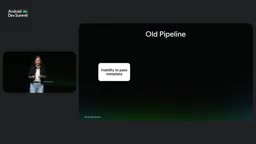
The Significance of zero-copy and Hardware Buffers
zero-copy means data is operated on directly in its original buffer without extra copy steps in memory. Video frames are typically large (a single 4K frame is about 8MB); if each frame were copied several times between decoder, effects processor, and encoder, memory bandwidth and power consumption would increase significantly and latency could be introduced. The new pipeline lets MediaCodec directly manage hardware buffers, and custom frame processors read and write these buffers in place, avoiding unnecessary copies. Synchronization fences are synchronization primitives between the GPU and codecs; apps use them to tell MediaCodec when a buffer can be safely reused, preserving data consistency while maintaining zero-copy.
New Effects: Video Enhancement and Studio Sound
Media3 1.12 will introduce two new types of effects. Video enhancement integrates on the app side with Play Services' enhancement module, covering tone mapping, noise reduction, depth blur, and super-resolution. Integration takes just a few lines of code: use the enhancement session decoder builder to selectively enable capabilities, then pass the resulting frame processor factory and hardware buffer helper into the transformer builder.
Studio Sound automatically analyzes a video's audio track and separates it into independent stems such as speech, ambient noise, and music, letting creators reduce wind or crowd noise and highlight dialogue and music. Integration means constructing a Studio Sound audio processor and attaching it to the media item, then receiving the analyzed channel mapping through a callback and reading each channel's index, identified audio type, and human-readable label channel by channel. In a live demo, a baby crying in the background was cleanly removed after enabling the effect.
The metadata and frame extraction tools have also been updated: MetadataRetriever integrates seamlessly with Kotlin coroutines, with one immutable retriever per media item, consistent behavior across API versions and devices, and out-of-the-box support for a large number of formats; FrameExtractor automatically manages low-level resources such as decoders, supports applying visual effects and HDR tone mapping, and provides fine-grained seek control to retrieve precise frames.
Streaming Formats: Eclipsa Video and Eclipsa Audio
Media3 continues to track streaming standards, with support for content steering (dynamically switching backend CDN paths mid-stream), server-guided ad insertion, multi-entry AV1 (including full AV1 HDR), Android Professional Video, and motion photos in JPEG and HEIC formats. These capabilities take effect automatically as device support rolls out.
Eclipsa Video targets the fundamental limitation of older HDR formats: descriptive metadata only specifies what a scene should look like, not how the display device should render it. Yet phones are carried into dark rooms and onto beaches, and apps often mix SDR UI, SDR content, and HDR content, easily causing jarring brightness jumps. Eclipsa Video instead uses prescriptive metadata built on three pillars: a reference white anchor that locks an environment-adaptive SDR white point, a creator SDR baseline that preserves the original tone mapping curve, and a headroom-adaptive gain curve that deterministically scales highlights according to the display device's real-time HDR headroom. The capability is available out of the box in ExoPlayer in Media3 1.11 and requires Android 17 or later devices.
Eclipsa Audio, meanwhile, is an open-source, royalty-free 3D spatial audio format based on the Alliance for Open Media's IAMF specification. It merges scene-based ambisonics and channel-based audio into a single stream, supports multiple mix presentations, enables object-like operations such as dialogue enhancement, and can play back from stereo headphones to surround sound systems. On Android 17 and later it is rendered automatically by ExoPlayer and the system audio framework; on Android 16 and earlier, the IAMF extension can be enabled through an optional Media3 add-on library. On the authoring side, the Media3 muxer can write IAMF audio tracks.

Descriptive vs. Prescriptive Metadata
HDR video metadata comes in two types. Descriptive metadata, such as HDR10's static metadata, only describes attributes like the content's maximum brightness and color gamut; how to map them to the display device is left to the device itself, so the viewing experience varies widely across devices. Prescriptive metadata, by contrast, directly provides rendering instructions, including the reference white point, tone mapping curve, and highlight gain strategy, enabling the display device to deterministically reproduce the picture as the creator intended. Eclipsa Video adopts the latter, aiming to eliminate brightness jumps when SDR and HDR content are mixed, and to keep the viewing experience consistent on phones under different ambient light.
Performance and Experience Optimizations
Most performance improvements can be obtained simply by keeping the Media3 version up to date. PCM audio offload can route playback to a low-power processing unit, saving up to 20% battery in screen-off audio playback in preliminary analysis; dynamic scheduling aligns ExoPlayer's internal render loop wakeups with VSync and decoder buffer availability; renderer pre-warming allows a second video renderer to be started in advance, enabling instant playlist transitions and smoother ad stitching; and stall detection and pre-buffering automatically identify stalled buffers and renderers and constrain pre-buffer memory.
For scenarios with frequent dragging, scrubbing mode makes progress bar dragging noticeably more responsive and smoother. On the system health front, Media3 has hardened MediaSessionService, the media notification manager, and the bitmap pipeline, avoiding common issues such as rejected foreground service starts and binder OOM—as long as you use Media3 according to the standard guidance, these limitations are handled automatically.
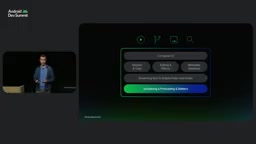
CodecDB: Farewell to One-Size-Fits-All Encoding Configuration
When exporting video, hardware fragmentation is one of the biggest challenges. Many apps use the same encoding configuration across all devices, resulting in suboptimal quality and performance. CodecDB is built on standardized quality metrics and hardware benchmark measurements across Android devices, and can return the ideal codec and encoding parameters for a specific SoC.
In a comparison demo, the differences between a generic configuration and the device-level optimal configuration were concentrated in high-detail areas—the clarity of branches and shrubs, the sharpness of building edges. Usage follows a streaming builder pattern: specify the use case (such as editing or camera capture), target resolution, and frame rate, then instead of guessing how much bitrate 1080p should use, declare the codecs you're willing to use and give a perceptual quality target. CodecDB is expected to land in Media3 soon and will use native Media3 types, so integration with existing code should be quite smooth.
The current latest stable version of Media3 is 1.11.1, with 1.12.0 in alpha. All the implementations above can be viewed in its GitHub repository.
Perceptual Quality Metrics and Hardware Benchmark Measurements
Traditional bitrate selection often relies on rules of thumb (such as 8Mbps for 1080p), but encoder efficiency varies greatly across SoCs, and image quality at the same bitrate can differ noticeably. CodecDB uses standardized quality metrics (such as perceptual quality models like VMAF) to benchmark hardware encoders across devices, building a mapping from "codec + parameters → perceptual quality." Developers only need to declare a target quality and use case, and CodecDB returns the optimal parameter combination that can reach that target on that device, achieving a more precise balance between image quality and bitrate.
Related articles

Will GitHub Die? Open Source Maintainer Burnout and the Collaboration Crisis in the AI Era
Lex Fridman podcast discussion on open source maintainer burnout and GitHub's predicament: massive pull requests overwhelm core maintainers, and AI worsens code bloat. Using math journal peer review and Poincaré conjecture verification as analogies, the article analyzes why verification in knowledge production must be deliberately slow, and how open source communities can avoid the failure mode of maintainers exiting.

Stop Building Cookie-Cutter AI Websites: 3 Tools That Transform Your Coding Agent
Three tools that boost AI coding agents: FFmpeg skill for local video editing in Claude Code and Cursor, Hallmark's 50 design themes to fix cookie-cutter AI sites, and Jailbreaks' 25+ model prompts.

How America's Gerontocracy Squeezes the Younger Generation
Americans over 55 hold nearly three-quarters of national wealth, alongside an 80-year-old president and elderly congressional leaders. The Atlantic's Idrees Kahloon explains how gerontocracy drives up housing costs, squeezes opportunities for the young, and explores zoning reform and child poverty reduction as practical fixes.