Jimeng Seedance 2.0 Tutorial: Money-Saving Tips + Prompt Engineering Walkthrough

Complete guide to ByteDance's Seedance 2.0 AI video model: capabilities, cost-saving tips, and prompt techniques.
ByteDance's Jimeng platform released Seedance 2.0, supporting up to 9 images + 3 videos as joint reference inputs with @material_name syntax for precise generation control. This article covers money-saving strategies (avoiding the 1 yuan trial that consumes first-time discounts, multi-platform free credits), four practical scenarios (first-last frame + motion reference, video extension/fusion, character replacement, comics-to-video), and optimization tips (always @ reference assets, use JSON prompts), while noting that real person video generation faces increasing regulatory restrictions.
ByteDance's Jimeng platform recently released the Seedance 2.0 model, which quickly took social media by storm with its powerful AI video generation capabilities. This model excels in character consistency, motion reference, camera control, and more, while also supporting multi-image and multi-video joint reference generation—making it a benchmark product in the current AI video generation landscape.
From a technical evolution perspective, Seedance 2.0's underlying architecture is most likely based on a Video Diffusion Model. The core idea behind diffusion models is: gradually adding noise to data until it becomes pure noise (forward process), then training a neural network to learn the reverse denoising process (backward process), thereby enabling the generation of target content from random noise. The key challenge in leaping from image diffusion models (like Stable Diffusion) to video diffusion models lies in temporal dimension modeling—the model must not only generate high-quality individual frames but also ensure temporal coherence between frames. Mainstream approaches include introducing Temporal Attention layers into U-Net or Transformer architectures, and using 3D convolutions instead of 2D convolutions to simultaneously process spatial and temporal information. ByteDance's previously released Seed series models have been iterating continuously in this direction, and Seedance 2.0 represents their latest technological achievement.
This article provides a hands-on guide to mastering Seedance 2.0 from three dimensions: model capabilities, cost control, and practical tips.
Seedance 2.0 Core Capabilities: Multi-Image and Multi-Video Joint Reference
Seedance 2.0 received a major upgrade in input capabilities. It supports up to 9 images and 3 videos (total duration not exceeding 15 seconds) as reference inputs, with a combined maximum of 12 files for images and videos. For output duration, users can freely choose video outputs ranging from 4 to 15 seconds.
Multi-modal Joint Reference is a cutting-edge direction in AI video generation. Traditional video generation models typically only accept a single input type—either text prompts (Text-to-Video) or a single image (Image-to-Video). Seedance 2.0's support for mixed image and video input represents an architecture-level innovation in the diffusion model's conditional injection mechanism. The model needs to simultaneously understand the spatial semantics of static images and the temporal information of dynamic videos, then fuse them into a unified generation space. Achieving this capability relies on ByteDance's long-term accumulation in multimodal large models, particularly the unified representation capability of their visual encoder for different input types.
The model offers two core modes: First-Last Frame Mode and All-Purpose Reference Mode. Although the previously available "Smart Multi-Frame" and "Subject Reference" options are no longer displayed separately, these capabilities have been integrated into the unified "Immersive Short Film" entry point. Users specify the purpose of each image and video segment in their prompts using the @material_name syntax, allowing the model to understand and execute complex creative intentions.
First-Last Frame Mode (First-Last Frame Interpolation) is essentially video interpolation—given a starting frame and ending frame, the model automatically generates the transitional frames in between. This technology originates from traditional computer vision's Optical Flow estimation and frame interpolation algorithms, but has been redefined in the diffusion model era: the model no longer relies on pixel-level motion estimation but instead learns semantic-level motion trajectories in Latent Space. The All-Purpose Reference Mode is more flexible, allowing the model to extract different dimensions of information from multiple reference sources—for example, extracting character appearance from Image A, motion patterns from Video B, and scene background from Image C—then organically combining this information during generation.
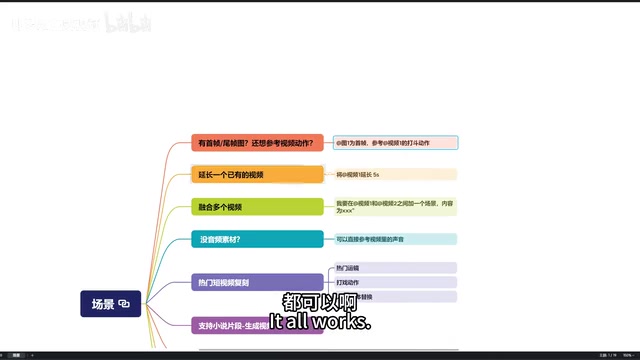
Note that referencing videos consumes more credits than pure image generation, so factor this into your usage cost planning.
Membership Recharge Money-Saving Strategies & Multi-Platform Free Credit Tricks
Want to experience Seedance 2.0 at low cost? The following tips can save you significant money.
Membership Recharge Pitfalls & Money-Saving Tips
Seedance 2.0 is currently in a gray release testing phase, and some users need to purchase membership to unlock access. Gray Release (also known as Canary Release) is a common product launch strategy in the internet industry, where new features are first opened to a small subset of users, then gradually expanded based on feedback and system load. For a computationally intensive AI model like Seedance 2.0, gray release is especially important—each video generation requires substantial GPU computing power, and opening it to all users simultaneously could overwhelm the servers. Through gray testing, ByteDance can collect real user usage data while controlling costs, optimize model inference efficiency and queue scheduling strategies, and prepare for full-scale release.
The platform offers a 1 yuan for 7-day basic membership trial that includes 200 credits. However, there's an easy-to-miss pitfall: first-time recharge discounts—50% off for annual auto-renewal subscriptions and 40% off for monthly auto-renewal subscriptions. Once you use the 1 yuan trial offer, the system no longer considers you a "first-time subscriber," and you lose this discount eligibility.
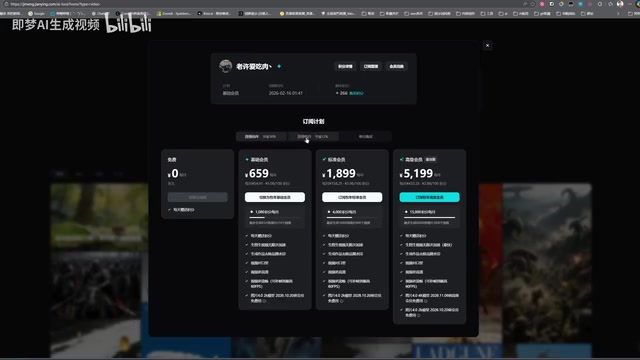
The smarter approach is: use one account to spend 1 yuan and try out the features first. Once you're satisfied, use a new account to directly purchase premium membership (299 yuan/month with 15,000 credits), so you can enjoy the first-time discount while getting ample credits.
Three Platforms for Free Credits
Seedance 2.0 is currently available on three platforms:
- Jimeng Official Website: The most stable channel, recommended as first choice
- Jianying Xiaoquelai (CapCut's Xiaoquelai): 130 free credits upon registration, no payment needed to select the 2.0 model
- Doubao: Available to some users, but may have restrictions recently
Both Jimeng and Xiaoquelai have referral campaigns: each successful invite earns 188 credits, with a daily cap of 3 people and an overall cap of 30 people. At full capacity across both platforms, you could theoretically earn 1,128 credits per day. In practice, inviting others can be challenging, but registering multiple accounts yourself is a viable workaround.
Four Practical Scenarios with Detailed Prompt Techniques
Scenario 1: First-Last Frame + Motion Reference Combination
This is Seedance 2.0's most practical feature combination. You can upload one image as the first frame, specify camera movement (e.g., "camera pans up for an overhead shot"), upload another image as the last frame or middle frame, and simultaneously attach a reference video to control the motion.
Prompt example:
Image one as the first frame, reference the fighting action in video one, end with the scene from image two
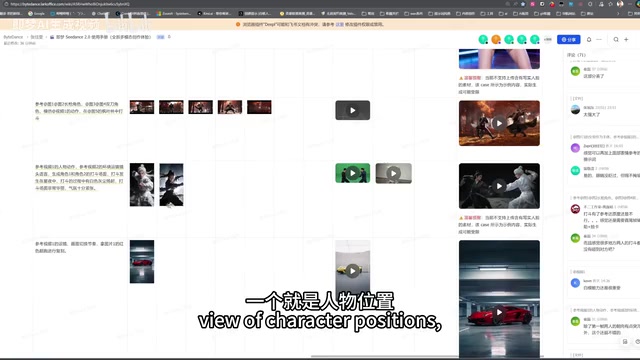
Key reminder: Every uploaded image must have its purpose explicitly stated via @. Testing revealed that if an image isn't referenced with @, the model gets "confused," causing that image to be randomly inserted multiple times in the generated result, severely degrading quality.
Scenario 2: Video Extension & Video Fusion
- Video Extension: Upload a video and write "@video_one extend 5 seconds" in the prompt to extend the video, with a maximum generation of 15 seconds
- Video Fusion: Upload two videos and describe the transition scene between them in the prompt; the model will automatically generate connecting content
Both features are extremely useful in editing workflows, significantly reducing the problem of insufficient footage.
Scenario 3: Character Replacement & Style Transfer
This is currently the most popular Seedance technique on short video platforms. Find a trending video as a motion and camera reference, then upload custom character images for replacement.
Character Consistency (Identity Preservation) is one of the most challenging technical problems in AI video generation. When generating multi-frame video, the model needs to ensure the same character maintains appearance consistency across different frames, angles, and lighting conditions—including facial features, hairstyle, clothing details, etc. Early video generation models frequently suffered from "face drifting" issues, where characters' facial features would shift during playback. Seedance 2.0's breakthrough in this area likely benefits from adopting technical approaches similar to IP-Adapter or Face Embedding, encoding character identity information as independent conditioning vectors that are continuously injected throughout the generation process, thereby locking in character appearance. This is also the technical foundation for the model's excellent performance in character replacement scenarios.
The model supports the following operations:
- Object replacement: Swap clothing, swap props
- Character replacement: Replace the video's protagonist with a specified character
- Plot reversal: Keep the original video visuals but change the storyline through prompts
- Cover song generation: Upload character image + song description to generate cover song videos
In testing, a single image + one prompt can generate surprisingly high-quality advertisement clips—for example, a creative Coca-Cola ad with the tagline "One sip of Coke, don't miss out." Both character consistency and prompt adherence are impressively good.
Scenario 4: Comics and Novels to Video
Supports converting comic grid panels or novel excerpts directly into video. You can upload screenshots or describe content in text, and the model will generate matching video based on semantics. A more advanced approach is using JSON-formatted prompts to precisely control what visual content appears from "second X to second Y."
JSON-formatted prompts represent the trend in AI content generation from natural language control toward structured control. While natural language prompts are intuitive, they contain ambiguity—for instance, "first show A, then switch to B" has vague time points. JSON format allows users to precisely define visual content, camera movement, and transition effects for each time segment using key-value pairs, similar to traditional storyboards in film production. This structured input method reduces the model's comprehension difficulty, enabling more accurate execution of creative intent. From a technical implementation perspective, the model likely incorporated structured instruction data during training, enabling it to parse JSON format and map timestamp information onto video frame sequences.
Current Limitations & Usage Notes
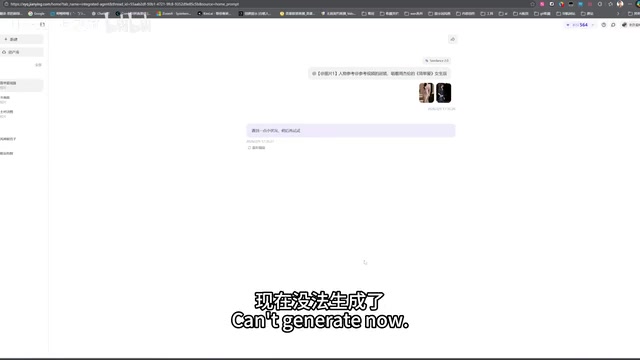
Due to Seedance 2.0's extreme popularity, there are several limitations to be aware of:
- Real person video generation is restricted: A large number of users have been using the model to create prank videos of real people, regulators have intervened, and real person video generation features may be further tightened. This issue isn't unique to Seedance but is a shared challenge across the entire AI-Generated Content (AIGC) industry. China's "Interim Measures for the Management of Generative AI Services" implemented in 2023 explicitly requires that AI-generated content must not infringe on others' portrait rights or reputation rights, and generated content must carry clear labeling. The abuse of Deepfake technology—including unauthorized face-swap videos, fake news videos, etc.—has triggered legislative responses globally. As a platform operator, ByteDance needs to find a balance between technological openness and compliance. Current industry-standard practices include: facial detection and authorization verification for uploaded real person images, embedding invisible watermarks in generated videos, and manual review for high-risk content.
- Platform availability fluctuations: Some users on Xiaoquelai and Doubao channels are unable to generate content normally; if you encounter issues, switch back to the official Jimeng platform
- Gray release testing phase: Some features are not yet fully available; purchasing membership can unlock the latest model version
Practical Tips for Optimizing Generation Quality
Based on extensive hands-on testing, the following points can significantly improve Seedance 2.0's generation quality:
- Provide panoramic reference images: For multi-character scenes, it's best to provide a panoramic image showing all characters' relative positions as the first frame; otherwise, the first few frames often have character positioning issues
- @ reference every uploaded asset: Unreferenced assets confuse the model—this is the most common cause of poor results
- Control duration wisely: For complex scenes, generate in segments at reasonable durations, then stitch them together using the video fusion feature
- Leverage JSON prompts: When you have precise timeline requirements, structured prompts produce far better results than natural language descriptions
Seedance 2.0 represents a major breakthrough in AI video generation. Whether you're a content creator, short video operator, or simply a tech enthusiast interested in AI, it's worth spending time exploring this tool in depth. Start with simple single-image generation, then gradually try advanced techniques like multi-asset joint reference, discovering the workflow that works best for you through practice.
Key Takeaways
- Seedance 2.0 supports up to 9 images + 3 videos as joint reference inputs, with @material_name prompt syntax for precise control over each asset's purpose
- First-time recharge enjoys 50% off annual and 40% off monthly auto-renewal subscriptions; the 1 yuan trial consumes this first-time eligibility, so choose your recharge strategy carefully
- Core application scenarios include first-last frame + motion reference, video extension/fusion, character replacement, and comics/novels to video, with JSON format support for precise timeline control
- Due to the model's extreme popularity, real person video generation may face regulatory restrictions, and third-party channels like Xiaoquelai have already experienced partial feature limitations
- All uploaded assets must be explicitly referenced in prompts; unreferenced assets cause model confusion, and multi-character scenes should include a panoramic reference image
Related articles
 Tutorials
ChatGPT Plus Subscription Guide: Are GPT-5.5, image-2, and Codex Worth the Upgrade?
A detailed look at ChatGPT Plus features — GPT-5.5, image-2, and Codex — with a Plus vs Pro comparison and a complete step-by-step subscription guide for users outside the US.
 Tutorials
Harness AI Engineering in Practice: Using Claude Code to Master Enterprise-Level E-Commerce Development
Deep dive into Harness AI Engineering: master enterprise e-commerce development with Claude Code using the Rules, Skills, Wiki, and Changes framework.
 Tutorials
Cursor + Codex Dual-IDE Collaboration: A Practical Methodology for Open-Source Project Customization
A complete methodology for open-source project customization based on real-world experience, detailing the Cursor+Codex dual-IDE workflow, seven-stage process, MVP validation, and AI source code reading techniques.