Karpathy Skills: Four Principles to Stop AI Coding Assistants from Over-Engineering

Karpathy Skills constrains AI coding assistants with behavioral guidelines to eliminate over-engineering.
Common AI coding assistant problems like over-engineering and unauthorized file modifications are fundamentally a lack of behavioral discipline. Andrej Karpathy's GitHub repository "Karpathy Skills" uses a lightweight instruction layer (a claude.md file) built around four principles—think before coding, simplicity first, surgical changes, and goal-driven execution—to constrain AI assistants' default behavior, making them clarify requirements before coding, write only the minimum necessary code, avoid spreading changes beyond scope, and confirm completion with verifiable criteria.
Why AI Coding Assistants Always "Try Too Hard"
If you've used AI coding tools for real project development, you've almost certainly encountered these maddening scenarios: the AI assistant starts cranking out code without fully understanding the requirements, over-engineers a simple feature into a 500-line monolithic architecture, or even modifies files you never asked it to touch. It sounds supremely confident, but may have completely missed the mark.
This isn't a model capability problem — it's a behavioral discipline problem. Recently, a GitHub repository called Andrej Karpathy Skills has gained widespread attention. It looks extremely simple, but it may be one of the most practical improvements to current AI coding workflows.
The Core Idea Behind Karpathy Skills: Installing Discipline, Not Features
Despite being called "Skills," this repository isn't some fancy skill pack or complex automation tool. Its core philosophy stems from Andrej Karpathy's observations of common failure modes in AI coding assistants. At its essence, it's a lightweight instruction layer designed to constrain how AI coding assistants behave.
About Andrej Karpathy: He is one of the co-founders of OpenAI, former AI Director at Tesla, and currently focuses on AI education and research. He's known for explaining complex AI concepts in accessible terms, and his YouTube channel and open-source projects are highly influential in the developer community. His observations about AI coding assistant behavior patterns come from extensive hands-on experience rather than pure theoretical reasoning — which is why his proposed principles are so practically relevant.
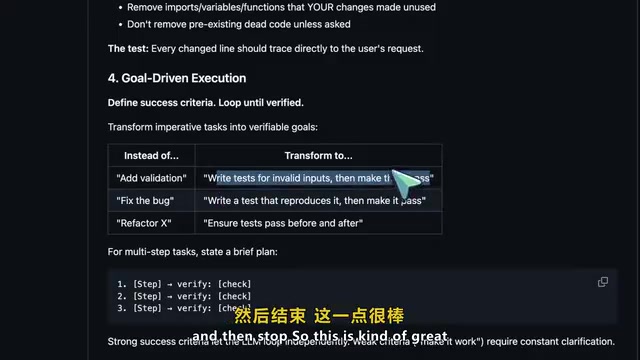
The entire repository is built around four core principles:
Principle 1: Think Before Coding
The AI assistant shouldn't silently guess your intent. When requirements are ambiguous, it should proactively surface those ambiguities, ask the right clarifying questions, or at least present the trade-offs between different approaches — rather than diving headfirst into writing code.
Principle 2: Simplicity First
This is one of the most valuable parts of the entire approach. Many AI coding tools have a strange compulsion to over-build everything. This tendency isn't accidental: AI coding assistants are trained on massive amounts of open-source projects and technical blogs, which naturally lean toward showcasing "complete solutions" and "best-practice architectures" rather than minimal viable implementations. Models may also receive higher scores during RLHF (Reinforcement Learning from Human Feedback) for answers that "look more complete," reinforcing the over-building tendency — this is a systemic training bias, not simply a model capability deficit. Karpathy Skills requires the AI assistant to write only the minimum code needed to solve the problem: no speculative abstractions, no massive frameworks for a single-function task, no unnecessary complexity added for show.
Principle 3: Surgical Changes
This point is crucial. The AI assistant should only modify what the task requires. It shouldn't randomly clean up unrelated code, rewrite comments, refactor adjacent functions, or "helpfully improve" things outside the scope of the request. Every change should be purposeful and minimal.
Principle 4: Goal-Driven Execution
Transform vague requests into verifiable outcomes. Instead of simply saying "fixed the bug" and hoping for the best, follow explicit steps: reproduce the bug → implement the fix → verify the fix works → then stop.
Installation & Configuration: Two Ways to Get Started Quickly
On a practical level, this repository's core is a claude.md file plus a Claude Code plugin installation path. Setup is very straightforward, with two usage methods:
Method 1: Claude Code Plugin Path (Recommended)
Add and install through the Plugin marketplace, making it active as a Claude Code plugin across all projects.
Method 2: Per-Project Configuration
If you only want to use it in a specific project, simply download the claude.md file to your project directory. If the project already has a claude.md, you can append the content rather than replacing it.

Technical Background:
claude.mdis essentially a "persistent system prompt" mechanism. In the conversational architecture of large language models, system prompts occupy the highest priority position in the context window and exert global constraints on the model's entire conversational behavior. Claude Code automatically reads theclaude.mdfile from the project directory at startup and injects its contents as system-level instructions, thereby changing the model's default behavior patterns without modifying model weights. The advantage of this "soft constraint" approach is that it can be adjusted at any time without retraining — it's one of the mainstream practical directions in current Prompt Engineering.
The key insight about its usage pattern: you don't need to enter special commands each time to trigger it. Once installed, it changes the AI assistant's default behavior in everyday work.
Real-World Comparison: "Add a Billing Dashboard" Example
Suppose you ask the AI assistant to "add a billing dashboard."
Without behavioral guidelines, many AI assistants will immediately start coding — creating database tables, API routes, webhooks, UI components, validation logic, even settings pages, all generated at once. Then you're forced to review a massive diff trying to figure out what it actually did.
With Karpathy Skills, the ideal behavior pattern is completely different:
- Clarify scope first: Is it one-time payment or subscription? Which payment provider? Do you need a full dashboard or just a read-only billing summary? What's the current minimum viable version?
- Keep the solution simple: Only implement what's actually needed right now
- Make only necessary changes: Don't spread to unrelated files
- Verify results with concrete criteria: Confirm completion through tests or clear success criteria
How to Tell If the Behavioral Guidelines Are Working
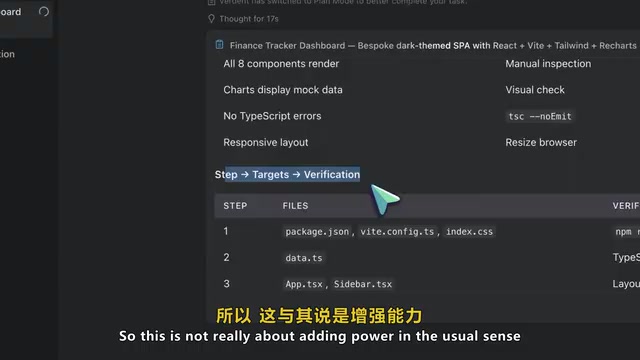
There are several clear signals that help you determine whether these behavioral guidelines are taking effect:
- The AI assistant starts asking better clarifying questions before writing code — good sign
- Generated diffs become smaller and more focused — good sign
- It stops randomly refactoring adjacent files unrelated to the task — very good sign
- It starts thinking in terms of verification rather than a "I've implemented it, trust me" attitude — exactly what you want
The essence of this approach isn't "adding capabilities" in the conventional sense
Related articles
 Tutorials
ChatGPT Plus Subscription Guide: Are GPT-5.5, image-2, and Codex Worth the Upgrade?
A detailed look at ChatGPT Plus features — GPT-5.5, image-2, and Codex — with a Plus vs Pro comparison and a complete step-by-step subscription guide for users outside the US.
 Tutorials
Harness AI Engineering in Practice: Using Claude Code to Master Enterprise-Level E-Commerce Development
Deep dive into Harness AI Engineering: master enterprise e-commerce development with Claude Code using the Rules, Skills, Wiki, and Changes framework.
 Tutorials
Cursor + Codex Dual-IDE Collaboration: A Practical Methodology for Open-Source Project Customization
A complete methodology for open-source project customization based on real-world experience, detailing the Cursor+Codex dual-IDE workflow, seven-stage process, MVP validation, and AI source code reading techniques.