Kimi Code Advanced Tutorial: Video Understanding, Swarm Mode & ACP Protocol Practical Guide

A practical guide to Kimi Code's advanced features including video understanding, Swarm mode, and ACP protocol.
This article provides an in-depth exploration of Kimi Code's advanced capabilities beyond basic coding. It covers video understanding with multimodal processing, Swarm mode for parallel task execution, ACP protocol for IDE integration, Goal mode for multi-round iteration, and Skills configuration. Performance benchmarks against Claude Opus 4.8 show competitive results with 97% cache hit rates and lower costs.
Introduction: The Rapid Evolution of a Domestic Coding Agent
Kimi's open-source Kimi Code is iterating new features at an almost daily pace. As a domestic alternative to Claude Code, Kimi Code's biggest advantage lies in its friendliness to Chinese users—no network restrictions, one-command installation, and a built-in Kimi K2.7 Code model with substantial programming capability improvements over the previous K2.6 generation.
A Coding Agent refers to an AI agent system with autonomous programming capabilities. It doesn't just generate code snippets—it understands project context, executes terminal commands, reads and writes files, runs tests, and autonomously iterates to fix issues based on results. Unlike traditional code completion tools (such as GitHub Copilot's Tab completion), a Coding Agent is closer to a virtual developer with autonomous decision-making ability, capable of completing the entire workflow from requirements analysis to code delivery end-to-end. This space is fiercely competitive, with overseas products like Claude Code, Gemini CLI, and OpenAI Codex going head-to-head with domestic solutions.
Beyond basic code writing capabilities, Kimi Code also offers a series of differentiated features including video understanding, official data plugins, Goal mode, Swarm group mode, and ACP protocol support. This article systematically covers the usage methods and practical results of these advanced features from a hands-on perspective.
Kimi Code Basic Installation & Practical Verification
One-Click Installation and Model Configuration
The installation process is extremely simple: visit the official website, select your operating system, and copy the one-click installation command to your terminal. After launching, enter /login to configure your model subscription. The simplest approach is to select Kimi Code OAuth login and subscribe to a plan on the official website. If you have a third-party API subscription, you can add it via the /provider command.
Large Codebase Bug Fix in Practice
To verify Kimi Code's actual capabilities, the test chose an enterprise-level calendar management system on GitHub with 4.5k stars (Cal.com), featuring over 7,000 code files and 720,000 lines of code. The test task was to fix a bug where the week view page defaulted to displaying midnight.
Kimi Code read through the Issue, located the relevant code, planned four to-do list items, and completed them one by one. The entire process took 7.5 minutes, and the fix was verified—the weekly board now automatically scrolls to working hours.
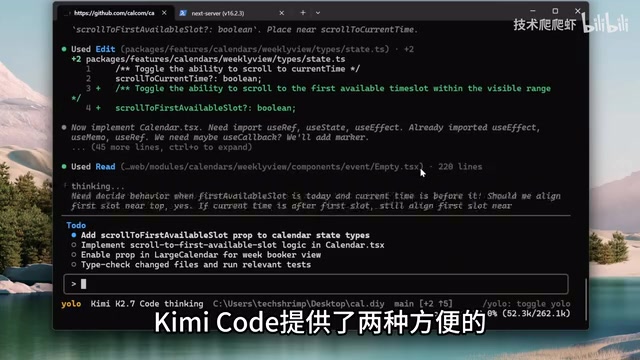
Two approval modes are worth noting:
- Auto mode (
/auto): Automatically approves tool calls and file modifications, balancing security and convenience - YOLO mode (
/yolo): Skips all approval confirmations, suitable for high-trust scenarios
These two modes reflect a core trade-off in AI Agent security design: the higher the autonomy, the higher the efficiency, but also the greater the potential risk. Auto mode maintains human confirmation for high-risk operations (such as deleting files or executing system commands), achieving a good balance between efficiency and safety. YOLO mode completely trusts the Agent's judgment and is suitable for use in isolated environments or low-risk tasks.
Kimi Code vs. Claude Opus 4.8 Performance Comparison
On the same task, Claude Opus 4.8 claimed completion after 8 minutes on its first attempt but didn't actually fix the bug—it only succeeded after the thinking intensity was set to high. Key metrics comparison:
| Metric | Kimi K2.7 Code | Claude Opus 4.8 |
|---|---|---|
| Context usage | 87.5k (33%) | Roughly equivalent |
| Cache hit rate | 97% | Not measured |
| Total token consumption | 2.6 million | Roughly equivalent |
| Total cost | Significantly lower | Higher |
A 97% cache hit rate is an impressive achievement. In LLM API calls, cache hit rate refers to the proportion of the current request's prompt prefix that overlaps with previous requests. Since LLMs charge by token and input tokens typically account for the majority of costs, a high cache hit rate means a large number of tokens can be billed at the cache price (typically 1/10 of the normal price). For Coding Agents that need to repeatedly send project context to the model, a 97% cache hit rate means only 3% of tokens require full-price computation per interaction. This enables the Agent to effectively reuse context, resulting in lower costs and more stable multi-turn collaboration, making it better suited for handling large codebases and long-workflow development tasks.
Kimi Code Video Understanding: Built-in Multimodal Capabilities
Kimi Code has a built-in Read Media File tool that can send images or videos as multimodal content to the model. "Multimodal" here refers to the model's ability to simultaneously process different types of information such as text, images, and video. Traditional programming Agents can only handle text-based code and logs, while multimodal capabilities enable the Agent to understand UI screenshots, design mockups, and even video content, greatly expanding application scenarios.
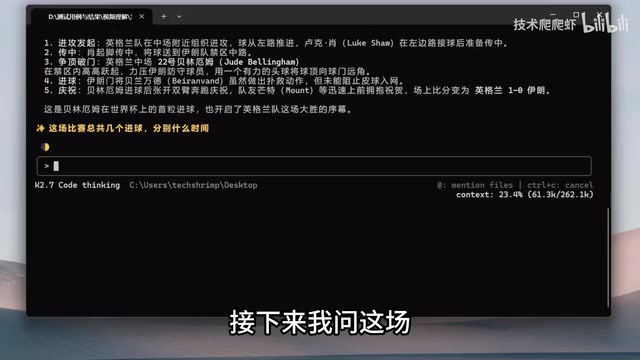
In testing, a 2022 Qatar World Cup match video was dragged into Kimi Code:
- Accurately identified the match year and both teams
- Provided detailed description of the first goal scenario
- Correctly answered that the match had 8 goals, annotating the time of each
Going further, Kimi Code can also create content based on video understanding results—keeping 5-second clips of each of the 8 goals to produce a 40-second highlight reel with background music. Under the hood, it uses FFmpeg for video splitting and composition. FFmpeg is an open-source audio/video processing library that supports encoding, decoding, conversion, editing, and synthesis for virtually all mainstream audio/video formats—it's the de facto standard tool in video processing. Kimi Code's ability to autonomously generate correct FFmpeg command chains to complete complex video editing tasks demonstrates its strength in combining multimodal understanding with code execution capabilities.
There's also a useful command here: /btw (By the way), which temporarily spawns a sub-Agent that can see the current conversation history but won't modify the context or invoke tools—perfect for asking quick technical questions on the fly.
Kimi Data Source: Official Data Plugin Queries
After installing Kimi Data Source via the /plugin command, you can query multiple data sources using natural language, including stock market quotes, corporate registration information, academic literature, and six other data sources.
This plugin mechanism essentially provides the Agent with structured external data interfaces. Compared to having the Agent scrape web data on its own, official data plugins offer guaranteed data quality, higher query efficiency, and no anti-scraping restrictions. This is also an important direction in current AI Agent ecosystem development—providing standardized data interfaces that allow Agents to reliably access real-time information, compensating for the timeliness limitations of model training data.
In testing, Kimi Code was asked to query gold prices, silver prices, US stocks, A-shares, and Hong Kong stocks over the past year and plot a normalized trend chart. Data Source returned precise historical data, and combined with Python plotting capabilities, generated clear visualization charts.
Skills: Configuring Professional Capabilities for the Agent
Skills are essentially professional skill packages for the Agent—instruction manuals with a directory structure. You can encapsulate workflows, professional capabilities, or specifications into Skills, making the Agent more stable and efficient when executing specific tasks.
From a technical perspective, the Skills mechanism is similar to injecting domain-specific System Prompts and tool usage specifications into the Agent. The core problem it solves is: while general-purpose large models possess broad knowledge, they may lack best-practice guidance for specific tool chains or workflows. Through Skills encapsulation, developers can transform their accumulated professional experience (such as best practices for specific frameworks, team coding standards, deployment processes, etc.) into standardized instructions executable by the Agent, enabling experience reuse and sharing.

Using the browser automation Skills (Playwright CLI) as an example:
- Create a new project folder
- Execute the configuration command to install Playwright CLI and corresponding Skills
- Rename the
.cloudfolder in the project directory to.agents - After launching, browser automation capabilities are available
Playwright is Microsoft's open-source end-to-end testing framework supporting three major browser engines: Chromium, Firefox, and WebKit. Once encapsulated as a Kimi Code Skill, the Agent gains the ability to open web pages, click buttons, fill forms, take page screenshots, and more—providing powerful support for UI testing, web data collection, and web application automation.
Goal Mode: Multi-Round Iteration to Achieve Complex Objectives
The /go command is a powerful Kimi Code feature that lets the Agent work toward a clear result across multiple rounds. K2.7 Code has been specifically optimized for Goal mode.
Traditional AI programming interaction is single-turn: the user states a requirement, the AI generates code, and the interaction ends. Goal mode introduces a goal-driven multi-round iteration mechanism—the Agent not only executes tasks but also autonomously verifies whether execution results meet the criteria, automatically entering the next optimization round if they don't. The core of this mode lies in the Agent's "self-evaluation" capability—it can judge the gap between current output and the target and formulate improvement strategies. This aligns with the TDD (Test-Driven Development) philosophy in software engineering: define acceptance criteria first, then iterate repeatedly until they pass.
Test task: Based on a Battle City (Tank) game screenshot, recreate the game in a single HTML file, then test, refine, and iterate using Playwright CLI. This task perfectly fits Goal mode's applicable scenarios:
- Requires multiple iterations
- Has verifiable methods (browser screenshot comparison)
- Has a clear objective (the closer the visuals and gameplay, the better)
Kimi spent 14 minutes performing 5 rounds of iteration, with visual quality progressively improving each round, ultimately completing a fully functional Battle City game with good visual effects.
Swarm Mode: Parallel Processing of Complex Tasks
By enabling group mode with /swarm, Kimi Code can break large complex tasks into subtasks, launch dedicated sub-agents for parallel processing, and then integrate the output.
Swarm mode draws from the MapReduce concept in distributed computing: decomposing a large task into multiple parallelizable subtasks (Map phase), processed independently by separate sub-Agents, with the main Agent aggregating results (Reduce phase). The advantage of this architecture is breaking through the context window limitations of a single Agent and the time bottleneck of serial execution. Each sub-Agent has its own independent context space and can focus on its assigned subtask, avoiding the context pollution and attention dispersion issues that often occur when a single Agent handles complex tasks. In practice, this mode is particularly suitable for batch processing, parallel multi-module development, and large-scale code refactoring.
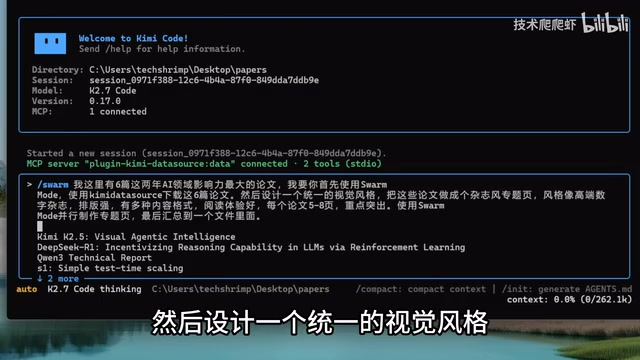
Practical case: Creating magazine-style feature pages from 6 important AI papers. Execution flow:
- Main Agent launches a Swarm of 6 Subagents to download papers in parallel
- After papers are downloaded, messages are aggregated to the main Agent
- Main Agent launches another Swarm, assigning 6 Subagents to create feature pages in parallel
- Main Agent consolidates all feature pages into a single file
Final result: Coding efficiency improved several times over, each paper features a unique theme color, with stable styling and a clean, elegant design.
ACP Protocol: IDE Integration for Collaborative Development
Kimi Code natively supports the ACP protocol (Agent Communication Protocol), a communication protocol designed for collaboration between code editors and programming Agents. ACP defines how an Agent receives context information from the editor (such as currently open files, cursor position, selected code, etc.) and how it sends modification instructions back to the editor for execution. The emergence of such protocols marks AI programming tools' evolution from standalone command-line tools toward deep integration with developers' existing workflows.
A similar protocol is MCP (Model Context Protocol) promoted by Anthropic, which focuses on providing standardized access to external tools and data sources for models. ACP and MCP together form the infrastructure layer of the AI Agent ecosystem—the former solves Agent-IDE collaboration, while the latter solves Agent-external world connectivity.
Using the ZED editor as an example, you simply need to add Kimi Code's configuration information in the External Agent settings to complete the integration, enabling a workflow where you can chat and view code modifications simultaneously. This integration approach eliminates the need for developers to frequently switch between terminal and editor—the Agent's code changes are reflected in the editor in real-time, and developers can manually adjust in the editor at any time before letting the Agent continue working.
Summary: Kimi Code's Core Advantages and Applicable Scenarios
Compared to the instability and closed ecosystem issues of overseas tools (such as Claude Code's recent listing/delisting drama), domestic tool chains represented by Kimi Code are evolving rapidly. Core advantages include:
- Network-friendly: No special network configuration needed for Chinese users
- Cost advantage: 97% cache hit rate delivers significant cost savings
- Feature-rich: Differentiated capabilities including video understanding, data plugins, and Swarm parallelism
- Open ecosystem: Supports ACP protocol and free switching between model providers
From an industry trend perspective, Coding Agents are evolving from "assisted programming" toward "autonomous development." Current-stage Agents can already independently complete medium-complexity development tasks, but still require human guidance for high-level decisions like architecture design and requirements understanding. Through mechanisms like Goal mode and Swarm mode, Kimi Code is exploring the possibility of having Agents handle increasingly complex tasks.
At the current pace of evolution, it's truly only a matter of time before domestic Coding Agents catch up with Claude Code. Whether you're getting started with AI programming or building complex automation workflows, Kimi Code is worth trying.
Key Takeaways
Related articles

Cord: Teaching Masked Diffusion Models to Learn Dynamic Decoding Order
Cord proposes a confidence-anchored order residual decoding strategy that dynamically adjusts reveal order in masked diffusion language models via geometric residuals, significantly boosting task success across benchmarks with minimal inference overhead.

No God Required: Can AI Religious Exemptions Redefine Faith Boundaries in the Workplace?
A University of Kentucky administrator won a religious exemption from using AI—without believing in God. This analysis examines how loose religious exemption definitions become an institutional exit for employees refusing AI, and what it means for employer compliance and management.

How Do Multi-Agent Medical Systems 'Launder' Bias? New Study Reveals Unfairness Beneath Consensus
New study reveals "disparity laundering" in clinical multi-agent systems: deliberation cannot eliminate bias but hides it. Learn how diverse-perspective ensembles reduce disparities.