Kimi K2.7 Code Hands-On: How Does High Speed Mode Feel in Practice?

Kimi K2.7 Code's High Speed mode delivers noticeably faster, more responsive AI coding across real-world projects.
Kimi K2.7 Code introduces High Speed mode, tested across a frontend architecture visualization demo and a backend e-commerce inventory alert system. The standout improvement is responsiveness — reduced wait times preserve developer flow state and cognitive continuity. The model handles legacy codebases well and performs best when given structured design prompts before coding begins.
The Key Upgrade This Time Isn't Features — It's Speed
Kimi has launched K2.7 Code with a new High Speed mode. One developer put it through its paces with two real-world development tasks, and the takeaway is telling: the most noticeable change isn't any new capability — it's that the waiting is genuinely much shorter.
In AI-assisted coding, speed is often underestimated. Previously, a large chunk of time spent using AI to write code was pure waiting — waiting for it to read the project, write the code, run commands, and fix bugs. The longer the wait, the easier it is for developers to mentally "fall out" of the task at hand.
There's solid cognitive science behind this. Working memory is an extremely limited short-term storage system responsible for temporarily holding and processing information during task execution. Neuroscience research shows that maintaining working memory relies on sustained activation in the prefrontal cortex — and once attention is interrupted, that activation decays rapidly. When wait times exceed roughly 8–10 seconds, the brain tends to switch to other tasks or enter what neuroscientists call the Default Mode Network state — where the brain wanders internally in the absence of external stimuli. This means the current task's context (code logic, debugging approach, architectural judgment) quietly fades from working memory, requiring additional cognitive effort to rebuild.
At the same time, psychologist Csikszentmihalyi's Flow State theory identifies several prerequisites for entering a highly focused, productive state: a match between task difficulty and skill level, a clear sense of goal, and immediate feedback from actions. The latency of AI tools is, at its core, a constant interruption of this feedback loop — every wait is a small "flow break." This explains why, even with identical features, a faster AI coding tool can deliver a dramatically different development experience: it's not just saving time, it's protecting the developer's cognitive continuity. The biggest thing High Speed mode delivers is that it feels more responsive — it moves forward with the developer's rhythm rather than against it.
This hands-on test skipped toy demos and instead used two projects closer to real-world scenarios: a pure frontend "Internet Architecture Evolution Lab," and an e-commerce microservice task built on a highly-starred GitHub project.
Frontend Project: Turning Abstract Architecture into an Interactive Lab
The first task was asking Kimi K2.7 Code to build an "Internet Architecture Evolution Lab" — testing whether it could transform abstract architectural knowledge into something visually polished, interactive, and easy to understand.
Opening Kimi Code defaults to K2.7. After entering the prompt, it first laid out a development plan, defined the tech stack and directory structure, then started writing code. Authorization prompts appeared along the way; selecting "allow similar operations" eliminated the need for repeated confirmations. Beyond reading and writing files, it could also execute terminal commands.
From a feel standpoint, the speed was genuinely fast. AI-assisted coding is fundamentally a continuous loop of reading the project, writing code, running commands, and fixing errors — the gains from speed compound throughout.
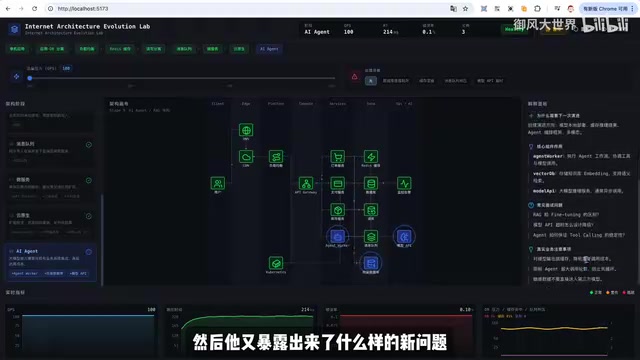
The final result exceeded expectations. Rather than generating a static page, it produced a truly interactive lab: architecture stages on the left, a topology diagram in the center, stage explanations on the right, and real-time metric changes at the bottom.
More importantly, it understood the logic behind the requirements — from single-machine apps, to separating app and data layers, to load balancing, Redis caching, read/write splitting, and finally message queues. Each step explained "what problem it solves and what new problems it introduces." It also supported QPS pressure adjustment, fault injection scenarios, request flow visualization, and live updates to response time, error rate, and DB pressure.
It broke a complex technical topic down into intuitive page structures and clear interactive states, with data simulation and explanatory copy tightly aligned. As a frontend educational demo, the completeness is more than sufficient, the implementation direction is sound, and it's ready for further iteration.
Backend Project: Staying "On Track" in a Legacy Codebase
The second task better reflects the complexity of real business work: a low-inventory alert feature for an e-commerce system. When a product SKU's stock falls below a safety threshold, can the backend automatically trigger an alert and connect the "replenishment task → arrival notification" chain?
SKU (Stock Keeping Unit) is the smallest granular unit used to uniquely identify a saleable item in an e-commerce system — distinguishing not just product category but also combinations of color, size, and spec. A "White XL" and a "Blue M" of the same T-shirt are two different SKUs. As a result, SKU-level inventory data often involves aggregated calculations across multiple warehouses and channels: the same SKU may be distributed across Beijing, Shanghai, and third-party cloud warehouses, with stock quantities needing real-time aggregation. Safety stock thresholds are also not fixed values — they must be dynamically calculated based on the SKU's historical sales velocity (average daily sales) and supplier replenishment cycles.
From a technical stack perspective, this requirement spans multiple system layers: the database layer needs scheduled tasks (e.g., Cron Jobs) or inventory-change event triggers to scan for SKUs below threshold; the message middleware layer (e.g., Kafka or RabbitMQ) decouples "alert generation" from "notification dispatch" to prevent high-concurrency alert bursts from overwhelming the notification service; and the real-time push layer requires WebSocket or SSE (Server-Sent Events) to surface alerts live on the backend operations interface. This is fundamentally why "just adding an endpoint" doesn't cut it — a design flaw at any layer can cause missed alerts, duplicate warnings, or performance bottlenecks.
Key Technique: Have AI Understand the Requirements Before Writing Code
The tester shared an important lesson: when using AI on a real project, never start by saying "implement this feature." It will immediately start writing code, but you won't know whether it truly understands the requirements, whether the project structure is clear in its mind, which modules need changes, whether the database design is sound, or whether API boundaries have been properly considered.
If the direction is off from the start, the cost of rework after testing is far higher.

A better approach is to treat AI as a collaborating engineer: have it read the project and requirements documents first, then produce requirement understanding, technical design, API design, database design, and development breakdown as staged deliverables. Once the direction is confirmed, move into the coding phase.
This "design first, implement second" collaboration pattern mirrors the classic Design Review process in software engineering — in real engineering teams, senior engineers typically produce a Tech Spec before writing code, which goes through team review before development begins. Incorporating AI into this workflow is fundamentally about leveraging its fast text generation to accelerate the "design consensus" phase, not skip it.
Results: A Complete, Verifiable End-to-End Flow
The finished product was close to a real business iteration: the backend shows a low-inventory alert list with replenishment tasks linked to each alert; the user-facing side receives arrival notifications; the entire flow ran successfully and met acceptance criteria.
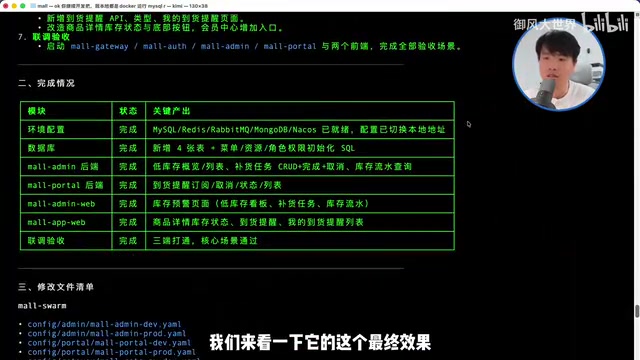
The process wasn't without hiccups — service startup failures and API errors appeared along the way. But pasting error messages to Kimi allowed it to quickly diagnose and fix the issues.
This led to a key observation: the real challenge in AI coding isn't generating code from scratch — it's staying "on track" inside a project that's been around for a long time. Real projects are saturated with context — API naming conventions, frontend-backend contracts, legacy baggage. Even human developers need time to learn how a system operates before they can make changes.
This "staying on track" capability depends technically on the model's context window size and long-range dependency modeling. The context window determines how much code information the model can "see" in a single inference pass — early models like GPT-3 had only 4K tokens, while modern mainstream models extend to 128K or even millions of tokens. However, window size is a necessary condition, not a sufficient one: research shows that when critical information appears in the "middle" of a very long context, the model's attention is noticeably diluted (the so-called "Lost in the Middle" problem), reducing comprehension accuracy.
To address this, engineering practice typically introduces Retrieval-Augmented Generation (RAG) or structured code indexing: building a semantic index over the codebase and dynamically retrieving the most relevant code snippets to inject into context at inference time, rather than dumping the entire codebase into the model. Maintaining coherent understanding across the full loop of "read project → decompose requirements → write code → fix errors" is the key threshold separating AI as a "code generator" from AI as a true collaborator.
Overall Assessment: Responsiveness Is the Standout Feature
Based on these two cases, Kimi K2.7 Code's coding capability places it in the top tier of domestic open-source models — particularly impressive in speed and sustained execution.
This reflects the broader industry trend of open-source coding models rapidly closing the gap over the past two years. Coding capability is typically evaluated using benchmarks like SWE-bench — which samples Issues and corresponding fix Pull Requests from real GitHub repositories, requiring models to automatically generate patches that pass tests given a codebase and problem description. It's widely considered the most realistic coding benchmark, far more meaningful than simple code completion accuracy.
At the end of 2023, open-source models lagged significantly behind GPT-4 on SWE-bench (closed-source models solved roughly 2–3× more issues). By 2024–2025, domestic open-source models led by DeepSeekAd Coder, Qwen Coder, and the Kimi K series have dramatically closed this gap, even surpassing on some metrics. The technical drivers come from three directions: continued pre-training on code data (secondary training on large volumes of high-quality code on top of a general language model), Reinforcement Learning from Execution Feedback (RLEF) (running model-generated code in real sandboxes and using test pass rates as reward signals), and scaled synthetic code data generation (using stronger models to generate harder programming problems and solutions to expand training data diversity).

K2.7 Code's most memorable quality is the responsiveness of High Speed mode. It's not a dramatic major version update, but once speed improves, the overall AI coding experience shifts noticeably — you're no longer waiting for it to finish before returning to work. Instead, you can follow along as it reads the project, edits code, surfaces errors, and fixes problems.
Of course, it can't fully automate all decisions — judgment calls and final acceptance still require a human in the loop. But for tasks with clearly defined boundaries — legacy codebase iteration, bug fixing, localized refactoring, mid-sized frontend-backend integration — Kimi K2.7 Code is already a strong open-source option worth considering.
In one sentence: it won't make every decision for you, but when the task boundary is clear, it delivers fast and on target. If this small update is just an appetizer before Kimi K3, the major version ahead is worth watching.
Related articles
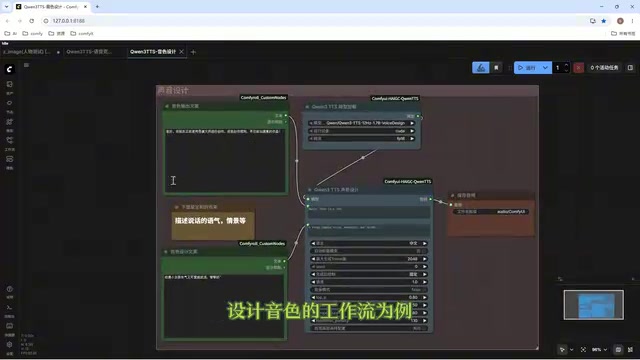
Director Master Tutorial: Full Workflow for AI Character Voice Design and Binding
Based on a Bilibili tutorial, this guide details how to design and bind AI character voices in Director Master: uploading voices, generating them via ComfyUI workflows, producing voice profiles alongside character design, and automatically inheriting voices in storyboard prompts.
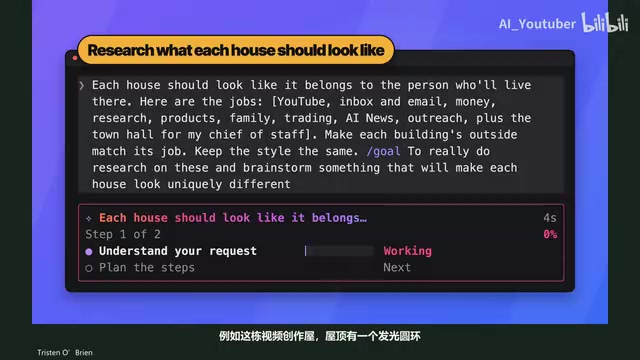
3.5 Hours and $47: Building an AI Agent Village Step by Step
A Bilibili creator built an AI Agent village in 3.5 hours for about $47: Claude Code handles logic and behavior, Higgs Field generates art. Seven steps cover maps and buildings, chief of staff and director roles, walkable areas and behavior rules, connecting to real tools like email and calendars, proving ground meetings, and retaining final human approval—including a cost ledger and prompt design thinking.
WorkBuddy Complete Beginner's Guide: Master Your AI Digital Employee in 7 Days
A detailed breakdown of the WorkBuddy beginner's guide: how this domestic Codex alternative works, its four advantages over traditional AI, and a learning path for newcomers.