Kirokune: An iPhone Work Incident Logger That Requires No Account
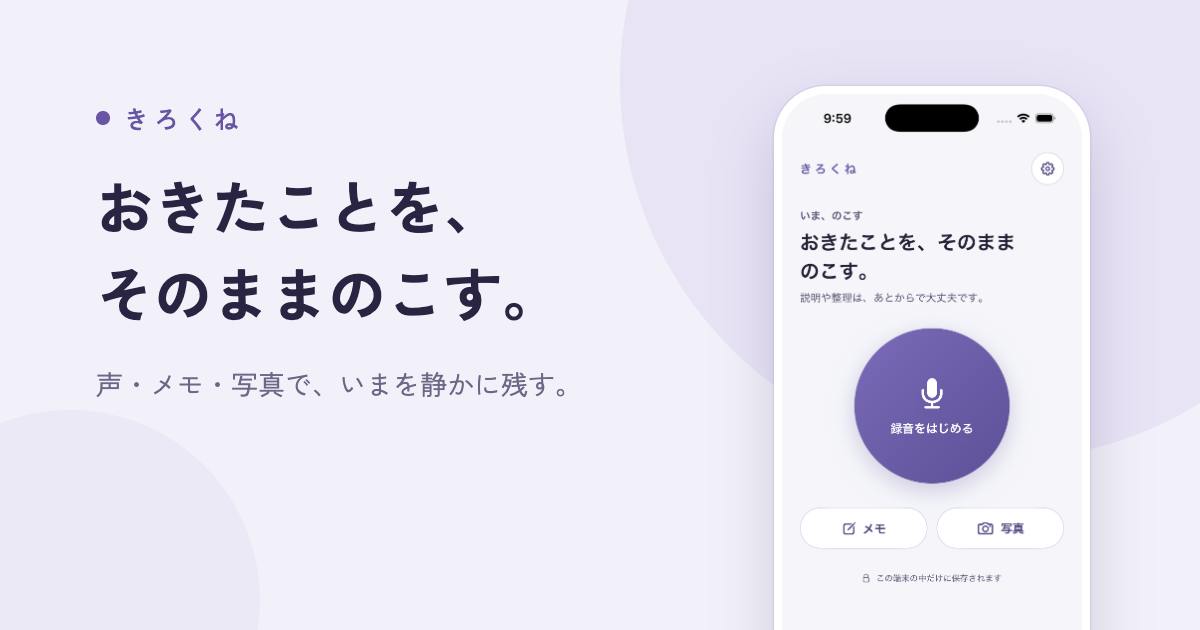
Kirokune is a no-account, local-first iPhone app for logging workplace incidents via text, audio, and photos.
Kirokune is an iPhone app for workplace incident documentation that ranked #9 on Product Hunt with 86 upvotes. Its two core differentiators are a no-account, local-first design that minimizes privacy concerns, and a timeline that integrates text notes, audio recordings, and photos with a free incident-log template. It suits use cases like equipment failures, client disputes, and on-site irregularities. The freemium model offers unlimited entries within one case for free, with multi-case management and PDF export as paid features. Currently iPhone-only with limited community discussion.
In the workplace, unexpected incidents, disputes, or irregularities often demand timely documentation and evidence. An iPhone app called Kirokune recently climbed to #9 on Product Hunt, earning 86 upvotes from the community thanks to its "no account required" design philosophy and focused positioning around incident logging. It aims to solve a seemingly simple but often overlooked pain point: how to quickly and reliably document workplace incidents on your phone.
Product Positioning: A Timeline Focused on Incident Logging
Kirokune's core functionality is organizing work-related event notes, audio recordings, and photos into a single iPhone timeline. Unlike general-purpose note-taking apps, it's explicitly designed for the vertical use case of "workplace incident documentation" — whether you're logging an equipment failure, a client dispute, or any workplace irregularity that needs to be on record. Users can consolidate text, voice, and images in chronological order.
This timeline-based organization is particularly well-suited to incident documentation. Events are inherently sequential — who did what, and when, directly affects how you review or present evidence later. Kirokune further lowers the barrier to entry with a built-in free incident-log template, helping users who aren't naturally organized quickly produce structured, consistent records.
The Standout Feature: No Account, Data Stays Local
Kirokune's most distinctive differentiator is "No account needed" — you can start using it without registering for anything. In an era where most apps require an email, phone number, or third-party login, this restraint is notable.
For a use case like workplace incident logging — which often involves sensitive information — no account requirement means data is more likely stored locally on the device, reducing reliance on cloud services and potential privacy concerns. Users don't have to worry about account breaches or vendor data practices. The instant, frictionless experience also lowers the psychological cost of logging. When an incident suddenly unfolds, being able to grab your phone and start recording immediately can make all the difference.
From a technical perspective, "local-first" application architecture has been gaining traction in developer communities in recent years. Traditional cloud architectures route and store user data through the developer's servers — leaving users exposed if the vendor suffers a data breach, changes its policies, or shuts down. Local-first architecture returns data ownership to the user: all information lives on the device, with the network serving as an optional sync channel rather than a required dependency. For workplace incident logs — which may contain colleague information, internal process details, or even potential legal evidence — local storage is especially meaningful. That said, local storage does carry the risk of data loss if you switch devices or your device is damaged. Users should check whether the app offers iCloud backup or manual export as a safety net.
Business Model: Free Core, Paid Upgrades
On pricing, Kirokune takes a user-friendly freemium approach:
- Unlimited entries within a single "case" — completely free
- Additional cases are an optional paid feature
- PDF export is an optional paid feature
A "case" here can be understood as a standalone incident file or project group. Free users can add unlimited records within a single case, covering the full tracking needs of one event. Paying only becomes relevant when users need to manage multiple independent cases simultaneously, or when they need to export records as a PDF for formal submission or archiving.
This "pay when you need more" design ensures a solid baseline experience for everyday users, while creating a monetization path for those with professional documentation needs — such as submitting materials to management or legal teams. PDF export is a sensible paid feature for professional contexts that require formal document output.
Freemium is one of the most common business models for indie developers and small SaaS products. The core logic is to attract a large user base with free features, building habitual usage, then monetizing high-value users through paid upgrades. PDF export as a paid feature is a classic "workplace escalation trigger" design — casual personal notes don't require formal documents, but the moment something needs to go to HR, management, or legal counsel, a printable, archivable PDF becomes a necessity. This design ties the purchase decision tightly to real user scenarios, typically driving stronger conversion than a forced monthly subscription paywall. For indie developers, it's also a common way to sustain the product without relying on advertising or data monetization.
Who Would Actually Use This
Kirokune's positioning is niche but precise. It's likely a strong fit for: technical staff who need to document equipment or operational failures; service industry workers who need to preserve records of client communications and disputes; managers tracking on-site irregularities; and anyone who wants a structured way to document unexpected workplace events.
Its Product Hunt performance — 86 votes and a #9 ranking — suggests there's still an audience for tools that are "lightweight, focused, and privacy-conscious." Rather than trying to be a sprawling all-in-one notes platform, Kirokune goes deep on the specific niche of workplace incident logging. This is a typical strategy for indie developer products.
A few caveats worth noting: Kirokune is currently iPhone-only, and community discussion is relatively limited (2 comments), so real-world experience and long-term reliability are still awaiting broader user validation. For anyone planning to use it for serious evidentiary purposes, it's worth evaluating upfront whether its backup and export capabilities meet your needs.
Related articles

Salesforce Acquires Rune for $375M: AI Logistics Tech Bolsters Defense Business
Salesforce reportedly acquires defense tech startup Rune for $375M. Rune's AI logistics tech will strengthen Salesforce's Missionforce defense platform, continuing its M&A spree.

Why Fair Use Benefits Everyone in the AI Era
Starting from a Hacker News discussion, this article analyzes the legal logic and controversies of the fair use principle in AI training and content creation, and its dual impact on creators and the tech ecosystem.

Mistral Large 4 Open-Sources a Trillion Parameters, Microsoft Offers Voluntary Severance to 60,000 Employees
Mistral Large 4 open-sources a trillion-parameter multimodal model with a coding agent score of 48; SanDisk earnings show AI inference reshaping NAND demand; Google Gemini adds in-app file editing, OpenAI raises Codex quotas, and Microsoft offers voluntary severance to 60,000 employees.