Landify V4 Review: AI & SaaS Website UI Kit with 350+ Components
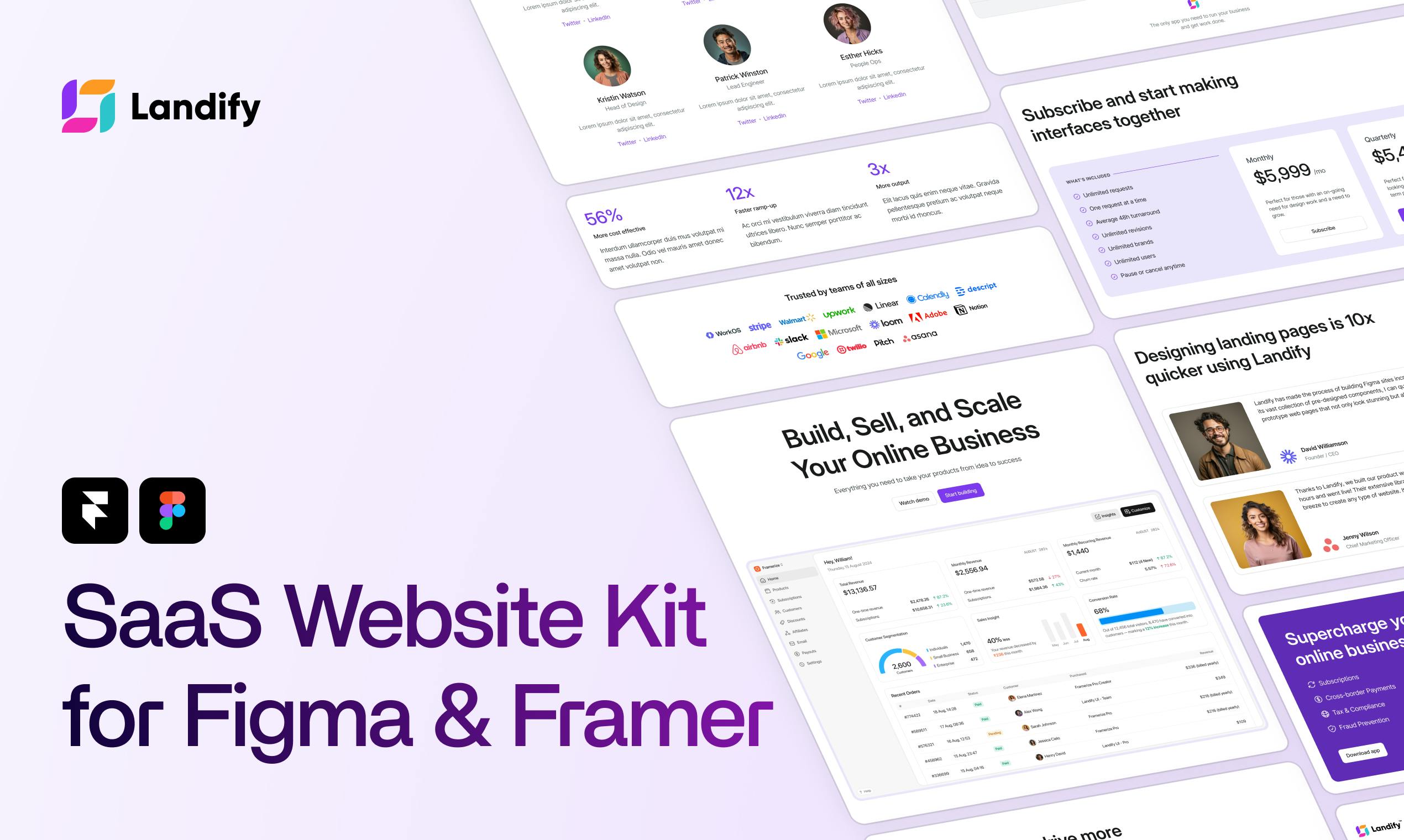
A comprehensive Figma + Framer UI kit with 350+ sections tailored for AI and SaaS websites.
Landify V4 is a complete website UI kit bridging Figma and Framer, providing 350+ responsive sections, 20+ page templates, and a unified design system specifically for AI and SaaS products. It enables seamless workflow from design to launch, helping teams skip basic setup and focus on brand customization.
In an era of explosive growth in AI and SaaS products, quickly building a professional, modern product website has become a common challenge for entrepreneurs and designers. Landify V4 offers a noteworthy solution—a complete website UI Kit that spans both Figma and Framer.
What is Landify V4: A Website UI Kit for AI & SaaS
Landify V4 positions itself as a complete website UI kit for modern AI and SaaS websites. Rather than being a website builder from scratch, it provides a comprehensive set of ready-to-use design resources that help teams skip tedious foundational setup and jump straight into content and brand customization.
According to the official description, Landify V4 includes the following core assets:
- 350+ Responsive Sections: Covering common page modules like Hero, pricing, feature showcases, and customer testimonials. "Responsive" here means each section is meticulously designed to automatically adjust layout and element sizes based on the user's device screen size—whether desktop monitor, tablet, or mobile phone—ensuring excellent browsing experience across all devices. This block-based construction approach borrows from the modular philosophy of modern website builders, breaking pages down into standardized functional units that can be independently edited and freely combined, significantly reducing page-building complexity.
- 20+ Complete Page Templates: Directly usable full-page designs
- 80+ Unified Style Icons: Ensuring visual consistency
- Reusable Component System: Supporting batch modifications and efficient maintenance
- Unified Design System: Spanning both Figma and Framer platforms
The core philosophy of this combination can be summarized in one official statement: "Design in Figma, build in Framer—no need to start from scratch, launch faster."
Figma + Framer Dual-Platform Synergy: Seamless Connection from Design to Launch
The most noteworthy highlight of Landify V4 is its integration of Figma and Framer workflows. These two tools each have distinct roles within the designer community: Figma excels at interface design and team collaboration, while Framer stands out in no-code website building and rapid publishing.
To understand the value of this combination, it's important to first grasp the technical background of these two tools. Figma is a browser-based collaborative design tool that has rapidly become the industry standard in UI/UX design since its 2016 launch. Its core advantages lie in real-time multi-user collaboration, cloud-based file management, and a powerful Component System—designers can create reusable design elements and manage different states through Variants. In 2022, Adobe attempted to acquire Figma for a staggering $20 billion, which ultimately fell through due to regulatory issues, but the attempt alone demonstrates its industry position. Framer evolved from an initial prototyping tool into a no-code website publishing platform. It allows designers to directly build launchable responsive websites in a visual interface, with built-in CMS (Content Management System), SEO optimization, custom domain binding, and other features. Essentially, it transforms design mockups directly into production-ready code, eliminating the frontend development step in traditional workflows.
Why This Dual-Platform Combination Matters
Previously, after completing visual designs in Figma, designers had to manually migrate to Framer or other website builders to reconstruct pages—a time-consuming process prone to design inconsistencies. Landify V4, through its unified design system, keeps the same set of components and style specifications consistent across both platforms, dramatically reducing friction costs from design to launch.
The "Design System" mentioned here is a concept worth understanding deeply. It's a complete framework containing design principles, component libraries, style specifications, interaction patterns, and documentation, ensuring visual and interactive consistency across different pages and platforms. Well-known design systems include Google's Material Design, IBM's Carbon Design System, and Shopify's Polaris. A mature design system typically includes design tokens (fundamental variables like colors, fonts, and spacing), atomic components (basic elements like buttons and input fields), and molecular components (complex modules composed of atomic components). The core value of Landify V4's unified design system is: when a team modifies a foundational variable (such as brand primary color), all components referencing that variable automatically update. This is especially critical in a large template library with 350+ sections—otherwise, manual updates would consume enormous time.
For AI and SaaS startups, this efficiency boost is particularly crucial. These products often need to iterate their websites frequently and quickly validate market feedback. A plug-and-play high-quality template set means more energy can be devoted to the product itself, rather than reinventing the wheel on basic page construction.
Why Focus on AI & SaaS: A Precise Industry Template Strategy
Landify V4 clearly targets users in the AI and SaaS sectors—a positioning with clear market logic.
Since ChatGPT ignited the generative AI wave in late 2022, the number of AI products has grown exponentially. Statistics show that in 2023 alone, over thousands of new AI tools emerged globally, each requiring an official website that clearly communicates product value. SaaS (Software as a Service) is a business model that delivers software via the internet, with users paying by subscription rather than one-time purchase. Product websites in both fields share highly standardized structures, stemming from years of CRO (Conversion Rate Optimization) best practices. These websites typically have highly similar page structures:
- Hero section highlighting core functionality—needs to convey core product value within 5 seconds
- Intuitive use case demonstrations
- Clear pricing plan comparisons—directly impacting paid conversions
- Trust-building customer testimonials and social proof—such as customer logo walls and reviews, which significantly boost visitor trust
Landify V4's 350+ sections are designed precisely around these high-frequency needs. Designers can quickly assemble modern pages meeting industry aesthetics like building blocks, without starting from a blank canvas. This "industry templatization" approach essentially productizes mature design experience, enabling non-professional designers to produce professional-grade landing pages.
Current Product Status and Objective Assessment
It's important to objectively note that Landify V4's market reception on Product Hunt is still in early stages—its vote and review counts are limited, and community validation still requires time to accumulate.
From a product categorization perspective, Landify V4 belongs to three major categories: Design Tools, Web Design, and Design Resources, created by independent developer Aravind Solaiappan. As a UI Kit product, its long-term value highly depends on several factors:
- Design quality and detail refinement of templates
- Update frequency and expansion speed of component library
- Compatibility with latest Figma and Framer versions
- Community feedback responsiveness and technical support
Worth mentioning, the UI Kit market has formed a sizable niche track in recent years. Main competitors include Untitled UI (one of the most popular design systems in the Figma ecosystem), Relume (component library focused on Webflow ecosystem), and Shadcn/UI (open-source component solution for developers). Such products typically adopt one-time payment or annual subscription business models, with core competitiveness lying in component design quality, breadth of covered scenarios, and frequency of continuous updates. The main challenge for independently developed UI Kits is long-term maintenance capability—as Figma and Framer continuously update APIs and features, component libraries need timely adaptation, otherwise compatibility issues may arise. This is also a key factor users should consider when purchasing such products.
Summary: Who is Landify V4 For?
Landify V4 represents a clear trend in today's design tool landscape: encapsulating design experience as reusable, systematized assets, helping teams produce professional results at lower cost and faster speed.
It's especially suitable for the following scenarios:
- AI and SaaS startup teams needing to quickly build product websites
- Designers hoping to maintain design consistency across both Figma and Framer
- Freelancers pursuing efficient output and reduced repetitive work
Of course, templatized tools are always a double-edged sword—they can significantly boost efficiency while potentially bringing homogenization risks. True differentiation still depends on how teams inject unique brand expression within the unified framework. For teams seeking rapid launch, Landify V4 deserves inclusion in the tool selection shortlist, but it's recommended to conduct actual trials based on specific design needs before final decisions.
Related articles

Salesforce Acquires Rune for $375M: AI Logistics Tech Bolsters Defense Business
Salesforce reportedly acquires defense tech startup Rune for $375M. Rune's AI logistics tech will strengthen Salesforce's Missionforce defense platform, continuing its M&A spree.

Why Fair Use Benefits Everyone in the AI Era
Starting from a Hacker News discussion, this article analyzes the legal logic and controversies of the fair use principle in AI training and content creation, and its dual impact on creators and the tech ecosystem.

Mistral Large 4 Open-Sources a Trillion Parameters, Microsoft Offers Voluntary Severance to 60,000 Employees
Mistral Large 4 open-sources a trillion-parameter multimodal model with a coding agent score of 48; SanDisk earnings show AI inference reshaping NAND demand; Google Gemini adds in-app file editing, OpenAI raises Codex quotas, and Microsoft offers voluntary severance to 60,000 employees.