LangChain 1.3 Event Stream in Practice: Real-Time Agent Monitoring from 4 Perspectives

LangChain 1.3 Event Stream V3 transforms Agent execution from a black box into real-time observable transparency.
LangChain 1.3 introduces Event Stream V3 with two major upgrades—typed projections and simplified parsing—offering four monitoring perspectives: model output, tool call preparation, tool execution details, and state changes. This mechanism supports real-time streaming output, reasoning process display, complex Agent debugging, and fine-grained token cost control, transforming Agents from unobservable black boxes into transparent, debuggable systems.
Before LangChain 1.3, using an Agent was like opening a mystery box—you'd input a question, wait endlessly, and have no visibility into what was happening in between. This black-box interaction was especially frustrating when debugging complex multi-step Agents.
Agents are a core architectural pattern in LLM applications, allowing large language models to autonomously decide when to invoke external tools and how to decompose complex tasks. Unlike simple Prompt-Response patterns, Agents may go through multiple reasoning loops (ReAct loops), each consisting of three phases: "Think-Act-Observe." While this multi-step autonomous decision-making mechanism is powerful, it also means a single user request might hide 5-10 or even more LLM calls and tool executions behind the scenes. Without observability support, developers can only see the final output, unable to determine whether an intermediate step went astray or triggered unnecessary tool calls—which is unacceptable in production environments. The industry's emphasis on AI observability is rapidly growing, and dedicated LLM monitoring platforms like LangSmith, Phoenix, and Helicone have emerged to address this need.
The Event Stream mechanism introduced in LangChain 1.3 completely changes this situation. It's essentially a live broadcast feed for your Agent, making every reasoning step and tool invocation clearly visible. Event streams are fundamentally implemented using Server-Sent Events (SSE) or Async Generator patterns. Unlike traditional request-response models, event streams establish a persistent unidirectional data channel where the server can push structured events to the client at any time. In LangChain's implementation, each node in the Agent's execution graph (a directed acyclic graph built on LangGraph) emits corresponding events during execution, which are serialized and transmitted to consumers through the streaming channel. This design draws from Reactive Programming principles, modeling the Agent's execution process as a subscribable event sequence where consumers can selectively listen to event types they care about.
Event Stream V3: Two Core Upgrades—Typed Projections and Simplified Parsing
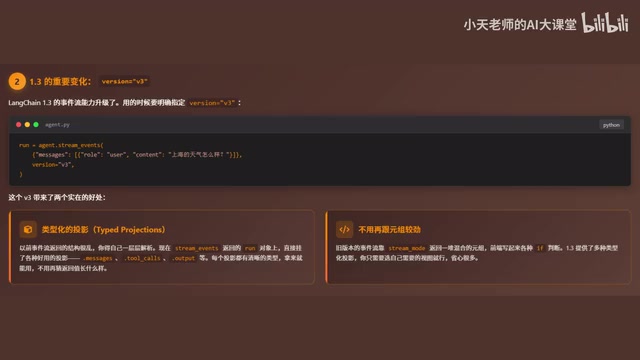
The event stream in LangChain 1.3 received a major upgrade, requiring explicit specification of version="v3" to enable the new features. V3 brings two key improvements:
First, Typed Projections. Previously, event streams returned complex nested structures that developers had to parse and guess the data format for. Now you can directly access properties like messages, tool_cause, and output through the run object, with all types clearly defined and ready to use out of the box.
The concept of typed projections originates from the projection operation in database theory—selecting a specific subset of fields from a complete dataset. In V2 and earlier versions, event streams returned generic dictionary structures, requiring developers to manually extract data using string key names. This was not only error-prone but also prevented IDE auto-completion and type checking support. V3 introduces strongly-typed dataclasses or Pydantic models to encapsulate each event type, enabling Python type checkers (like mypy, pyright) to catch potential attribute access errors at coding time. This evolution from weak typing to strong typing is an important milestone in LangChain's journey toward production-grade maturity.
Second, no more tedious tuple handling. Older versions required using stream_mode with extensive if-else statements to parse data, while V3 only requires selecting the desired projection type to conveniently retrieve target data.
Four Monitoring Perspectives: Comprehensive Visibility into Agent Execution
The event stream provides four different monitoring perspectives, covering the complete lifecycle of Agent execution.
Perspective 1: What the Model is Saying (run.messages)
This is the most intuitive perspective—the model's response is returned in real-time, token by token. Text generation in large language models is fundamentally an autoregressive process—the model predicts only the next token each time, then appends it to the existing sequence to continue prediction. API providers like OpenAI and Anthropic leverage this characteristic to support streaming each token immediately after generation, rather than waiting for the entire sequence to complete. For a 500-token response, if the Time to First Token (TTFT) is 500ms and full generation takes 10 seconds, streaming output lets users start seeing content after 0.5 seconds instead of waiting the full 10 seconds. This dramatic reduction in perceived latency is crucial for user experience and is a standard capability of modern AI chat products.
run.messages contains several core fields:
- text: Text delta chunks for implementing typewriter effects
- reasoning: The LLM's reasoning process (currently only supported by OpenAI O series). The OpenAI O series (such as o1, o1-mini, o3, etc.) is OpenAI's model family focused on complex reasoning. Unlike general-purpose models like GPT-4, O series models perform explicit "Chain of Thought" before generating final answers, consuming additional reasoning tokens in the process. OpenAI's API allows developers to access the content of these reasoning tokens, providing unprecedented visibility into the model's internal thinking. Note that while reasoning tokens don't appear in the final output, they still count toward token usage and billing, requiring special attention in cost control scenarios.
- tool_cause: Incremental tool call parameters, showing the real-time process of the model generating tool names and arguments
- output: The final complete content of the message
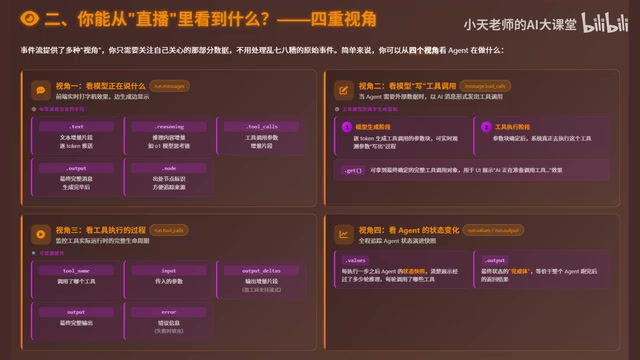
Perspective 2: Tool Call Preparation Phase (message.tool_cause)
When an Agent decides to call an external tool, it goes through two phases:
- The model generates the tool call parameter block token by token—you can observe the parameter generation process in real-time through
message.tool_cause - Only after parameters are finalized does the system actually execute the tool
A notable detail: message.tool_cause provides a get() method to retrieve the final, complete tool call object. It's essentially a constituent part of the tool call action, not merely a bystander.
Perspective 3: Tool Execution Details (run.tool_cause)
This perspective lets you see the entire lifecycle of actual tool execution:
- Which specific tool was called
- What the input parameters were
- Output chunks (if streaming is supported)
- Complete output results
- Whether errors occurred and error messages
Perspective 4: State Changes and Final Output (run.values / run.output)
run.values returns a state snapshot of the Agent after each execution step, clearly showing how state evolves across execution steps. This feature is closely tied to LangGraph's architecture. LangGraph is a framework in the LangChain ecosystem for building stateful, multi-step Agents, modeling the Agent's execution flow as a State Graph. Each node in the graph represents an execution step (such as LLM call, tool execution, conditional logic), edges represent transition logic between steps, and the State is the shared data structure passed between nodes. Whenever a node completes execution, the state is updated and passed to the next node. run.values provides snapshot records of these state transitions, enabling developers to debug Agents like debugging a state machine, clearly seeing how data changes after each step.
run.output is the final return value after the entire Agent run completes.
Hands-On Practice: Building a Weather Query Agent with Event Streams
Let's look at the concrete implementation of event streams using a weather query Agent as an example.
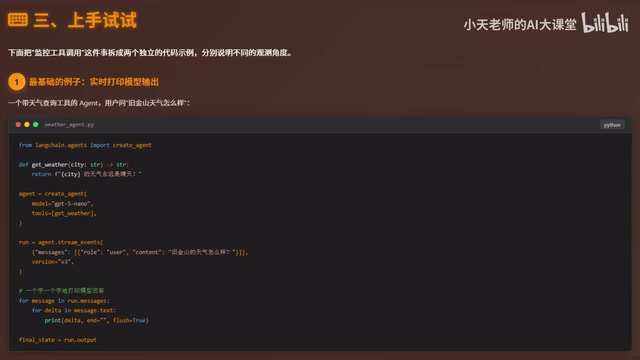
The core steps are:
- Define the tool function
getWeather - Bind the tool and model together via
create_agent - Call
agent.stream_eventswithversion="v3"specified - Iterate through
run.messages, printing text deltas one by one
To watch tool call parameters being generated in real-time, simply listen to the message.tool_cause event and print output whenever a new chunk arrives. To get the final complete tool call information, use the message.tool_cause.get() method.
Monitoring the complete tool execution lifecycle is equally straightforward: iterate through run.tool_cause, printing the tool name, input parameters, output chunks, final output, and error information for each call.
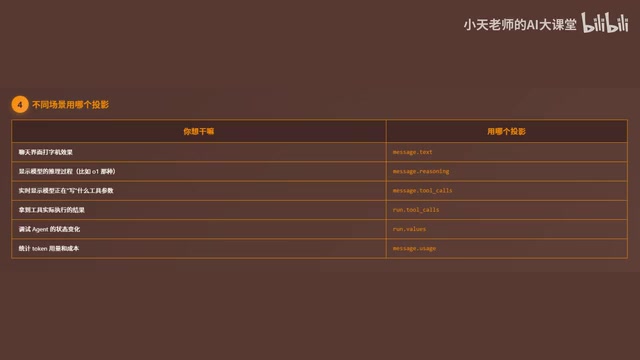
Scenario Selection Guide: Matching Different Needs to Different Projections
For different development scenarios, choosing the right projection type is crucial:
| Scenario | Recommended Projection |
|---|---|
| Chat interface typewriter effect | message.text |
| Display model reasoning process | message.reasoning |
| Real-time tool parameter generation viewing | message.tool_cause |
| Get tool execution results | run.tool_cause |
| Token usage tracking / cost control | message.usage |
Practical Applications: Experience Enhancement and Cost Control
Instant Feedback Chat Experience
By listening to text deltas in the run.messages loop, the frontend appends each token to the screen immediately upon receipt, making users feel virtually no thinking delay. This streaming output experience is far superior to waiting for the complete response before displaying it all at once.
Elegant Display of Reasoning Process
The reasoning content can be extracted separately and displayed using special styling like collapsible panels. Users who are interested can expand to view the AI's thinking steps, while those who aren't can directly see the answer—serving both needs without compromise.
Efficient Debugging of Complex Agents
For complex Agents with multiple tools and multi-round reasoning, viewing state changes at each step lets you clearly track how many rounds occurred and which tools were called in each round. When tool calls fail, the error field in run.tool_cause directly pinpoints the problem, saving significant troubleshooting time.
Fine-Grained Token Cost Control
The message.usage projection provides token usage information for each model call, supporting the following scenarios:
- Monitor usage trends of long-running services
- Set budget threshold alerts to prevent overspending
- Track consumption per end user, facilitating cost allocation in multi-tenant scenarios
In SaaS (Software as a Service) models, multiple end customers (tenants) share the same Agent infrastructure, but LLM call volumes vary dramatically between tenants. Without fine-grained usage tracking, service providers are limited to either coarse-grained monthly subscription pricing (which may lead to losses) or unable to offer competitive tiered pricing for large customers. The data returned by the message.usage projection typically includes prompt_tokens (input token count), completion_tokens (output token count), and total_tokens (total token count). Combined with each model's unit pricing (e.g., GPT-4o's input price of $2.50/million tokens, output at $10.00/million tokens), you can precisely calculate the cost of each call. By aggregating this data by tenant ID, you can implement a pay-as-you-go business model.
Summary
LangChain 1.3's event stream mechanism transforms Agents from black boxes into transparent boxes. Four monitoring perspectives—model output, tool call preparation, tool execution, and state changes—cover the complete chain of Agent execution.
Whether you're building smooth chat interfaces, debugging complex multi-step Agents, or implementing fine-grained token cost control, Event Stream V3 provides powerful and intuitive support. If you're building Agent applications with LangChain, upgrading to 1.3 and enabling Event Stream V3 will bring a qualitative improvement to your development and debugging experience.
Related articles
 Tutorials
ChatGPT Plus Subscription Guide: Are GPT-5.5, image-2, and Codex Worth the Upgrade?
A detailed look at ChatGPT Plus features — GPT-5.5, image-2, and Codex — with a Plus vs Pro comparison and a complete step-by-step subscription guide for users outside the US.
 Tutorials
Harness AI Engineering in Practice: Using Claude Code to Master Enterprise-Level E-Commerce Development
Deep dive into Harness AI Engineering: master enterprise e-commerce development with Claude Code using the Rules, Skills, Wiki, and Changes framework.
 Tutorials
Cursor + Codex Dual-IDE Collaboration: A Practical Methodology for Open-Source Project Customization
A complete methodology for open-source project customization based on real-world experience, detailing the Cursor+Codex dual-IDE workflow, seven-stage process, MVP validation, and AI source code reading techniques.