LangChain Beginner's Guide: From Model Calls to Agent Tool Development

LangChain is a modular framework for rapidly connecting LLMs to real business applications.
This article explains LangChain's role and value for enterprise AI development. When connecting LLMs to internal business data, developers face challenges like memory management, context handling, and concurrency — LangChain's modular architecture abstracts these away so teams can focus on business logic. The framework supports unified integration with DeepSeek, OpenAI, and other major models, and provides tools for building Agents that can actively call external data to complete real tasks. Beginners are advised to follow a progression from basic model calls, to memory and context management, and finally to Agent and tool development.
Why We Need a Framework Like LangChain
The core strength of large language models (LLMs) lies in reasoning — you talk to them, they understand your intent and respond accordingly. That capability alone is powerful, but it comes with a fundamental limitation: LLMs can only draw on their training data, with no direct access to a company's internal business data.
This is the central pain point for enterprises building AI applications today. Why is there such high demand for LLM-related roles? Because countless companies are actively trying to bridge the gap between large models and their own business context — and turning that into production-ready AI applications. That bridge requires code, and writing that code requires a solid framework.
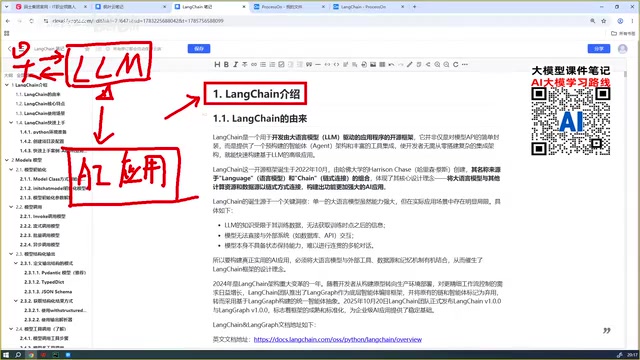
LangChain is exactly that kind of framework — a toolkit designed to help developers integrate LLMs into real business scenarios quickly.
Understanding LangChain's Value Through a Concrete Example
LLMs are inherently stateless — by default, they don't remember anything from earlier in a conversation. But real AI applications almost always need the model to "remember" who it's been talking to and what was said.
That opens up a cascade of follow-on problems:
- How do you handle optimization as conversation history grows?
- How do you write code that connects the model to your own business data?
- How do you handle each incoming request when concurrent traffic spikes?

If you build everything from scratch on top of a raw LLM, you'll end up writing a ton of low-level code to manage concurrency, track conversation history, and maintain context. That leaves you spending all your energy on infrastructure details instead of the actual business problems that matter.
Frameworks exist to take that manual, repetitive work off your plate. In short: LangChain lets you build AI applications quickly, so you can keep your focus on the business itself.
LangChain's Core Capabilities and Modular Design
As a mature AI application development framework, LangChain has a few key characteristics worth understanding.
Connect to Any LLM
LangChain provides a unified interface for connecting to models. Whether you're using DeepSeekAd, OpenAI, Anthropic, Gemini, or models from domestic Chinese vendors, they all plug in through the same framework layer. This model-agnostic design means switching out the underlying model doesn't require rewriting your application code.
Modular Architecture
LangChain is built around a modular design that breaks complex AI application functionality into independent components, including:
- Model management: Unified handling of models from different providers
- Prompt management: Structured management of prompts
- Memory management: Handling conversation memory
- Context management: Maintaining context across multi-turn conversations
- Security management: Access control for your application

This layered approach lets developers combine only the capabilities they need, without reinventing the wheel.
Building Agents and Tools
Another core capability of LangChain is building Agents and Tools. Agents are one of the hottest concepts in AI right now — nearly every company doing LLM development is working on agent systems in some form.
"Tools" are what actually connect an agent to real business data. By developing custom tools for an agent, you enable the LLM to call external capabilities and access business data, making it capable of handling real-world scenarios. This is also why protocols like MCP (Model Context Protocol) are becoming increasingly important in agent development.

The core idea behind agents is shifting LLMs from passive question-answerers to active planners — models that can break down goals into steps, call tools, and iterate based on results until a task is complete. The underlying logic typically follows the ReAct (Reasoning + Acting) paradigm: the model reasons about what to do next, executes the corresponding tool call, observes the result, then reasons again — forming a "think → act → observe" loop.
MCP (Model Context Protocol) is an open protocol introduced by Anthropic in 2024, designed to give LLMs a standardized way to connect to tools and data sources. It allows models from different vendors to call external capabilities through a unified interface — think of it as a "USB port" for AI. LangChain's Tools mechanism shares the same philosophy as MCP: developers wrap business logic into tool functions that conform to the framework's spec, and the agent automatically decides when to call them during reasoning — no manual intervention required at each step.
Setting Up Your LangChain Environment
Before you start building, you'll need to get your environment configured.
Python Version Requirements
You'll need a Python project with Python 3.10 or higher. The examples in this guide use Python 3.11. This version requirement is a hard constraint for newer LangChain features — anything below 3.10 won't work.
Configuring Your Model API Key
This guide uses DeepSeek as the example model. You'll need to configure your credentials in the project's .env file:
- Rename the provided
.env.examplefile to.env - Fill in your DeepSeek
API KeyandBase URL - You'll need to apply for an API Key on the DeepSeek website
Without a valid API Key and Base URL, your code won't be able to connect to the hosted model.
# .env example
DEEPSEEK_API_KEY=your_api_key_here
DEEPSEEK_BASE_URL=your_base_url_here
The Base URL is the API endpoint address for the LLM service. DeepSeek and many other providers — along with numerous third-party services — design their APIs to be OpenAI-compatible. This means you can use LangChain's ChatOpenAI class and simply swap out the base_url and api_key parameters to switch to DeepSeek or other models, without changing any of the underlying call code. This OpenAI-compatible design significantly reduces the cost of switching between models, and is a key reason LangChain's "model agnosticism" works in practice.
Storing sensitive config in a .env file is standard practice. Combined with the python-dotenv library, environment variables get loaded automatically at runtime — keeping your API keys out of source code and preventing accidental credential leaks.
Learning Path: From Model to Agent
For beginners starting from scratch, follow a "simple first, complex later" progression:
- Start with basic model calls: Understand how to connect to and call an LLM within the LangChain framework, and complete a basic conversation.
- Progress to memory and context management: Tackle the memory problem in multi-turn conversations so your application can maintain continuity.
- Finally, build Agents and Tools: Develop custom tools for your agent to bridge AI capabilities with real business data.
The logic behind this path is: first understand what LLMs can do, then understand what the framework saves you from doing, and only then bring AI into production. When you get to the point of building tools for your agents, you'll genuinely appreciate what the framework handles for you at the infrastructure level — concurrency, context management, and all the rest. It keeps you focused on solving business problems instead of getting bogged down in engineering details.
Summary
At its core, LangChain is an application development framework that lets you rapidly connect LLMs to real business contexts. Its modular design abstracts away the hard problems of memory, context, and concurrency, while providing the building blocks for agents and custom tools. For developers looking to break into LLM application development, starting with basic model calls and gradually working up to Agent tool development is a clear and efficient path into the field.
Related articles

Cursor AI in Practice: Weighing Efficiency Gains Against Costs in an AI IDE
An in-depth look at Cursor AI IDE's interface layout, four modes (Agent/Plan/Debug/Ask), model selection, and Git context integration, with hands-on demos weighing subscription costs against going direct to Claude.

Free Landing Page Design Rules Library: A Practical Guide for Claude Code and Cursor
A free landing page design skill for Claude Code and Cursor: MIT licensed, nearly 9,000 stars, asks about offer/audience/action before planning 12 sections with hard font and spacing constraints.

Cursor Keeps Writing Wrong Code? The Problem May Be Context, Not Prompts
Cursor keeps writing wrong code? The problem may be context, not prompts. Learn how to supply relevant files, full error messages, and expected results, plus a plan-first, small-step, test-driven workflow to reduce AI coding errors—while remembering code review remains the developer's job.