LangChain Conversational Memory in Practice: Principles and Latest Implementation of Four Memory Types

Systematic review of four conversational memory types and their latest LangChain implementation
This article explains why conversational memory is essential for AI chatbots—since LLMs are inherently stateless, memory components must inject historical messages into prompts. It systematically introduces four classic memory types: Buffer (full retention), Buffer Window (sliding window), Summary (compressed summaries), and Summary Buffer (hybrid approach), analyzing the pros, cons, and use cases of each. It also demonstrates how to implement these memory types in LangChain 0.3 using RunnableWithMessageHistory, along with engineering optimization recommendations.
Why Conversational Memory Matters
Conversational Memory is a core component of chatbots and AI Agents. Without it, a model can only respond to the most recent message and has no ability to understand context—meaning it fundamentally lacks the ability to hold a "conversation."
To understand this, you first need to recognize the nature of large language models: LLMs are inherently stateless—each API call is independent, and the model doesn't automatically remember what was said in the previous turn. The core responsibility of a conversational memory component is to re-inject historical messages into the Prompt with each call, making the model "appear" to have memory. This also means that so-called memory management is essentially a token budget allocation problem: how to maximize the retention of historically valuable information for the current response within a limited Context Window. Mainstream models have expanded their context windows from the early 4K tokens to 128K or even longer, but in high-concurrency production environments, token consumption directly corresponds to latency and cost, making memory strategy selection still critically important.
However, LangChain deprecated its earlier memory components (such as ConversationBufferMemory, ConversationChain, etc.) in version 0.3, and now recommends using the LCEL-based RunnableWithMessageHistory to implement conversational memory. This article systematically reviews the principles of four classic memory types and demonstrates how to correctly implement them in the latest version of LangChain.
Overview of Four Conversational Memory Types
1. Conversation Buffer Memory
This is the simplest and most intuitive memory type: all messages are stored as a list and returned in full when needed. There's no compression or trimming—every interaction record is completely preserved.
Pros: Zero information loss, simple implementation Cons: As conversations grow longer, token consumption increases linearly, driving up both latency and cost
Given that current large models generally support high context windows, if you expect conversations won't be too long, Buffer Memory is actually the most practical choice.
2. Conversation Buffer Window Memory
This adds a parameter k on top of Buffer Memory, returning only the most recent k messages. Historical messages beyond the window are simply discarded.
Pros: Controllable token consumption, stable latency Cons: May lose critical information (e.g., the user's name mentioned in a self-introduction at the beginning of the conversation)
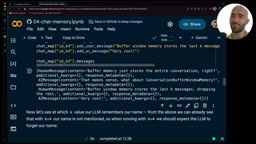
You may not have noticed that in the original LangChain, k=4 actually preserved the most recent 4 pairs of interactions (i.e., 8 messages), a design that easily causes confusion. In the new implementation, it's recommended to have k directly correspond to the number of messages for clearer semantics.
3. Conversation Summary Memory
This type doesn't store raw messages directly. Instead, it uses an LLM to compress historical interactions into a summary. The summary is iteratively updated whenever new messages are added.
Pros: As conversations grow longer, token consumption grows slowly; retains global information Cons: Each summary update requires an additional LLM call; short conversations actually consume more tokens; information compression inevitably loses details
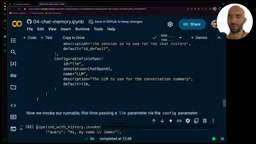
What does this "additional LLM call" mean in engineering terms? Each time the summary is updated, the system needs to send the current summary along with new messages to the LLM to generate a new summary. This not only increases response latency (typically an extra 100–500ms) but also incurs additional token costs. Using GPT-4o as an example, if summarization is triggered every turn, a 100-turn long conversation could generate dozens of extra calls, with non-negligible costs. Therefore, batch-triggered summarization (e.g., compressing only after accumulating N messages) is a key strategy for reducing costs in production environments—see the engineering practices section below for details.
An important engineering detail: when passing messages to the summary LLM, you should only pass message.content rather than the entire message object; otherwise, metadata like token usage will be mixed into the summary.
4. Conversation Summary Buffer Memory
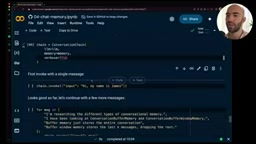
This is a hybrid of the previous two approaches: it retains the full content of the most recent k messages (the buffer) while compressing historical messages beyond the buffer into a summary.
Pros: Combines high resolution of recent interactions with global coverage of historical information Cons: Highest implementation complexity, requires careful tuning of summary prompts
Implementation in the Latest LangChain
Core Component: RunnableWithMessageHistory
LCEL (LangChain Expression Language) is the declarative chain-calling syntax introduced in LangChain 0.1. It connects components using the pipe operator |, making data flow clear and readable. RunnableWithMessageHistory is the wrapper in the LCEL ecosystem specifically designed for handling stateful conversations—it automatically loads historical messages before each invoke and automatically saves new messages after invoke, completely decoupling state management from business logic. This design is more aligned with functional programming principles than the old ConversationChain, and is easier to unit test and scale horizontally.
In LangChain 0.3, all memory types are implemented through RunnableWithMessageHistory. The core approach is:
- Define a Prompt template: Use
MessagesPlaceholderto mark where historical messages should be inserted - Build the Pipeline: Link the Prompt and LLM via LCEL
- Implement a
get_session_historyfunction: Returns the message history object for a specific session - Wrap the Pipeline with
RunnableWithMessageHistory
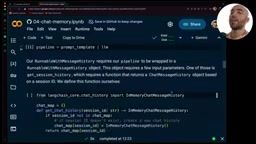
Key configuration items include:
history_messages_key: Must match the variable name inMessagesPlaceholderinput_messages_key: Corresponds to the user input variable namesession_id: A unique identifier for isolating different users/conversations
Implementation Pattern for Custom Memory Types
For Buffer Memory, you can directly use the built-in InMemoryChatMessageHistory. But for Window Memory, Summary Memory, etc., you need to inherit from BaseChatMessageHistory and implement three core interfaces:
class CustomMessageHistory(BaseChatMessageHistory):
    messages: list  # Message storage

    def add_messages(self, messages):  # Logic for adding messages
        pass

    def clear(self):  # Clear history
        pass
If your custom class introduces new parameters (such as k or llm), you need to expose them to LangChain through ConfigurableFieldSpec in history_factory_config, so they can be dynamically passed in during invoke.
How to Choose the Right Memory Type
Using LangSmith monitoring data, you can intuitively compare token consumption across different memory types:
| Memory Type | Short Conversation Token Usage | Long Conversation Token Usage | Information Retention |
|---|---|---|---|
| Buffer | Low | High (linear growth) | 100% |
| Buffer Window | Fixed | Fixed | Low (old messages discarded) |
| Summary | Higher (extra LLM calls) | Medium (slow growth) | Medium |
| Summary Buffer | Higher | Medium | Relatively high |
Selection Guidelines:
- Conversations expected to be short (<20 turns): Use Buffer Memory directly
- Conversations may be long but don't need early details: Buffer Window Memory
- Conversations are long and need global context: Summary Memory
- Conversations are long and need both recent details and global context: Summary Buffer Memory
Engineering Best Practices
When implementing conversational memory in production environments, there are several optimization points worth noting:
- Batch summarization instead of per-message summarization: Don't trigger a summary every time 2 messages are exceeded. Instead, set a larger buffer (e.g., 20 messages), and summarize 10 messages at once when exceeded, reducing the number of LLM calls
- Control summary length: Explicitly limit output length in the summary prompt (e.g., "keep it within a short paragraph")
Related articles
 Tutorials
ChatGPT Plus Subscription Guide: Are GPT-5.5, image-2, and Codex Worth the Upgrade?
A detailed look at ChatGPT Plus features — GPT-5.5, image-2, and Codex — with a Plus vs Pro comparison and a complete step-by-step subscription guide for users outside the US.
 Tutorials
Harness AI Engineering in Practice: Using Claude Code to Master Enterprise-Level E-Commerce Development
Deep dive into Harness AI Engineering: master enterprise e-commerce development with Claude Code using the Rules, Skills, Wiki, and Changes framework.
 Tutorials
Cursor + Codex Dual-IDE Collaboration: A Practical Methodology for Open-Source Project Customization
A complete methodology for open-source project customization based on real-world experience, detailing the Cursor+Codex dual-IDE workflow, seven-stage process, MVP validation, and AI source code reading techniques.