LangChain Prompt Templates Explained: A Practical Guide to Few-Shot and Chain-of-Thought

A systematic guide to LangChain prompt templates and core prompting techniques using RAG as the entry point.
This article explains how prompt engineering drives NLP's paradigm shift from "pre-train and fine-tune" to "pre-train, prompt, and predict." Using RAG as the core scenario, it details the four-layer structure of RAG prompts (rules, context, query, answer), introduces LangChain ChatPromptTemplate usage, and covers key techniques including Few-Shot prompting and Chain-of-Thought reasoning with practical application scenarios.
Why Prompts Matter So Much
Prompts may seem simple, but they are the core driving force behind AI's transition from the pre-training era to the large model era. To understand the depth of this transformation, we need to look back at the paradigm evolution in NLP. Before large language models emerged, the NLP field primarily relied on the "Pre-train Fine-tune Paradigm." Developers needed to perform supervised fine-tuning on models like BERT and GPT-2 using task-specific datasets. This required not only large amounts of labeled data but also specialized ML engineering skills and expensive computational resources — collecting data, labeling, training, and evaluating, with the entire cycle often taking months.
The rise of Prompt Engineering marks the arrival of a new "Pre-train, Prompt, Predict" paradigm. The model's capabilities are directly activated through natural language instructions without modifying any model weights. Before LLMs became widespread, adapting an AI model to a specific task required collecting massive amounts of data and spending days or even months on fine-tuning. Now, different prompts can guide models to complete various tasks — this is a true paradigm shift, reducing months of work to minutes.
LangChain has built a rich feature ecosystem around prompts, allowing developers to construct dynamic prompt pipelines that modify the structure and content passed to LLMs based on different variables and inputs. This article uses RAG (Retrieval-Augmented Generation) as an entry point to systematically explain prompt templates and core prompting techniques in LangChain.
The Four-Layer Structure of RAG Prompts
Before diving into prompt structure, it's necessary to understand the origins of RAG technology itself. Retrieval-Augmented Generation (RAG) was formally proposed by Meta AI in their 2020 paper Retrieval-Augmented Generation for Knowledge-Intensive NLP Tasks. Its core motivation is to address two inherent limitations of LLMs: the training cutoff date that prevents models from accessing the latest information, and the hallucination problem that causes models to confidently output incorrect content beyond their knowledge boundaries. RAG dynamically retrieves from external knowledge bases during inference, combining the "parametric knowledge" stored in model weights with real-time "non-parametric knowledge," enabling models to access real-time, private, or domain-specific information without retraining the entire model.
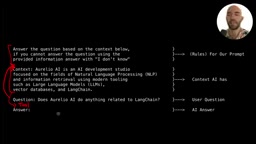
A typical RAG prompt contains four core components:
Rules and Instructions (System Prompt)
This is a component found in nearly all prompts, used to set the LLM's behavioral mode: how to respond to user queries, what persona to adopt, what to focus on, and what boundary constraints exist. The core principle is to provide as much contextual information as possible while keeping it concise — the LLM itself knows nothing about the application scenario it's operating in, so we need to explicitly tell it everything while avoiding redundancy and "over-prompting."
Context
This is the RAG-specific component, referring to information retrieved from external sources (web searches, database queries, vector databases). This external knowledge augments the knowledge contained in the LLM's own model weights — this is exactly what "retrieval-augmented" means. For chat models, context is typically placed in user/assistant messages, and newer models also support placing it in tool messages.
Query
The user's input query, typically passed as a user message. If you find the LLM sometimes deviates from rules set in the system prompt, you can append additional instructions here as constraints.
Answer (Output)
The response content generated by the assistant.
LangChain ChatPromptTemplate Basics
In LangChain, we use ChatPromptTemplate to build prompt templates. Here's a standard RAG prompt template example:
from langchain.prompts import ChatPromptTemplate

prompt = ChatPromptTemplate.from_messages([
    ("system", "Answer the user's query based on the context below. "
               "If you cannot answer using the provided information, "
               "answer with 'I don't know'.\n\nContext: {context}"),
    ("user", "{query}")
])
LangChain automatically identifies input variables in the template (such as context and query). You can also use SystemMessagePromptTemplate and HumanMessagePromptTemplate objects for more explicit definitions — both approaches produce the same result, and the choice depends on your preference for code readability.
Temperature Parameter Selection for RAG
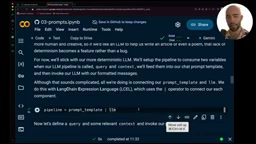
In RAG scenarios, it's recommended to use a low temperature (temperature=0). Understanding this recommendation requires knowing the mathematical nature of the temperature parameter: Temperature controls the randomness of LLM output by scaling the logits in the Softmax function. When temperature approaches 0, the model almost always selects the highest-probability token (i.e., greedy decoding), producing highly deterministic output; when temperature approaches infinity, all token probabilities become equal, and output approaches complete randomness. Typical values range from 0 to 2, with 00.3 recommended for RAG scenarios, since RAG requires the LLM to output accurate, truthful information, and high temperatures amplify hallucination risk while increasing creativity. For creative writing scenarios, temperature can be raised to 0.71.2. Low temperature makes output more deterministic, theoretically reducing hallucinations effectively.
Few-Shot Prompting: Guiding Model Behavior with Examples
The core idea of Few-Shot prompting is to provide the LLM with several input-output examples before the actual conversation, demonstrating the expected behavioral patterns. This technique originates from the "In-Context Learning" (ICL) capability in the meta-learning domain and was first systematically described in the GPT-3 paper. The theoretical assumption is that sufficiently large language models have implicitly learned the meta-ability to "induce patterns from examples" during pre-training. Few-Shot examples essentially activate this latent ability in the model rather than triggering actual gradient-update learning — this also explains why not many examples are needed (typically 3~8 suffice) and why example quality matters more than quantity.
When Do You Need Few-Shot Prompting
For top-tier models like GPT-4o, the necessity of Few-Shot prompting has decreased because their instruction-following capabilities are strong enough. However, for smaller open-source models (such as Llama 2/3), Few-Shot prompting remains an effective method for getting models to follow specific output formats.
FewShotChatMessagePromptTemplate in Practice
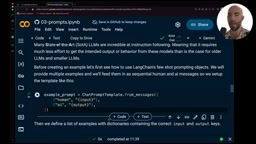
Suppose you want the LLM to always output in a specific Markdown format (main title → summary → subheadings → key points → conclusion). You can provide format examples through FewShotChatMessagePromptTemplate:
from langchain.prompts import FewShotChatMessagePromptTemplate

examples = [
    {"input": "query1", "output": "formatted_answer1"},
    {"input": "query2", "output": "formatted_answer2"}
]

example_prompt = ChatPromptTemplate.from_messages([
    ("human", "{input}"),
    ("ai", "{output}")
])

few_shot_prompt = FewShotChatMessagePromptTemplate(
    example_prompt=example_prompt,
    examples=examples
)
An advanced technique worth trying is dynamic example selection: dynamically switching between different example sets based on the user's topic (determined through keyword matching or semantic similarity), making Few-Shot examples more relevant to the current conversation.
Chain-of-Thought: Making Models Reason Step by Step
Chain-of-Thought (CoT) prompting encourages LLMs to show their reasoning process step by step, similar to a math teacher requiring students to write out complete solution steps. This technique was formally proposed by the Google Brain team in their 2022 paper Chain-of-Thought Prompting Elicits Reasoning in Large Language Models. The research found that simply adding intermediate reasoning steps to Few-Shot examples could significantly improve model performance on arithmetic, commonsense reasoning, and symbolic reasoning tasks. Subsequent research has produced important variants including Zero-Shot CoT (which activates reasoning chains by simply adding "Let's think step by step" at the end of the prompt, without any examples) and Self-Consistency (sampling multiple reasoning paths and taking the majority answer to further improve accuracy).

Why Chain-of-Thought Works
By "writing down the reasoning process," LLMs gain improvements in three areas:
- Reduced hallucinations: Step-by-step reasoning is more accurate than jumping directly to an answer
- Easier debugging: Engineers can see where the model went wrong
- Better performance on complex tasks: Breaking large problems into manageable sub-problems
Experimental Comparison: Counting Keystrokes
Here's an intuitive experiment — counting how many keystrokes are needed to type the numbers 1 to 500:
- Without Chain-of-Thought (forced to answer directly): Output 1511, incorrect
- With Chain-of-Thought (asked to break it down step by step): Splits the problem into 1-digit numbers (1-9), 2-digit numbers (10-99), 3-digit numbers (100-499), and 500's keystrokes, ultimately arriving at 1392, the correct answer
- No constraints: Modern LLMs default to using Chain-of-Thought and also arrive at the correct answer
Related articles
 Tutorials
ChatGPT Plus Subscription Guide: Are GPT-5.5, image-2, and Codex Worth the Upgrade?
A detailed look at ChatGPT Plus features — GPT-5.5, image-2, and Codex — with a Plus vs Pro comparison and a complete step-by-step subscription guide for users outside the US.
 Tutorials
Harness AI Engineering in Practice: Using Claude Code to Master Enterprise-Level E-Commerce Development
Deep dive into Harness AI Engineering: master enterprise e-commerce development with Claude Code using the Rules, Skills, Wiki, and Changes framework.
 Tutorials
Cursor + Codex Dual-IDE Collaboration: A Practical Methodology for Open-Source Project Customization
A complete methodology for open-source project customization based on real-world experience, detailing the Cursor+Codex dual-IDE workflow, seven-stage process, MVP validation, and AI source code reading techniques.