LangChain Streaming Output & Async in Practice: Complete Implementation for Agent Scenarios

In-depth guide to implementing streaming output and async processing in LangChain Agent scenarios.
This article explains why streaming output and async processing are critical for AI applications: async programming solves the blocking problem of LLM API calls through the event loop mechanism, while streaming output leverages LLM's autoregressive generation to deliver tokens in real time. It covers LangChain's astream method, streaming implementation for Agent scenarios, and a producer-consumer architecture design based on AsyncQueueCallbackHandler and asyncio.Queue.
When building conversational AI applications, streaming output and async processing are two indispensable core capabilities. Without streaming, users must endure long waits before seeing a complete response; without async processing, the application completely blocks while waiting for LLM API responses, making it impossible to scale. This article provides an in-depth analysis of the implementation principles behind streaming output and async in LangChain, and demonstrates how to integrate these capabilities into real-world APIs.
Why Streaming Output and Async Are Critical for AI Applications
Async Programming: Solving the Performance Bottleneck of LLM API Waiting
Large language model calls are almost always made through APIs, and each call may take several seconds or even longer. If your application uses synchronous code, the entire thread is blocked while waiting for the LLM response, unable to do anything else. This means your application cannot handle multiple user requests simultaneously, resulting in extremely poor scalability.
Python's async programming is based on the Event Loop mechanism, supported by the asyncio standard library. Unlike multithreading, async programming is single-threaded — it uses Coroutines to voluntarily yield control during I/O waits, allowing the event loop to schedule other tasks. This model is particularly well-suited for I/O-intensive scenarios — and LLM API calls are a textbook example of I/O-intensive operations: after a network request is sent, the CPU does virtually nothing, just waiting for the remote server's response. The async model makes full use of this "idle window," allowing the event loop to process other users' requests in the meantime.
The core advantage of async code is: while one request is waiting for an LLM response, the program can handle other requests. For AI applications, where the vast majority of time is spent waiting on API calls, the performance gains from async processing are especially significant. In practice, an async FastAPI service can handle dozens of concurrent LLM requests with a single process, whereas a synchronous version under the same conditions might only be able to process them serially.
Streaming Output: Not Just a UX Optimization, But a Functional Mechanism
The fundamental nature of LLM text generation is token-by-token production — models based on the Transformer architecture use an Autoregressive approach to generate text: each forward pass predicts only one token, which is then appended to the input sequence for another forward pass to predict the next token. The latency of this process is determined by model size, sequence length, and hardware performance — typically each token requires tens of milliseconds, and generating a complete response may take several seconds. Streaming output transmits this token-by-token generation process to users in real time, rather than waiting until all tokens are generated before returning everything at once.
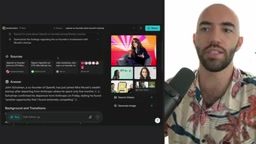
The value of streaming output manifests at three levels:
- User experience improvement: Imagine using GPT-4 to generate a long story — without streaming, users might stare at a blank page for ten seconds or more, which is unacceptable in a chat scenario.
- Intermediate step visualization: In Agent scenarios, streaming output not only delivers the final text but also reveals the intermediate decision-making process — such as "searching the web" or "calling a calculation tool." Perplexity's ProSearch is an excellent example, where users can watch the search and analysis process in real time.
- Feature implementation: When ChatGPT receives tokens like "use search tool" from the LLM, it doesn't display these tokens directly — instead, it transforms them into a "searching the web" UI notification. This demonstrates that streaming output itself is a functional mechanism.
LangChain Basic Streaming Output: astream Method Explained
Using astream for Async Streaming Output
In LangChain, methods with the a prefix are the async versions of their corresponding methods. astream is the async version of stream, and its usage is very concise:
tokens = []
async for token in llm.astream("Tell me about NLP"):
    tokens.append(token)
    print(token.content, end="|", flush=True)
Each returned object is of type AIMessageChunk, containing a small piece of content. An interesting feature is that these chunks can be merged through addition:
tk = tokens[0]
for token in tokens[1:]:
    tk += token
The merged result is still an AIMessageChunk, but with the content fully concatenated. This feature applies not only to text content but also to tool call arguments and other fields, making it very useful when handling streaming output from Agents.
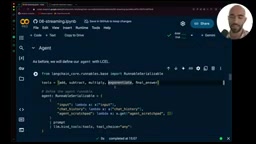
Note that the flush=True parameter forces the console to immediately update the displayed content, making the streaming effect smoother. Without it, the output will have a noticeable "chunky" feel.
LangChain Agent Streaming Output Implementation
Building a Configurable Agent Instance
Agent scenarios are much more complex than simple LLM calls because they involve multiple LLM calls and tool executions. To use streaming output in an API, we need to provide a new callback handler for each query. Through LangChain's configurable_fields mechanism, we can add configurable fields to the LLM:
llm = ChatOpenAI(streaming=True)
llm = llm.configurable_fields(
    callbacks=ConfigurableField(description="callbacks")
)
Note the streaming=True parameter — while it may seem inconspicuous, it's a prerequisite for enabling streaming output. Once configured, different callback handlers can be passed in each time the Agent is called.
Custom AsyncQueueCallbackHandler
LangChain's callback system is an implementation of the Observer Pattern, allowing developers to inject custom logic at various lifecycle points during Chain or Agent execution. Events that callback handlers can listen to include: LLM start/end, tool call start/end, chain start/end, etc. AsyncCallbackHandler is the async version — all its methods are coroutines that won't block the event loop. We leverage this mechanism to capture and forward each token as it's produced.
The core idea is: the callback handler places tokens produced by the LLM into an async queue (asyncio.Queue), and externally, tokens are consumed from the queue for processing. asyncio.Queue is the core data structure for implementing the producer-consumer pattern in Python async programming — when the queue is empty, get() automatically suspends without consuming CPU resources, perfectly matching the scenario of "LLM slowly producing tokens, external code rapidly consuming tokens."
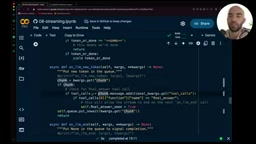
This custom handler inherits from AsyncCallbackHandler and contains several key components:
__aiter__ method: As an async generator, it continuously retrieves tokens from the queue. If the queue is empty, it waits using asyncio.sleep(0.1) — async sleep must be used here, otherwise it would block the entire thread. When a "done" marker is received, iteration stops; otherwise, the current token is yielded.
on_llm_new_token method: LangChain calls this method when the LLM returns each token. It extracts tool call information from the chunk's additional_kwargs, using Python's walrus operator (:=) to perform assignment and condition checking simultaneously:
if tool_calls := chunk.additional_kwargs.get("tool_calls"):
    if tool_calls[0]["function"]["name"] == "final_answer":
        self.final_answer_seen = True
    else:
        await self.queue.put(chunk)
The final_answer_seen flag is used to distinguish between tool call tokens and final answer tokens, enabling different handling for each.
on_llm_end method: During Agent execution, the LLM is called multiple times (selecting tools, generating the final answer, etc.), and each completion triggers this method. If the current completion is a tool call ending, a "step_end" marker is sent; if it's the final answer ending, a "done" marker is sent to stop the generator.
Architecture Design of the Streaming Agent Executor
Using astream Instead of invoke for Streaming Calls
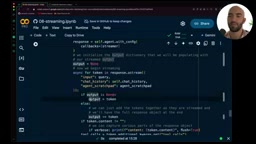
Integrating streaming output into the Agent executor revolves around using astream instead of invoke to call the Agent:
async def stream(self, query):
    async for token in self.agent.astream(query, config={"callbacks": [streamer]}):
        # Merge chunks into complete output
        if output is None:
            output = token
        else:
            output += token
        # Extract tool call information
        tool_calls = token.additional_kwargs.get("tool_calls")
        if tool_calls:
            # Process tool names and arguments
            ...
Each chunk is incrementally merged into the output while tool call names and arguments are extracted in real time. Since the Agent uses tool_choice="any", all output is returned through tool calls, and the content field is always empty.
Using asyncio.Queue to Decouple Agent Execution from Token Consumption
The key architectural design principle is: don't handle the final destination of tokens inside the Agent executor. The Agent executor is only responsible for placing tokens into the queue, while externally, tokens are consumed from the queue through an async loop to decide how to use them:
queue = asyncio.Queue()
streamer = QueueCallbackHandler(queue)
task = asyncio.create_task(agent_executor.run(query))

async for token in streamer:
    if token == "step_end":
        print("\n")
    elif "function" in str(token):
        tool_name = extract_tool_name(token)
        print(f"Calling {tool_name}")
    else:
        print(token, end="")
Related articles
 Tutorials
ChatGPT Plus Subscription Guide: Are GPT-5.5, image-2, and Codex Worth the Upgrade?
A detailed look at ChatGPT Plus features — GPT-5.5, image-2, and Codex — with a Plus vs Pro comparison and a complete step-by-step subscription guide for users outside the US.
 Tutorials
Harness AI Engineering in Practice: Using Claude Code to Master Enterprise-Level E-Commerce Development
Deep dive into Harness AI Engineering: master enterprise e-commerce development with Claude Code using the Rules, Skills, Wiki, and Changes framework.
 Tutorials
Cursor + Codex Dual-IDE Collaboration: A Practical Methodology for Open-Source Project Customization
A complete methodology for open-source project customization based on real-world experience, detailing the Cursor+Codex dual-IDE workflow, seven-stage process, MVP validation, and AI source code reading techniques.