LangChain v0.3 Agent Tutorial: Complete Guide to Tool Definition, Building, and Execution

A complete tutorial on building AI Agents from scratch using LangChain v0.3
This article systematically introduces the core concepts and practices for building AI Agents with LangChain v0.3. It covers tool definition (@tool decorator, JSON Schema generation), Agent core components (LLM, Tools, Prompt, Memory), the ReAct reasoning framework, the distinction between Agent and Agent Executor responsibilities, as well as advanced features like parallel tool calls and LangSmith observability, helping developers understand the complete workflow from decision-making to execution.
Introduction: Why Agents Are the Core of AI Applications
AI Agents are one of the most important components in modern AI applications — virtually every intelligent AI application has some form of Agent implementation at its core. This article, based on LangChain v0.3, walks you through building a fully functional AI Agent from scratch, covering core concepts such as tool definition, Agent construction, and executor configuration.
The essence of an Agent is giving an LLM the ability to "take action" — it no longer just generates text but can call external tools, search the web, perform calculations, and conduct multi-step reasoning based on results.
Technical Background and Evolution of AI Agents
The concept of AI Agents originated from Multi-Agent Systems research in the 1990s, but it wasn't until after 2022 that they were truly combined with large language models and became practical. The ReAct (Reasoning + Acting) paper (2022) laid the theoretical foundation for modern LLM Agents, proposing that LLMs alternate between "reasoning" and "acting" to form a closed loop of chain-of-thought and tool invocation. Subsequently, the viral spread of projects like AutoGPT and BabyAGI brought the Agent concept into the mainstream. LangChain rose during this wave by standardizing the engineering implementation of Agents, eliminating the need for developers to build reasoning-action loops from scratch and significantly lowering the barrier to building production-grade Agent applications.
LangChain Tools: Extending Agent Capabilities
The Nature and Design Principles of Tools
Tools are the foundation of an Agent's capabilities. Simply put, a tool is a specially formatted Python function that enables an LLM to understand when, why, and how to use it.
Designing a high-quality tool requires following three principles:
- Clear docstrings: Use natural language to explain the tool's purpose and use cases
- Semantic parameter names: Parameter names should be self-explanatory; if not intuitive enough, supplement with explanations in the docstring
- Complete type annotations: Add type hints to parameters and return values
Creating Tools with the @tool Decorator
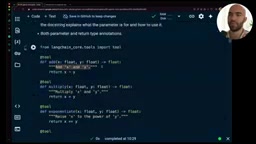
Using LangChain's @tool decorator, we can convert ordinary functions into structured tool objects (StructuredTool):
from langchain.core.tools import tool

@tool
def multiply(x: float, y: float) -> float:
    """Multiply two numbers together."""
    return x * y
The decorator automatically extracts the function name as the tool name, the docstring as the description, and generates a JSON Schema containing parameter types, required fields, and other information.
Technical Principles of JSON Schema and Tool Descriptions
JSON Schema is a specification for describing JSON data structures, and LangChain uses it to pass the tool's "instruction manual" to the LLM. When the @tool decorator processes a Python function, it extracts the function signature via Python's inspect module, combines it with Pydantic for type validation, and ultimately generates a JSON Schema conforming to the OpenAI Function Calling specification. This Schema contains structured information including the tool name, description, parameter names, parameter types, and whether fields are required. The LLM uses these Schemas as context during inference to determine when to call which tool and how to construct parameters. This is precisely why docstrings and type annotations are so important — they directly affect the quality of the LLM's understanding of the tool. A vague description may cause the LLM to invoke a tool in inappropriate scenarios or pass incorrectly formatted parameters.
LLM Tool Invocation Mechanism Explained
The LLM itself does not directly execute tools. The actual flow is: the LLM generates a JSON string specifying the tool name and parameters to call, then the Agent execution logic parses this JSON and actually invokes the corresponding function:
import json
# String output by the LLM
llm_output = '{"x": 10.7, "y": 7.68}'
params = json.loads(llm_output)
# Actually execute the tool
result = exponentiate.func(**params)
This "LLM decision → execution logic invocation" pattern is key to understanding how Agents work.
Building a LangChain Agent: From Prompt to Executor
Core Components of an Agent
A complete LangChain Agent requires four core components:
- LLM: The decision-making brain
- Tools: The set of callable tools
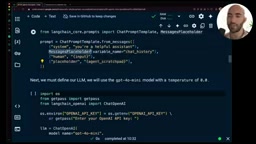
- Prompt: Includes system message, chat history, and Agent Scratchpad
- Memory: Conversation memory
Among these, the Agent Scratchpad is a special placeholder that stores the Agent's internal dialogue during multi-step reasoning — including which tools it called, what results it received, and its next decision.
The ReAct Framework: The Underlying Logic of Agent Reasoning
The execution flow of a LangChain Agent is essentially an engineering implementation of the ReAct (Reason + Act) framework. The ReAct framework defines a loop: Thought (reflect on current state) → Action (decide which tool to call) → Observation (receive tool results) → Thought again... until the LLM determines the task is complete and outputs a Final Answer. The Agent Scratchpad is the recording medium for this loop — it serializes each round's Thought/Action/Observation sequence into text and appends it to the Prompt, allowing the LLM to "see" what it did previously in the next reasoning round. This design reconciles the contradiction between the LLM's stateless nature and multi-step task execution — each LLM call is stateless, but through context injection via the Scratchpad, the Agent as a whole exhibits stateful continuous reasoning capabilities.
The Difference Between Agent and Agent Executor
This is an easily confused concept. In LangChain, the Agent and Agent Executor serve different responsibilities:
- Agent: Responsible for decision-making — telling us which tool to use and what parameters to pass
- Agent Executor: Responsible for execution — actually calling tools, managing multi-step iterations, and handling memory
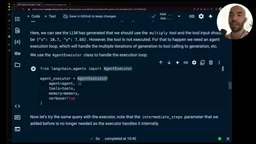
This is also why tools are passed twice: they're passed to the Agent so the LLM understands the tool's Schema (how to use it), and passed to the Executor to obtain the actual function references (for execution).
Agent Execution Flow in Practice
When we ask the Agent "What is 10.7 times 7.68?", the execution flow is as follows:
- The LLM analyzes the question and decides to use the multiply tool
- The LLM outputs tool call parameters:
{"x": 10.7, "y": 7.68} - The Executor actually executes the multiply function, getting the result 82.176
- The result is fed back to the LLM as an "observation"
- The LLM generates the final answer
Advanced Features: Parallel Tool Calls and External API Integration
Parallel Tool Calls
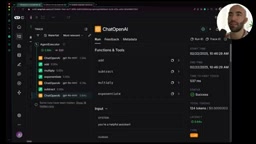
Agents support calling multiple tools in parallel within a single execution loop. For example, when asked to calculate "(3+5) × 2^3 - 10", the Agent will:
- Execute add(3,5), multiply, and exponentiate in parallel
- Execute subtract after receiving results
- Return the final answer
Through LangSmith, you can clearly see the call chain of this parallel execution, which is very efficient for complex computation scenarios.
LangSmith Observability Platform
LangSmith is LangChain's official observability platform for LLM applications, similar to APM (Application Performance Monitoring) tools in traditional software development. It can trace the complete chain of every LLM call: input Prompt, output content, token consumption, latency, tool call order, and more. For complex multi-step execution systems like Agents, LangSmith's call chain visualization is particularly important — developers can intuitively see the temporal relationships of parallel tool calls, the time distribution at each node, and the complete content of intermediate reasoning steps. This is invaluable for debugging abnormal Agent behavior (such as incorrect tool call order or parameter construction failures), optimizing execution efficiency, and continuously evaluating model performance in production environments.
Integrating Google Search and Custom Tools
LangChain provides a loading mechanism for pre-built tools:
from langchain.agents import load_tools
tools = load_tools(["serpapi"])
Related articles
 Tutorials
ChatGPT Plus Subscription Guide: Are GPT-5.5, image-2, and Codex Worth the Upgrade?
A detailed look at ChatGPT Plus features — GPT-5.5, image-2, and Codex — with a Plus vs Pro comparison and a complete step-by-step subscription guide for users outside the US.
 Tutorials
Harness AI Engineering in Practice: Using Claude Code to Master Enterprise-Level E-Commerce Development
Deep dive into Harness AI Engineering: master enterprise e-commerce development with Claude Code using the Rules, Skills, Wiki, and Changes framework.
 Tutorials
Cursor + Codex Dual-IDE Collaboration: A Practical Methodology for Open-Source Project Customization
A complete methodology for open-source project customization based on real-world experience, detailing the Cursor+Codex dual-IDE workflow, seven-stage process, MVP validation, and AI source code reading techniques.