Let AI Find Its Own Bugs: A Practical Guide to Fully Automated Code Review

A practical methodology for structured automated review and fixing of AI-generated code using AI itself.
This article demonstrates the complete AI automated Code Review process through a real 3D model generation project case study. Core methodologies include: driving the review process with problem checklists, distinguishing real bugs from false positives, and adopting layered verification strategies. AI Code Review offers clear advantages in speed, systematicness, and false positive identification, making it suitable as a first line of defense, though architectural design and security analysis still require human oversight.
Introduction: Having AI Review AI-Written Code
With the proliferation of AI programming tools like Cursor and Copilot, more and more developers are relying on AI to generate code. Copilot is based on OpenAI's Codex model, offering line-level and function-level code completion as an IDE plugin; Cursor is a native AI IDE deeply integrated with multiple large language models such as GPT-4 and Claude, supporting cross-file context understanding and project-wide code generation and modification. The core technical foundation of these tools is large language models (LLMs) pre-trained on massive amounts of open-source code, giving them the ability to understand code semantics and infer programming intent.
But there's an unavoidable reality: AI-generated code also has bugs. LLMs are fundamentally probabilistic models—the code they generate is the "most likely output" based on statistical patterns, not a "correct output" that has been logically verified. This is the root cause why AI-generated code inevitably contains defects. Manually reviewing every line? Too inefficient. So can we have AI review and fix these issues itself?
The answer is yes. This article demonstrates how to run a fully automated Code Review process using AI through a real case study of a 3D model generation project—from discovering issues, verifying bugs, to fixing them one by one, forming a complete AI self-review loop.
Practical Background: Code Review Needs for a 3D Model Generation Project
This project is a 3D model generation application developed with AI assistance, covering multiple functional modules including profile editing, default model settings, model generation and display. Such applications typically involve complex full-stack technologies: the frontend requires a WebGL rendering engine (such as Three.js or Babylon.js) for real-time model display and interactive operations including rotation, scaling, and lighting adjustments; the backend may involve AI generation pipelines based on NeRF (Neural Radiance Fields), 3D Gaussian Splatting, or diffusion models. State management is particularly complex—user model selections, generation parameters, rendering configurations, and other states need to be synchronized across multiple components, and any state inconsistency could lead to display errors or functional anomalies.
After initial development was complete, the developer chose not to manually review the code line by line, but instead had AI perform a systematic code review. Traditional Code Review primarily relies on manual review during the Pull Request process. Google's engineering practice data shows that manual Code Review takes an average of 4-8 hours per review cycle. The AI-driven structured testing methodology draws from formal verification and checklist-driven review principles—decomposing review tasks into independently verifiable atomic check items, each with clear expected results and verification criteria. The introduction of AI makes automatic generation and automatic verification of check items possible, significantly reducing execution costs.
The entire investigation process proceeded item by item according to a problem checklist, embodying a structured AI-driven testing methodology.

Item-by-Item Investigation: The Complete AI Automated Verification Process
Issue One: Fixing Profile Section Functionality
The first flagged issue was a functional anomaly in the profile section. AI quickly located the logic error in the code and provided specific modification suggestions, which the developer used to complete the fix.
This demonstrates AI's efficiency at locating known issues—the developer doesn't need to spend extensive time reading through code context. AI directly points out the problem and provides a fix, with the entire process taking just a few minutes.
Issue Two: Multi-Layer Verification of Default Model Settings
The second issue involved the default model setting logic. The developer had AI check: whether the default model in the settings page correctly displays as the "HongYan 3D" model.

After checking, AI confirmed that the default model was indeed the HongYan 3D preset configuration, consistent with expectations. But the investigation didn't stop there—the developer further had AI verify a deeper question: After a user has selected and generated a 3D model, does the interface display the default model or the model the user actually selected?
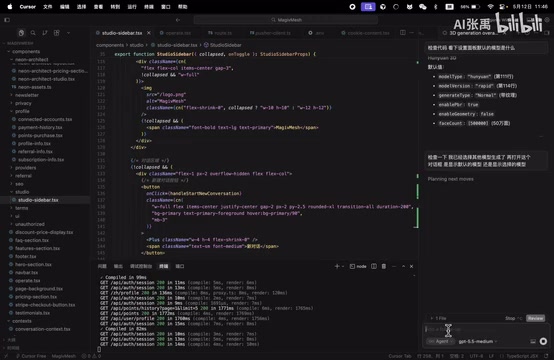
The results showed that when opening the settings panel, the updated model information was displayed without reverting to default values—the state management logic was correct. This potential bug actually didn't exist.

This step is particularly noteworthy—it demonstrates that AI can not only discover real bugs but also effectively eliminate false positives, helping developers avoid wasting time on non-existent problems. False positives are a core challenge faced by all automated detection tools. In the static code analysis domain, traditional tools like SonarQube and ESLint typically have false positive rates between 15%-40%. Excessive false positive rates lead to "alert fatigue"—developers gradually ignore tool warnings and may miss real issues. Academic research shows that when false positive rates exceed 30%, developer trust and willingness to use tools drops significantly. A key advantage of AI Code Review is that it can reduce false positive rates through contextual understanding and dynamic verification: it not only analyzes the static structure of code but can also simulate execution paths to determine whether potential issues would actually trigger at runtime.
Issue Three: Functional Verification of Model Display Format
The third issue focused on how generated 3D models are presented to users. After AI's automated check, no anomalies were found in the model display functionality—rendering and interaction logic both met the expected design.
Three Core Methodologies for AI Automated Code Review
From this practical case, we can distill a directly reusable AI Code Review methodology:
Method One: Drive the Review Process with a Problem Checklist
Don't let AI review code aimlessly. A better approach is to have AI generate a structured problem checklist first, then verify items one by one. This ensures review coverage while avoiding missed critical functionality.
In practice, you can have AI scan the project structure and core logic first, output a prioritized list of items to check, then execute verification one by one. This method draws from the checklist philosophy widely used in aviation and healthcare industries—systematically reducing the risk of human oversight by decomposing complex tasks into standardized inspection steps.
Method Two: Distinguish "Real Bugs" from "False Positives"
As demonstrated in the default model check in this case, some potential issues flagged by AI turn out not to exist after verification. A mature AI Code Review process must include a verification step rather than blindly fixing all flagged issues.
Blindly fixing false positives not only wastes time but may introduce new bugs. Verify first, then fix—this order cannot be reversed. In practice, you can require AI to provide a confidence score for each flagged issue along with specific verification steps. Developers should prioritize high-confidence issues and execute verification procedures first for low-confidence ones.
Method Three: Adopt a Layered Verification Strategy
For each functionality point, don't just check surface behavior—dig deeper to verify edge cases and state changes. For example, in the default model check, AI not only verified whether the initial state was correct but also whether the state updated correctly after user actions.
This layered verification effectively catches hidden state management bugs—issues that often appear normal during initial testing and only surface under specific operation sequences. The theoretical foundation of the layered verification strategy comes from the V-Model and Test Pyramid concepts in software testing: the first layer verifies unit-level correctness (e.g., whether function inputs/outputs meet expectations), the second layer verifies integration-level state transitions (e.g., whether data passing between components is consistent), and the third layer verifies end-to-end user scenarios (e.g., whether complete operation flows work normally). In frontend frameworks like React and Vue, state may be distributed across component local state, global state managers (such as Redux, Vuex, Zustand), or URL parameters—the more state sources there are, the higher the probability of inconsistencies. Typical state management bugs include: UI not re-rendering after state updates, state overwrites due to race conditions, and async state updates after component unmounting—these are precisely the issues that layered verification strategies excel at catching.
Conclusion: Advantages and Boundaries of AI Code Review
"Having AI find bugs in AI-written code" isn't a joke—it's a development paradigm that's being implemented today. From this practical experience, AI has several clear advantages in code review:
- Speed: Item-by-item checking is far more efficient than manual review, completing in minutes what would take hours
- Systematic: Executing by checklist means nothing gets missed due to fatigue or oversight
- Distinguishes real from false issues: The verification step effectively reduces false positives and avoids unnecessary rework
Of course, AI Code Review currently cannot completely replace manual review. AI is better suited as the first line of defense, handling routine logic checks and state verification. Higher-level concerns such as architectural design rationality, performance bottleneck analysis, and security vulnerability auditing still require experienced developers to oversee.
Several AI code review products are already maturing in the market: CodeRabbit provides PR-based automated review, generating line-by-line comments and improvement suggestions; Amazon CodeGuru Reviewer uses machine learning to detect performance issues and security vulnerabilities in code; Sourcery focuses on automatic refactoring suggestions for Python code. According to GitHub's 2024 Developer Survey, over 60% of developers are already using some form of AI-assisted tools in their daily work, with code review being one of the fastest-growing application scenarios.
In the future, as AI programming capabilities continue to improve, the fully automated loop of "AI writes → AI reviews → AI fixes" will become increasingly mature. The developer's role will gradually shift from "writing code by hand" to "guiding AI to write code and accepting AI's output." Mastering AI Code Review methodology is preparation for this transition.
Key Takeaways
- Use AI for structured Code Review, investigating items systematically by problem checklist for both efficiency and coverage
- AI can not only discover real bugs but also effectively eliminate false positives, avoiding wasted development time on non-existent issues
- Adopt a layered verification strategy that goes beyond surface behavior to deeply verify edge cases like state changes
- AI Code Review works well as a first line of defense for routine logic checks, while architectural concerns still require human oversight
- The fully automated loop of AI writing, AI reviewing, and AI fixing is becoming a viable development paradigm
Related articles
 Tutorials
ChatGPT Plus Subscription Guide: Are GPT-5.5, image-2, and Codex Worth the Upgrade?
A detailed look at ChatGPT Plus features — GPT-5.5, image-2, and Codex — with a Plus vs Pro comparison and a complete step-by-step subscription guide for users outside the US.
 Tutorials
Harness AI Engineering in Practice: Using Claude Code to Master Enterprise-Level E-Commerce Development
Deep dive into Harness AI Engineering: master enterprise e-commerce development with Claude Code using the Rules, Skills, Wiki, and Changes framework.
 Tutorials
Cursor + Codex Dual-IDE Collaboration: A Practical Methodology for Open-Source Project Customization
A complete methodology for open-source project customization based on real-world experience, detailing the Cursor+Codex dual-IDE workflow, seven-stage process, MVP validation, and AI source code reading techniques.