Linear + Claude Code in Practice: Let AI Autonomously Complete 90 Development Tasks

Use Linear as a shared brain for AI coding agents to enable multi-device, multi-agent autonomous development.
This article explains how to deeply integrate the project management tool Linear with Claude Code/Codex, solving AI coding agents' problems of task drift, context fragmentation, and multi-agent conflicts. With a single prompt, AI automatically generates 90 tasks with acceptance criteria in Linear. AI agents can autonomously pick up tasks from the board, code, test, and mark them complete, supporting multi-agent parallel development for an efficient workflow that goes from manual direction to automatic execution.
When you're doing AI-assisted development simultaneously on a laptop, desktop, iPad, and phone, how do you keep all the AI coding agents across devices in sync and moving forward in an orderly fashion? The answer is to give them a shared "project brain."
This article details how to deeply integrate the free project management tool Linear with Claude Code/Codex to achieve a truly autonomous AI development workflow—from automatically planning 90 tasks to multi-agent parallel development, a complete solution to help you say goodbye to the inefficient mode of manually directing AI.
Why Do AI Coding Agents Need a "Second Brain"?
When using AI coding tools like Claude Code or Cursor, you've likely encountered these problems:
- Task drift: After completing one feature, the AI doesn't know what to do next, starts "freestyling," and produces large amounts of useless code
- Context fragmentation: When switching to a different device to continue development, you need to re-explain project progress and to-do items to the AI
- Lack of acceptance criteria: The AI doesn't know "what counts as done," resulting in half-finished features or over-engineering
- Multi-agent conflicts: When using Claude Code and Codex simultaneously, the two agents might duplicate work or overwrite each other
The root cause of these problems lies in the architectural characteristics of AI coding agents: current mainstream models (including Claude, GPT-4, etc.) are all based on the Transformer architecture, and their "memory" is essentially a limited context window—Claude 3.5 Sonnet has approximately 200K tokens, GPT-4o approximately 128K tokens. Once a conversation ends or the window overflows, all project background information is lost, and the AI enters an "amnesiac state" with each new session. This means AI coding agents lack a persistent, structured project memory. Linear fills exactly this gap—it's not just a project management tool, but a shared brain for AI agents, allowing each agent to fetch tasks, update status, and stay coordinated from the same board.
Tutorial: Setting Up Linear and Claude Code Integration
Linear was founded in 2019 by former Uber engineer Karri Saarinen, designed specifically for software teams, and is known for its extreme performance and clean interactions. Unlike traditional tools like Jira, Linear uses a local-first architecture where all operations respond instantly locally, then sync to the cloud via WebSocket with near-zero latency. More importantly, Linear provides complete REST API and GraphQL API—this is precisely the technical foundation that enables deep integration with AI tools like Claude Code. Its free plan supports unlimited members and up to 250 issues, which is more than enough for indie developers and small teams, with no credit card required.
Step-by-step instructions:
- In Claude Code, go to Customize → Connect your apps
- Search for Linear and log in to authorize
- Connection complete
The process for Codex is similar—complete the same flow in the Plugins section in the upper left corner.
Once connected, Claude Code can directly read and write to your Linear board—viewing task lists, updating task statuses, creating new tasks—all through natural language commands.
AI Auto-Planning Projects: One Prompt Generates 90 Tasks
This is the most impressive part of the entire workflow. You only need a single prompt describing the app you want to build, and Claude Code will automatically create a complete project plan in Linear.
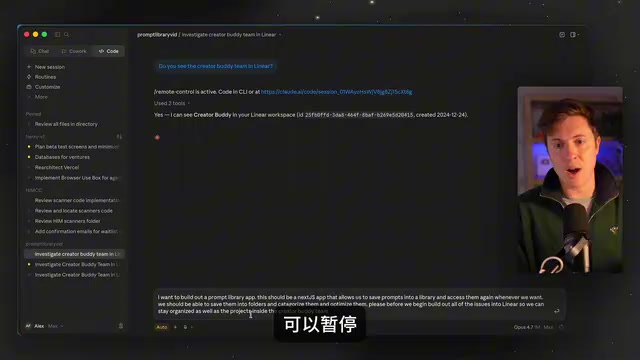
Taking a Prompt Library app as an example, you can use a prompt like this:
"I want to build a Prompt Library app. This is a Next.js app that allows us to save prompts to a library and access them at any time. We should be able to save them into folders, categorize, and refine them. Before starting, please build all the issues and projects in Linear so we can stay organized."
Claude Code then automatically completed the following:
- Created multiple Projects (e.g., Infrastructure, Prompt Management, Organization Features, Prompt Optimization, etc.)
- Generated detailed Issues (tasks) for each Project, totaling approximately 90 tasks
- Set priorities, dates, detailed descriptions, and Acceptance Criteria for each task
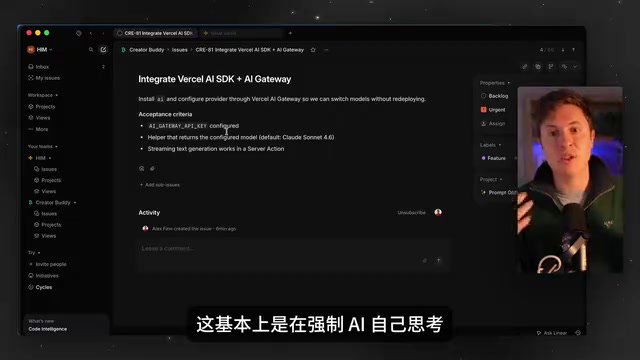
Acceptance Criteria (AC) originates from User Story practices in Agile development, first popularized by Extreme Programming (XP) methodology. It defines verifiable conditions for when a feature is "done" in "Given-When-Then" or simple list format, and is the key boundary distinguishing "feature complete" from "feature usable." In AI-assisted development, the role of AC is further amplified—it essentially provides the AI agent with an executable test specification. Without AC, AI tends to stop when it thinks things are "good enough"; with clear AC, AI can automatically verify against each criterion. The core value of this step is: it forces the AI to think systematically before writing code—what needs to be built, in what order, and what the completion criteria are for each task. This fundamentally solves the problems of "code drift" and producing low-quality code.
Autonomous Building: From Manual Direction to Automatic Execution
Task-Driven Automated Development Flow
Once project planning is complete, the development flow becomes extremely streamlined. You just need to say:
"Check the Linear board, tell me which tasks I should tackle first, then start building."
Claude Code automatically executes the following loop:
- Read pending tasks from the Linear board
- Select the next task by priority
- Move the task status from Backlog to In Progress
- Write code and self-test
- Mark the task as Done
- Automatically move to the next task

In the actual demonstration, Claude Code autonomously completed 18 tasks in one go—including a Toast notification system, deleting prompts, favorites/starring, copying prompts, sidebar folder tree, tag input, filtering by folder, and more. Without Linear as a second brain, AI typically stops after completing the first task and asks "What should I do next?"
What's even more noteworthy is that Claude Code automatically tests its own output during the build process—opening the app, clicking buttons, going through the entire user flow to ensure each feature meets the acceptance criteria defined in Linear.
Multi-Agent Collaboration: Claude Code + Codex Parallel Development
Another powerful aspect of this workflow is its support for multi-agent parallel development. You can have Claude Code and Codex open simultaneously, each checking the same Linear board and independently picking up different tasks.
From a system design perspective, this solution adopts the "Blackboard Architecture" approach—the Linear board serves as shared state storage, allowing multiple agents to implicitly coordinate by reading and writing to the same data source, completely avoiding the complexity of direct inter-agent communication. This architecture is called "Single Source of Truth" in distributed systems and is one of the core design principles of microservices architecture. The two agents don't need to communicate with each other—they both derive from Linear as the "single source of truth."
Related articles
 Tutorials
ChatGPT Plus Subscription Guide: Are GPT-5.5, image-2, and Codex Worth the Upgrade?
A detailed look at ChatGPT Plus features — GPT-5.5, image-2, and Codex — with a Plus vs Pro comparison and a complete step-by-step subscription guide for users outside the US.
 Tutorials
Harness AI Engineering in Practice: Using Claude Code to Master Enterprise-Level E-Commerce Development
Deep dive into Harness AI Engineering: master enterprise e-commerce development with Claude Code using the Rules, Skills, Wiki, and Changes framework.
 Tutorials
Cursor + Codex Dual-IDE Collaboration: A Practical Methodology for Open-Source Project Customization
A complete methodology for open-source project customization based on real-world experience, detailing the Cursor+Codex dual-IDE workflow, seven-stage process, MVP validation, and AI source code reading techniques.