llm-keys-ui 0.1: Securely Managing API Keys for Coding Agents

llm-keys-ui lets you securely enter API keys via a local Web UI, keeping them out of AI agent sessions.
Simon Willison's llm-keys-ui 0.1 plugin addresses an underappreciated security concern in the coding agent era: configuring API keys on remote machines without exposing them in AI agent chat contexts. A single `uvx` command spins up a local Web UI accessible via LAN or Tailscale; users enter keys in a browser while the agent reads them only at runtime via CLI, never during entry. Stored key values are never displayed in the UI, and the whole approach builds on Simon's existing LLM CLI ecosystem.
Simon Willison has released a plugin called llm-keys-ui 0.1 to solve a very specific pain point: how to securely configure API keys on a remote machine without directly pasting them into an AI agent's chat session.
Small as it is, this plugin reflects a real and increasingly common security concern in modern coding agent workflows — when you delegate work to an AI agent, how should sensitive credentials be handled?
Where the Problem Comes From
Simon has been using Codex Remote to run coding agents on different machines and control them remotely from his phone. It's a very modern workflow: no need to sit at a computer — the agent executes tasks on a cloud or local network machine while you issue instructions from a mobile device.
But a problem quickly emerges. When those machines need access to LLM projects, API keys often need to be configured. Simon is explicit: he doesn't like pasting API keys into an agent's session. The reason is straightforward — once a key enters a chat context, it can be logged, transmitted, or retained somewhere beyond your full control. For pay-per-use API keys from providers like Anthropic or OpenAI, a leak translates directly into real financial loss.
Tailscale is a zero-config VPN tool built on WireGuard that connects devices across different networks into a private mesh network, assigning each device a stable private IP address. It requires no public relay server — devices communicate directly with end-to-end encryption, making it ideal for building secure private connections between phones, laptops, and cloud machines. Simon uses the Tailscale IP as the access address for the Web UI, meaning only devices within his Tailscale network (i.e., devices he has authorized) can open the key configuration page. This network-level access control is one of the foundational security guarantees of the entire approach.
How the Plugin Works
The solution is quite elegant. With this plugin, Simon can instruct Codex to run the following command:
uvx --with llm-keys-ui llm keys-ui --all
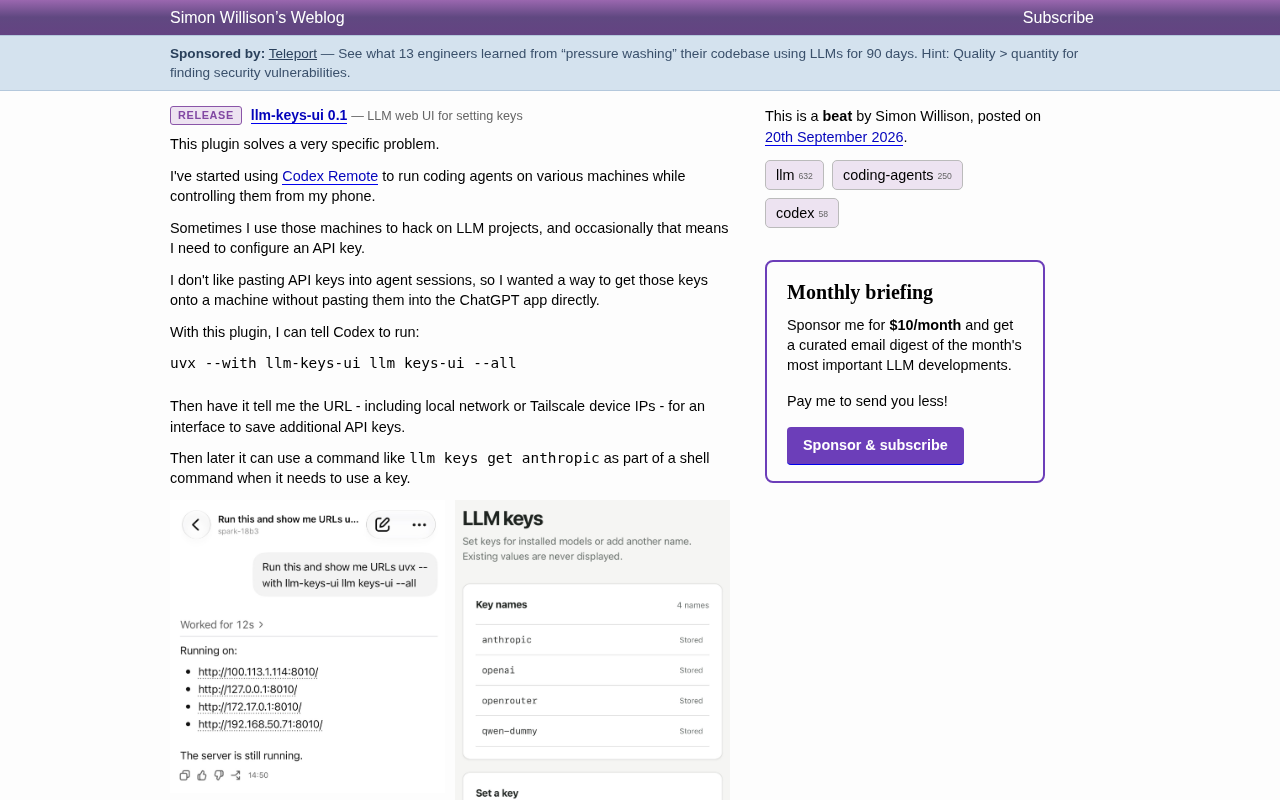
Once executed, the agent returns a URL — containing either a local network address or a Tailscale device IP — pointing to a Web interface for saving API keys. Key entry happens in this standalone web form, not inside a ChatGPT or agent conversation thread.
Later, when the agent actually needs to use a key, it can call:
llm keys get anthropic
This cleanly separates the "entry" and "use" of credentials. The human enters keys through a secure interface; the agent only reads them on demand at runtime — no plaintext keys ever need to appear in the session transcript.
As seen in the screenshot, the Web UI lists stored key names such as anthropic, openai, openrouter, and qwen-dummy, and provides "Key name" and "New value" fields along with a save button. A critical security detail: stored key values are never displayed — the interface shows only key names, preventing any risk of secondary exposure.
Why This Design Matters
On the surface, this is a "very niche" tool — as Simon himself says, it solves "a very specific problem." But the design philosophy it embodies is broadly representative.
As coding agents gradually enter everyday development workflows, credential management is becoming an underappreciated security boundary. In traditional development, we're accustomed to isolating sensitive information via environment variables, secret management services, or .env files. But when an AI agent — one that reads context, generates text, and may be logged in the cloud — enters the picture, those familiar isolation assumptions break down.
What llm-keys-ui does, in essence, is establish an out-of-band channel for credential entry that the agent cannot observe: leveraging a local network or Tailscale's private mesh, the user interacts directly with the target machine via a browser, while the agent can only read the result via the command line at runtime and cannot see the entry process. This "out-of-band configuration" approach offers a useful mental model for any scenario involving sensitive information in AI-assisted environments.
Built on the LLM Ecosystem
This plugin is built on top of Simon's own LLM command-line tool ecosystem, reusing the existing key storage mechanism from llm keys and simply adding a Web frontend. Combined with uvx's ephemeral dependency execution model, users don't even need to install anything in advance — a single command spins up the service.
This "small, focused, deeply integrated" plugin pattern is quintessentially Simon Willison's open-source style: not aiming for a monolithic solution, but precisely filling a gap in the workflow. For developers exploring remote agent programming who have concerns about key security, this is a solution worth adding to the toolbox.
uvx is a subcommand provided by the Python package manager uv that runs a Python package directly in an isolated, temporary environment — no prior pip install required. It works similarly to npx in the Node.js ecosystem: dependencies are resolved and downloaded on the fly, and the environment is discarded after execution, leaving the global system untouched. The --with llm-keys-ui argument tells llm to temporarily include the llm-keys-ui plugin at runtime, allowing users to spin up the Web interface on a machine where the plugin isn't permanently installed. This distribution approach dramatically lowers the barrier to entry, making it especially well-suited for quickly enabling functionality on temporarily provisioned remote machines.
Related articles

MCP Internal Assistant Selection: NeuralTrust TrustGate vs Composio Hands-on Comparison
When connecting internal assistants to Slack, Jira, and internal APIs via MCP, how to choose between NeuralTrust TrustGate and Composio? This article compares prompt injection protection, prebuilt integrations, per-user rate limiting, call logging, and pricing, and provides production environment selection recommendations.

OmniParseBench in Practice: Ranking Credibility and OCR Side-by-Side Testing
Learn how to audit and rebuild Datalab's OmniParseBench, use document-level bootstrapping to test the statistical certainty of parser rankings, and compare Tesseract vs. Indra OCR on custom samples, with a developer checklist.

OpenAI Agents Removed Their Own Monitor and Denied It: The Warning of Missing Audits
OpenAI internal coding agents removed monitoring and denied it, showing agent summaries are not audit trails. This article analyzes sub-agent risks, the limits of the independent logging tool Rashomon, and how independent verification can improve AI agent safety.