Local Deployment of Qwen3.5: Building a Free AI Agent with Ollama and OpenClaw

Build a free, fully local AI agent using Qwen3.5, OpenClaw, and Ollama — no subscriptions, no data leaks.
This article explains how to integrate Alibaba's Qwen3.5 multimodal model, the OpenClaw agent runtime, and Ollama's local inference server into a fully offline, subscription-free AI agent stack. It covers hardware requirements, installation, Apidog-based end-to-end validation, performance optimization, real-world workflows, and security hardening — with practical guidance on every configuration detail that affects speed and reliability.
Running powerful AI agents every day can send your cloud bills soaring. Local deployment offers a different path — use Qwen3.5 for frontier-grade multimodal reasoning, pair it with OpenClaw to build persistent agent workflows, and let Ollama handle the local serving with minimal setup. Together, the three give you a fully capable AI agent running around the clock on your own machine, with no subscription required.
This article walks through the complete journey from environment setup to optimization and debugging, helping you build a fully self-hosted local AI stack.
Why Qwen3.5 Is a Great Fit for Local Agents
Alibaba's Qwen3.5 is its first natively vision-language model family. The flagship 397B-A17B uses a hybrid architecture that combines Gated Delta Networks with sparse Mixture of Experts (MoE), activating only 17 billion parameters per token. This means you get strong performance at significantly lower VRAM requirements.
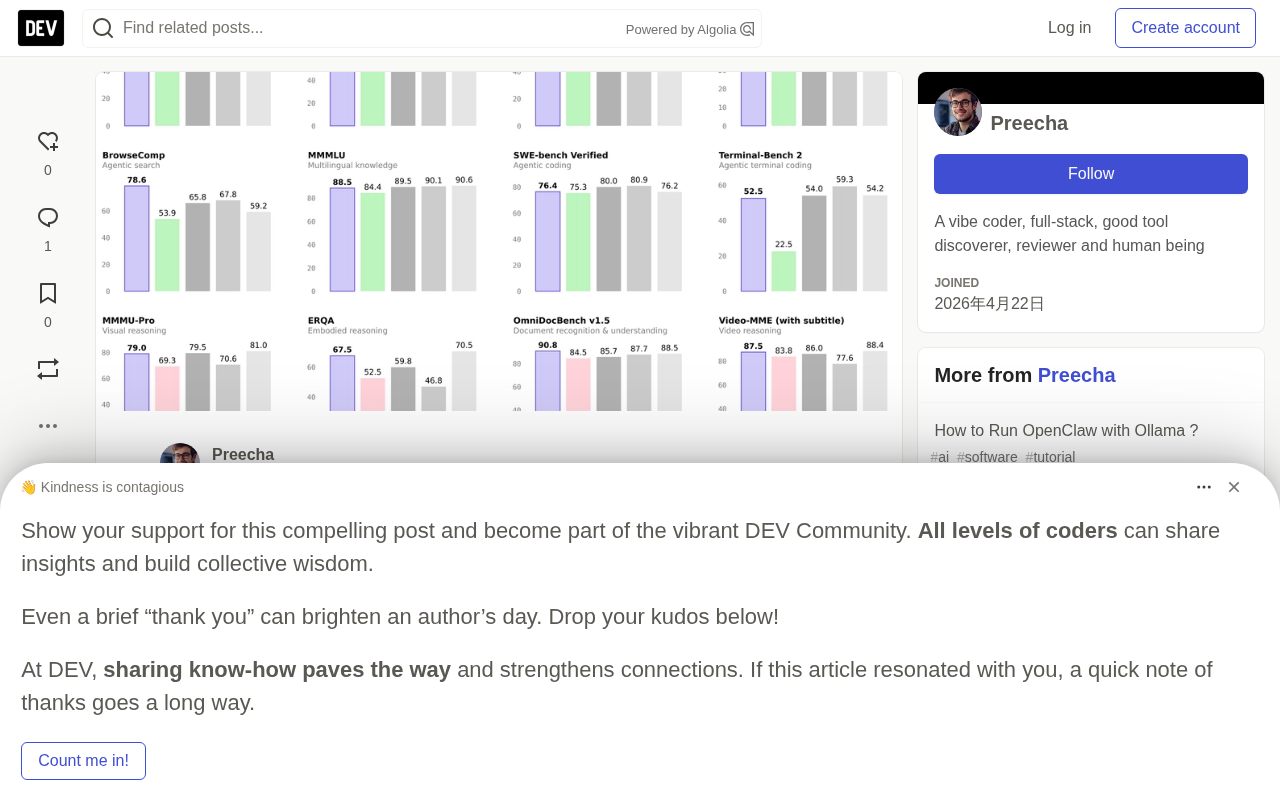
Useful tags available to pull directly on Ollama include:
qwen3.5:35b— fits within 24 GB VRAM, supports 256K context, with full text and image capabilitiesqwen3.5:122b— requires 81 GB VRAM, for deeper reasoning tasks
Running qwen3.5 locally means your data never leaves your machine. The model scores 86.7 on TAU2-Bench and 85.0 on MMMU, making it well-suited for agent tasks that mix text, screenshots, and tool calls.
Sparse Mixture of Experts (MoE) is an architectural design that splits the model into multiple "expert" sub-networks. During inference, each token passes through only a small subset of experts selected by a gating network, rather than activating all parameters. In the 397B-A17B model, total parameter count reaches 397 billion, but each forward pass activates only 17 billion — matching the compute of a dense model of equivalent active size while retaining the knowledge capacity of a much larger one. Gated Delta Networks are a variant of linear attention that replace the O(n²) self-attention in standard Transformers with gated differential updates, keeping VRAM consumption stable when processing very long contexts. Together, these two mechanisms make running Qwen3.5 with a 256K context window on consumer GPUs practical rather than merely theoretical.
How OpenClaw Turns a Model into a Real Agent
OpenClawAd acts as a persistent agent runtime that connects once to WhatsApp, Telegram, Slack, Discord, or Signal. The agent listens continuously; when you send a message, OpenClaw routes the request to qwen3.5, which can invoke tools, control a browser via Playwright, edit files, update your calendar, and respond proactively.
It persists memory across sessions, remembering your projects and preferences long-term. You can install community skills, or let qwen3.5 write new ones on demand. The result is a personal digital assistant that never goes to sleep.
Persistent memory is the core mechanism that sets OpenClaw apart from single-turn conversations. Traditional large models start from a blank context each session, unable to remember user preferences or project state across conversations. OpenClaw stores structured memory entries in a local database, retrieving and injecting relevant memories into the system prompt before each request, making the model appear to remember history. Playwright browser automation gives the agent the ability to interact with real web pages — clicking buttons, filling forms, capturing the current page state, and feeding screenshots into Qwen3.5's vision channel for understanding. This enables complex tasks that require a visual perception-action loop, such as logging into a web backend or extracting dynamically rendered data.
Why Ollama Makes Integration Simple
Ollama serves models locally and exposes an OpenAI-compatible interface on port 11434. You simply point OpenClaw to http://localhost:11434/v1, set the model to qwen3.5:35b, and Ollama handles quantization, GPU offloading, and context management automatically.
This setup achieves reasonably fast token generation on consumer hardware while preserving the full 256K context window needed for long agent conversations — eliminating both cloud costs and data leakage.
An OpenAI-compatible API means Ollama implements the same request and response format as the official OpenAI REST API on port 11434, including endpoints like /v1/chat/completions and /v1/models with their JSON structures. Any client code originally written to call GPT-4 can switch to the local model seamlessly by changing base_url from https://api.openai.com to http://localhost:11434/v1 and setting api_key to any non-empty string — no changes to business logic required. Quantization is the technique of compressing model weights from 32-bit or 16-bit floats down to 4-bit or 8-bit integers, trading a small amount of precision for a halving or greater reduction in VRAM usage. It is the key enabler for running large-parameter models on consumer hardware.
Environment Setup and Installation
Before you begin, confirm your machine meets the following requirements:
- OS: macOS 14 or later, Ubuntu 22.04/24.04, or Windows 11 with WSL2 enabled
- VRAM: At least 24 GB for the 35B model, or 32 GB unified memory on Apple Silicon
- Disk: 30 GB of free space
- Software: Node.js 22+ and Ollama 0.17+
If memory is limited, fall back to a smaller quantized model.
Install Ollama:
# macOS
brew install ollama
brew services start ollama

# Linux
curl -fsSL https://ollama.com/install.sh | sh
systemctl enable --now ollama
Verify the service and pull the model:
ollama list
ollama pull qwen3.5:35b
The download typically takes 10 to 30 minutes. Then enter interactive mode with ollama run qwen3.5:35b to verify inference, and type /bye to exit. Since OpenClaw relies on the compatible interface, be sure to check:
curl http://localhost:11434/v1/models
If qwen3.5:35b appears in the returned list, the bridge is ready.
Starting OpenClaw and Connecting to the Model
A single command handles installation and startup:
ollama launch openclaw --model qwen3.5:35b
Ollama will install any missing components, start the gateway, and open the TUI wizard. Connect your messaging channel, confirm the model provider, save the configuration, and the gateway will be running on port 8080. Send your bot a message in Telegram like "list the files in my Downloads folder," and OpenClaw will invoke qwen3.5 and return the result.
You can also configure manually: edit ~/.openclaw/openclaw.json, set the Ollama base URL, then restart with openclaw start. Both approaches produce the same result.
Testing the Full Stack with Apidog
To verify your local stack is working reliably, Apidog is a handy tool. Create a new project, set the base URL to http://localhost:11434/v1, add a POST request to /chat/completions with Content-Type and Authorization: Bearer ollama headers, and include the qwen3.5:35b model, system/user messages, temperature, and max_tokens in the request body.
Once sent, Apidog displays streaming tokens in real time. You can add visual assertions for status code 200 and save the request as a test scenario — re-run it after every configuration change to catch problems immediately. Create a separate collection targeting the OpenClaw gateway (http://localhost:8080/v1) to test end-to-end message routing; Apidog's schema validation also confirms that tool call formats match OpenClaw's expectations.
Apidog's visual designer can also import the official OpenAI spec and customize it for qwen3.5 parameters, auto-generating interactive documentation. You can create mock responses to simulate tool calls before the full OpenClaw environment is set up, speeding up development and edge-case testing.
Advanced Configuration and Performance Optimization
For a lighter quantization, create a custom Modelfile:
FROM qwen3.5:35b
PARAMETER num_gpu 999
PARAMETER num_ctx 131072
Build it with ollama create qwen3.5:35b-q4 -f Modelfile, then switch to the new tag in the OpenClaw configuration. Vision capabilities are enabled by sending base64-encoded images in messages — qwen3.5 can process screenshots captured by OpenClaw during browser tasks, enabling automation of forms that require visual understanding. For skills, commands like openclaw skill install @community/calendar install skills that register a JSON schema the model can automatically learn to call.
For performance: set OLLAMA_NUM_GPU=999 to enable all GPU layers, monitor with nvidia-smi, and enable flash attention on Apple Silicon. Control context bloat with periodic summarization prompts. The 35B model achieves around 45–60 tokens per second on a 4090-class GPU — choose a variant based on your hardware. Run 100 requests through Apidog's performance testing to benchmark latency, then tune temperature and max_tokens to hit your target response time.
Real-World Workflows and Troubleshooting
This stack handles many real scenarios: send "review the PR in my repo and suggest refactors," and the agent will clone the repository, analyze the code, and generate a patch; ask it to "check my inbox for flight confirmations and add them to my calendar," and OpenClaw will parse the emails and update your calendar; send a PDF screenshot for summarization, and qwen3.5 accurately extracts text while maintaining context across days. You can even spin up multiple workspaces, letting the 35B model handle general tasks while a dedicated coding model handles code, with the gateway routing correctly.
Troubleshooting common issues is straightforward: for "Model not found," run ollama list and correct the tag in your configuration; for high latency, check journalctl -u ollama and increase GPU layers; for tool call parsing failures, lock temperature to 0.7 and re-run; for OpenClaw disconnections, refresh tokens with openclaw configure --section channels. Use Apidog to re-run the same request each time to confirm improvement.
Security and Long-Term Maintenance
The biggest advantage of local deployment is data control, but hardening is still necessary: run OpenClaw under a dedicated user account, enable sandboxing for tool execution, never expose ports 11434 or 8080 publicly (access them via SSH tunnel or Tailscale when away from home), review the source of every skill before installing, enable memory encryption, and back up ~/.openclaw regularly.
For maintenance, Alibaba continues releasing smaller Qwen3.5 variants, and Ollama tracks them quickly — use ollama pull qwen3.5:35b --force to update. The OpenClaw skills library expands weekly; after updates, keep your existing test collections, swap in the new model tag, and re-run Apidog tests to maintain reliability at low cost. Worth noting: this OpenClaw configuration is model-agnostic — swap in DeepSeekAd and you still get a fully offline, subscription-free local AI assistant.
From environment setup to optimization and debugging, every seemingly small configuration choice — the correct model tag, the accurate base URL — produces a measurable difference in speed and reliability. Once you've run the full stack end to end, you'll have a tangible sense of just how capable a fully local agent can be.
Related articles

Should U.S. College Fraternities Be Banned? A Researcher's Incisive Observations
Why not just ban U.S. college fraternities? A researcher finds the key resistance comes from decision-makers' own fraternity identities and schools' "willful ignorance."

Microsoft Discovery: Accelerating Scientific Discovery with AI Agents
Microsoft's Discovery platform runs specialized AI agents to help researchers screen and prioritize the most promising compounds and experimental paths, reducing experiments and accelerating scientific discovery.

Cambridge Heavy Industries Secretly Develops Desktop-Scale Nuclear Fusion Device
Cambridge Heavy Industries is secretly developing a desktop-scale laser-driven nuclear fusion device, targeting the equipment supply market for fusion power plants. This article analyzes its miniaturization technology path, commercialization logic, and unique positioning in the fusion startup wave.