Lost Code from Parallel AI Development? CLAUDE.md + Git Worktree Is the Permanent Fix

Prevent code loss in parallel AI coding with CLAUDE.md rules that auto-isolate workspaces and enforce delivery.
When running multiple Claude sessions in parallel, code changes easily get overwritten or forgotten. After personally losing a bug fix, the author proposes writing iron-clad rules in CLAUDE.md: each session automatically creates an independent Git Worktree workspace, and upon task completion must choose between merge, PR, or shelve. This automated mechanism replaces human memory, fundamentally solving the code management chaos of multi-AI collaboration.
Four Claudes Working Simultaneously, But Code Quietly Disappearing
Running three or four Claude sessions in parallel to handle different tasks looks like having your own AI development team. But behind this efficiency lurks a fatal trap that's incredibly easy to overlook.
The author shared a real-world horror story: the other night, they stayed up late fixing a bug where subtitles jittered along with audio in their app. After hours of work, it was finally fixed—running perfectly on both iPhone and Android. Mission accomplished, close the windows, go to sleep.
The next morning, they rebuilt from the main codebase to iPhone, and the jitter was back.
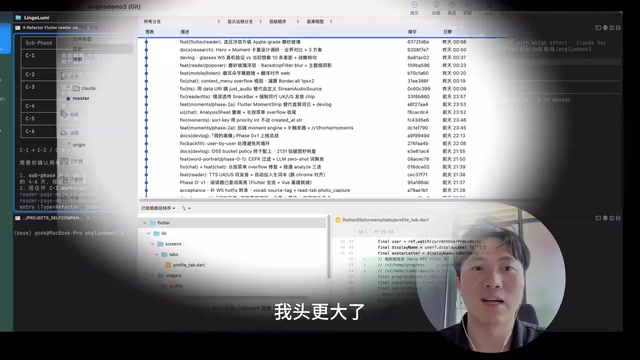
Opening SourceTree to check commit history revealed nothing related. Eventually, they had Claude investigate and discovered the truth—last night's fix was never merged back into the main codebase. It had been sitting in the dedicated working directory of one of the four Claude sessions running simultaneously, never committed. Building directly from that directory to the phone for testing naturally worked fine, but building from the main codebase today meant the fix simply didn't exist.
The Core Problem with Parallel AI: Workspace Conflicts
This is the biggest trap in parallel AI development. You think you're the boss of four Claudes, all working efficiently for you. In reality, they're fighting each other in the same folder:
- Code written by A gets overwritten by B
- A bug fixed by C never gets pushed
- Trying to trace changes after the fact is nearly impossible
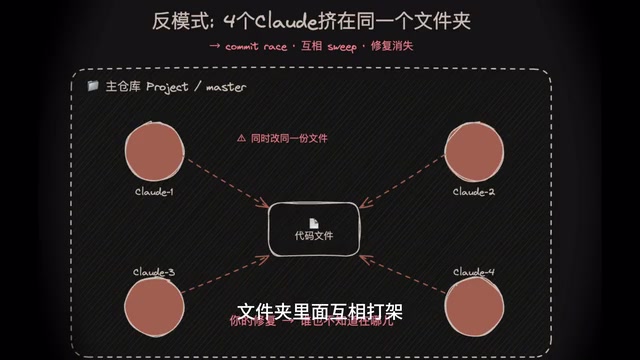
Even worse is the human attention problem. The second you finish one thing, your attention has already been pulled away by the next idea. Claude shows you the fixed state in its own little directory, but we too easily mistake that for the entire project being fixed.
"Just merge immediately after finishing each task, right?"—everyone knows this in theory, but people genuinely forget things too easily. The author admits that after six months of Vibe Coding, they never truly got workspace isolation right, always thinking they could just open a Claude session, let it work, and review afterward. It wasn't until parallel sessions kept multiplying—four, five, six, or more—that they realized managing this at scale through memory alone is completely impossible.
What is Vibe Coding? "Vibe Coding" was coined by OpenAI co-founder Andrej Karpathy in early 2025, describing a programming paradigm that heavily relies on AI-generated code, where developers primarily act as "requirement proposers and acceptors." This approach dramatically lowers the barrier to programming but introduces new engineering management challenges: when code generation speed far exceeds human review speed, the traditional linear flow of "write code → review → commit" begins to break down. Parallel AI sessions push this contradiction to the extreme—concurrent code changes can exceed a single person's cognitive management capacity. This is precisely why scaling Vibe Coding requires automated engineering discipline mechanisms rather than relying solely on developers' attention and memory.
The Solution: Writing Iron-Clad Rules in CLAUDE.md
The author realized that what's needed isn't more self-discipline, but an automated mechanism—letting AI automatically isolate its own working environment without requiring any human attention.
CLAUDE.md and AI Context Engineering CLAUDE.md is a project-level instruction file designed by Anthropic for Claude Code. When placed in the project root directory, Claude automatically reads the rules and conventions within it every time a session starts. This embodies the core philosophy of "Context Engineering": rather than repeatedly reminding AI to follow standards in every conversation, bake rules into the AI's "work manual" so constraints become automatically executed default behaviors. Similar mechanisms exist in other AI programming tools, such as Cursor's
.cursorrulesand Copilot'scopilot-instructions.md. These files are essentially the "constitution" governing collaboration between human engineers and AI, defining AI's behavioral boundaries and workflows within a project.
The specific approach is to add an iron-clad rule to CLAUDE.md, with core logic in two steps:
Step 1: Automatically Detect and Isolate the Workspace
Every time Claude starts a new session, the first thing it does is check which folder it's in. If it finds itself in the main code directory (main branch), it must:
- Automatically create an independent Git Worktree workspace
- Move itself to an isolated branch to work
- Never modify code directly on the main branch
What is Git Worktree? Git Worktree is a feature introduced in Git 2.5 that allows developers to check out multiple working directories from the same Git repository simultaneously. In traditional workflows, one repository corresponds to one working directory, and switching branches requires stashing or committing current changes first. Worktree breaks this limitation: you can have feature-A branch running in
/project-worktree-Aand feature-B branch running in/project-worktree-B, both sharing the same.gitdatabase while being completely physically isolated and non-interfering. This is the natural solution for parallel AI development scenarios—each Claude session owns its own Worktree, like each engineer having their own workstation, with code modifications never stepping on each other.
Step 2: Must Report Back When Done—No Sneaking Away
After completing a task, Claude is not allowed to simply end the session. It must present a three-option menu:
- Merge immediately — merge directly into the main branch
- Go through Pull Request flow — submit a PR and wait for review
- Shelve temporarily — set aside for now, let the developer decide
The Engineering Significance of Pull Request Workflow Pull Request (PR) originated from open-source collaboration culture and was standardized by GitHub in 2008 as a core workflow in modern software engineering. The essence of a PR isn't just a "code merge request"—it's a mandatory code review checkpoint: it requires code changes to receive explicit human confirmation before entering the main branch, structurally preventing "changes quietly disappearing" or "unreviewed code sneaking into the trunk." In parallel AI development scenarios, forcing AI to go through PR workflow after task completion effectively transplants decades of collaboration discipline accumulated by the open-source community into human-AI collaboration—using mature engineering systems to compensate for the natural limitations of human attention.

Once this rule is written into CLAUDE.md and agents.md, AI will consciously follow it throughout. The key point: developers' usage habits don't need to change at all. Opening a new session still means going directly into the project directory and tossing out requirements in a single sentence, exactly like before. But the pitfall of "a fix hiding in some directory that never made it home" will never happen again.
The Management Philosophy of Multi-AI Collaboration
This case reveals an important cognitive shift: when AI tools evolve from "single-threaded assistant" to "multi-threaded team," management methods must upgrade accordingly.
With traditional single AI sessions, relying on human memory and after-the-fact review can barely cope. But when you're running four or five parallel sessions simultaneously, you're essentially managing a small development team. And managing teams doesn't rely on personal discipline—it relies on processes and systems.
The core approach of this solution is worth adopting for every AI programming practitioner:
- Write rules into CLAUDE.md — let AI execute the process itself rather than relying on humans to remember
- Use Git Worktree for physical isolation — each AI session operates in its own independent workspace and branch
- Enforce the delivery step — completed tasks must go through the merge process, eliminating code that "wanders off"
Combined with the author's previous tip about "AI must write Devlogs when coding," a complete multi-AI collaboration management framework is taking shape: Devlogs solve traceability, Worktree solves isolation, CLAUDE.md solves automated execution.
Final Thoughts
Many people using AI programming tools focus on how to make AI write better code while overlooking engineering management issues. When you go from one Claude to four Claudes running in parallel, the biggest risk isn't code quality—it's the chaos of code management.
Rather than spending enormous time after the fact investigating "where did the code go," it's far better to invest a little time upfront establishing mechanisms that prevent code from ever getting lost in the first place.
Related articles
 Tutorials
ChatGPT Plus Subscription Guide: Are GPT-5.5, image-2, and Codex Worth the Upgrade?
A detailed look at ChatGPT Plus features — GPT-5.5, image-2, and Codex — with a Plus vs Pro comparison and a complete step-by-step subscription guide for users outside the US.
 Tutorials
Harness AI Engineering in Practice: Using Claude Code to Master Enterprise-Level E-Commerce Development
Deep dive into Harness AI Engineering: master enterprise e-commerce development with Claude Code using the Rules, Skills, Wiki, and Changes framework.
 Tutorials
Cursor + Codex Dual-IDE Collaboration: A Practical Methodology for Open-Source Project Customization
A complete methodology for open-source project customization based on real-world experience, detailing the Cursor+Codex dual-IDE workflow, seven-stage process, MVP validation, and AI source code reading techniques.