M5 Ultra Mac Studio In-Depth Review: Does Apple's 4.3x AI Performance Claim Hold Up?

M5 Ultra Mac Studio tested: multi-core beats Apple's claim at 1.72x, but AI gains depend heavily on your workload.
A 15-benchmark deep dive into the $12,299 M5 Ultra Mac Studio finds multi-core CPU performance at 1.72x over M3 Ultra — far exceeding Apple's 1.3x claim — thanks to replacing weak efficiency cores with powerful super cores. Apple's 4.3x AI figure holds up only for prompt processing (tested at 4.1x); token generation speed improves just 1.45x due to memory bandwidth limits. Blender rendering reaches 8x faster than M1 Ultra. Verdict: compelling for M1/M2 Ultra users or heavy AI workloads; M5 Max is the smarter entry point for newcomers.
When you have a maxed-out Mac Studio (M5 Ultra, 256GB unified memory, $12,299) sitting in front of you, only one question really matters: do Apple's seemingly outrageous performance claims actually hold up?
Apple made three core promises for the M5 Ultra — 1.3x multi-core performance over M3 Ultra, up to 1.8x graphics, and a whopping 4.3x AI performance. This review puts those numbers through 15 benchmarks and real-world comparisons across multiple machines (M1, M2, M3 Ultra, M5 Max MacBook Pro, and an RTX 5080-equipped PC) to find out.
Four-Die Architecture: The Engineering Story Behind M5 Ultra
On paper, the M5 Ultra looks fairly similar to the M3 Ultra — same GPU core count, same 512GB memory ceiling. But the underlying architecture is completely different.
Previous Ultra chips fused two Max dies together via UltraFusion, making macOS treat them as a single chip. The M5 Ultra is a four-die design — M5 Max is itself a dual-die chip, so fusing two M5 Max dies together yields four dies in total. Apple calls it the first four-die M-series chip.
Four dies means four memory pools that have to pretend to be one cohesive unit. The inter-die bandwidth in UltraFusion jumps from roughly 2.5TB/s on M3 Ultra to 4.4TB/s — a 6x increase in interconnect density. Memory bandwidth also rises from 819GB/s to 1.2TB/s, a 50% jump.
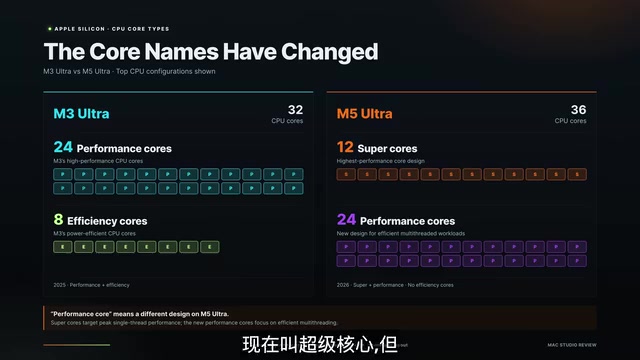
The core configuration changes are equally interesting. M3 Ultra had 32 cores (24 performance + 8 efficiency), while M5 Ultra bumps to 36 cores — 12 of which are now branded "super cores," with 24 performance cores rounding out the rest. Apple has dropped the "efficiency core" label entirely, and the count has tripled. Total core count only grew 12.5%, but the small cores have been substantially upgraded. Additionally, each GPU core now has a neural accelerator built in — a first for Ultra-class chips.
Visually, the two generations are nearly indistinguishable — same 3.7-inch height, same 7.7×7.7-inch footprint. The real updates are Wi-Fi 6E → 7, Bluetooth 5.3 → 6, and SSD upgraded to Gen 6. That seamless continuity is the whole point: if you have a full rack of gear, every stand, dock, and cable carries right over.
UltraFusion is Apple's proprietary chip interconnect technology that physically packages two separate dies using a silicon interposer, making the OS and applications see them as a single chip. The key engineering challenge is cache coherency: four separate memory pools must stay in sync in real time so any processing core always sees the latest data — otherwise you get data races and computation errors. The jump from 2.5TB/s to 4.4TB/s inter-die bandwidth is precisely aimed at reducing the latency bottleneck from cross-die communication. Compared to Intel's MCM (Multi-Chip Module) or AMD's Chiplet approach, UltraFusion offers higher interconnect density and lower latency — but at a steep packaging cost, which is one of the main reasons Ultra pricing sits so far above Max.
CPU and Creative Apps: Multi-Core Hits 1.72x
In Cinebench R26 single-core, M3 Ultra scores 577 and M5 Ultra hits 752 — exactly 1.3x, actually slightly beating Apple's claimed 1.25x.
Multi-core is even more striking: M3 Ultra scores 10,425 while M5 Ultra reaches 17,943 — 1.72x — far exceeding Apple's claimed 1.3x and the highest multi-core score the reviewer has ever recorded. Going from 32 to 36 cores is only a 12.5% increase, which couldn't possibly explain a 72% performance jump. The real secret is that 8 weak efficiency cores were replaced with 12 genuinely powerful performance-class cores. Apple didn't just add cores — they swapped weak cores for strong ones.
In creative applications, Premiere Pro's Puget Bench score goes from 180,370 to 234,912 — exactly 1.3x, matching Apple's claim. Photoshop goes from 14,815 to 18,360, or 1.24x. DaVinci Resolve render time drops from 5:36 to 4:54, a 14% improvement, and the stuttering that previously occurred when scrubbing HEIC photo timelines is completely gone.
One interesting outlier: Firefox compile tests clocked M5 Ultra at 6 minutes versus M3 Ultra's 5 minutes. The reviewer chalked this up to noise — the margin across six machines was too small to be meaningful, since compilation depends more on disk speed, single-thread performance, and build parallelism than raw core count.
Gaming and Rendering: Blender Up to 8x Faster
Gaming performance was a pleasant surprise. In 3DMark Steel Nomad, M5 Ultra scores 8,073 — 1.46x faster than M3 Ultra and 2.5x faster than M1 Ultra.
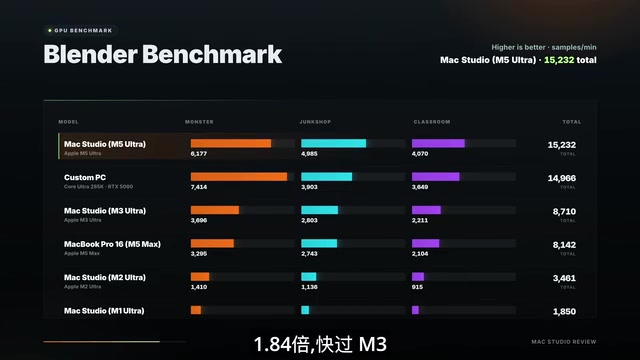
Blender results were off the charts. Across the Monster, Junk Shop, and Classroom scenes, M5 Ultra was 1.67x, 1.78x, and 1.84x faster than M3 Ultra respectively — and versus M1 Ultra, the gap reaches a staggering 8x. For anyone whose livelihood depends on rendering, this is a generational leap.
In actual games, Cyberpunk 2077 runs at 74fps on M1 Ultra, 108fps on M3 Ultra, and 166fps on M5 Ultra — 1.54x and 2.2x improvements respectively (Metal FX upscaling enabled, High quality, frame generation off). Red Dead Redemption runs at a steady ~60fps at 2560×1440 with frame generation off. The reviewer specifically emphasized turning frame generation off — a lot of frame rate numbers floating around online have it enabled, which skews the comparison.
That said, the reviewer was blunt: almost nobody is spending $12,000 on this machine just to play games.
AI Inference: How Did Apple Calculate That 4.3x?
AI performance is this machine's headline selling point — and the number most worth unpacking. Apple claims 4.3x AI performance, which is a massive figure. The reviewer tested it three ways.

Test 1: Time to first token on a 70B parameter model. Time to first token is the pause between pressing Enter and the screen starting to output — this corresponds to prompt processing. M3 Ultra took 31.6 seconds; M5 Ultra took just 7.7 seconds — a 4.1x improvement, essentially matching Apple's 4.3x claim. The PC in the comparison took 30 seconds on the 70B model — slower than the three-year-old M3 Ultra — not because the GPU is weak, but because the model doesn't fit in 16GB of VRAM and has to crawl through the PCIe bus into system memory. This is the core advantage of unified memory architecture: it's not that Apple computes faster, it's that at this model scale, even high-end discrete GPUs simply can't compete on capacity.
Test 2: Token generation speed on a small 8B parameter model. M3 Ultra generates 129 tokens/sec; M5 Ultra hits 188 tokens/sec — only 1.45x faster. Nowhere near 4.3x.
These two tests are measuring completely different things, and understanding which one applies to your workflow determines whether this machine is worth buying. When a model processes a prompt, it handles hundreds or thousands of tokens simultaneously — exactly the workload the new neural accelerators inside each GPU core excel at, which is why you see 4x gains there. When generating a response, the model outputs one token at a time, and every single token requires reading the entire model (say, 40GB) out of memory. The compute demand is minimal; the GPU spends most of its time waiting for weights to arrive. So generation speed isn't about raw compute — it's about memory bandwidth. Bandwidth went up 50%, generation speed went up 45%. That math checks out perfectly.

The conclusion is clear: if you're feeding massive prompts into local models — entire documents, full codebases, RAG pipelines, long-context workflows — the drop from 31 seconds to 7.7 seconds is transformative, and this machine is extraordinary. But if you're just casually chatting with a small model, it's faster but not fast enough to justify upgrading from an M2 or M3 Ultra.
For image generation, SDXL in Draw Things drops from 21.6 seconds to 9.45 seconds — 2.29x faster.
"Unified Memory Architecture" (UMA) is the key to understanding Apple's AI advantage. In a traditional PC, CPU memory and GPU VRAM are physically separate, and data must travel between them over a PCIe bus — typically with 32–64GB/s of bandwidth, far less than a GPU's internal VRAM bandwidth (the RTX 5080's VRAM bandwidth is roughly 960GB/s). Apple's unified memory is a single physical pool shared by the CPU, GPU, and Neural Engine — no cross-bus copies needed. For large language model inference, model weights (a 70B model needs roughly 40GB) are loaded once and accessible directly by both CPU and GPU. When a model exceeds a discrete GPU's VRAM capacity, the PC platform has to spill weights into system memory and repeatedly shuttle them over the PCIe bus — throughput plummets. That's the fundamental reason an RTX 5080 ends up slower than an M3 Ultra on 70B models.
SSD and Browser: Gen 6 Nearly Doubles Read/Write Speeds
SSD is another major upgrade this generation. M3 Ultra reads around 7,100 MB/s and writes around 8,000 MB/s. M5 Ultra reads at 14,800 MB/s and writes close to 19,000 MB/s — nearly double, thanks entirely to PCIe Gen 6. For users pulling 8K footage from internal storage all day, this is genuinely useful.
In the least exciting test of the bunch, Speedometer scores show M2 Ultra at 37.4 and M3 Ultra at 40 — nearly identical. M5 Ultra jumps to 57, with M5 Max trailing by only about 4%. This suggests the gains are primarily a function of the M5 generation itself rather than the Ultra configuration specifically.
PCIe (Peripheral Component Interconnect Express) is the high-speed serial bus standard connecting SSDs, GPUs, and other devices to the processor, with each generation doubling bandwidth: Gen 4 is roughly 7GB/s (single lane), Gen 5 around 14GB/s, and Gen 6 reaches a theoretical peak of about 32GB/s per lane (x4 slots = ~128GB/s). The Mac Studio's SSD jump from 7,100 MB/s to 14,800 MB/s almost precisely mirrors the 2x bandwidth increase from Gen 4 to Gen 6 (Gen 5 was effectively skipped). For video production workflows, a single 8K RAW stream requires roughly 3–6GB/s of read throughput — at 14.8GB/s, you can stream multiple high-bitrate tracks simultaneously without stuttering, which makes a real difference for proxy-free editing workflows.
Who Should Buy This?
The answer depends entirely on your use case. If you're doing conventional content creation and video editing, upgrading from M3 Ultra doesn't make sense. But if you're coming from M1 or M2 Ultra and are heavily invested in AI inference or GPU-intensive workloads, this is a massive leap.
The reviewer also flagged something they didn't dig into on camera: this machine's power consumption is remarkably low — nothing like a large desktop PC — yet it's quiet, powerful, and efficient. That's always been what makes this product category genuinely impressive.
For anyone new to the Mac Studio world, the reviewer's recommendation leans toward M5 Max — it also includes the neural accelerators, and for most users its GPU core count is more than sufficient. It's the smarter buy.
Related articles

A Single Prompt Triggers a Global PHP Security Storm: Is AI a Savior or a Hidden Risk?
A single AI prompt triggered a global PHP security crisis affecting Wikipedia and the Internet Archive. This article reviews the incident, analyzes the OpenAI-Amazon controversy, and explores the security paradox of lowered vulnerability discovery barriers in the AI era and developer response strategies.

When AI Is Taken Away: How Reliance on Shortcuts Undermines Your Problem-Solving Resilience
A study of 1,222 people found that after using AI to answer questions, once AI was removed, people gave up on more problems than a control group that never used AI. The article analyzes the impact of AI reliance on learning resilience and metacognition, and explores design implications for AI learning tools.

Carta and NewView Partner to Let Startup Employees Cash Out Equity Early
Carta and NewView Capital partner to simplify startup tender offers, helping employees sell equity early. Analysis of the mechanism, liquidity pain points, and impact.