M5 Ultra Mac Studio vs. RTX 5090: Who's the Real Performance King?
M5 Ultra dominates CPU and large-model AI inference; RTX 5090 wins in GPU-native tasks and gaming.
A hands-on comparison of the M5 Ultra Mac Studio against a Ryzen 9 9950X3D + RTX 5090 PC reveals sharp performance splits by workload. The M5 Ultra nearly doubles the 9950X3D in multi-core CPU performance while drawing 25% less power. In local AI inference, the 5090 leads on smaller models, but the M5 Ultra is 20x faster on 70B-parameter models that overflow the 5090's 32GB VRAM — thanks to unified memory architecture. Adobe Premiere Pro export times favor the Mac Studio by 2x, while gaming remains firmly in PC territory. At under $7,000 for a complete system versus a $9,000+ GPU alone, the Mac Studio's unified memory advantage for local AI development is something conventional PC architecture currently cannot replicate.
After Apple unveiled the M5 Ultra Mac Studio, one question immediately surfaced: can this machine — billed as the "most powerful Mac ever" — actually hold its own against a top-tier PC in professional workloads? A tech YouTuber put together a flagship PC armed with a Ryzen 9 9950X3D, 96GB of RAM, and an RTX 5090 to find out, running head-to-head tests across CPU, GPU, local AI inference, video editing, and gaming. The results are far more nuanced than either "PC wins everything" or "Apple reigns supreme."
The Price Reality: A Complete System vs. a Single GPU
Let's start with a hard truth. The high-end M5 Ultra Mac Studio (36-core CPU, 80-core GPU, 96GB unified memory) costs under $7,000 — and it's a complete, ready-to-use computer. Meanwhile, the RTX 5090, driven by a recent demand spike, has jumped from $5,000 to nearly $9,000. And that's just one component.
The reviewer did the math: building a comparable PC also requires a CPU, RAM (currently overpriced as well), cooling, storage, a case, a power supply, and an operating system — easily pushing the total to $10,000–$12,000. The 256GB unified memory configuration of the Mac Studio used in this review also carries a steep $4,000 upgrade premium. Neither side is cheap — they're just expensive in different ways.
The reviewer also made a pointed observation: the RTX 5090's high price tag was never really aimed at gamers. Its true value lies in its 32GB of high-bandwidth GDDR7 memory, which is in intense demand for training large language models, powering agentic AI that constantly shuffles data, and GPU-accelerated production workflows.
CPU Battle: M5 Ultra Redefines the Benchmark
In single-core performance, the M5 Ultra is roughly on par with the PC — maybe slightly ahead — continuing the M series tradition of snappy project launches and instant responsiveness. The real gap opens up in multi-core. The 9950X3D's 32-thread architecture simply can't keep pace with the M5 Ultra's 36 cores, which scored nearly double in multi-core tests and maintained that lead in Cinebench 2026.
What's equally impressive is efficiency. These scores were measured after 10 minutes of sustained load — not a momentary burst — and performance remained stable throughout, with solid thermals and low noise. On power draw, the M5 Ultra pulls around 150W under full load versus the 9950X3D's ~200W. Double the performance at 25% less power is an extraordinarily difficult combination to achieve.
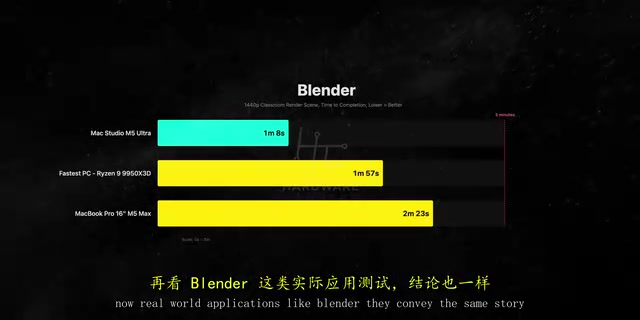
In real-world apps, the M5 Ultra beat the 9950X3D by over 70% in Blender, more than doubled the M5 Max MacBook Pro, led by roughly 60% in Houdini, and stayed ahead in HandBrake CPU encoding. The reviewer flatly called it the fastest CPU they've ever tested.
A note on 3D V-Cache: This is the key differentiator between the Ryzen 9 9950X3D and the standard 9950X. AMD stacks extra SRAM vertically on top of the compute die, expanding L3 cache from 32MB to 128MB. This works brilliantly in gaming, where working datasets can fit entirely in cache and reduce latency from accessing main memory. But in sustained multi-core rendering workloads like Cinebench or Blender, 3D V-Cache's advantage fades — those datasets far exceed 128MB, cache hit rate improvements are minimal, and the bottleneck shifts to core count and memory bandwidth. That's why the 9950X3D, despite its cache advantage in games, still gets blown out by the M5 Ultra's 36 cores in pure compute tasks.
GPU and AI Inference: Software Stack and Memory Capacity Decide the Winner
The GPU comparison gets interesting. In Blender, the Mac Studio was about 40% faster than the 5090 — but that's comparing against Nvidia's CUDA path. Blender supports Apple Silicon natively via Metal but doesn't officially support Nvidia's OptiX ray tracing engine. Switch to OptiX on the PC and the 5090 immediately takes the lead. They're running on fundamentally different software stacks, and that distinction matters enormously.
Local AI inference is where things get really fascinating. The reviewer tested six models ranging from 12B to 70B parameters in LM Studio. One methodology note: some models on the Mac side used Apple's MLX framework, giving them a native backend advantage — this isn't a pure GGUF-vs-GGUF comparison.

A clear pattern emerges. For smaller models that fit within the 5090's 32GB of VRAM, the 5090 leads on raw throughput and massive bandwidth: Gemma 4 12B by ~45%, GPT-OSS 20B by over 75%. On Qwen 3 27B, the lead drops from 47% at Q4 to 23% at Q8 — higher-quality quantization actually narrows the gap, because Q8 is more memory-bandwidth-bound, which is where Mac's unified architecture starts to close in.
The real dividing line is the 70B DeepSeekAd R1 distilled model. It can't fit in the 5090's 32GB of VRAM, so it spills into system memory and data has to shuttle back and forth across the PCIe bus. The result: the M5 Ultra is more than 20x faster than the 5090. Even the M5 Max MacBook Pro beats the 5090 here. This is unified memory architecture in action: CPU and GPU share the same memory pool, with no spillover and no PCIe bottleneck. Even a base 96GB M5 Ultra handles 70B models without breaking a sweat.
The power draw makes it even more striking: the 5090 pulls about 275W under this load, the M5 Ultra about 300W — nearly identical power consumption, yet 20x the speed. The efficiency gap speaks for itself.
Understanding Unified Memory Architecture: This is the key to understanding why Apple Silicon crushes discrete GPUs in AI inference. In a traditional PC, CPU memory (DDR5) and GPU memory (GDDR7) are physically separate pools. Transferring data between them requires crossing the PCIe bus — PCIe 5.0 x16 offers ~64 GB/s theoretical bandwidth, but real-world throughput is lower and latency is significant. When a model's weights can't all fit in VRAM, the inference runtime has to offload some to system memory, and every forward pass involves repeated cross-bus data transfers — causing throughput to collapse.
Apple Silicon's unified memory is a single physical pool shared by the CPU, GPU, and Neural Engine, with up to 800 GB/s of bandwidth (on M5 Ultra) and zero cross-bus copies. A 70B model at Q4 quantization requires roughly 35–40GB — just over the RTX 5090's 32GB limit. Once it spills to system RAM, the PCIe bus becomes the bottleneck. The M5 Ultra's 96GB unified memory fits the whole thing and lets the GPU cores access it at full speed. That's the underlying reason for the 20x speed difference.
On MLX vs. GGUF: GGUF (GPT-Generated Unified Format) is the cross-platform quantization format used by the llama.cpp ecosystem and runs on both CPU and GPU — it's what the RTX 5090 uses in LM Studio. MLX is Apple's machine learning framework built specifically for Apple Silicon, deeply integrating unified memory scheduling and Neural Engine support with Metal shader optimizations, achieving higher memory access efficiency at equivalent quantization levels. Since some Mac-side models in this test used the MLX backend, Apple had a native framework advantage. This doesn't explain away the 20x gap at 70B parameters, but it warrants some caution when interpreting results for smaller models where the competition is closer.
Video Editing and Gaming: Mixed Results
Video editing is another GPU-heavy workload. In DaVinci Resolve Studio, exporting a 10-minute 4K timeline to H.265, the M5 Ultra and 5090 finished at almost the same time — a tie between Apple's media engine and Nvidia's NVENC hardware encoders.

But in Adobe Premiere Pro, the M5 Ultra finished a 4K export in less than half the time of the 5090 PC. What surprised the reviewer even more: his M5 Max MacBook Pro — his daily editing machine — matched that $9,000-GPU PC on export speed. A laptop keeping pace with a flagship desktop GPU setup says a lot about how deeply Adobe has optimized for Apple Silicon.
Gaming is where the PC dominates. In Cyberpunk, Baldur's Gate 3, and Total War: Warhammer III, the 5090 significantly outpaces the M5 Ultra. Even in games with native Apple Silicon support, the gap is clear; for titles requiring the Crossover translation layer, the Mac falls even further behind. The reviewer acknowledged that nobody buys a Mac Studio for gaming, and nobody spends $9,000 on a 5090 just for games either. But it's worth noting: five years ago, gaming on a Mac was a punchline. Today, it's at least playable.
Hardware Details and Buying Advice

The Mac Studio's design hasn't changed much from the previous generation — same footprint, same I/O layout: six Thunderbolt 5 ports, HDMI 2.1, and 10G Ethernet. It may be the only current Mac that still includes full-size USB-A ports, which makes sense given how many users still rely on legacy peripherals. The full-size SDXC card reader is also a genuine convenience for creators pulling footage from cameras.
The reviewer offered a few grounded caveats: First, Mac Studio isn't cheap either — the 256GB unified memory configuration is eye-wateringly expensive. Second, most tests didn't even push unified memory to its limits, and that headroom is precisely what conventional PCs can't offer — a major advantage for local AI development. Third, the M5 Ultra configuration currently has a 16–18 week shipping delay, and prices could shift before you get your hands on one. Fourth, if you really want to match the M5 Ultra's CPU performance with a PC, the honest comparison is Threadripper, not the 9950X3D — and a Threadripper Pro 9975WX with an RTX 5090 would push past $14,000, making the value conversation considerably more complicated.
The conclusion is genuinely practical: if you're an AI developer who needs to run large frontier models locally, the Mac Studio is an extremely compelling machine. For most workloads that fall somewhere in between, the performance gap between the M5 Ultra and a top-tier PC is smaller than you might expect. The right choice ultimately comes down to your specific workflow — and whether your applications can take advantage of Apple Silicon's optimization dividends.
Related articles

Why Does the Tesla Roadster Need to Fly? A Deep Dive into Musk's Wild Demo
Tesla's Roadster launch showed wall-climbing, upside-down driving, and flying stunts—but The Vergecast notes the demo car may lack a battery, the Rocket version is invite-only and not street-legal, and the website terms don't guarantee delivery. After nine years of delays, why does this car still need to exist?

AI Is Not a Replacement: Human-AI Collaboration Through the Lens of Factory Root Cause Analysis
Starting from factory root cause analysis, this article explains how AI accelerates evidence chain construction rather than replacing human experts, exploring the pragmatic implementation logic and business value of 'AI supporting people rather than replacing them.'

AI Agent Decision Auditing: Building an Evidence Chain in Regulated Workflows
Starting from a Reddit discussion, this article analyzes three core issues in AI agent decision auditing within regulated workflows: what fields audit records should contain, how to handle feedback latency for erroneous decisions, and how to continuously calibrate LLM judge consistency with human judgment.