Mailoz v1.0.8 Update Explained: Complete Tutorial for Getting Free Cursor Pro Credits

Mailoz v1.0.8 update breakdown and how to use temp email to get free Cursor Pro trial credits
This article covers the core updates in temporary email tool Mailoz v1.0.8, including the new Feedback Center, streamlined menu reorganization, improved email retrieval stability, and updated tutorials. It also provides a detailed walkthrough on using Mailoz to generate temporary emails for registering Cursor accounts to obtain free Pro trial credits, while warning users about compliance risks, data security concerns, and timeliness issues, recommending formal subscriptions for long-term use.
Introduction
Cursor is one of the most popular AI coding assistants available today, and many developers are eager to experience its Pro features. Cursor is an AI programming IDE deeply customized on top of the VS Code open-source code editor, developed by Anysphere. It integrates large language models (LLMs) directly into the editor's core workflow, supporting features like code auto-completion, cross-file context understanding, natural language code generation, and intelligent refactoring. Under the hood, it leverages cutting-edge models such as GPT-4 and Claude, with Pro users getting higher model call quotas and faster response times. The reason Cursor rose to prominence so quickly is that unlike traditional AI plugins that only handle local completions, it can understand the entire project's codebase context, enabling true "conversational programming."
However, the $20/month subscription fee isn't cheap for individual developers and students. Mailoz, as a temporary email tool, provides a practical path to obtaining free Cursor trial credits. Recently, Mailoz officially updated to v1.0.8, bringing significant improvements in stability and user experience. Let's dive into the details of this update and the specific operational methods.
Mailoz v1.0.8 Core Update Analysis
New Feedback Center
The most practical new feature in this update is the Feedback Center. Previously, you could only report issues through community groups, which was fairly inefficient. Now v1.0.8 integrates a feedback module directly into the system, allowing you to submit bug reports, feature suggestions, or usage questions, which the development team can see and follow up on immediately.
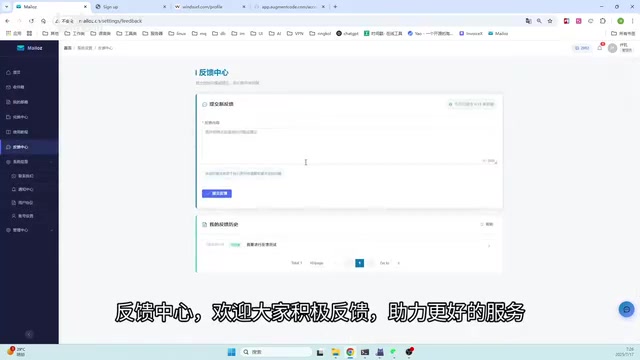
How good a tool is largely depends on whether developers can quickly respond to user needs. The addition of the Feedback Center shortens this communication chain. This kind of in-product feedback mechanism is increasingly common in modern software development — it essentially shortens the closed-loop cycle between user feedback and development iteration, enabling the product to respond more agilely to problems encountered in real usage scenarios.
Streamlined Menu and Information Reorganization
Another notable change is the significantly streamlined menu bar. The old version had too many menu items, requiring multiple layers of navigation to find a feature. v1.0.8 restructured the menu layout:
- High-frequency functions prioritized: Common operations like email generation and credit applications are placed in the most prominent positions
- Low-frequency information tucked away: System version numbers, configuration parameters, and other secondary content are unified under a "System Info" submenu
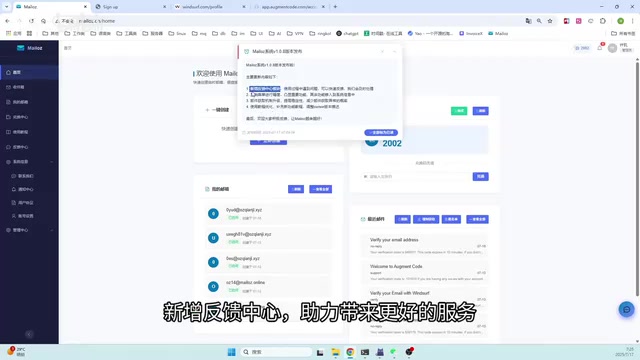
This design follows the interaction principle of "Progressive Disclosure" — showing the most important content first to reduce the user's operational cost. Progressive Disclosure is a human-computer interaction design principle proposed by IBM researchers John M. Carroll and Mary Beth Rosson in the 1980s. Its core idea is that interfaces should prioritize displaying the functions and information users use most frequently and find most critical, hiding advanced options and secondary settings in deeper layers that only appear when users actively explore. This principle is widely applied in modern software design — for example, macOS System Preferences and Google Search's advanced options — and its benefit lies in significantly reducing cognitive load so users don't have to face the complexity of all features on first contact.
Improved Email Retrieval Stability
For a temporary email tool, stability is the core competitive advantage. v1.0.8 optimized the underlying logic of email retrieval, improving success rates for both email address generation and mail reception. Issues frequently reported by users such as "retrieval timeout" and "verification code not received" should see significant improvement after upgrading.
To understand the significance of these optimizations, you need to understand the technical principles behind temporary email. Temporary email (Disposable Email / Temp Mail) is a one-time-use email service that requires no registration. Its working mechanism is: the server pre-configures MX records (Mail Exchange records) for a batch of domains. When external mail servers send emails to these domains, the temporary email service's SMTP server receives and temporarily stores these emails, which users can then read through a web interface or API. Emails are typically destroyed automatically after a certain period. In this chain, any delay or failure in MX record resolution, SMTP connection establishment, or email content parsing will cause "timeout" or "can't receive verification code" issues on the user end. The underlying logic optimization in v1.0.8 likely involves improvements to retry mechanisms and connection pooling targeting these critical points.
Updated Usage Tutorial
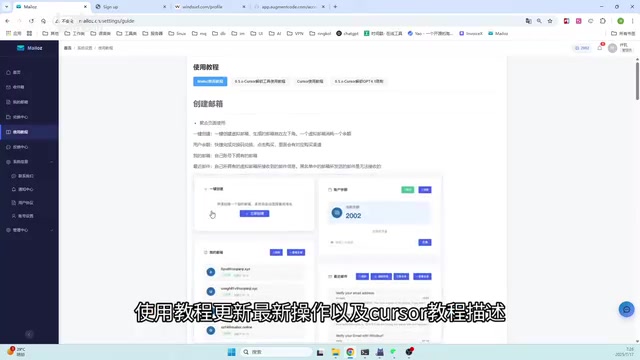
The new version also rewrote the usage tutorial, covering the latest operational processes and specifically including detailed guidance for use with Cursor. New users can follow the tutorial without needing additional exploration.

Practical Operation: Process for Getting Free Cursor Pro Credits
Using Mailoz v1.0.8 with Cursor to obtain free trial credits involves the following steps:
- Open the Mailoz system and quickly access the email generation function through the streamlined menu
- Generate a temporary email address — this address will be used to register a Cursor account
- Go to the Cursor official website to complete registration — enter the temporary email address, and Mailoz will automatically receive the verification email
- Click the verification link to complete activation — successfully obtain Cursor Pro trial credits and experience the AI programming features
From actual testing, the entire process runs smoothly under v1.0.8, with email reception speed noticeably faster than the old version, ultimately successfully obtaining free Cursor usage credits.
It's worth mentioning that the AI coding tool market is extremely competitive right now. Besides Cursor, major players include GitHub Copilot (co-developed by GitHub and OpenAI, deeply integrated into VS Code and JetBrains IDEs), Windsurf (formerly Codeium, emphasizing a free strategy), Amazon CodeWhisperer (targeting the AWS ecosystem), and domestic options like Tongyi Lingma and MarsCode. The core differences between these tools lie in model capability, context window size, multi-file understanding depth, and degree of integration with development workflows. Cursor's unique advantage is that rather than embedding as a plugin in an existing editor, it rebuilt the editor-AI interaction from the ground up, supporting advanced features like Composer multi-file editing and Agent mode for autonomous task execution — which is why many developers are willing to pay for it or seek trial access.
Important Notes and Risk Warnings
While this method is technically feasible, you should understand the following points before using it:
- Compliance risk: Repeatedly registering trial accounts may violate Cursor's Terms of Service, and accounts could potentially be banned. Most SaaS platforms explicitly prohibit users from creating multiple accounts to repeatedly obtain free trial resources in their Terms of Service, and this behavior is typically classified as "Service Abuse." Platforms usually employ multiple technical detection methods, including Device Fingerprinting (generating unique identifiers by collecting browser version, screen resolution, installed fonts, and other information), IP address tracking, credit card information matching, and behavioral pattern analysis. Once abuse is detected, consequences range from account bans and trial revocation to potentially more serious outcomes.
- Data security: Accounts registered with temporary emails may lose project data and personal configurations at any time — storing important projects is not recommended. Since temporary emails have no passwords and messages are automatically destroyed, once you need to recover a password or verify identity through email, you'll completely lose control of the account.
- Timeliness issues: Cursor's platform may adjust its registration and verification policies at any time, and the current method is not guaranteed to work indefinitely. In fact, many platforms have already begun adopting stricter identity verification methods like phone number verification and credit card pre-authorization to address temporary email registration.
- Long-term cost: If Cursor truly significantly improves your coding efficiency, a formal subscription is the more hassle-free choice
Conclusion
Mailoz v1.0.8 is a pragmatic version iteration. The Feedback Center makes communication between users and developers more efficient, the streamlined menu makes daily operations smoother, and the improved email retrieval stability directly addresses the most critical usage pain point. For developers who want to try Cursor Pro features but don't have a payment plan yet, Mailoz provides a low-cost entry solution.
That said, good tools deserve support. If you find Cursor genuinely useful after trying it, consider getting a formal subscription — it's a healthier choice both for developers themselves and for the entire AI coding tool ecosystem. AI programming tools are in a period of rapid development, and developers' paid support directly determines whether these tools can continue investing in R&D, training more powerful models, and providing more precise code comprehension capabilities. In the long run, a virtuous commercial ecosystem is what drives the entire industry forward.
Key Takeaways
- Mailoz v1.0.8 adds a Feedback Center, establishing an efficient communication channel between users and the development team
- The menu bar has been streamlined and reorganized, with core functions prioritized and secondary information archived under System Info
- Email retrieval stability has been optimized at the underlying level, reducing timeout and verification code reception failures
- Combined with the updated tutorial, free Cursor trial credits can be successfully obtained through temporary email
- Registering with temporary emails carries compliance risks and data security concerns — formal subscription is recommended for long-term use
Related articles
 Tutorials
ChatGPT Plus Subscription Guide: Are GPT-5.5, image-2, and Codex Worth the Upgrade?
A detailed look at ChatGPT Plus features — GPT-5.5, image-2, and Codex — with a Plus vs Pro comparison and a complete step-by-step subscription guide for users outside the US.
 Tutorials
Harness AI Engineering in Practice: Using Claude Code to Master Enterprise-Level E-Commerce Development
Deep dive into Harness AI Engineering: master enterprise e-commerce development with Claude Code using the Rules, Skills, Wiki, and Changes framework.
 Tutorials
Cursor + Codex Dual-IDE Collaboration: A Practical Methodology for Open-Source Project Customization
A complete methodology for open-source project customization based on real-world experience, detailing the Cursor+Codex dual-IDE workflow, seven-stage process, MVP validation, and AI source code reading techniques.