Major Claude Code Desktop Update: Built-in Terminal, Automated Routines, and Opus 4.7 Coming Soon

Claude Code Desktop gets an epic update, transforming into an AI-driven integrated development environment.
Anthropic has delivered a major update to Claude Code Desktop, adding a built-in terminal and editor, multi-panel parallel collaboration, cloud-based automated Routines, and Ultra Plan Mode. These features transform it from an AI coding assistant into a self-sufficient development environment centered around AI agents. Meanwhile, the Opus 4.7 model is on the verge of release, signaling another wave of change in the AI coding landscape.
Anthropic recently delivered what can only be described as an epic update to Claude Code Desktop. With a completely redesigned interface, built-in terminal, automated workflows (Routines), and more, it has transformed from an AI coding assistant into a self-sufficient development environment. Meanwhile, the Opus 4.7 model is reportedly on the verge of release, signaling another wave of change in the AI coding landscape.
A Brand New Desktop App: From Chat Interface to a True IDE
The concept of an Integrated Development Environment (IDE) has been the professional developer's core workbench ever since Borland Delphi and Microsoft Visual Studio popularized it in the 1990s. The core value of traditional IDEs lies in consolidating code editing, debugging, version control, terminal, and other tools into a single interface, reducing context-switching costs. Early forms of AI coding assistants (like GitHub Copilot's code completion plugin) merely embedded AI capabilities within existing IDEs—essentially remaining "tool plugins" at their core. This Claude Code update marks a new product philosophy: rather than being parasitic on traditional IDEs, it redesigns the entire development environment's interaction paradigm with the AI agent at its center.
The most visible change in this update is the complete interface redesign. Claude Code Desktop no longer resembles a traditional chat interface—it now looks much more like a true IDE. The left panel centralizes chat and Claude Code feature management, supporting multiple sessions running side by side in the same window, with a cleaner, more user-friendly overall layout.
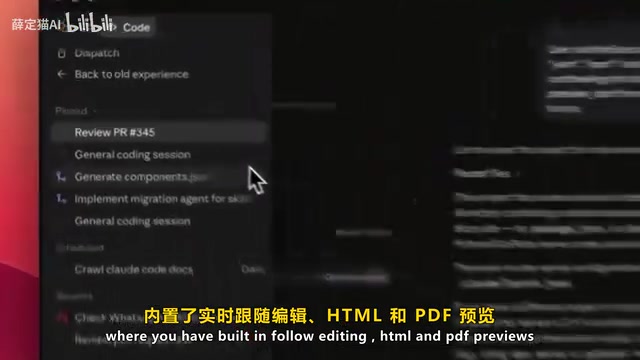
Core feature upgrades include:
- Built-in integrated terminal: Execute commands directly within the app without switching to an external terminal
- Built-in editor: Supports live HTML and PDF preview with WYSIWYG capabilities
- Faster diff viewer: Dramatically improved efficiency for code change comparisons
- Flexible drag-and-drop layout: Freely arrange panels to match your personal workflow
Interestingly, command-line keyboard shortcuts remain fully functional and feature-identical to the CLI version—the graphical interface doesn't sacrifice any capabilities. However, this update currently only supports macOS and Windows; Linux users will need to wait a few weeks.
Multi-Panel Collaboration: A New Paradigm for Parallel Development
Multi-Agent Systems are an important research direction in AI, with the core idea of decomposing complex tasks across multiple specialized AI agents for parallel processing, then consolidating results. In software development, this means you could simultaneously have one agent writing feature code, another generating test cases, and a third conducting code review—all progressing in parallel. Compared to the serial workflow of a single agent, multi-agent parallelism can significantly shorten development cycles for complex projects, which is a key reason the industry views it as an important part of the "next-generation AI coding paradigm."
One of the most exciting features of this update is multi-panel support, which brings this concept to life as a concrete product experience. Users can simultaneously open previews, PR tasks, various proposals, and even launch another terminal directly within the app. This means you can run multiple AI agents simultaneously to handle complex tasks.

More importantly, Claude Code can now launch work sessions directly from PRs (Pull Requests). You can immediately start code review, editing, or debugging code within a PR without manually configuring the environment. This makes the entire code review workflow faster and smoother.
From a product positioning perspective, Claude Code is shifting from a tool that "passively responds to commands" to a "proactive collaboration" development partner. The interface design emphasizes developer experience, with a cleaner input area that highlights the AI agent's execution capabilities and real development workflows. This version is clearly laying the groundwork for more powerful AI agent features and automation capabilities.
Automated Routines: Let AI Work Continuously in the Background
The most revolutionary new feature in this update is Routines. In terms of technical positioning, it differs fundamentally from traditional RPA (Robotic Process Automation) and workflow orchestration tools (like Zapier or n8n). Traditional RPA relies on predefined rules and fixed operation sequences, lacking the ability to understand unstructured content. Claude Code's Routines combines large language model semantic understanding with an event-driven automation framework, enabling it to handle tasks that require "judgment" rather than merely "execution."
This is a preview feature that allows users to configure workflows once—including prompt libraries and connected tools—then trigger execution through:
- Scheduled automatic runs: Set fixed time intervals for periodic task execution
- API call triggers: Launch workflows via external system calls
- Event responses: Automatically execute corresponding actions in response to specific events

Crucially, these automated workflows run in the cloud—users don't need to keep their computers on to execute tasks. The cloud execution architecture means Anthropic maintains a persistent task scheduling system on the backend, which demands infrastructure far beyond ordinary API services. This also signals that Anthropic is extending its commercial boundaries toward becoming an "AI infrastructure provider." This effectively turns Claude Code into a fully automated system capable of continuously processing tasks in the background.
A typical use case: configure a daily automated workflow that scours the web to find the latest AI model release news for you. This "set once, run continuously" model dramatically expands the boundaries of what AI coding tools can do.
Ultra Plan Mode: Structured Collaboration Before Execution
Ultra Plan Mode embodies an important principle in AI safety—Human-in-the-Loop. As AI agents' autonomous capabilities continue to grow, how to maintain human control over critical decisions while preserving efficiency advantages has become a core product design challenge. Ultra Plan Mode's design logic is: before the AI executes high-impact operations (such as large-scale code refactoring or database migrations), it first generates a reviewable, editable structured plan, allowing users to fully understand and confirm the AI's intentions. This aligns with OpenAI's "o-series" models' emphasis on "think before acting" and represents a necessary step for AI agents transitioning from "experimental tools" to "production-grade tools."
With this feature, Claude can create complete execution plans for users, who can view and edit proposals directly on the web, refining and confirming them thoroughly before execution.

Once ready, plans can be chosen to run in the cloud or executed in a local terminal, giving users better control over the execution process. This is a major advancement in structured AI agent development—you're no longer just sending prompts and waiting for results, but collaborating with the AI on a complete plan before execution.
Opus 4.7 Coming Soon: What to Expect from Anthropic's New Flagship Model
Anthropic's model naming system follows a "series name + capability tier" convention.
Related articles
 Tech Frontiers
A Rare Quiet Day in AI: Recursive Self-Improvement Stirs Beneath the Surface
A rare quiet day in AI sees multiple sources go silent simultaneously. Behind the calm, Recursive Self-Improvement (RSI) research continues. What this means for the industry.
 Tech Frontiers
Reve 2 vs. Ideogram 4: A Deep Dive into Layout Control in AI Image Generation
A deep comparison of Reve 2 and Ideogram 4's layout control capabilities, covering technical approaches, real-world use cases, and industry trends for designers and creators.
 Tech Frontiers
In the Weights: Check Your Influence Score in the AI World
In the Weights is an AI influence search engine that quantifies your presence in the AI world with a score. Explore how it evaluates practitioners and what it means for digital identity.