MCP Architecture Explained: How Host, Client, and Server Work Together

Breaking down MCP's Host, Client, and Server three-layer architecture and clarifying the common misconception that the Client is the app users see.
Based on Day 3/7 of the MCP tutorial series, this article systematically breaks down the three-layer architecture of the Model Context Protocol. The Host is the AI application users interact with directly (such as Claude or VS Code)—a container, not a connector. Inside the Host, an independent Client is started for each Server, with the Client handling session maintenance and protocol communication. The Server wraps a single tool (such as GitHub or Slack) and interacts with the Client via the MCP protocol. Using VS Code configured with both a GitHub Server and a database Server as an example, the article shows that while the interface presents a unified tool list, underneath there are two isolated connection channels. It particularly points out a common misconception: the Client is not the app users see—the VS Code window is the Host, not the Client. Clarifying these three roles helps accurately locate issues during debugging and lays the foundation for learning about Server capabilities later on.
MCP (Model Context Protocol) is becoming a key protocol for AI applications to connect with external tools, but many people confuse the three roles of Host, Client, and Server when trying to understand its architecture. Based on Day 3/7 of our tutorial series, this article breaks down MCP's three-layer structure and points out a common misconception.
Host: The AI Application You Use Directly
The Host is the AI application users interact with directly, such as Claude, VS Code, etc. It provides the interface, manages sessions, and coordinates communication between internal components and external tools. The Host itself does not talk to tools directly—it establishes connections through internal Clients.

The key to understanding the Host is this: it's the container, not the connector. All the feature entry points users see are at the Host layer, but the actual protocol communication happens at a lower layer.
MCP (Model Context Protocol) is a protocol proposed and open-sourced by Anthropic in late 2024, aiming to standardize how large language model applications connect with external data sources and tools. Before MCP, every AI application needed custom integration code to connect tools, resulting in a severely fragmented ecosystem; MCP defines a unified communication specification so that tool providers only need to implement a Server once, and it can be called by any Host that supports the protocol. Understanding this helps grasp the positioning of the three-layer architecture: the Host delivers the user experience, while the Client and Server handle protocol-level interoperability—the separation of responsibilities across the three exists precisely to avoid coupling application logic with connection logic.
MCP communication is typically based on the JSON-RPC 2.0 message format and carried over transport layers such as stdio (standard input/output) or HTTP/SSE—which is why connection state needs to be maintained by a separate Client instance.
Client: The Connection Unit Inside the Host
Inside the Host, each Client corresponds to one Server connection. That is, if you configure multiple tool services in the Host, the Host starts an independent Client for each service. The Client is responsible for maintaining the session with the Server, sending requests, and receiving responses.
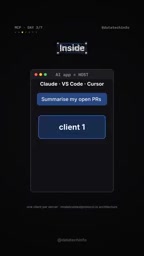
This design allows the Host to manage multiple tool connections simultaneously, with each connection's state and lifecycle isolated from the others.
Server: The Protocol Endpoint Wrapping a Single Tool
The Server is the tool-side component in the MCP architecture. Each Server wraps a specific tool or service—such as GitHub or Slack—and communicates with the Client via the MCP protocol. The Server's job is to expose tool capabilities and handle invocation requests from the Client.
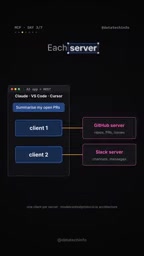
One Server corresponds to one tool—this one-to-one relationship simplifies permission management and fault isolation.
The capabilities an MCP Server actually exposes are not limited to "tool invocation"; they typically include three types of primitives: Tools (functions the model can call), Resources (contextual data available for reading, such as files or database records), and Prompts (predefined prompt templates). The GitHub and Slack examples in this article are typical Tools scenarios. In addition, a Server can be implemented as a local process (communicating with the Client via stdio) or deployed as a remote service (via HTTP transport)—both forms are isomorphic at the protocol level.
"One Server corresponds to one tool" is a simplified way of understanding: in practice, a Server often wraps multiple related tools under the same category of service (for example, a single GitHub Server can provide tools for creating issues, checking PRs, reading repositories, etc.), but they are managed as a whole in terms of permissions and lifecycle—which is exactly where the fault and permission isolation emphasized in this article comes from.
A Practical Example: Multi-Tool Configuration in VS Code
Take VS Code as an example. Suppose you add a GitHub Server and a database Server. VS Code, as the Host, starts two Clients, each connecting to one of these Servers. What the user sees in the interface is a unified tool list, but underneath there are two independent connection channels.

This example clearly illustrates the hierarchical relationship among Host, Client, and Server: the Host is the application, the Client is the connection, and the Server is the tool.
Common Misconception: The Client Is Not the App You See
Many people mistakenly believe that the Client is the application itself—the user interface. In reality, the Client resides inside the Host and is a connection instance that the Host creates for each Server. The VS Code window you see is the Host, not the Client. Only by clearing up this misunderstanding can you correctly understand MCP's communication model.
Distinguishing between Host and Client helps pinpoint problems during debugging and configuration: when a connection fails, the issue may lie between the Client and the Server, not in the Host's interface layer.
Summary
MCP's architecture can be summarized as: the Host is the AI application, which starts a Client for each Server internally; the Server wraps a single tool and implements the MCP protocol. Understanding these three roles is the foundation for learning about Server capabilities (Day 4 content) later on.
Related articles

Why Microsoft CEO Nadella Still Backs Nvidia After Jensen Huang's Departure
Microsoft CEO Nadella publicly expresses confidence in Nvidia interim CEO Colette Kress. This article analyzes Nvidia's power transition after Jensen Huang's departure, Microsoft's compute dependency, and the trust logic of the AI supply chain.

Nadella: Critical Infrastructure Is 'Unpatchable' as AI Cybersecurity Arms Race Escalates
Microsoft CEO Nadella addresses AI cyberattack fears, saying much critical infrastructure is unpatchable, downplaying the Outlook outage, and analyzing AI's dual role in cybersecurity.

Musk Backs Jensen Huang: Firing Him Is Like Cutting Jordan
Musk says Jensen Huang is loyal to the U.S. and likens firing him to cutting Michael Jordan—highlighting politicization anxieties in the AI chip industry and defending talent value.