MCP Servers: From Single-User to Concurrent Production — Where Tutorials Leave You Stranded

MCP tutorials stop at hello world — multi-user timeouts stem from blocking I/O, shared state, and resource pool exhaustion.
A developer shared a widely relatable problem on Reddit: their MCP server worked perfectly for one user but collapsed with timeouts the moment a second user connected — and no tutorial addressed why. The article identifies three root causes: synchronous blocking code monopolizing the event loop, incorrect shared session state across concurrent clients, and exhaustion of underlying resource pools like database connections. The solution isn't to find advanced MCP tutorials, but to apply standard backend engineering practices: add observability logging, simulate concurrent load locally, ensure the full I/O chain is genuinely async, explicitly configure resource pool limits, and isolate session state per client. An MCP server is ultimately just a network service facing the same scalability challenges as any web backend.
The Real Pain Point Every Tutorial Ignores
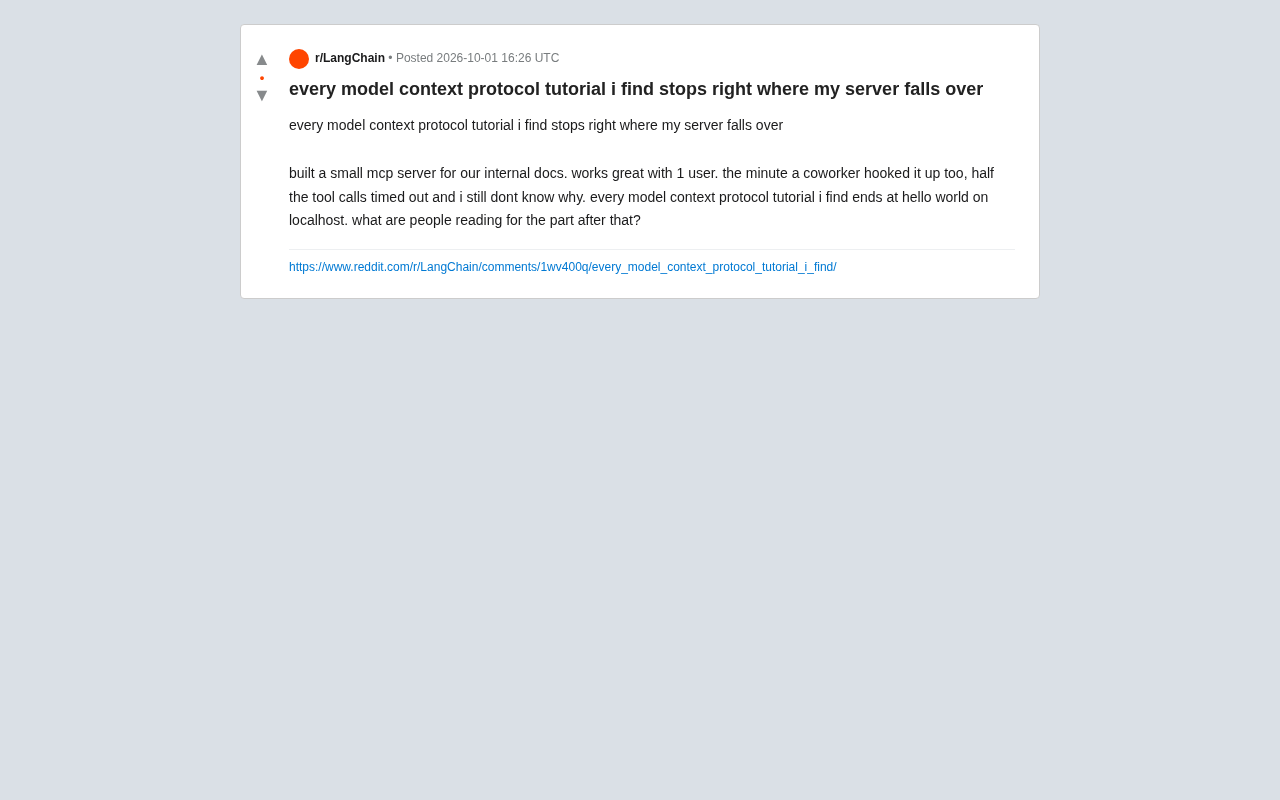
A developer posted on Reddit with a problem that resonated widely: he'd built a small MCP (Model Context Protocol) server for his company's internal documentation. It ran smoothly for a single user — but the moment a colleague connected, half of all tool calls started timing out, and he had no idea why.
His frustration cut right to the heart of the issue: "Every MCP tutorial I can find stops right at hello world on localhost." That observation exposes a structural gap in the current MCP ecosystem — educational content almost universally stops at "getting it running" and almost never touches "keeping it running" under real production conditions.
This isn't an isolated case. MCP, the protocol that connects large language models to external tools and data sources, is gaining traction fast — but most introductory materials focus on protocol syntax and minimal examples, steering clear of the engineering realities of concurrency, timeouts, and connection management. When a server collapses going from one user to two, developers quickly discover there's no clear path forward.
Why a Second User Can Bring Down the Server
When symptoms look like "works fine for 1 user, timeouts for 2," the problem almost certainly isn't MCP itself — it's the server's concurrency model. There are a few common root causes worth investigating systematically.
Blocking I/O and the Single-Threaded Event Loop
Many simple MCP server implementations use synchronous, blocking calls. With a single user, requests execute serially and nothing feels wrong. But when two users fire tool calls nearly simultaneously, a single long-running operation — like a document retrieval or an external API request — blocks the entire event loop, causing subsequent calls to queue up until they time out. The fix is ensuring I/O operations are genuinely asynchronous, with no synchronous blocking code running inside the event loop.
Node.js and Python's asyncio are the two most common runtimes for MCP servers, and both rely on a single-threaded event loop model. This means any operation that isn't properly async — reading a file synchronously instead of asynchronously, or calling a third-party library that internally makes blocking system calls from within an async function — monopolizes the thread and prevents the process from responding to anything else. A common Python pitfall is using the requests library (synchronous HTTP) inside an asyncio coroutine instead of httpx or aiohttp. In Node.js, the equivalent mistake is using fs.readFileSync or doing CPU-intensive JSON parsing without offloading it to worker_threads. Tools like clinic.js for Node.js or aiomonitor for Python can monitor event loop lag and show exactly how long and where the loop is being blocked.
Connection and Session State Management
MCP's transport layer — whether stdio or HTTP/SSE-based long connections — requires independently maintaining each session's state when multiple clients are involved. If the server incorrectly shares stateful resources across clients (a single database connection, a global cache, unpartitioned context), concurrent requests will interfere with each other, manifesting as random timeouts or garbled data.
MCP supports two primary transport modes: stdio mode is suited to local single-process scenarios, where the client and server communicate via standard input/output; HTTP/SSE (Server-Sent Events) mode is designed for multi-client network deployments, where the server pushes messages to clients over persistent connections. In HTTP/SSE mode, each client connection corresponds to its own SSE stream, and the server must maintain an isolated session context per stream. If the server uses a global variable to store "the current session's tool call state," two concurrent clients will overwrite each other's state, causing scrambled results or hanging requests. The correct approach is to use the connection ID or session ID as a key, store all session-related data in isolated dictionaries or objects, and explicitly clean up when a connection closes.
Resource Pool Exhaustion
Underlying dependencies — database connection pools, HTTP client connection limits, file descriptors — all have default ceilings. A single user never gets close to them; two concurrent users might instantly max them out, leaving new requests waiting indefinitely. Checking the configured limits and timeout settings on these pools often points directly to the problem.
What to Read After the Tutorial Ends
The core question in the original post was: "After hello world, what is everyone reading?" It reveals a learning resource gap. Bridging the demo-to-production divide requires expanding your focus beyond the MCP protocol itself to general server-side engineering.
On one hand, the official MCP specification documents the transport layer mechanics, session lifecycle, and message format — foundational knowledge for understanding concurrent behavior. On the other hand, the knowledge that actually fixes crashes mostly lives outside the MCP world: in general async programming, server architecture, and observability. How to run concurrent load tests. How to configure connection pools. How to set sensible timeouts and retries for tool calls. How to use logging and distributed tracing to pinpoint where things are blocking.
Put simply, an MCP server is still a network service at its core. Every scalability challenge it faces is identical to those faced by any web backend. Treating it like an ordinary backend service — doing capacity planning and load testing — is usually more effective than hunting for "advanced MCP tutorials."
Observability refers to the ability to understand a system's internal state through the signals it exposes externally — logs, metrics, and traces. For an MCP server, the most basic observability practice is logging a timestamp and parameter summary at the entry point of each tool call, and logging elapsed time and result status at the exit. Going further, you can introduce distributed tracing — such as OpenTelemetry — to generate a unique Trace ID for each invocation, making it straightforward to pinpoint which step in a multi-tool chain is introducing latency. On the metrics side, monitor event loop lag, connection pool utilization, and P95/P99 tool call latency. These measurements transform "intermittent timeouts" from a subjective feeling into a quantifiable, reproducible engineering problem.
Practical Advice for Developers Facing the Same Issue
For the specific failure mode of "multiple users cause timeouts," here's a prioritized debugging checklist:
- Add observability first: Log elapsed time at the entry and exit of each tool call to identify exactly where the timeout occurs — is it request queuing, downstream I/O, or protocol handshaking? Guessing without data is just wasted time.
- Reproduce concurrency locally: Use a script to simulate multiple clients firing calls simultaneously rather than waiting for real colleagues to trigger the problem. You can only reliably fix what you can reliably reproduce.
- Audit the async chain: Verify that nothing in the call path from the transport layer down to business logic contains hidden synchronous blocking — especially in I/O-heavy operations like document retrieval.
- Tune resource pool configuration: Explicitly set connection limits and timeouts for databases and HTTP clients. Don't let default values become your bottleneck.
- Isolate session state: Ensure each client session has its own independent context and shares no mutable state with other sessions.
This developer's experience reflects a typical phase in any emerging technology ecosystem: the protocol and tooling are mature enough to build prototypes, but best practices for production deployment haven't yet solidified into accessible tutorials. At this stage, shoring up foundational server-side engineering skills will solve real problems far more effectively than searching for MCP-specific answers.
Related articles

Why Does the Tesla Roadster Need to Fly? A Deep Dive into Musk's Wild Demo
Tesla's Roadster launch showed wall-climbing, upside-down driving, and flying stunts—but The Vergecast notes the demo car may lack a battery, the Rocket version is invite-only and not street-legal, and the website terms don't guarantee delivery. After nine years of delays, why does this car still need to exist?

AI Is Not a Replacement: Human-AI Collaboration Through the Lens of Factory Root Cause Analysis
Starting from factory root cause analysis, this article explains how AI accelerates evidence chain construction rather than replacing human experts, exploring the pragmatic implementation logic and business value of 'AI supporting people rather than replacing them.'

AI Agent Decision Auditing: Building an Evidence Chain in Regulated Workflows
Starting from a Reddit discussion, this article analyzes three core issues in AI agent decision auditing within regulated workflows: what fields audit records should contain, how to handle feedback latency for erroneous decisions, and how to continuously calibrate LLM judge consistency with human judgment.