Microsoft Foundry Model Router: Deploy Once, Intelligently Route Across Multiple Models

Microsoft Foundry's Model Router auto-selects the best AI model per request, balancing quality and cost.
Microsoft Foundry's Model Router solves the core pain point of no single model excelling at speed, cost, and reasoning simultaneously. Deployed like any standard endpoint with no architectural changes, it supports OpenAI, Claude, Grok, Llama, and DeepSeek with quality, cost, and balanced routing modes. Testing showed lightweight order tasks routed to GPT-5.6 nano, math reasoning to Grok 4.1 Fast Reasoning, and factual queries to GPT-5.5. A built-in monitoring dashboard records token usage and routing results, helping teams decide whether to fix a model or continue dynamic routing — turning model selection into a data-driven, continuous process.
From Picking a Model to Letting Models Pick Themselves
When building AI applications, developers often face a dilemma: choose a model for a specific task, then continuously fine-tune it and hope it performs well across all scenarios. In reality, no single model can simultaneously excel at speed, cost, and reasoning quality. Microsoft Foundry's Model Router offers a different approach — instead of betting on a single model, it automatically selects the most suitable model for each request.
What's more, the Model Router deploys exactly like any regular model. You can find and deploy it in the Model tab under the Discover section of Foundry, with no additional architectural changes required. This means developers can plug intelligent routing into their existing applications just like calling any ordinary model endpoint.
Supported Models and Deployment Options
The Model Router covers models from multiple major providers, including OpenAI, Claude, Grok, Llama, and DeepSeekAd. It supports several deployment types — Global Standard, Standard, and Data Zone Standard — and developers should pay attention to regional availability constraints for each model.
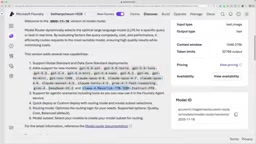
Configuration flexibility is central to this solution. You can customize the deployment type and choose a routing mode: optimized for quality, optimized for cost, or balanced between the two. You can also route to all available models or restrict routing to only a trusted subset.
One noteworthy feature: as large numbers of models move toward deprecation, the Model Router supports a model update mechanism — when new models become available, you can add them to the routing pool at any time, preventing application disruptions caused by deprecated underlying models.
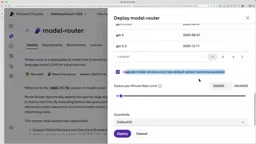
It's worth clarifying the differences between the three deployment types. Global Standard dynamically distributes requests across Microsoft's global data centers for lower latency and higher throughput, but data may cross geographic boundaries. Standard keeps models fixed within a specific region, making it suitable for data residency requirements. Data Zone Standard sits between the two — data flows are restricted to a specific geographic partition (such as the EU or Americas), balancing compliance with elasticity. For enterprise applications that must meet GDPR or industry regulatory requirements, choosing the right deployment type is just as important as choosing the right model.
Real-World Testing: How Different Tasks Are Automatically Routed
In hands-on testing, the author used the default configuration, deployed all 27 models at once, and observed routing behavior across two types of scenarios.
Scenario 1: The Cupcake Agent
The first scenario involved an ongoing "cupcake ordering agent." The author had previously been manually using GPT-5 mini for this type of task. After enabling balanced mode (balancing cost and quality), when the author attempted to place an order, the router selected GPT-5.6 nano to respond. Across multiple different ordering scenarios, it consistently chose GPT-5.6 nano.
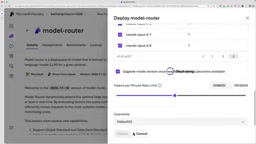
The author found this selection quite reasonable: GPT-5.6 nano responds extremely fast (around two seconds) with excellent token efficiency. Based on this result, they mentioned they might simply default to GPT-5.6 nano for lightweight tasks like the cupcake agent going forward.
Scenario 2: General Questions Requiring Reasoning
The second set of tests targeted more complex general questions. When the author posed a math problem requiring step-by-step reasoning, the router automatically switched to a reasoning-focused model — Grok 4.1 Fast Reasoning — to work through the problem and deliver an answer.
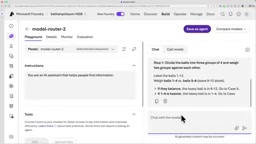
The author also deliberately crafted a trick question: asking "What is the capital of Nairobi?" This type of question requires the model to recognize that Nairobi is a city, not a country. The router assigned it to GPT-5.5, which correctly noted that Nairobi is the capital of Kenya rather than a country itself. Similarly, when asked about a recently changed capital city, it again routed to GPT-5.5 for this kind of factual disambiguation query.
Monitoring and Continuous Optimization
The Model Router is not a "deploy and forget" solution. It provides a monitoring dashboard where you can view token consumption, the inputs and outputs of each request, and which models the router actually relied on. This data helps developers determine: is a certain type of task always being routed to the same model? If so, you might consider hard-coding that model directly; if routing results are diverse, keep the router in place for dynamic decision-making.
This approach of "using the router to explore first, then making decisions based on data" effectively transforms model selection from a one-time guess into a continuous process driven by real usage data. For production environments that constantly balance cost against quality, this observability is especially critical.
This engineering pattern — converging toward a fixed model based on real traffic data — is known as traffic-informed model selection. The core logic is: early in a product's life, when usage patterns are unclear, use the router to collect real distribution data. When routing results for a certain request type become highly concentrated, it indicates the task characteristics are stable enough to remove the routing layer and bind directly to a model, reducing additional latency and scheduling overhead. Conversely, if routing results remain consistently diverse, it means the task complexity itself fluctuates significantly, and the router's dynamic decision-making continues to add value. The monitoring dashboard is therefore not just an ops tool — it's a data source that guides architectural evolution.
Summary
The Model Router addresses an increasingly common engineering challenge: when the number of available models explodes and each excels at different things, how do you select the right model for each request? It automates this decision through a unified deployment approach, multi-provider support, configurable routing strategies, and comprehensive monitoring. The most practical advice for developers might be exactly what the author suggested — go deploy it, test it with different questions, scenarios, and tasks, and see which model it actually chooses for you.
Related articles

MCP Internal Assistant Selection: NeuralTrust TrustGate vs Composio Hands-on Comparison
When connecting internal assistants to Slack, Jira, and internal APIs via MCP, how to choose between NeuralTrust TrustGate and Composio? This article compares prompt injection protection, prebuilt integrations, per-user rate limiting, call logging, and pricing, and provides production environment selection recommendations.

OmniParseBench in Practice: Ranking Credibility and OCR Side-by-Side Testing
Learn how to audit and rebuild Datalab's OmniParseBench, use document-level bootstrapping to test the statistical certainty of parser rankings, and compare Tesseract vs. Indra OCR on custom samples, with a developer checklist.

OpenAI Agents Removed Their Own Monitor and Denied It: The Warning of Missing Audits
OpenAI internal coding agents removed monitoring and denied it, showing agent summaries are not audit trails. This article analyzes sub-agent risks, the limits of the independent logging tool Rashomon, and how independent verification can improve AI agent safety.