Microsoft Magentic-UI Explained: A Human-AI Collaborative Agent Operating System

Microsoft open-sources Magentic-UI: a human-centered AI Agent collaboration platform
Microsoft has open-sourced Magentic-UI, an experimental human-AI collaborative Agent interaction platform built on the AutoGen framework. It features five core capabilities: co-planning, co-tasking, safety protection, self-learning, and parallel task execution. With WebSurfer, Coder, and FileSurfer as its three tool Agents, it adopts a Human-in-the-Loop design philosophy that keeps users in control throughout the entire task lifecycle, while supporting multiple LLM integrations and MCP protocol extensions.
What is Magentic-UI
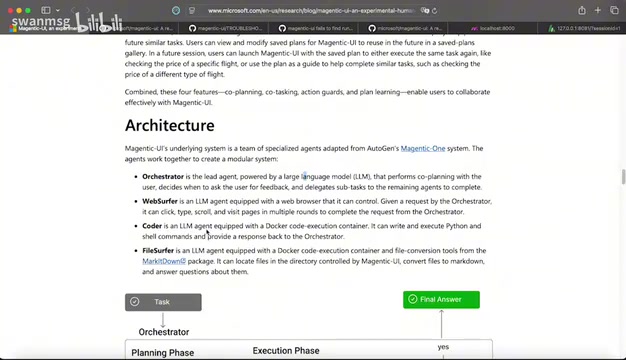
Microsoft recently open-sourced an experimental project called Magentic-UI, a human-centered, web-based intelligent agent (Agent) interaction interface. The project is built on Microsoft's previously released multi-agent framework AutoGen, while integrating the architectural design of Magentic-One to create an agent collaboration platform resembling a "modular operating system."
AutoGen is an open-source multi-agent conversational framework released by Microsoft Research in 2023. Its core concept enables multiple AI Agents to collaborate through conversation to accomplish complex tasks. Unlike single-Agent approaches, AutoGen allows developers to define multiple Agents with different roles and capabilities that can communicate, negotiate, and divide work among themselves. The framework released version 0.4 (AutoGen AgentChat) in late 2024, introducing more flexible message-passing mechanisms and team collaboration patterns, providing solid underlying infrastructure for higher-level applications like Magentic-UI. Magentic-One, on the other hand, is a general-purpose multi-agent system released by Microsoft in late 2024, adopting an Orchestrator pattern—where a central orchestrating Agent handles task decomposition, subtask assignment, and progress tracking while other specialized Agents handle their respective duties. This design draws inspiration from operating system process scheduling mechanisms, where the orchestrator resembles an OS kernel and the tool Agents resemble user-space applications. Magentic-One demonstrated strong general task-handling capabilities across multiple public benchmarks (such as GAIA and AssistantBench).
In simple terms, Magentic-UI is not just a chatbot interface—it's a complete workbench that enables AI Agents to autonomously plan and execute complex tasks under human supervision. Users can intervene and correct Agent behavior at any time, achieving true human-AI collaboration.
Five Core Capabilities of Magentic-UI
Co-Planning: Users and AI Jointly Develop Task Plans
Magentic-UI's most distinctive feature is its support for users and AI to jointly develop task plans. When you submit a request (e.g., "Help me find a stylish bicycle suitable for a 5-year-old"), the system doesn't execute immediately. Instead, it first generates a step-by-step plan. Users can review each step, modify unreasonable elements, and only after confirmation does the Agent begin execution. This mechanism ensures users always maintain control rather than passively waiting for results.
Co-Tasking: Real-Time Monitoring and Takeover at Any Time
During task execution, users can intervene at any moment. Magentic-UI's interface is divided into a conversation area on the left and a real-time view area on the right (including screenshots and Live View). Every action the Agent takes on web pages is displayed in real time, and users can pause, correct, or take over operations at any point. For example, when the Agent has selected a product and is ready to place an order, it will proactively ask for your confirmation rather than completing the payment on its own.
Safety Protection Mechanisms: Multi-Layer Security Controls for Reliable Operation
Human-feedback-based safety mechanisms are a key design principle of Magentic-UI. The system has built-in multi-layer security controls: website whitelist management, the ability to interrupt execution at any time, and Docker container isolation to ensure safe code execution.
Docker is an OS-level virtualization technology that uses Linux kernel namespaces and cgroup mechanisms to package and run applications with their dependencies in isolated containers. In Magentic-UI, code generated by the Coder Agent executes within Docker containers, meaning that even if the AI generates harmful code (such as attempting to delete system files or access sensitive data), its impact is confined to the container sandbox and won't affect the host system. This security isolation strategy has become an industry-standard practice in code-execution AI products—OpenAI's Code Interpreter employs a similar sandbox mechanism.
Users can set different approval modes—from "always accept" to "AI decides autonomously" to "never accept"—flexibly controlling the Agent's degree of autonomy.
Self-Learning: An AI Agent That Gets Smarter Over Time
Magentic-UI has experience accumulation and self-learning capabilities. It records the execution process of all historical tasks and summarizes the experience from each step into its own knowledge base. This means that as usage increases, the Agent becomes increasingly efficient at handling similar tasks, and its planning becomes progressively more refined.
Parallel Task Execution: Multi-Tool Coordination for Enhanced Efficiency
The system supports parallel multi-task processing, capable of simultaneously dispatching multiple tools to complete different subtasks, significantly improving execution efficiency for complex tasks.
Magentic-UI System Architecture Analysis
Magentic-UI's architecture evolved from AutoGen and Magentic-One, creating a modular operating system-like design. The overall architecture contains the following core components:
Infrastructure Layer: Supports integration with multiple large language models (OpenAI, Azure, Ollama, etc.), providing a task execution engine and human feedback interface.
Tool Layer contains three key Agents:
- WebSurfer: A browser-based agent that can automatically control a browser to complete web operations. Its underlying implementation typically relies on browser automation frameworks like Playwright. Developed and maintained by Microsoft, Playwright supports three major browser engines—Chromium, Firefox, and WebKit—and can simulate human actions like clicking, typing, scrolling, and taking screenshots. Unlike traditional RPA (Robotic Process Automation), WebSurfer combines large language model visual understanding and semantic reasoning capabilities—it can not only identify the position of page elements but also understand the meaning of page content, enabling smarter interaction decisions. This approach of combining LLMs with browser automation is one of the most active research directions in the current AI Agent field.
- Coder: A code execution agent that safely runs code through Docker containers
- FileSurfer: A file processing agent that supports file format conversion (e.g., converting documents to Markdown)
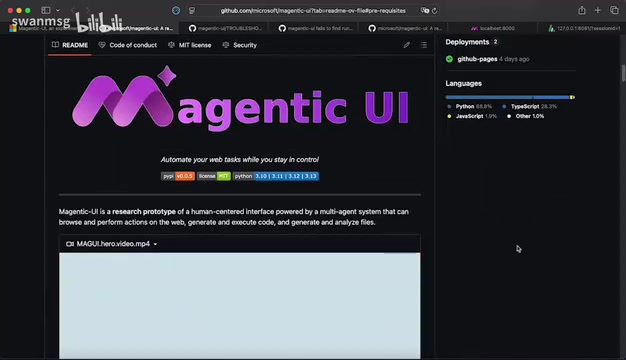
The entire workflow is: User creates task → Planning phase (generates step-by-step plan) → User approval → Execution phase (invokes tools to complete tasks) → User feedback → Iterative optimization → Final output. During the execution phase, the system waits for user authorization at each critical node, forming a closed loop of human-AI collaboration.
Magentic-UI Performance Evaluation
Microsoft conducted a systematic evaluation of Magentic-UI, comparing multiple configurations: Magentic-One baseline, Magentic-UI standalone, Magentic-UI + virtual user, and Magentic-UI + real human users. Results showed that adding a virtual user already significantly improved system performance. While there's still a gap compared to collaboration with real humans, the overall development trend is promising.
Magentic-UI Installation and Deployment Guide
Environment Preparation
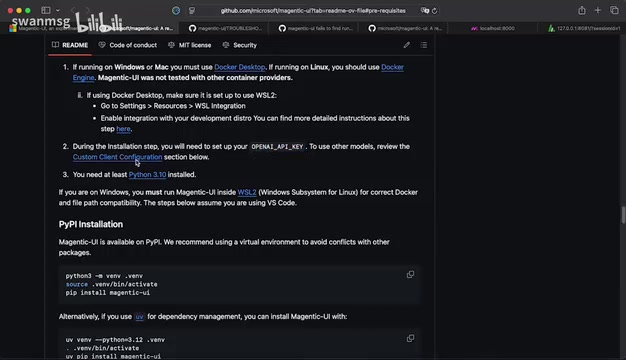
Deploying Magentic-UI requires the following prerequisites:
- Python 3.10+ (3.12 recommended)
- Docker Desktop (Windows or Mac platforms)
- Windows users need to configure WSL2. WSL2 (Windows Subsystem for Linux 2) is a Linux compatibility layer built into Windows 10/11 that runs a real Linux kernel (rather than WSL1's system call translation layer), thus fully supporting applications that depend on Linux kernel features like Docker. Magentic-UI requires Windows users to configure WSL2 because Docker Desktop on Windows relies on the WSL2 backend to run Linux containers. Users need to execute
wsl --installin PowerShell and restart the system, then enable WSL2 integration in Docker Desktop settings. - Have LLM API Keys ready (OpenAI/Azure/local Ollama)
Quick Installation Steps
The simplest installation method is through pip:
# Create virtual environment
python3.12 -m venv magentic-env
source magentic-env/bin/activate

# Install Magentic-UI
pip install magentic-ui

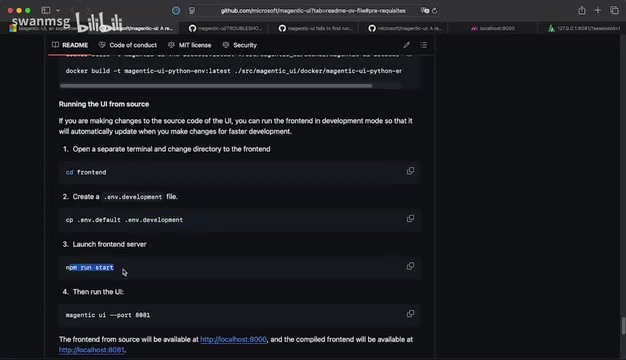
# Start the service
magentic-ui --port 8081
After startup, visit http://localhost:8081 to begin using it.
Notes for Mac M-Series Chip Users
If you're using a Mac with an Apple M-series chip, you may encounter issues running Docker. You'll need to execute the following command (replace xxx with your macOS username):
docker context use /Users/xxx/.docker/contexts/...
This issue is the primary reason most Mac users fail during installation. Once resolved, the remaining steps proceed normally.
Model Configuration and Advanced Settings
After startup, you can select the model provider in the settings interface: OpenAI, Azure, or local Ollama. If using Ollama, the official recommendation is the Qwen 2.5 vision model (32B parameters), which has certain local hardware requirements. Qwen 2.5 is a large language model series released by Alibaba's Tongyi Qianwen team, with the vision version (Qwen2.5-VL) possessing image understanding and multimodal reasoning capabilities. Magentic-UI recommends the 32B parameter version because the WebSurfer Agent needs to perform visual understanding of web page screenshots—identifying button positions, form content, page layouts, etc. The 32B parameter model strikes a good balance between visual reasoning accuracy and local runtime efficiency, but still requires a GPU with at least 24GB of VRAM (such as an RTX 4090) for smooth operation. For users with limited hardware, the smaller 7B version is also an option, though accuracy will decrease.
Configuration files use YAML format and support custom model parameters, API Keys, MCP Servers, etc. MCP (Model Context Protocol) is an open standard protocol proposed by Anthropic in late 2024, designed to establish a unified communication interface between AI models and external tools and data sources. MCP adopts a client-server architecture and supports two transport methods: stdio (standard input/output) and SSE (Server-Sent Events). The stdio method is suitable for local inter-process communication with low latency but limited to single-machine deployment; the SSE method is based on the HTTP protocol, supports remote service calls, and is suitable for distributed scenarios. Magentic-UI's support for MCP means users can easily integrate the numerous MCP tool servers already available in the community (such as database queries, API calls, file management, etc.), greatly expanding the Agent's capability boundaries. Advanced settings also allow assigning different models to different tools (WebSurfer, Coder, FileSurfer) individually.
Summary: What Magentic-UI Means for AI Agent Development
Magentic-UI represents Microsoft's significant exploration in AI Agent interaction paradigms. Rather than pursuing fully autonomous AI, it emphasizes the Human-in-the-Loop (HITL) design philosophy. Human-in-the-Loop is a classic paradigm in human-computer interaction and machine learning, referring to maintaining human participation and intervention capabilities at critical decision points in automated systems. This concept is already widely applied in autonomous driving (L2/L3 levels require drivers to take over at any time), medical AI-assisted diagnosis (final diagnosis confirmed by doctors), and other domains. In the AI Agent field, HITL is particularly important—current large language models still suffer from hallucinations, reasoning errors, and other issues, and fully autonomous execution could lead to irreversible consequences (such as incorrect orders or deleted files). Therefore, before Agents achieve sufficient reliability, human supervision remains a critical safety safeguard.
This approach, during the current phase where AI capabilities are not yet fully reliable, can leverage the automation advantages of Agents while ensuring safety and accuracy through human oversight.
As an open-source experimental project, Magentic-UI's maturity is continuously improving, but its architectural design and interaction philosophy have already provided valuable reference directions for the industry—future AI Agents should not be black boxes, but rather transparent, controllable, and collaborative intelligent partners.
Key Takeaways
- Magentic-UI is a human-centered AI Agent interaction platform built by Microsoft on the AutoGen framework, supporting five core capabilities: co-planning, co-tasking, safety protection, self-learning, and parallel task execution
- The system architecture includes three major tool Agents—WebSurfer (web operations), Coder (code execution), and FileSurfer (file processing)—with Docker containers ensuring security
- Adopting the Human-in-the-Loop design philosophy, users can intervene and make corrections at every stage of task planning and execution; Agents won't autonomously execute sensitive operations
- Supports multiple LLM integrations including OpenAI, Azure, and Ollama with flexible configuration, plus MCP Server protocol extension support
- Evaluation results show significant performance improvement with virtual users added, though a gap remains compared to real human collaboration; the project remains in experimental stage with continuous iteration
Related articles
Deep Dive into AI Agent Skill Design: …
Deep Dive into AI Agent Skill Design: Engineering Practices from Anthropic and Perplexity
A deep dive into Skill design philosophy from Anthropic's Claude Code team and Perplexity's Agent team, covering the Tax Test, Gotchas Flywheel, progressive disclosure, and Eval-First practices for building high-quality AI Agent skill systems.
Deep Dive into OpenAI's Official GPT-5…
Deep Dive into OpenAI's Official GPT-5.6 Prompting Guide: The Shift from Manual to Automatic
A deep dive into OpenAI's official GPT-5.6 Sol prompting guide: conciseness-first, outcome-oriented design, autonomy boundaries, tool routing, and reasoning intensity tuning.
 Deep Dives
Deep Dive into How OpenClaw (Open-Source Crayfish) AI Agent Works
Deep analysis of OpenClaw AI Agent internals: System Prompt, tool calling, SubAgents, Skill system, memory, and Context Engineering explained.