Migrating Power BI Dashboards on Databricks with GenAI: A Practical Breakdown

Use GenAI to auto-migrate 600 Power BI reports to Databricks AI/BI dashboards with ~90% DAX conversion rate.
Facing the real-world challenge of migrating large volumes of Power BI reports to Databricks, creator Sagar Kajapati built an AI-assisted migration tool on Databricks Apps. The workflow covers uploading PBIX/PBIT/PBIP files, LLM-powered DAX-to-SQL conversion, human review and approval, visualization mapping, and automated deployment with validation. In a demo of ~11 measures, 10 were successfully converted — roughly 90% automation — with edge cases like CALCULATE context switching and SAMEPERIODLASTYEAR still requiring manual handling. The tool features editable system prompts, parameter tuning, and numerical comparison validation, forming a complete "AI-generate, human-verify, data-validate" loop.
A Real Enterprise Migration Challenge
When a company faces the task of migrating 600 Power BI reports to the Databricks platform, doing it purely by hand is nearly impossible. In his latest video, YouTube creator Sagar Kajapati showcases a solution he built for exactly this real-world client need — a "Power BI to AI/BI Dashboard Migrator" built on Databricks Apps and powered by generative AI.
The core value of this tool lies in delegating what would otherwise be tedious, line-by-line translation of DAX measures and visualization rebuilds to a large language model (LLM), while retaining a human review step to ensure accuracy. For enterprises that have accumulated significant Power BI assets and want to consolidate onto the Databricks Lakehouse ecosystem, migration tools like this are becoming a critical piece of adopting an AI data stack.
How the Migration Process Works
From the video demo, the entire migration flow is broken down into several clear steps. First, you configure the basic environment in the settings panel — SQL Warehouse version, job storage path, Model Serving Endpoint, and Unity Catalog. The author notes that live Power BI connectivity isn't yet supported; instead, the migration is initiated by uploading files in PBIX, PBIT, or PBIP format.
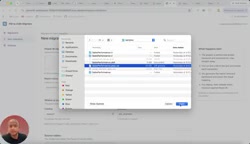
When creating a new migration, users specify the target Catalog and Schema, along with the location of the source data tables — since the generated measure queries need to know where to read data from. The author chose a pre-prepared pbi_demo Schema, which already contains all the base models and tables. The tool reads models, table structures, and other metadata from this schema, then sets up a Validation Baseline to compare whether values are consistent between the Power BI and AI/BI dashboards.
AI-Powered Automatic Conversion of DAX Measures
The most technically demanding part of the migration is converting Power BI's DAX measures to Databricks SQL. This step is entirely LLM-driven — and therefore prone to errors.
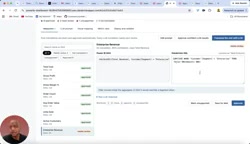
In the demo, the author candidly shows the limitations of AI: for the "enterprise revenue" measure, the system flags that "CALCULATE is outside the normalizable subset" and cannot be directly converted, requiring a secondary LLM translation pass. For "YoY revenue" scenarios involving the SAMEPERIODLASTYEAR function, which is unsupported, manual rewriting is the only option.
What stands out is the overall conversion success rate — out of roughly 11 measures, 10 were successfully converted and approved, with only 1 unsupported. The author estimates this represents approximately 90% automation. For each converted result, users can review the LLM's confidence score, verify the formula is correct, and click approve — forming an "AI-generated, human-verified" workflow.
DAX (Data Analysis Expressions) is a formula language built into Microsoft products such as Power BI and Excel Power Pivot. It's designed for relational data models and supports context-aware aggregate operations. The CALCULATE function modifies filter context, while SAMEPERIODLASTYEAR is a built-in time intelligence function — both deeply dependent on Power BI's own date table mechanics and row/filter context switching logic. These are fundamentally different from Databricks SQL's standard ANSI SQL execution model. During migration, the LLM must understand the semantic intent of DAX expressions (e.g., "calculate year-over-year comparison") and re-express them using standard SQL primitives like window functions and date offsets. This is precisely why conversion is difficult and why roughly 10% of measures still require human intervention.
Customizable System Prompts
To handle the complexity of different reports and formulas, the tool includes an editable LLM system prompt. The author has pre-configured a fairly detailed prompt, and users can append additional instructions tailored to their specific formulas and Power BI report structures. Parameters like max token count and temperature can also be tuned. This design gives the migration tool a degree of flexibility, preventing complete failure when it encounters unusual reports.
Visualization Mapping and Deployment Validation
Once measure conversion is complete, the next step is visualization mapping. After triggering generation, the system maps Power BI charts to their corresponding AI/BI components. For visualization types with no equivalent implementation (such as certain chart types), the tool suggests using a Genie Space query as a replacement.
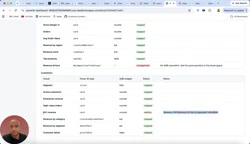
After this step, users enter the Metric View, where they can download the generated SQL, export the dashboard's JSON configuration, or regenerate. The most critical button — "Deploy and Validate" — automatically deploys the converted AI/BI dashboard to the Databricks workspace. In the demo, after a successful deployment, opening the dashboard shows data rendering largely correctly, with a few invalid items still requiring manual attention.
Post-deployment, the tool also offers a Run Validation function that compares each measure's values between Power BI and Databricks one by one, providing data-level confidence in the migration results.
Genie Space is the natural language query interface within the Databricks AI/BI suite, allowing users to ask questions about datasets in a conversational way, with the LLM automatically generating SQL and returning results. When a certain chart type from Power BI has no direct equivalent in the AI/BI dashboard, replacing it with Genie Space essentially substitutes "on-demand Q&A" for "pre-built visualizations" — consistent with Databricks' product direction toward AI-driven data exploration. However, for scenarios requiring fixed-format reporting, it's worth evaluating whether this approach meets business presentation requirements.
What This POC Reveals About the Enterprise AI Data Stack
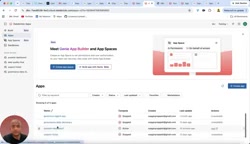
The author emphasizes that this is still a POC (proof of concept) — a prototype built to demonstrate the concept to company management. But the underlying approach has broad applicability: using Databricks Apps to host business logic, Unity Catalog for data governance, Model Serving to provide LLM capabilities, and a human review loop to close the cycle — together forming a relatively complete enterprise-grade AI migration solution.
The author also revealed plans to add an ADF (Azure Data Factory) pipeline migration to Lakeflow Pipeline project within the same course. His take on industry trends is direct — he believes "agentic" approaches will become mainstream for enterprises, with large numbers of companies across traditional industries embedding AI into their data projects.
For data engineers and BI developers, the value of practical case studies like this goes beyond learning a specific tool. It's about understanding the methodology behind "AI-assisted migration": which steps are suitable for LLM automation, which must retain human review, and how to build trust in AI outputs through numerical validation. This way of thinking has far more long-term value than any single piece of code.
Unity Catalog is Databricks' unified data governance layer, providing access control and lineage tracking for data assets — including tables, views, models, and files — across workspaces. In a migration context, Unity Catalog ensures that converted SQL measures can be safely invoked within a unified permissions framework, while data lineage records dependencies between measures and underlying tables, reducing future maintenance overhead. Model Serving Endpoint is the access point for Databricks' managed LLM inference service, supporting calls to external models (such as Azure OpenAI) or open-source models deployed within Databricks. The migration tool uses this endpoint to send DAX formulas to the LLM and receive converted SQL — with the entire process completed within the enterprise's private cloud environment, satisfying data residency compliance requirements.
Related articles

AI New Grad Resume Diagnosis: How to Stand Out for ML/CV Roles?
How can AI/ML new grads optimize their resumes to get interviews? Based on a real Reddit case, this article analyzes project selection, depth display, and structure for ML/CV roles, with actionable revision advice.

OpenAI Opens Up Decision Models as Competition with Jev Heats Up
OpenAI makes its decision model widely available, directly challenging first mover Jev. We analyze the impact on the decision model competitive landscape and key considerations for developers and enterprises.

Startup Growth Secrets: Early Sales Are Not the Key
At Disrupt, experts from Lovable, Polska, and Theory Ventures said early startup growth depends not on early sales but on a repeatable sales process, a clear ICP, team development, and data-driven iteration.