MiniMax H3 Open-Source Video Model Hands-On: Can It Disrupt AI Video Generation?

MiniMax H3 brings open-weight, audio-driven, ComfyUI-native video generation to consumer GPUs.
MiniMax H3 is an open-weight multimodal video generation model supporting text, image, video, and audio inputs, outputting up to 2K resolution and 15 seconds in a single pass that generates both video and synchronized audio. Hands-on tests show commercial-grade results for anime PVs, slow motion, and motion graphics, with stable R2V camera-following and pricing as low as ~6 cents/second on the official platform. Key limitations include motion blur at high speeds, weakening audio sync in the latter half, inconsistent multilingual support, and slow local generation (~15 min for 5s 1080p on 24GB VRAM). Native ComfyUI integration signals that top-tier video generation has officially entered the consumer GPU era.
The pace of progress in open-source large models is reshaping the industry. After matching — and in some cases surpassing — top closed-source models in general capabilities, the open-source community has now brought the battle to AI video generation. MiniMax H3 enters the scene with open weights, generating significant community buzz. It's already natively integrated into ComfyUI and offers unique capabilities that even some paid models lack. This article, based on an in-depth hands-on test by a Bilibili creator, breaks down its core features, real-world performance, and the feasibility of local deployment.
What Is MiniMax H3: Multimodal Input and Audio-Driven Generation
MiniMax H3 supports multiple input modalities: text, images, video, and audio. Its audio capability is particularly distinctive — rather than simply using audio as a reference, it builds video visuals on top of the audio, which is a relatively rare approach.
Spec-wise, the model supports up to 2K resolution and up to 15 seconds in duration. Crucially, video and audio are generated in a single pass, meaning audio can theoretically sync more naturally with the video's rhythm.
On pricing, accessing it through the official app MiniMax Design costs roughly 6 cents per second at 2K resolution — significantly cheaper than comparable models and third-party hosting platforms. For creators who need to iterate heavily, this cost threshold is quite appealing.

Real-World Performance: Anime, Product Showcases, and Camera Motion
The creator stress-tested the model across multiple scenarios. Results were mixed but overall impressive.
Anime PVs and Transitions
In tests simulating anime-style character previews (think gacha game new-character reveals), the results exceeded expectations. Rather than simple realistic frames, the model produced polished, ready-to-use content with clean, crisp transitions. The creator felt the output could be used directly as promotional material for anime-style games.
Audio Sync
Audio-driven tests revealed a consistent pattern: the opening portion of the video syncs impressively well with the music's beat, but synchronization noticeably weakens in the latter half. Interestingly, when the model was given more creative freedom (e.g., abstract graphics), the final results were at their best.
Reference-to-Video (R2V)
R2V (Reference-to-Video) has been a hot topic in the community lately — it involves using a reference clip (such as camera movement) to guide the generation. The creator used a drone aerial shot as a motion reference to generate scenes like ancient Rome, and the motion-following results were quite solid and consistent across multiple tests.
Slow Motion and Motion Graphics
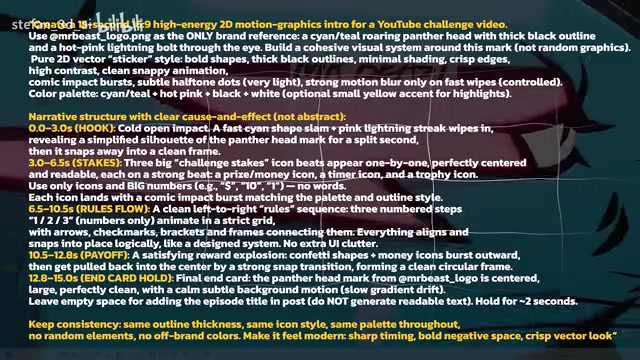
The model delivered stunning results for slow motion and motion graphics. A motion graphics test inspired by MrBeast-style videos produced cool, controllable results even without providing all reference images. Slow-motion product showcases were equally impressive, with real commercial viability.
Reference-to-Video (R2V) is an emerging workflow paradigm in AI video generation. Unlike pure text-to-video (T2V) or image-to-video (I2V), R2V allows users to provide an existing clip — such as a drone shot, camera movement path, or even a playblast from 3D software — as a reference for camera motion or action, which the model then uses to generate new visual content. Its core value lies in returning motion control to the creator, reducing reliance on the model's randomness and aligning more closely with the standard professional filmmaking pipeline: storyboard → previs → final shot. For commercial projects that require precise camera language, R2V is currently one of the most open and accessible methods for achieving fine-grained control.
Shortcomings and Trade-offs
The model isn't perfect. Here are the limitations exposed during testing:
- Duration cap: Maximum 15 seconds — long-form content still requires segmented planning.
- Motion blur on fast movements: Rapid camera motion causes slight blurring at 2K; the faster the movement, the more pronounced the blur. Slow, deliberate movements yield sharper frames. This was most apparent in 3D reference tests.
- Lip sync and audio integration: Lip sync is nearly flawless, but the generated voiceover feels too isolated — lacking natural blending with ambient environmental audio, and the AI voice quality still has room to improve.
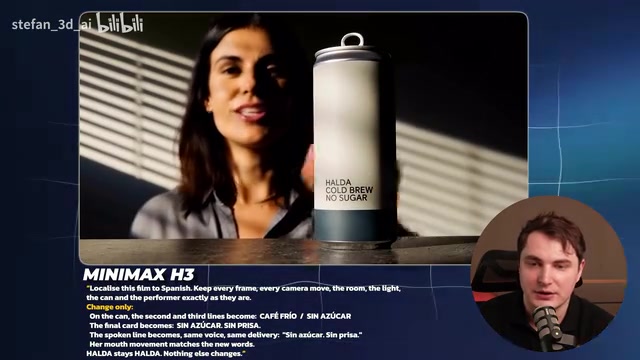
- Inconsistent multilingual support: English works fine, but Spanish tests produced randomly altered label text, while Japanese retained the original text with only the voiceover switching languages. Overall behavior was unpredictable.
Playblast Doesn't Always Help
One counterintuitive finding: for complex scenes involving in-game TV dialogue and character references, providing a 3D playblast as a reference didn't necessarily outperform pure prompting. Multiple tests showed that without a playblast, motion looked more natural and usability was higher (around 80%), which led the creator to revise his earlier recommendation of playblast workflows. That said, MiniMax does offer a 3D Director stage feature — a lightweight Blender-like tool — for precise control over cameras and objects.
Playblast is a common term in 3D animation and game development, referring to a quick, low-quality render (usually a direct viewport capture) produced in software like Maya, Blender, or Unreal Engine to preview character motion, camera movement, and scene layout before committing to a full render. Because they generate almost instantly, playblasts are widely used in film production for director review and animation adjustment. Incorporating playblasts into AI video generation workflows theoretically gives the model precise 3D spatial motion information, compensating for the imprecision of text prompts in camera control. However, this test found that for dialogue-heavy scenes, overly specific 3D references can sometimes constrain the model's generative freedom, resulting in stiff motion — less natural than relying on the model's own learned motion priors.
Client Brief Test: One-Click Commercial Ad Generation
The most ambitious test involved feeding a PDF brief containing product information and delivery requirements (main video, vertical format, etc.) directly into the MiniMax Agent, using the laziest possible approach — letting it work through the deliverables listed in Section 9.
The results were surprising: the 15-second generated video looked like a proper commercial. Some anomalies appeared (e.g., battery elements), and the 30-second full version had some garbled text (gibberish), but the text overlaid on the video was mostly accurate. The creator's conclusion: publishing the full video as-is isn't realistic, but certain segments are fully usable in commercial productions. Iterating in smaller segments with more detail and reference material would yield more reliable results. On text consistency, the model successfully preserved prominent label text without garbling after using Claude to organize tag copy.
Local Deployment: ComfyUI Is the Easiest Path
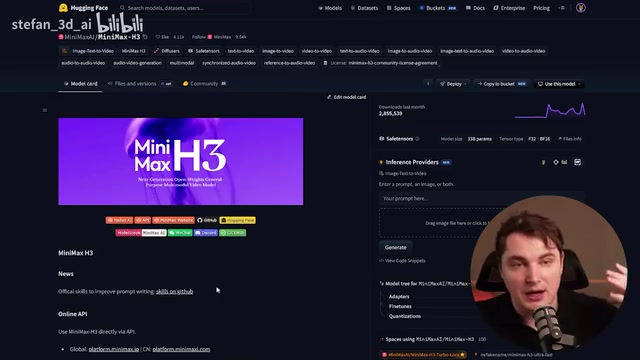
MiniMax H3 is open-sourced on Hugging Face, and the community has already produced derivative versions like Turbo and Max. But the most hassle-free approach is through ComfyUI's native integration:
- Install ComfyUI Desktop — MiniMax is the top recommended template in the workflow selection screen at launch.
- The model is approximately 53GB — allow some time for the download.
- 24GB VRAM or more should be sufficient to run it.
The creator's optimized configuration on 24GB VRAM (5090-class) was: launch flags --use-sage-attention, --fast, --cache-none, along with running pip install triton and installing sage attention via terminal for faster inference. The ComfyUI template library includes multiple workflow presets for image-to-video, reference-to-video, and text-to-video. The MiniMax Design website also offers additional downloadable ComfyUI workflow presets.
Note that local generation costs are not trivial: generating a 5-second 1080p video on 24GB VRAM takes approximately 15 minutes. For most users, given the platform's ~6 cents/second pricing, the official platform remains the more efficient choice.
ComfyUI is an open-source node-graph-based interface for Stable Diffusion and generative AI workflows, allowing users to connect model loading, image preprocessing, inference, and post-processing steps as visual nodes to form reusable automated pipelines. Compared to script-driven interfaces like Automatic1111, ComfyUI excels in workflow transparency, fine-grained parameter control, and an active community node ecosystem — nearly every new open-source model release receives corresponding ComfyUI node support within days. Sage Attention is an optimized implementation of the Transformer attention mechanism that reduces VRAM usage and improves inference speed through more efficient memory access patterns. It's particularly effective for long-sequence or high-resolution generation tasks, and is one of the most widely used acceleration plugins for locally deploying large video and image models today.
Conclusion: Open-Source Video Models Enter the Consumer GPU Era
The significance of MiniMax H3 lies not just in generation quality, but in what it proves: top-tier video models can simultaneously be open-weight and fit on consumer-grade GPUs. Many open-source models release weights that are simply impractical to run on standard hardware; H3 belongs to the rare category of both cutting-edge and accessible. For developers, its API and context capabilities are also worth noting — especially for building video AI applications, where it may currently be one of the cheapest options available. According to the creator, MiniMax Design may in the future release a version that runs on local VRAM. If it can extend the Agent workflow, that would further lower the barrier to entry.
Related articles

Apple Opens Multiseat Subscription Purchasing: App Subscriptions Can Now Be Sold in Bulk to Businesses and Schools
Apple opens multiseat purchasing for auto-renewable subscriptions: businesses and schools can bulk-buy via Apple Business and Apple School Manager, adding or removing seats anytime. Enabled by default in App Store Connect—developers should verify settings; group purchasing sandbox testing opens October 2026.

Meta Restarts Muse Sharing Feature: A Security Gamble After Privacy Controversy
Meta re-enabled Muse AI sharing after researchers found public chat links exposed sensitive data like revenue reports and loan applications. Privacy vs. convenience.

X-Hinges: Giving Everyday Objects Sensing Capabilities Through 3D Printing
X-Hinges is a design software that automatically embeds sensors into 3D-printed objects, enabling lamps, gloves, and other everyday items to sense human contact and respond adaptively. This article covers its core features, design approach, and potential limitations.