Modern Web Guidance: Helping AI Generate Better Modal Transition Animations

Modern Web Guidance retrieves guides to steer AI toward generating modal code that follows top layer animation best practices.
The article compares modal transition code generated by an AI coding agent with and without the Modern Web Guidance skill. The unguided agent turned the modal into a drawer, kept it in the DOM occupying space, and relied on z-index hacks. The guided agent retrieved the 'animate to from top layer' guide in real time, added overlay to transitions, applied allow-discrete to display, and correctly placed @starting-style, enabling smooth slide-out and clean removal via native top layer rendering.
When you're implementing smooth enter/exit animations for modal dialogs in an AI workflow—especially when top layer elements are involved—it's easy to run into pitfalls. Google's Modern Web Guidance skill is designed to guide AI coding agents toward code that better conforms to modern web standards. Based on a recent demo video, this article compares the modal transition code that AI generates with and without this skill, and analyzes the best practices behind it.
How Guided AI Changes Code Generation
In the video demo, the left side is an unguided AI agent, and the right side is an agent with Modern Web Guidance enabled. After receiving the same prompt, the agent on the right actively searched for "details modal slide smooth transition" before coding, and matched the "animate to from top layer" guide, which was progressively disclosed in real time. This retrieval-augmented generation approach gives the AI targeted, standards-based knowledge before it starts writing code.
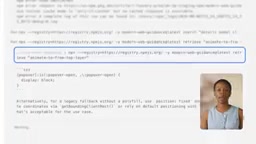
Although the unguided agent also completed the functionality, its implementation had obvious flaws: it converted the modal into a drawer and added opacity, transform, and transition properties, but on close the element remained in the DOM and occupied space. Ideally, a dismissible dialog or drawer should be fully removed from the layout.
Key Difference: overlay and Discrete Transitions
The code generated by the guided agent on the right follows several best practices. In modal.css, the transition property list includes overlay to support top layer element movement animations, and applies allow-discrete to the display property, ensuring that the element is only removed from the render tree after the animation ends.
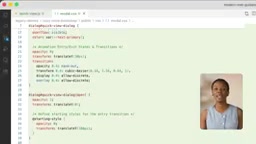
In addition, the starting style block (@starting-style) is correctly placed inside or after the open-state selector to ensure correct cascading, and is excluded from the exit animation. The practical result is that the element smoothly slides off screen first, then is cleanly removed from the DOM, as expected.
Top layer rendering mechanics: HTML's top layer is a special layer that sits outside the normal stacking context and renders above all other content. <dialog>'s showModal(), fullscreen elements, and popovers all live in it. Top layer elements are not affected by parent z-index, transform, or overflow clipping, which is the fundamental reason the guided solution doesn't need z-index hacks. Correspondingly, CSS's overlay property does not itself produce any visual effect; rather, it tells the browser that the element is participating in a top layer animation: when the element is about to leave the top layer, the browser delays its removal from the top layer until the transition ends, allowing the exit animation to play out fully.
Discrete animations and allow-discrete: Properties like display and overlay are discrete properties—there is no interpolatable intermediate state between values, and traditionally changes take effect instantly. transition-behavior: allow-discrete allows such properties to participate in transitions; the browser applies the start and end values at the 0% and 100% key points of the transition respectively, achieving the effect of "animate first, then remove."
The role of @starting-style: When an element first renders or goes from display: none to visible, the browser does not generate a "before" style for it, so the entry transition lacks a starting point. The @starting-style rule is specifically used to declare the initial style for an element on entry, allowing properties such as opacity and transform to transition smoothly from that starting point to the open state. It must be placed after or inside the open-state selector to ensure the correct cascade order, and since it only takes effect when the element enters, it naturally does not interfere with the exit animation. Note that @starting-style's precedence rules are consistent with ordinary declarations; when written inside a selector, it is equivalent to adding an initial snapshot for that state.
Real-World Comparison: Z-index Hacks vs. Native Top Layer
In actual testing in Chrome, with the unguided solution, clicking a book kept the dialog component active and modified the z-index, translating only along the X axis. With the guided solution, the native dialog transitions smoothly, and the DevTools inspector shows that the element is correctly in the top layer, rendering above other content without any z-index hack.

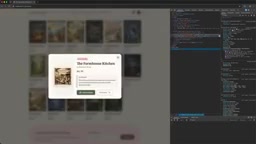
Finally, the @starting-style rule is correctly applied, and developers can verify by toggling the top layer state in DevTools. The same intent produces drastically different code quality—Modern Web Guidance ensures your code leverages native browser capabilities out of the box.
How to Enable
You can enable this skill in anti-gravity or install it through your preferred coding agent. The official installation address is goo.gle/mwg. For frontend teams that frequently deal with interaction details, this can significantly reduce time spent debugging transition animations and stacking issues.
Analysis: Why This Matters
The shortcoming of AI coding agents is often not syntax, but lagging awareness of the latest platform features. Modern Web Guidance injects best practices into the generation process through structured guide retrieval, bridging this gap. Based on the demo, the guided code is not only more concise (removing unnecessary DOM retention) but also more aligned with accessibility and performance principles. As native browser capabilities grow stronger, such "knowledge-augmented" AI workflows are expected to become a standard part of frontend development.
One-line Summary
Modern Web Guidance retrieves guides to steer AI toward generating modal code that follows top layer animation best practices.
Paragraph Summary
The article compares the modal transition code generated by an AI coding agent with and without the Modern Web Guidance skill enabled. Although the unguided agent implemented the animation, it converted the modal into a drawer, kept it in the DOM occupying space, and relied on modifying z-index and translating on close, resulting in messy stacking. The guided agent retrieved the "animate to from top layer" guide in real time before coding; the generated code added overlay to the transition properties, applied allow-discrete to display, and correctly placed @starting-style, so the element smoothly slides off screen before being cleanly removed, while leveraging native top layer rendering without any z-index hack. The article argues that such knowledge-augmented workflows can compensate for AI's lagging awareness of new platform features and are expected to become a standard frontend development configuration.
Related articles

AgentCore in Practice: Connecting Custom Tools and MCP Servers to Agents
DebuggerCafe tutorial shows how to connect custom tools and MCP servers to Amazon Bedrock AgentCore agents, covering tool contract design, MCP reuse, and production concerns.

816B Parameters Scores Only 39? The Real Cost-Effectiveness of the Open-Source LLM Parameter Race
Meta's 816B Muse Spark Open scores just 39 on Artificial Analysis, while 180B Qwen3.8-Flash-Next scores 40. This article analyzes 11 open-weight models' parameters vs. scores, exploring the real impact of activated parameters, quantized size, and deployment cost.

Aerial Manipulators: The Next Step for Drones from 'Seeing' to 'Changing'
Starting from a Reddit discussion, this article analyzes the technical challenges, potential applications, and deployment bottlenecks of aerial manipulators, exploring the key challenges for drones moving from environmental perception to physical manipulation.