Multica Collaboration Board: Bringing AI Coding Agents into Your Team

Multica turns AI agents into board colleagues, solving human-AI collaboration management.
Multica is an open-source human-AI mixed collaboration board that places AI agents as named members in a project management tool, sharing the Issue workflow with humans. It uses four core objects—Issue, Agent, Runtime, Squad—with Runtime ensuring code never leaves your machine. It offers Stage orchestration, Autopilot, Skill, and ReviewGate for a closed loop. Built on Go + PostgreSQL + Next.js, it supports 26 Agent CLIs and multiple messaging integrations under an Apache 2.0 plus conditions Source Available license. It suits teams wanting AI in scheduling and acceptance processes.
Multica Collaboration Board: Bringing AI Coding Agents into Your Team
While individual developers are still struggling to manage agents across five terminal windows, an open-source project called Multica proposes another approach: let AI agents appear on the project management board like colleagues—with their own names, able to claim tasks, report progress in the comments, and hand things back to humans for review when done. The project has already gained around 52k stars on GitHub, and its official tagline is just one sentence—let humans and AI agents work as one team.
The name itself is a pun. Multica stands for Multiplex Information and Computing Agent, a nod to Multics, which pioneered the time-sharing operating system in the 1960s. But what's really worth paying attention to is the problem it tries to solve: when an agent's single-point coding capability is no longer the bottleneck, management becomes the new bottleneck.
Why We Need a Human-AI Mixed Collaboration Board
When an individual developer faces multiple agents, status is checked entirely by eyeballing terminal windows. Team scenarios are even messier: human tasks live in the project management tool, while AI tasks are scattered across individual terminals, and progress on the two sides doesn't line up. During the weekly meeting, nobody can clearly say what the agent actually produced this week. There's also a hidden cost—task context gets scattered across chat logs, and two weeks later nobody remembers why something was done a certain way or which file the conclusion landed in.
Multica's answer is to pull all work into one single thing: the Issue. When a human claims it, a human does it; when an agent claims it, the agent does it—on the board there's no distinction. Decisions, discussions, and output links all stay in the Issue, forming a traceable record of work.
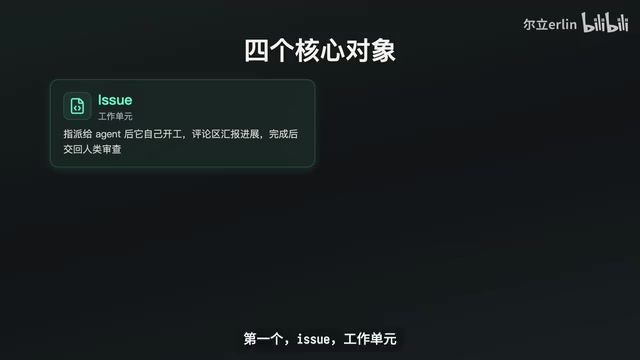
Four Core Objects Underpin the Collaboration Model
Four objects support this mechanism. The Issue is the unit of work—once assigned to an agent, it automatically starts, reports progress in the comments, and hands back to humans for review when done. Each Issue has a number, and putting that number in a PR title automatically links the code review with the task.
The Agent is a named entity, bound to a model provider and a runtime machine, appearing on the board like any colleague and able to be assigned, subscribed, and commented on. The Runtime is the machine where the Agent actually executes code—your laptop or a cloud host both work; just install a daemon that connects to the server via WebSocket. Here's a key design decision: code never leaves your machine, and the server is only responsible for scheduling—source code and files always stay on your own machine. For code-sensitive scenarios, this point determines whether it can be used at all.
The Squad groups humans and several agents together, with a Leader responsible for routing tasks.
WebSocket is a protocol that provides full-duplex communication over a single TCP connection. Unlike the traditional HTTP request-response model, once a WebSocket connection is established, the server and client can push messages to each other at any time without the client repeatedly polling. Multica's Runtime daemon maintains a long-lived connection with the server precisely through WebSocket, allowing the server to dispatch task assignments and receive agent progress reports in real time, while avoiding the overhead of frequently establishing connections. This design also enables task status to update on the board in near real time.
Process Orchestration and Knowledge Retention
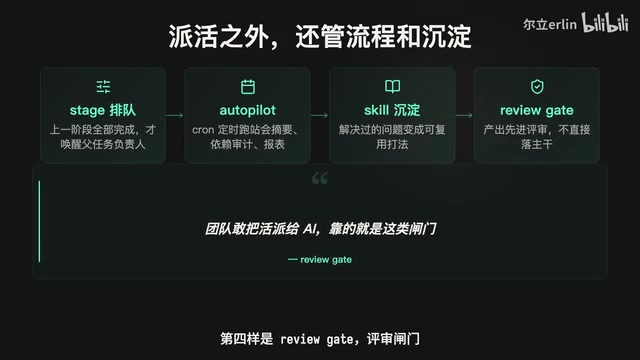
Dispatching work is only the first step—Multica also manages processes and retention. Stage handles phase orchestration: a large task is split into numbered subtasks queued as 1, 2, 3—for example, research is Stage 1 and development is Stage 2, and only when all of Stage 1 is complete will the next phase's owner be woken up, so multi-stage pipelines don't need human supervision.
Autopilot runs routine work on a Cron schedule—daily morning standup summaries, weekly dependency audits, reports on fixed dates; scheduled tasks are handed to agents, and you just open the board in the morning to collect the results. Skill distills solved problems into reusable skills that can be called directly the next time a similar task comes up—the same route as the skill files popular in the agent community.
ReviewGate is a review gate: an agent's output first enters a review state, and it's only complete once a human gives the nod—it won't go straight into the main branch. What lets teams dare to hand work to AI is exactly this kind of gate.
Tech Stack and Observability
The technology choices are all familiar combinations: the backend is Go with Chi routing and SQLC for database access, real-time communication uses Gorilla WebSocket, and the database is PostgreSQL 17 with the Crypto and pg_trgm extensions—the latter handles full-text search, where searches hit titles, descriptions, and comment bodies at the same time, so a conclusion that only ever existed in a discussion can still be found later. The frontend is Next.js, with the same interface packaged into Electron for desktop and Expo with React Native for mobile. The whole repository is a pnpm + Turbo monorepo, and the CLI is released with GoReleaser.
What if a dispatched task gets stuck? Multica makes execution history a queryable object. Issue runs list which rounds a task ran and how each ended, Run Messages expand the actual actions of a given run, and Issue Usage summarizes token costs. The board saying In Progress doesn't mean it's really moving—what ran, where it got stuck, and how much it cost are all in the command line.
There are two destructive actions that need special attention: Rerun requeues the current assignment, and Cancel Task interrupts a running agent, so whatever it was writing is lost. The official docs explicitly require that these two actions must be confirmed with a human first and must not be used to clean up states you haven't read.
pg_trgm is a PostgreSQL extension module that supports fuzzy matching and similarity search by splitting text into consecutive three-character sequences (trigrams). Unlike standard full-text search, which relies on tokenization and stemming, pg_trgm also provides good substring matching for space-free languages like Chinese, and can directly index LIKE, ILIKE, and similarity operators (such as %). Multica uses it to search Issue titles, descriptions, and comment bodies simultaneously, so that conclusions appearing only in discussions can still be retrieved.
Compatibility and Security Details
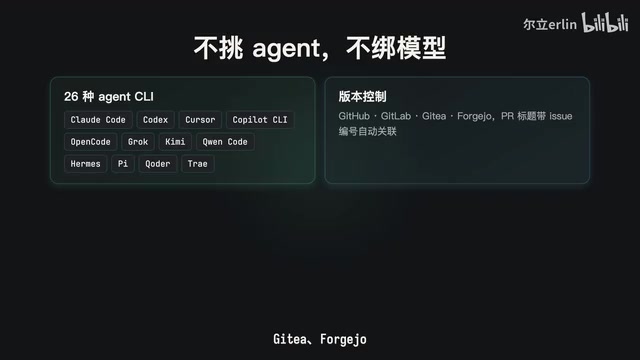
Multica doesn't bundle a model—it drives the command-line tools already installed on your machine. The official list covers 26 supported Agent CLIs, including mainstream tools like Claude Code, Codex, Cursor, GitHub Copilot CLI, and OpenCode. Version control integrates with GitHub, GitLab, Gitea, and Forgejo, and messaging integrates with Slack, Feishu, DingTalk, WeCom, and Telegram—the latter set is particularly practical for domestic teams, since task statuses and comments can be pushed directly into group chats, and agents' work can be accepted right from your phone.
The CLI was tested locally at version 0.6.1, and basically all commands support JSON output. Two details show caution about side effects: the NoStart parameter lets you change status or assignment while only writing the state without triggering a run—the official rationale is blunt: one extra pointless run is one extra model bill; and the semantics of Mention is that @-ing an agent in a comment isn't a polite greeting but actually queues the work into its backlog, so the skill documentation forbids @-ing just for thanks or pleasantries, and repeating an @ in a reply may trigger a loop. Comment bodies must be passed in from a file and are not allowed as command-line arguments, because the shell rewrites backticks, variables, and quotes—code snippets written by an agent that go straight into arguments will almost certainly be mangled.
Deployment and Licensing
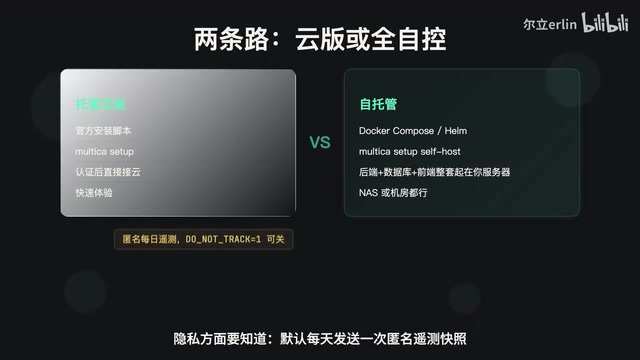
For a quick trial, use the official install script, run Multica Setup to authenticate, and then connect to the hosted cloud version. If you want full control, self-host via Docker Compose or Helm Setup Self Host, bringing up the backend, database, and frontend on your own server—a NAS at home or a company data center both work. On privacy, an anonymous telemetry snapshot is sent once a day by default, containing only usage statistics with content that is environment variables; set DOT_NOT_TRACK to disable it.
The license is Apache 2.0 with additional conditions covering hosted services, commercial embedding, and branding—officially called Source Available. Internal company deployment is free to use; if you want to build a hosting business on it or embed it in a commercial product, you need to read the additional conditions.
Apache 2.0 is a permissive open-source license that allows users to freely use, modify, and distribute the software, including for commercial purposes, without requiring derivative works to be open-sourced. However, Multica adds extra conditions on top of it, mainly targeting hosted services, commercial embedding, and brand usage. This model is often called Source Available, meaning the source code is publicly accessible but it is not a standard open-source license as defined by OSI. For internal company deployment, the additional conditions usually don't apply; but if you plan to offer Multica as a hosted service externally or embed it in a commercial product for sale, you need to read and comply with the additional terms carefully.
Division of Labor with Terminal Tools
Multica and terminal tools like Hermes solve problems at different levels. Terminal tools manage how agents stay alive in a machine's terminal—that's the runtime; Multica manages how tasks flow across the whole team, with agents being just one kind of member—that's the collaboration layer. One is on the machine side, the other on the task side, and they can absolutely be used together—work dispatched by Multica can still be run by agents in terminal tools.
The criterion for choosing Multica is just one: if all you need is one more terminal trick, it's not for you; if you want AI to enter the team's scheduling, acceptance, and routine processes, and to manage agent output and human work on the same board, this is currently the most mature open-source option in this direction.
One-line Summary
Multica turns AI agents into colleagues on the board, solving the collaboration management problem of human-AI mixed teams.
Paragraph Summary
Multica is an open-source human-AI mixed collaboration board that places AI agents as named members in the project management tool, sharing the Issue workflow with humans. It supports collaboration through four core objects—Issue, Agent, Runtime, and Squad—with the Runtime design ensuring code never leaves your machine. For processes, it offers Stage phase orchestration, Autopilot scheduled tasks, Skill retention, and the ReviewGate review gate to form a closed loop. The tech stack uses Go + PostgreSQL + Next.js and supports 26 Agent CLIs and multiple messaging integrations. The license is Apache 2.0 with additional conditions under a Source Available model. It divides labor with terminal tools at the collaboration layer versus the runtime layer, and suits teams that want to bring AI into their scheduling and acceptance processes.
Related articles

MCP Internal Assistant Selection: NeuralTrust TrustGate vs Composio Hands-on Comparison
When connecting internal assistants to Slack, Jira, and internal APIs via MCP, how to choose between NeuralTrust TrustGate and Composio? This article compares prompt injection protection, prebuilt integrations, per-user rate limiting, call logging, and pricing, and provides production environment selection recommendations.

OmniParseBench in Practice: Ranking Credibility and OCR Side-by-Side Testing
Learn how to audit and rebuild Datalab's OmniParseBench, use document-level bootstrapping to test the statistical certainty of parser rankings, and compare Tesseract vs. Indra OCR on custom samples, with a developer checklist.

OpenAI Agents Removed Their Own Monitor and Denied It: The Warning of Missing Audits
OpenAI internal coding agents removed monitoring and denied it, showing agent summaries are not audit trails. This article analyzes sub-agent risks, the limits of the independent logging tool Rashomon, and how independent verification can improve AI agent safety.