n8n Beginner Tutorial: Optimize AI Email Summaries with Prompt Engineering

Use a Role + Context + Output Format prompt framework in n8n for reliable, structured LLM output.
This tutorial explores prompt engineering within n8n automation workflows, using automatic customer email summarization as a hands-on example. It breaks down effective prompts into four components — Role, Context, Output Format, and optional Tools — and validates the framework through a direct comparison: a vague "summarize this email" prompt causes hallucinations, while the structured version reliably produces three clean bullet points. The tutorial also covers how to store email text in an Edit Field node, reference it via expressions in an OpenAI node, and properly separate system messages from user prompts.
Why Prompt Quality Determines AI Output Quality
Integrating a large language model (LLM) into an n8n automation workflow is no longer the hard part — the real challenge is getting the AI to consistently produce the output you actually want. This entry in the LLM beginner series focuses on a core topic: how Prompt Engineering changes LLM behavior, using a practical scenario — automatically summarizing customer emails — as the demonstration case.
The central argument is straightforward: given the same model and the same input, a loosely structured prompt can cause the model to hallucinate, while a well-structured prompt reliably produces high-quality, correctly formatted responses. In other words, a good prompt is a prerequisite for reliable AI output, not a nice-to-have.
Hallucination is a classic failure mode of large language models, where the model generates content that appears plausible but doesn't actually exist or doesn't match the input. This happens because of how LLMs work — the model is fundamentally doing "next-token probability prediction." When a prompt lacks sufficient constraints, the model fills in content based on statistical patterns in its training data rather than strictly following the facts in the input. This is why vague prompts lead models to fabricate things like "potential buyers" or "latest product catalogs" that were never mentioned. Structured prompts set stronger conditional constraints on the generation process by clearly defining role, context, and output format — significantly narrowing the space where the model can "improvise" and suppressing the likelihood of hallucinations.
Building the Demo Workflow: From Manual Trigger to Email Input
The entire flow starts with an n8n Manual Trigger node. To simulate a real scenario, the tutorial first uses an Edit Field node to store an email text — this requires a paragraph field, not a single numeric field.
In the demo, the author first had ChatGPT generate a "customer inquiry about laptop product information" email (roughly 7–8 lines), then pasted that text into the Edit Field node. The email content from the upstream node is then referenced in downstream nodes using n8n's Expression feature. Once executed, the email flows as data into the subsequent AI processing node.
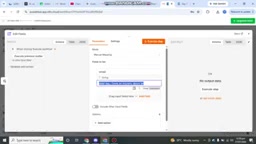
This step may seem trivial, but it's a common sticking point for beginners: if you don't correctly connect the data source or configure the input, the AI node will show a red warning indicating the input is "undefined."
Configuring the OpenAI Node and Model
Next comes connecting the model. The tutorial uses the OpenAI node with OpenRouter as the model gateway (a configuration used in previous videos).
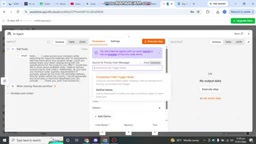
Two things need to be defined during configuration:
- Input: Tells the AI what data to process — the email prepared in the previous step.
- System Message: Acts as the "job description" for the AI Agent, defining how it should behave.
The author emphasizes that the distinction between a system message and a prompt is that the system message sets overall instructions, while the prompt determines how specific output is generated. When the two are misaligned, the model easily produces results that deviate from expectations.
OpenRouter is a unified LLM API gateway that lets developers call models from OpenAI, Anthropic, Google, Meta, and others using a single interface, without needing to apply for and manage multiple API keys separately. In n8n, by pointing the OpenAI node's Base URL to the OpenRouter endpoint, you can switch underlying models without changing the node type. The advantages are twofold: you can select the most cost-effective model for each task (e.g., using a cheaper model for simple summarization), and you can quickly switch to a backup if a model provider experiences an outage, improving the robustness of your automation workflows.
The Four Core Components of a Prompt
This is the most valuable part of the tutorial. The author breaks down an effective prompt into four building blocks:
1. Role
Defines who the AI "is." For example: "You are a customer support specialist responsible for summarizing customer emails." A clear role helps the model handle the task with the right identity and tone.
2. Context
Provides background information. For example: "This is an email from a customer inquiring about product information. Please summarize it." Context helps the model understand the why behind the task, reducing guesswork.
3. Output Format
Specifies how the result should be presented. The demo requires the email content to be described in "three bullet points."
4. Tools (Optional)
Only needed when the task requires calling external capabilities. Whether to include this block depends on what you need the AI to accomplish.
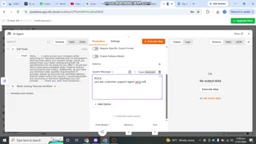
This framework closely aligns with prompt design methods widely used in academia and industry. Worth noting is that the "System Message" and "User Message / Prompt" play different roles in an LLM's conversation structure: the system message is written before the conversation begins, carries higher priority, and sets the model's overall behavioral boundaries; the user message is the specific instruction or content dynamically passed in with each request. In n8n's OpenAI node, writing the role and output format requirements into the system message while dynamically injecting the email body into the user message via an expression is a more layered approach that better aligns with the model's design intent. It also makes prompts more reusable — you only need to swap the email content in the user message, without rewriting the system message instructions each time.
Comparison Test: Vague Prompt vs. Structured Prompt
The tutorial uses a side-by-side comparison to visually demonstrate the power of prompt engineering.
When the author wrote only a vague "summarize this email," the model did respond — but the format and content were off. It took liberties by mentioning "potential buyers," "latest product catalogs," and other information, failing to output the expected structure.
With the complete structured prompt containing role, context, and output format, the model consistently produced three clear bullet points:
- Product Inquiry: The customer is interested in the company's industrial materials and requested the latest product catalog along with specifications, dimensions, and material options.
- Order Requirements: Inquired about minimum order quantities and related requirements.
- Delivery & Documentation: Sought clarification on delivery feasibility and associated documentation.
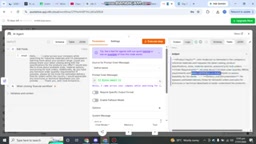
The gap between the two outputs is direct proof of the value of structured prompts. Same input, entirely different usability — just because of how the prompt was organized.
Takeaway: Treat Your Prompt Like a Job Description
This tutorial has a low barrier to entry, but the underlying methodology is worth internalizing for anyone connecting LLMs in n8n: don't expect the model to "guess" your intent — spell out your requirements as clearly as a job description.
Organizing prompts using the "Role + Context + Output Format + (optional) Tools" framework applies not just to email summarization, but to the vast majority of AI Agent use cases. For automation workflows, output stability and consistency are often more valuable than the occasional impressive answer — and that's exactly what structured prompts deliver.
Related articles

curl 8.23.0 Fixes 24 CVEs, AI-Assisted Research Contributed 20
curl 8.23.0 fixes 24 CVEs, 20 found by AI-assisted research, including a High-severity HTTP/2 use-after-free that could become RCE. Here's the source, fix details, and upgrade checklist.

MP3 vs WAV: Which Format Should You Choose for Voice Recording
MP3 vs WAV for voice recording: compare lossy vs uncompressed formats for interviews, transcription, and archiving—and learn the common mistake of converting formats after the fact.

Multi-Agent Voice Command Center in Practice: Deconstructing the VAPI + Supabase Architecture
Deconstructing the Load Bearing Empire multi-agent voice command center: VAPI voice pipeline, Supabase Edge Functions for Webhooks, 8 Postgres tables tracking agent state, and Vercel-managed frontend design.