n8n + GoHighLevel + AI: A Practical Guide to Automated Sales Lead Distribution

An automated lead classification and distribution pipeline built with n8n, GoHighLevel, and AI that completes in under 1.5 seconds.
This article presents an automated sales lead distribution solution demonstrated by a Bilibili creator, using n8n for orchestration, GoHighLevel as the CRM backbone, and LLMs for classification. The workflow triggers on form submission and handles email validation, contact deduplication, AI routing (sales/partner/ignore), opportunity creation, and differentiated Slack notifications. With two layers of deduplication and choice-type AI prompts, the entire process completes in under 1.5 seconds.
When a sales lead comes in, how do you quickly decide whether it should go to the sales team, the partner team, or be ignored entirely? Manual sorting is slow and inconsistent. A Bilibili creator demonstrated a complete solution in a video: using n8n for automation orchestration, GoHighLevel as the CRM backbone, and AI to handle lead classification and routing decisions. The entire workflow — from form submission to notification — completes in under 1.5 seconds.
Overall Architecture: Full-Chain Automation from Form to Notification
The system starts with a simple contact form. When a potential customer fills it out and submits, the n8n workflow triggers immediately, and all subsequent actions — contact deduplication, AI routing, opportunity creation, Slack notification — happen automatically.
The core idea behind this solution isn't complicated: hand off repetitive judgment and data entry work to machines, so humans only need to receive a clearly formatted notification in Slack and decide how to follow up.
Here's the complete execution chain of the workflow:
- Form submission triggers the workflow — a user fills out the contact form, and n8n detects the submission event
- Validate the email field — confirm whether the lead provided an email address, which serves as the basis for subsequent deduplication
- Look up the contact in GoHighLevel — search the CRM by email address to determine whether the contact already exists
- Auto-create the contact if it doesn't exist — avoid duplicate records and keep CRM data clean
- AI classification and routing — based on a predefined ICP description and routing criteria, classify the lead into the sales team, partner team, or ignore
- Create an opportunity based on the routing result — automatically generate an opportunity record in the corresponding pipeline
- Send Slack notifications — generate formatted notification messages for different teams
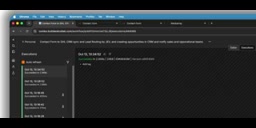
n8n is an open-source workflow automation tool, positioned similarly to Zapier or Make, but with support for self-hosting, code nodes, and more complex conditional branching. It orchestrates API calls to different services into a single flow by chaining "nodes" together: trigger nodes listen for events (such as form submissions, webhooks, or scheduled tasks), middle nodes handle data processing, conditional logic, and external system calls, and a final action node wraps things up. n8n's core advantage lies in combining visual orchestration with programmability — simple logic can be done by dragging and dropping in the graphical interface, while complex logic can be handled by inserting JavaScript or Python code nodes. For small and mid-sized teams, self-hosting means data doesn't have to flow through third-party SaaS, so sensitive data like leads that contain personal information can stay on your own servers.
GoHighLevel (GHL for short) is an all-in-one CRM platform for marketing agencies and resellers, bundling contact management, sales pipelines, forms, calendars, SMS and email marketing into a single system. Its data model is centered on "contacts," and each contact can be associated with multiple "opportunities." Opportunities further belong to different "pipelines," and opportunities within a pipeline progress through stages. This structure is ideal for lead distribution scenarios: sales leads and partner leads can be placed in different pipelines, and each team only needs to view the pipeline they're responsible for. GHL also provides a complete API that allows external systems to create contacts, query opportunities, and update fields — which is exactly what makes it integrable with n8n.
Key Component 1: Contact Deduplication and Opportunity Deduplication
This workflow has two "anti-duplication" designs that deserve special mention.
At the contact level: Every time a new lead comes in, the system first searches GoHighLevel by email address. If the contact already exists, the creation step is skipped; if not, a new contact record is automatically created. The benefit is that the same customer submitting the form multiple times won't generate multiple duplicate records in the CRM.
At the opportunity level: Before creating an opportunity, the workflow also checks whether the contact already has an opportunity in the corresponding pipeline. The creator specifically demonstrated this logic when showing the second lead — since the contact already existed and had an active opportunity, the system automatically skipped opportunity creation, but the AI routing decision still executed normally.

This deduplication logic looks simple, but it's crucial in real business operations. When sales pipelines are flooded with duplicate opportunities, it becomes very difficult for teams to assess the true funnel conversion situation.
In CRM practice, deduplication is typically handled at two levels. At the contact level, matching relies on unique identifiers (email, phone number, or external ID), and most CRMs provide Upsert semantics — update if exists, create if not — to avoid race conditions between "check first, then create." At the opportunity level, deduplication relies more on business rules: whether the same contact can have multiple active opportunities in the same pipeline varies from team to team. Some teams allow one per product line, while others require only one open opportunity at a time.
The approach described here queries before entering the creation node — a "read-then-write" pattern that is logical and easy to debug, but theoretically carries a risk of duplicate creation under high-concurrency scenarios. A more robust implementation would set uniqueness constraints on the CRM side or use idempotency keys, letting the system enforce it at the data layer. Additionally, deduplication should not only check "whether it already exists" but also consider the opportunity's stage status: closed opportunities typically shouldn't block the creation of new ones, otherwise returning-customer leads would be mistakenly flagged as duplicates.
Key Component 2: Prompt Design for AI Classification Routing
The most interesting part of the entire system is letting AI make the lead classification decision. The creator showed the specific Prompt structure in the video: provide the AI with an ICP (Ideal Customer Profile) description, the lead's name and related information, then ask the AI to choose one of three options — sales team, partner team, or ignore.

The routing type is set to "choice," meaning the AI can only select from predefined options, reducing the risk of uncontrollable output formats. This design approach is worth adopting: rather than letting AI freely generate, narrow the decision space to a few explicit options.
Why make "ignore" a formal option? This actually reflects a pragmatic business judgment — not every lead is worth pursuing. Some submissions clearly don't match the ICP, and rather than having the sales team waste time filtering them out, it's better to filter at the entry point.
ICP (Ideal Customer Profile) is a structured description of "the type of customer most worth investing sales resources in," typically including dimensions such as industry, company size, revenue range, geographic location, tech stack, procurement budget, and typical pain points. It's the core basis for prioritizing resource allocation in B2B sales: leads that match the ICP go to the direct sales team for deep engagement, borderline matches can be routed to partners or self-service conversion paths, and clear mismatches are simply dropped.
In an AI routing scenario, the ICP description is actually the most critical piece of context in the Prompt. The AI itself doesn't understand your business boundaries — it can only judge based on the criteria you provide, so the more specific and quantifiable the ICP, the more stable the model's classification results. For example, writing "B2B SaaS companies with 50-500 employees, located in North America, already using Salesforce or HubSpot" is far more reliable than vaguely writing "mid-to-large enterprises." Conversely, when the ICP description is vague, the same type of lead may be routed differently at different times, making distribution results non-reproducible.
In LLM API calls, structured output capability is the prerequisite for integrating AI into automated workflows. If the model returns free-form text, downstream nodes must parse it with regular expressions, and any slight wording variation will cause parsing failures. To address this, major model providers offer several constraint mechanisms: first, JSON Schema or JSON Mode, which requires the model to output strictly according to a given structure; second, Function Calling or tool calling, which defines selectable outcomes as function parameters; third, structured output parsers in frameworks like LangChain.
Limiting routing results to three enumerated values — "sales team / partner team / ignore" — essentially transforms an open-ended generation problem into a closed classification problem. This narrowing brings two benefits: outputs can be directly consumed by n8n's conditional branch nodes without additional cleaning; and behavioral differences across different models and versions are greatly reduced, making the entire workflow more predictable. The trade-off is reduced flexibility — once the business needs to add a new routing option (such as "nurture pool"), you must go back and update both the Prompt and the branching logic in sync.
Key Component 3: Generating Separate Slack Notifications per Team
After routing is complete, the system follows different branches based on the result. Sales leads enter the sales pipeline, partner leads enter the partner pipeline, and the structure of both branches is essentially the same: find opportunity, check status, create opportunity, send notification.
There's a detail in the Slack notification step: the system generates different message formats for different teams, rather than sending one generic notification. The creator mentioned in the demo that AI first generates a formatted Slack message content, then fills this generated message into the Slack node's message text field, and finally sends it to the corresponding channel.
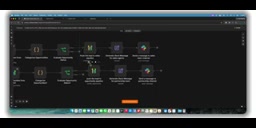
This means the notification the sales team sees differs from what the partner team sees in terms of wording and highlighted information. Although the underlying lead data is the same, the presentation is adapted to the recipient's role.
Actual Performance and Results
The creator demonstrated the complete workflow with two sample leads.
After the first lead was submitted, the workflow executed successfully, an opportunity record was automatically created in GoHighLevel under the marketing pipeline, and the corresponding notification was received in the Slack channel.
After the second lead was submitted, the workflow completed execution within 1.5 seconds. Since the contact's opportunity already existed, the system skipped the opportunity creation step, but the AI routing decision still executed accurately.
In terms of execution time, this workflow — which includes multiple API calls and one AI inference — completes end-to-end in under 1.5 seconds, which is more than sufficient for lead distribution scenarios.
Who This Solution Is For
If you're using GoHighLevel as your CRM and facing problems with inefficient lead sorting and inconsistent criteria, this n8n + AI combination is worth referencing. Its advantage is that it doesn't depend on industry-specific lead characteristics — routing criteria are entirely defined by you through the Prompt and ICP description.
A few points to keep in mind in practice:
- The quality of the ICP description directly determines AI routing accuracy. The more specific you write it, the closer the AI's judgment will be to your expectations
- The "ignore" option should be introduced cautiously. If filtering is too aggressive, you might miss borderline but valuable leads
- Keep the deduplication logic. Although it adds more nodes, it significantly improves CRM data quality
- Slack notification templates can be continuously iterated based on team feedback, making each notification truly actionable
One-line Summary
An automated lead classification and distribution pipeline built with n8n, GoHighLevel, and AI that completes in under 1.5 seconds.
Paragraph Summary
This article introduces an automated sales lead distribution solution demonstrated by a Bilibili creator, with a tech stack of n8n for orchestration, GoHighLevel as the CRM backbone, and LLMs for classification decisions. The entire chain is triggered by form submission and sequentially performs email validation, CRM contact deduplication and creation, AI routing of leads into sales team, partner team, or ignore based on ICP and routing criteria, opportunity creation in the corresponding pipeline, and finally generating differentiated Slack notifications. The solution includes two layers of deduplication — contacts and opportunities — and in the demo, the second lead automatically skipped creation because the opportunity already existed. AI routing uses a choice-type Prompt, narrowing decisions to three enumerated values to reduce the risk of uncontrollable output. End-to-end execution time is under 1.5 seconds, making it suitable for teams using GoHighLevel as their CRM and struggling with inefficient lead sorting.
Related articles

Gemini 4 Argon Hands-On: AI Builds Board Games, Constructs Temples, and Trains Robots Autonomously
Gemini 4 Argon hands-on roundup: AI autonomously builds a desk racetrack and temple in Blender, writes a ray tracing engine, trains a humanoid robot to sink 7 shots, plus API pricing and developer access.

The Magic Octagonal Coin: Why Only 9% of People Can Predict Its Flip?
Only 9% of people can correctly predict the Magic Octagon coin flip. This article explains its spatial rotation mechanism, common cognitive pitfalls, and a new hypothesis based on Relevance Theory, exploring the limits of human spatial reasoning.

Sam Altman: AI Is Entering the Era of Scientific Discovery — Math Breakthroughs Will Replicate in Biology and Energy
Sam Altman says AI is entering the era of scientific discovery — math breakthroughs will replicate in biology, materials science, and energy to help develop new drugs and energy sources.