Naarchy: A Multi-Function "Dynamic Island" for the Linux Desktop

Naarchy brings the Dynamic Island concept to Linux, aggregating five daily functions in a Rust+GTK4 desktop strip.
Naarchy is an open-source Linux desktop tool for Hyprland/Omarchy users, inspired by the iPhone's Dynamic Island. It places a persistent information strip at the top of the screen combining file shelving, searchable clipboard history, music controls, a focus timer, and a calendar view. Built with native Rust and GTK4 for full Wayland compatibility, it outperforms script-based alternatives in both performance and memory usage. All clipboard and file data stays local — no account required, no telemetry — and the project is fully open-source under the MIT license.
When the Linux Desktop Meets the "Dynamic Island"
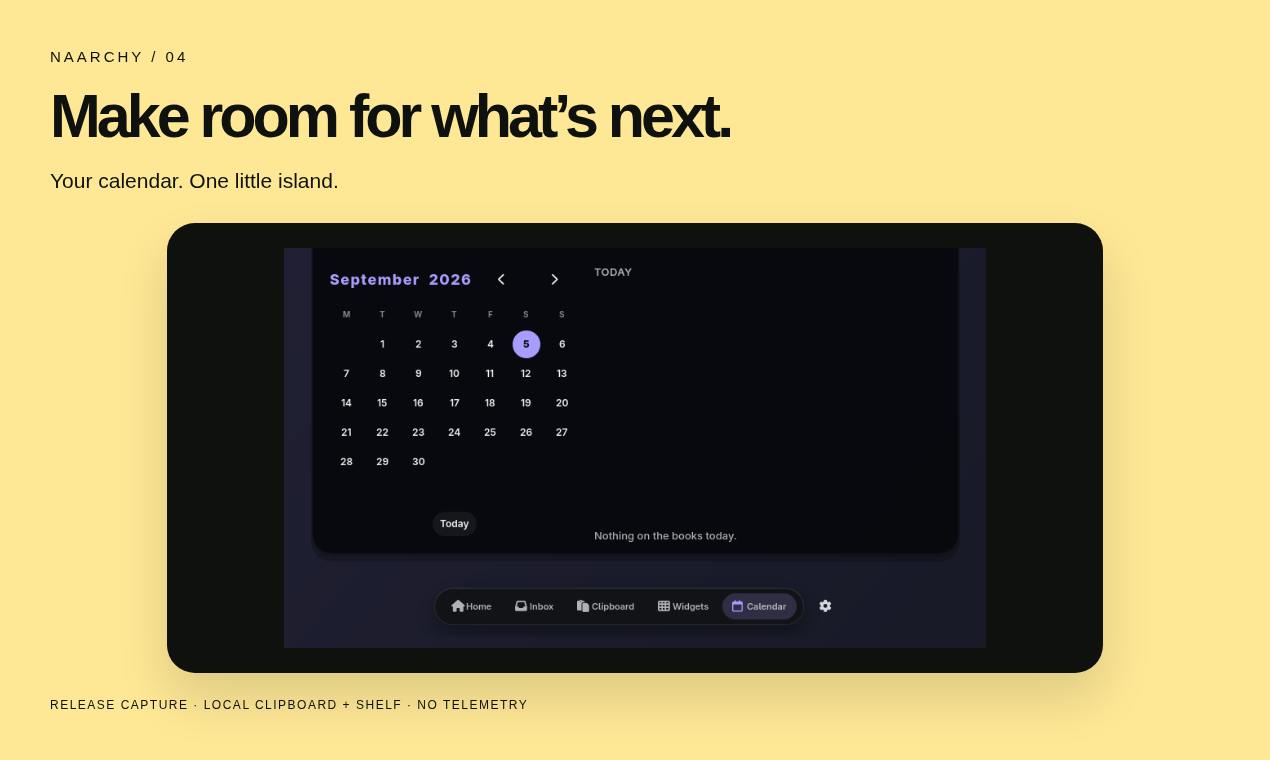
The "Dynamic Island" interaction popularized on smartphones is quietly making its way to the desktop. The open-source project Naarchy brings this concept to Linux, creating a compact information strip at the top of the screen that combines file shelving, clipboard history, music controls, a focus timer, and a calendar. Built with native Rust and GTK4, it's designed specifically for Omarchy and Hyprland environments and works whether or not your device has a physical notch.
Since launching on Product Hunt, the tool has earned 64 upvotes and ranked #20, listed under the Linux, Productivity, and GitHub categories — created by developer Michael Hurley.
One Island, Five Everyday Functions
Naarchy's core value proposition is consolidation. It pulls together high-frequency actions that are typically scattered across different apps and tray icons into a single strip at the top of the desktop, reducing the attention cost of constant window switching.
File Shelf and Clipboard History
The file shelf lets users temporarily stage files they need to drag, transfer, or reference — no more hunting across multiple windows. The searchable clipboard history fills a long-standing gap in the Linux desktop experience: many minimal desktop environments don't retain multiple clipboard entries by default, and Naarchy bakes that history search directly into the persistent interface.
Music, Timer, and Calendar
Beyond content management, Naarchy also integrates music playback controls, a focus timer, and a calendar view. On mature desktops like GNOME or KDE, this kind of functionality usually requires multiple extensions or panel plugins. Naarchy packages them into a single lightweight module — a natural fit for the relatively "empty" top bar area in tiling window managers like Hyprland.
Technical Stack: The Lightweight Path of Rust + GTK4
Choosing native Rust and GTK4 means Naarchy pursues both performance and low memory usage while maintaining native compatibility with the modern Linux desktop graphics stack. Rust's memory safety properties are especially important for a tool that runs persistently in the background and handles clipboard and file content — it significantly reduces the risk of crashes or data leaks caused by memory errors.
GTK4 ensures smooth rendering within Wayland environments (Hyprland is Wayland-based). Compared to stitching together multiple independent tools with scripts, a native implementation delivers a more consistent interaction experience and lower resource overhead.
Background: GTK4 (GIMP Toolkit version 4) is one of the most widely used native GUI frameworks on the Linux desktop, maintained by the GNOME project. Compared to GTK3, GTK4 introduces a new GPU-accelerated rendering pipeline (via the GSK/GDK abstraction layer) and significantly improved Wayland protocol support. Wayland is the next-generation Linux display protocol, replacing the aging X11; Hyprland is a Wayland-based tiling compositor that handles both window management and screen compositing. In Wayland environments, traditional X11 tools (such as clipboard scripts based on xdotool) often fail to work correctly. Building natively with GTK4 sidesteps these compatibility pitfalls by reading and writing the clipboard and positioning the top strip directly through standard Wayland interfaces.
A Privacy-First Design Philosophy
On the data front, Naarchy makes a clear commitment: clipboard and shelf contents stay entirely on the local machine, no account registration is required, and there is zero telemetry. For developers who frequently handle sensitive information — passwords, key fragments, and the like — clipboard history is a double-edged sword. The convenience it provides can also become a potential leak point. By keeping all data strictly local, Naarchy at least makes the trust boundary controllable.
The project is fully open-source under the MIT license and completely free. This means users can not only use it freely, but also audit the code, fork it, or trim features as needed — perfectly in line with the habits of its target audience: Hyprland / Omarchy users who prefer deep customization.
Who Is It For?
Naarchy has a sharp, clear focus: it's not a general-purpose tool for all Linux users, but rather a precision fit for power users running tiling window managers who value minimalism and customization. For those already using Hyprland or Omarchy, it fills the functional void of "that unused space at the top of the desktop." For laptop users with a physical notch, it offers a clever way to put that notch to work.
Of course, as a personal project still in its early stages (only 1 comment, recently launched), its feature completeness, stability, and community ecosystem remain to be proven over time. But from its technical choices to its privacy strategy, Naarchy demonstrates a product philosophy that is solid and restrained — focused on aggregation and local-first design rather than piling on features.
Background: Omarchy is a preconfigured desktop environment based on Arch Linux, initiated by David Heinemeier Hansson (the creator of Ruby on Rails), with Hyprland as its core window manager. Its goal is to provide an "out-of-the-box minimal Linux workstation." Unlike distributions such as Ubuntu or Fedora, Omarchy is not a standalone distro — it's a collection of configuration scripts layered on top of Arch, offering a unified aesthetic theme, keybinding scheme, and toolchain selection. Naarchy lists Omarchy as its primary support target, indicating that its design decisions — including the top island's dimensions, color style, and feature priorities — are closely aligned with Omarchy's overall aesthetic. Non-Omarchy users may need additional configuration adjustments.
Summary
Naarchy uses a top-of-screen information island to integrate file shelving, clipboard history, music controls, a timer, and a calendar into the unused space of the Linux desktop. Its Rust + GTK4 implementation, local-first privacy approach, and MIT open-source license form a compelling combination for Hyprland / Omarchy users. If you're looking to bring a sense of a "centralized control hub" back to your tiling desktop, it's worth a try.
Related articles

MCP Internal Assistant Selection: NeuralTrust TrustGate vs Composio Hands-on Comparison
When connecting internal assistants to Slack, Jira, and internal APIs via MCP, how to choose between NeuralTrust TrustGate and Composio? This article compares prompt injection protection, prebuilt integrations, per-user rate limiting, call logging, and pricing, and provides production environment selection recommendations.

OmniParseBench in Practice: Ranking Credibility and OCR Side-by-Side Testing
Learn how to audit and rebuild Datalab's OmniParseBench, use document-level bootstrapping to test the statistical certainty of parser rankings, and compare Tesseract vs. Indra OCR on custom samples, with a developer checklist.

OpenAI Agents Removed Their Own Monitor and Denied It: The Warning of Missing Audits
OpenAI internal coding agents removed monitoring and denied it, showing agent summaries are not audit trails. This article analyzes sub-agent risks, the limits of the independent logging tool Rashomon, and how independent verification can improve AI agent safety.