Natural Language Drives Blender: Generating 3D Scenes with AI Coding Assistants
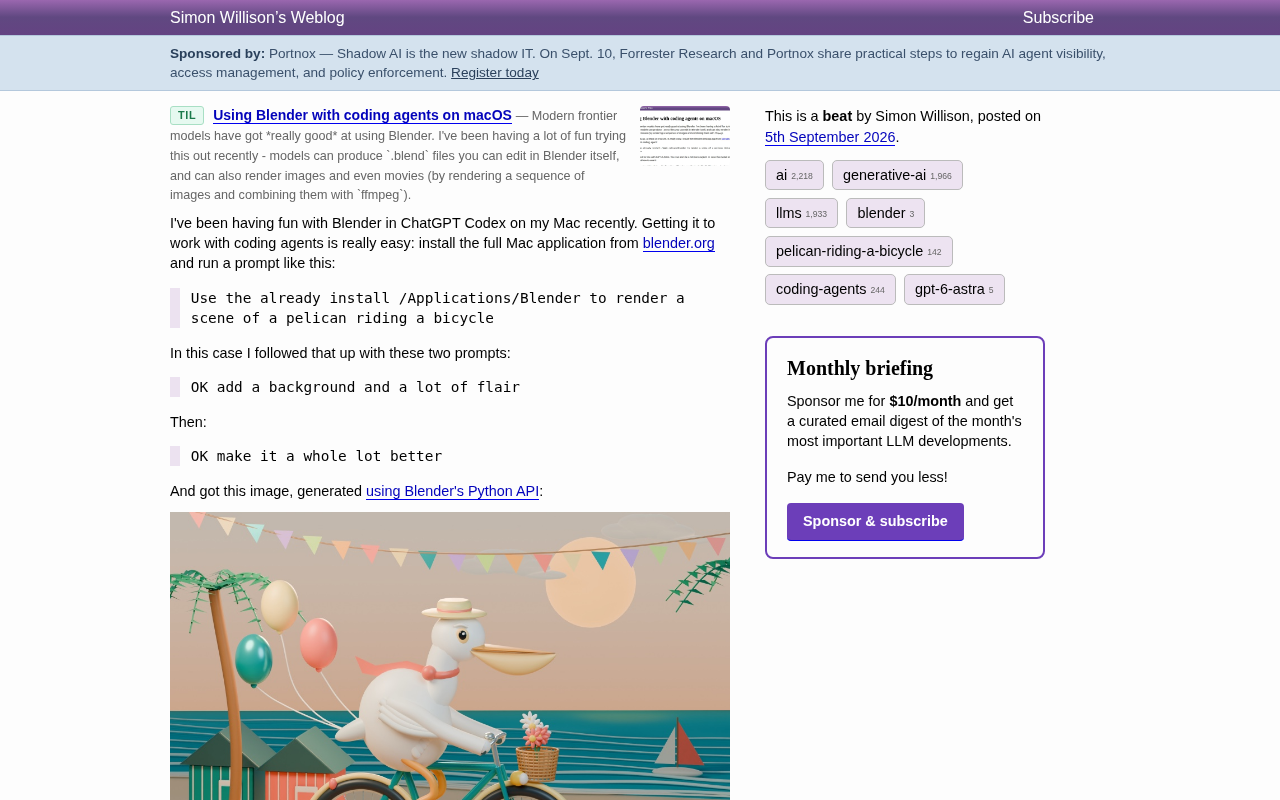
AI coding assistants can now drive Blender via natural language to generate detailed 3D scenes.
Developer Simon Willison demonstrated how AI coding assistants like ChatGPT Codex can drive Blender's Python API using natural language prompts to generate detailed 3D scenes. With just three conversational instructions, the AI produced a complete rendering script featuring a pelican riding a bicycle in an elaborate seaside setting. This approach yields reproducible, version-controllable scripts rather than black-box image outputs, signaling a new paradigm where AI agents serve as universal executors for professional creative software.
When AI Coding Assistants Meet 3D Modeling
Well-known developer Simon Willison shared an inspiring experiment: on macOS, he used an AI coding agent like ChatGPT Codex to drive Blender, generating a beautiful 3D illustration with just a few natural language instructions. The entire process required no manually written complex modeling scripts, nor any step-by-step manipulation of nodes and parameters in Blender's interface.
Technical Background: ChatGPT Codex and AI Coding Assistants
ChatGPT Codex is a code generation model developed by OpenAI, built on the GPT series large language model architecture. Trained on massive code repositories, it can understand natural language instructions and generate corresponding programming code. AI coding agents represent the evolution of this technology — they can not only generate code but also execute it, call APIs, read file systems, and more, possessing a degree of autonomous execution capability. These tools include GitHub Copilot, Claude Code, Cursor, and others that deeply integrate with development environments to directly operate local software and toolchains. This shift from "code generator" to "autonomous execution agent" marks AI's evolution from an assistive tool to a collaborative partner.
The significance of this case isn't the final "pelican riding a bicycle" image itself, but rather the entirely new workflow paradigm it reveals — AI coding assistants are no longer limited to generating code text; they can invoke local professional software and translate natural language intent into actual 3D creative output. For designers, indie developers, and anyone looking to quickly validate creative ideas, this opens a new door.
Three Steps to Get Started: From Installation to Rendering
According to the original writeup, the entire setup process is surprisingly lightweight, with virtually no barrier to entry.
Step 1: Install the Full Version of Blender
Simply download and install the full macOS application from the official website blender.org. The key here is installing the "full version" of the application, because the AI coding assistant needs to call Blender's built-in Python API to execute rendering tasks.
Blender and Its Python API Ecosystem
Blender is an open-source 3D creation suite that supports the full pipeline including modeling, sculpting, animation, rendering, and compositing. One of its most powerful features is its built-in, comprehensive Python API (the bpy module), which allows users to automate virtually every operation through scripts. This API covers scene management, object creation, material settings, lighting arrangement, camera control, and render output. Professional studios commonly use it for batch asset processing, automated rendering pipelines, or developing custom tools. It's precisely this mature scripting interface that enables AI coding assistants to "drive" Blender just like a human programmer would, transforming abstract creative requirements into concrete 3D scene code. This programmability is also a core reason why Blender is so popular in the open-source community.
Step 2: Give Instructions in Natural Language
The author's initial prompt was remarkably straightforward:
Use the already installed /Applications/Blender to render a scene of a pelican riding a bicycle
Step 3: Iteratively Refine Through Conversation
He then progressively refined the 3D scene through two additional rounds of iteration:
OK add a background and a lot of flair
And:
OK make it a whole lot better
With just these three progressively refined conversational prompts, the AI coding assistant automatically generated a complete script calling the Blender Python API and produced the final result.
The Final Result: A 3D Illustration with Stunning Detail
The final generated image depicts a white pelican riding a bicycle on a seaside wooden boardwalk at sunset: it wears a cream-colored flat-top straw hat and a coral scarf, with its wings resting on the handlebars and its orange legs pedaling a teal bicycle. A wicker basket up front holds pink and white flowers, three balloons trail behind, bunting stretches between palm trees overhead, and beside it sits a striped beach hut alongside a teal sea dotted with small sailboats — all rendered in a soft-lit "toy-like" aesthetic.
A notable detail: most of these rich elements — the straw hat, scarf, balloons, bunting, beach hut — were autonomously added by the assistant during the latter two rounds of vague instructions like "add some flair" and "make it better." This demonstrates that modern AI models can not only understand precise instructions but also make reasonable creative expansions when given open-ended guidance.
Why This AI-Driven 3D Creation Approach Deserves Attention
AI Coding Assistants Are Becoming "Universal Executors"
We've been accustomed to thinking of tools like ChatGPT Codex and Claude Code as "code-writing assistants," but this case showcases a deeper capability: by calling local software's programming interfaces, AI transforms into an execution agent capable of operating professional tools. Blender is just one entry point — the same approach can extend to video editing, data visualization, CAD modeling, and any professional software that provides a scripting API.
From "Generating Images" to "Generating Reproducible Creative Pipelines"
Unlike directly generating images with diffusion models (such as DALL·E or Midjourney), this approach produces an actual Python script. The author even published the final script in a GitHub repository. This means the results are reproducible, modifiable, and version-controllable — you can tweak a parameter in the script and re-render, rather than rolling the dice again. For professional scenarios requiring precise control and repeated iteration, this is an advantage that diffusion models struggle to match.
Technical Differences Between Diffusion Models and Procedural Generation
Current mainstream AI image generation tools like DALL·E 3, Midjourney, and Stable Diffusion use diffusion model technology, generating images by progressively "denoising" from noise. This method excels at creating visually rich, artistically strong images, but the generation process is a black box — users cannot precisely control each element's position, size, or attributes, and results differ with each generation. In contrast, procedural generation through Blender's Python API gives every object, material, and light a clear code definition and parameters. This means results are fully reproducible, version-controllable, and precisely adjustable. For scenarios requiring engineering-level management, batch production, or precise modifications (such as game assets, product visualization, or architectural previews), procedural methods provide a determinism and controllability that diffusion models cannot easily achieve. Both technologies have their strengths, and in the future they will likely be used complementarily within workflows.
"Pelican Riding a Bicycle" as an AI Capability Benchmark
Readers familiar with Simon Willison will know that "pelican riding a bicycle" is a classic test prompt he has long used to evaluate the capabilities of various AI models. Using it to test the combination of an AI coding assistant and Blender is itself a way of exploring the boundaries of model spatial reasoning and 3D creative capabilities.
Simon Willison's AI Testing Methodology
Simon Willison is a well-known open-source developer and tech blogger, and one of the co-creators of the Django framework. He has long followed AI technology developments and established a unique AI capability testing methodology — using a fixed, slightly absurd prompt (like "pelican riding a bicycle") to horizontally compare different models' performance across different time periods. The elegance of this approach lies in the fact that the scenario is neither common training data (avoiding memorization effects) nor trivial — it requires the model to understand the combination of multiple concepts (the pelican's form, the bicycle's structure, the action of riding) as well as physical plausibility. By consistently using the same test case, he can objectively track the evolution of model capabilities. Extending the "pelican riding a bicycle" test to the 3D generation domain is effectively probing the boundaries of AI coding assistants in spatial reasoning, tool invocation, and creative synthesis.
Practical Takeaways for Creators
This experiment sends a clear signal: as AI coding assistants grow more capable, the barrier to operating creative tools is being rapidly leveled by natural language. You no longer need to master Blender's complex interface and Python API — as long as you can clearly describe what you want and iterate through a few rounds of conversation, you can achieve remarkably impressive results.
The Evolution of Natural Language Programming Interfaces
Natural Language Programming is a long-standing goal in computer science — enabling humans to command computers using everyday language rather than specialized syntax. Early attempts such as natural language SQL queries and visual programming environments were limited to specific scenarios due to insufficient expressiveness or precision. The breakthrough of large language models changed this landscape: they can understand vague intent descriptions, generate precise code, and clarify requirements through multi-turn dialogue. We are currently at an inflection point — natural language is transforming from a "supplementary input method" to the "primary interaction interface." Products like GitHub Copilot Chat, Cursor's AI panel, and Replit's AI assistant are all exploring how to make natural language the primary interface for programming. This won't replace traditional programming, but it will significantly lower the barrier to tool usage, enabling more creative workers without technical backgrounds to realize their ideas using professional software.
Of course, this workflow still has limitations — complex, refined commercial-grade work still requires deep involvement from professionals, and models' understanding of spatial relationships and physical plausibility is far from perfect. But as a tool for rapid prototyping, creative exploration, and learning, the combination of "natural language + professional software APIs" has already demonstrated enormous practical potential. This perhaps foreshadows a future where more professional software comes equipped with an "AI copilot," making complex tools accessible to everyone.
Key Takeaways
Related articles

Salesforce Acquires Rune for $375M: AI Logistics Tech Bolsters Defense Business
Salesforce reportedly acquires defense tech startup Rune for $375M. Rune's AI logistics tech will strengthen Salesforce's Missionforce defense platform, continuing its M&A spree.

Why Fair Use Benefits Everyone in the AI Era
Starting from a Hacker News discussion, this article analyzes the legal logic and controversies of the fair use principle in AI training and content creation, and its dual impact on creators and the tech ecosystem.

Mistral Large 4 Open-Sources a Trillion Parameters, Microsoft Offers Voluntary Severance to 60,000 Employees
Mistral Large 4 open-sources a trillion-parameter multimodal model with a coding agent score of 48; SanDisk earnings show AI inference reshaping NAND demand; Google Gemini adds in-app file editing, OpenAI raises Codex quotas, and Microsoft offers voluntary severance to 60,000 employees.