Next.js Project Structure Explained: A Complete Guide to Configuration Files and Directories

A complete breakdown of Next.js project folder structure and configuration file roles
This article systematically explains the Next.js project folder structure, including script command differences in package.json (using dev instead of start for development), the highly integrated nature of core dependencies, and the responsibilities of ESLint, next.config.js, PostCSS, and Tailwind configuration files. It highlights the file-system-based routing mechanism in the src/app directory, embodying the "Convention over Configuration" design philosophy.
Introduction
After creating a Next.js project, understanding its folder structure is the first step toward efficient development. As the third part of the Next.js Quick Start series, this article provides a detailed breakdown of each configuration file and directory in the project, helping developers transitioning from React to Next.js quickly build a mental model of the project structure.
package.json: The Core Configuration of a Next.js Project
package.json is the fundamental file for project information and dependency management, containing the project name, version number, script commands, and dependency list. For developers migrating from React projects, there's an important difference to note here.
Differences in Script Commands
In traditional React projects, we're used to running npm start to launch the development server. But in Next.js, you should use npm run dev to start development mode. The start command in Next.js is meant for production deployment — when you run a project on a deployment platform, the platform first executes build to compile the project, then uses the start command to launch the production server.
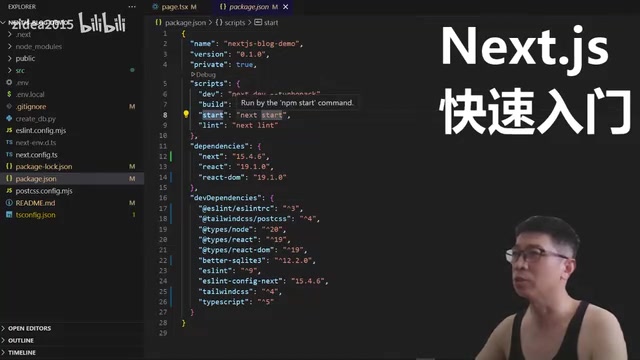
Next.js script responsibilities break down as follows:
dev: Local development and debugging with hot reload supportbuild: Build the production versionstart: Start the production serverlint: Code quality checks
Dependency Structure
The core dependencies of a Next.js project are remarkably minimal, mainly including:
next: The Next.js framework itself, with a vast amount of functionality bundled in this single packagereactandreact-dom: React's base runtime

It's worth noting that the high level of integration within the next package is the technical foundation of its "zero-config" experience. Internally, it already integrates Webpack for bundling (or the experimental Turbopack), the SWC compiler for TypeScript transpilation (written in Rust, dozens of times faster than traditional Babel), the Terser minification tool, and built-in CSS Modules support. Version compatibility of these tools is managed uniformly by the framework, so developers don't need to manually maintain complex toolchain dependency relationships. In contrast, traditional Create React App projects manage these tools indirectly through react-scripts, offering less flexibility and more cumbersome upgrades.
In devDependencies, you'll typically find the following development dependencies:
tailwindcss: The Tailwind CSS framework for utility-first stylingpostcss: A CSS build tool — think of it as the Webpack of the CSS world, responsible for CSS transformation and optimizationtypescriptand related type definitions: Providing TypeScript support
Next.js Configuration Files Explained One by One
There are multiple configuration files in the project root directory, each serving a different purpose. Let's go through them one by one.
.eslintrc (ESLint Configuration)
ESLint is a static code analysis tool used to enforce code standards at the language and syntax structure level. In this file, you can:
- Configure various ESLint plugins
- Implement customized checking rules
- Enforce team-internal coding standards
ESLint's value goes beyond unifying code style — more importantly, it can detect potential logic errors and security vulnerabilities before code runs. In Next.js projects, the official eslint-config-next configuration package includes framework-specific checking rules — for example, detecting whether <img> tags should be replaced with Next.js's <Image> component, or whether <a> tags should be replaced with the <Link> component. These rules are directly tied to performance optimization practices, helping developers follow best practices during the coding phase. Combined with the npm run lint command in CI/CD pipelines, non-compliant commits can be automatically blocked before code merges — an essential line of defense for code quality in team collaboration projects.
next.config.js (Next.js Core Configuration)
This is the core configuration file for the Next.js framework. Throughout the project's build and management process, you can use it to customize various behaviors, such as:
- Configuring image domain whitelists
- Setting up redirects and rewrite rules
- Customizing Webpack configuration
- Configuring internationalization options

This file is extremely feature-rich — it's recommended to dive deeper into it when you encounter specific needs during actual development.
postcss.config.js
The PostCSS configuration file. PostCSS's relationship to CSS is similar to Webpack's relationship to JavaScript — it's a CSS processing toolchain responsible for CSS transformation, minification, adding browser prefixes, and more.
From a technical standpoint, PostCSS is essentially a CSS AST (Abstract Syntax Tree) processing platform: it parses CSS into a manipulable JavaScript object tree, allows plugins to read and modify it, and finally serializes it back into CSS text. This is highly similar to how Babel processes JavaScript. When Tailwind CSS runs as a PostCSS plugin, it scans class names across all files in the project and generates corresponding CSS rules on demand — this is the technical foundation that enables Tailwind to achieve extremely small production bundle sizes. Other common PostCSS plugins include autoprefixer (automatically adding browser vendor prefixes) and cssnano (CSS compression and optimization), which together form the CSS build pipeline for modern frontend projects.
tailwind.config.js
The Tailwind CSS configuration file, used to customize design system variables like theme colors, breakpoints, and spacing. If your project uses Tailwind CSS for styling, this file is the entry point for adjusting design specifications.
The src Directory: Your Core Development Workspace
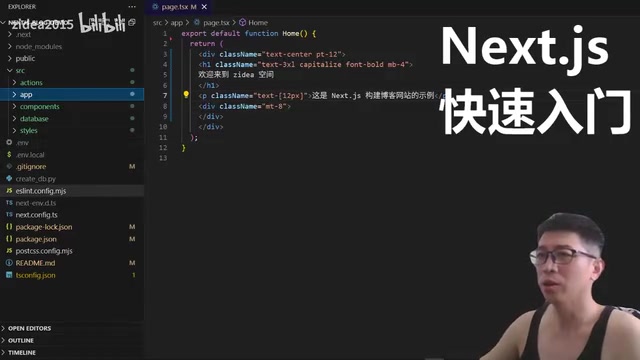
The src directory is where you'll spend most of your development time — virtually all business code writing and modifications happen within this directory. Under Next.js's App Router mode, the src/app directory uses a file-system-based routing mechanism, where directory structure directly maps to URL paths.
This design means you don't need to configure a separate routing table. Simply create files and folders following the conventions, and Next.js will automatically generate the corresponding page routes. This reflects the "Convention over Configuration" design philosophy — the framework provides sensible default behaviors for developers, and explicit configuration is only needed when deviating from those defaults. This concept was originally popularized by the Ruby on Rails framework, forming a stark contrast to the approach of early Java EE frameworks that required extensive XML configuration files.
It's worth mentioning that App Router is the next-generation routing architecture introduced in Next.js 13, built on React Server Components. Compared to the legacy Pages Router (pages/ directory), it offers more powerful capabilities: native support for Server Components, Streaming, Parallel Routes, and other advanced features, representing the future direction of Next.js. The file naming conventions are also richer — page.tsx automatically becomes a page component, layout.tsx automatically becomes a layout component, loading.tsx automatically becomes a loading state component — developers don't need to register any routing table, as the framework infers everything from the file system structure.
Regarding the specific internal structure of the src directory (such as layout.tsx, page.tsx, route groups, etc.), since there's a lot of content involved, it's recommended to dive deeper into each feature as you encounter it during actual development — this approach is more efficient for learning.
Summary
Next.js's project structure design follows the "Convention over Configuration" philosophy, with most configurations having sensible defaults. For beginners, focus on the following key points:
- Use
npm run devfor development, notnpm start - Core business code lives in the
srcdirectory
Related articles
 Tutorials
ChatGPT Plus Subscription Guide: Are GPT-5.5, image-2, and Codex Worth the Upgrade?
A detailed look at ChatGPT Plus features — GPT-5.5, image-2, and Codex — with a Plus vs Pro comparison and a complete step-by-step subscription guide for users outside the US.
 Tutorials
Harness AI Engineering in Practice: Using Claude Code to Master Enterprise-Level E-Commerce Development
Deep dive into Harness AI Engineering: master enterprise e-commerce development with Claude Code using the Rules, Skills, Wiki, and Changes framework.
 Tutorials
Cursor + Codex Dual-IDE Collaboration: A Practical Methodology for Open-Source Project Customization
A complete methodology for open-source project customization based on real-world experience, detailing the Cursor+Codex dual-IDE workflow, seven-stage process, MVP validation, and AI source code reading techniques.