Next UI MCP: Helping AI Agents Build ServiceNow UI Components Correctly

Next UI MCP gives AI agents the tools to correctly generate and deploy ServiceNow HDS components via MCP.
ServiceNow's Next Experience components are scarce in public training data, causing AI coding agents to generate non-compliant code. Next UI MCP is an MCP server that exposes 10 tools — covering HDS component lookup, live metadata validation, now-ui.json sync, and project scaffolding — turning deep tribal knowledge into callable runtime capabilities. The article follows a hands-on demo covering the full flow from an empty folder to three components (color-toggle, counter-card, random-accordion) live in UI Builder, and highlights how the MCP server handles tricky details like content slots in now-accordion-item.
ServiceNow's Next Experience components are poorly represented on the public internet, which causes AI coding agents to frequently generate incorrect code when working with them. To address this, a tool called Next UI MCP has emerged — an MCP server that gives AI coding agents the toolchain they need to reliably write code using ServiceNow's Horizon Design System (HDS) components.
This article breaks down a YouTube hands-on demo, walking through how to use this tool to go from an empty folder to three custom components running on a UI Builder page.
Why AI Agents Get ServiceNow Components Wrong
The root problem is a lack of training data. Next Experience components are extremely underrepresented in the public web, so AI models simply don't have enough reference material — and naturally generate non-compliant code. Making things worse, the component versions published to public NPM are roughly five years out of date. Some components (like now-accordion) aren't published to NPM at all, and those that are look and behave noticeably differently from what's actually running on a current ServiceNow instance.
Next UI MCP's value lies in bridging this gap. It gives AI agents four key capabilities: finding the right HDS components, validating code against live metadata from the instance, keeping code in sync with the now-ui.json manifest file, and scaffolding correct starter files in a modern way for deployment. In short, it takes the tacit knowledge that developers previously had to internalize deeply and packages it into tools that AI agents can call directly.
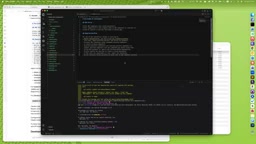
MCP (Model Context Protocol) is an open protocol proposed by Anthropic and now adopted by several AI coding tools. It establishes a standardized communication interface between large language models and external tools/data sources. An MCP server is essentially a collection of tools that an AI agent can dynamically discover and invoke at runtime — rather than relying solely on knowledge baked in during training, agents can actively query live information, perform actions, and receive structured feedback. This architecture is especially well-suited for tech stacks where training data is scarce but an authoritative documentation source exists. The ServiceNow instance itself is the most authoritative metadata source, and the MCP server acts as a bridge between the agent and the instance.
Horizon Design System (HDS) is ServiceNow's official component library for the Next Experience platform, including standardized UI components like buttons, cards, and accordions. One of HDS's design goals is theme inheritance — component styles are automatically derived from the ServiceNow instance's current theme, so when an admin updates the theme, all HDS-based interfaces update in sync. This is a capability that hand-rolled custom components struggle to replicate.
Environment Setup and Project Initialization
Getting started requires three things: the ServiceNow CLI (available on the developer site under Reference > Next Experience > CLI), Visual Studio Code with an AI coding agent installed (the demo uses GitHub Copilot, though Claude Code works too), and a ServiceNow instance with admin credentials — used both to discover HDS components on the instance and to deploy at the end.
Once the CLI is configured, you can view connected instances with snc configure profile list. Projects are created with the snc ui-component project command, which requires name and scope as mandatory parameters. The demo also uses the offline option — without it, the CLI connects to the instance to verify the scope exists, but if you've already confirmed the scope is unique, running offline is faster. The command automatically scaffolds a sample component.
Next come two critical configuration steps. First, add the Next UI MCP server to the project by adding the NPM package name along with environment variables like instance URL, admin username, and password to the mcp.json file. Second, configure the project instruction file agents.md (Claude Code users also need to create a claude.md that references it). This instruction file tells the coding agent when to use the MCP server and how strongly to prefer HDS components — for example, when given a UI mockup, should it strictly reproduce the design, or can it freely reach for an out-of-the-box now-card component?
Once credentials are configured and you click start, the MCP server pulls the package from NPM and discovers 10 available tools, all documented in the GitHub project's README.
now-ui.json is the core manifest file for ServiceNow Next Experience component projects, serving a role similar to a Web Component metadata registry. It declares the component's name, properties, actions, events, and presentation configuration within UI Builder. This file must stay in precise sync with the code implementation — if a component dispatches an event in code but it's not declared in now-ui.json, UI Builder won't be able to recognize that event for page editors to bind logic to. Manually maintaining this file is one of the most error-prone parts of Next Experience development, and Next UI MCP's automatic sync capability is designed specifically to address this pain point.
From Prompt to Running Component
The first component in the demo is called color-toggle: three buttons and a large color swatch. Clicking a button changes the swatch's background color. The default colors are red, green, and blue (modifiable via component properties), clicking a button dispatches an event containing the color information, and the button corresponding to the current color should be disabled until another color is selected.
After submitting the prompt, the agent requests permission to run several tools — confirm each one. The result is an index file and a styles file. Notably, the agent didn't invent its own button — it correctly called the HDS now-button component.
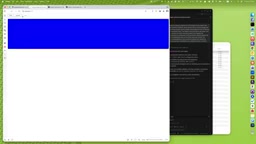
Running snc ui-component develop --fa (where --fa fetches assets from the instance) and visiting localhost:8081 lets you see the component in action. At this point, now-ui.json has been automatically populated with the color-toggle component, its properties, and action definitions, and it's registered in UI Builder.
The second component, counter-card, is simpler: a card with a button that increments a counter, starting from 1. It also works on the first run.
The real test for the AI is the third component, random-accordion: a component containing 10 accordion items, each corresponding to a number range (item 1 covers 1–10, item 5 covers 41–50, and so on up to 100). Each accordion item contains exactly three cards, each displaying a random number from that item's range. The agent checks the HDS component library and finds now-accordion, now-accordion-item, and now-card.
This is where the MCP server's deeper value shows itself: now-accordion-item requires a specific content slot for content to render correctly. Without using that slot, content won't display even if elements are genuinely nested inside. With the MCP server, the AI agent can detect which slots a component supports and place content accordingly — this is exactly the kind of detail that's very hard to get right from model knowledge alone.
Deploying to the Instance and Integrating with UI Builder
Once local components are ready, run snc ui-component deploy --fa to deploy. There's an important design choice here: all component assets are pulled directly from the ServiceNow instance rather than rebuilt locally. This ensures you're using the latest versions that actually work on the target instance, sidestepping the outdated NPM versions entirely.
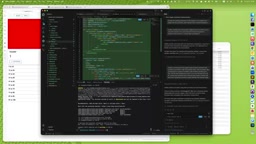
Iteration is equally smooth — modify local code and run deploy again. The tool intelligently creates, updates, or deletes the corresponding files on the instance (for example, if you remove a property or event, it cleans that up too). After deployment, you'll see a newly created custom-scoped application in the sys_app list, containing all 24 files including the UX component definition and macro component.
In UI Builder, these components are immediately searchable and can be added to pages. In the demo, the three components are placed in separate tabs. color-toggle exposes its defined color properties (you can change red to yellow) and the color-selected event. counter-card's increment button renders in the instance's theme styling — this is the core benefit of using HDS components: they automatically update their appearance to match the instance theme, which hardcoded custom buttons simply can't do.
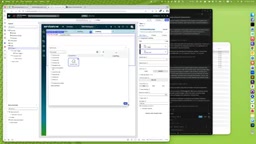
The demo wraps up with event handling: create a client state parameter named color, configure color-toggle to set it to the selected color whenever the color-selected event fires, then bind a text element to that state. As you switch colors, the text updates in real time to show green, blue, and so on — completing the full loop of component dispatching an event, the page listening and updating client state, and other components reacting to that state.
UI Builder is ServiceNow's low-code page editor running on the Next Experience framework, giving admins and developers a drag-and-drop interface for building Portal or Workspace pages. It is a completely separate system from the traditional ServiceNow Service Portal (which is based on AngularJS) and the two are incompatible with each other's components. UI Builder pages use "Experiences" as containers and share data at the page level through Client State Parameters. Communication between components relies on an event bus — components dispatch events, the page layer listens and updates state, and other components bind to that state to respond. The color-toggle and text binding demonstrated at the end of the article is a textbook example of this pattern.
Why This Tool Matters
The workflow of developing local components and integrating them into UI Builder — including manually authoring now-ui.json and other tedious steps — is not widely understood. Next UI MCP's real value is encapsulating all that deep specialist knowledge and letting AI coding agents handle it on your behalf. For ServiceNow developers, it lowers the barrier to Next Experience component development. It also provides a replicable example of how niche tech stacks can use MCP to improve AI agent reliability.
Related articles

Why Does the Tesla Roadster Need to Fly? A Deep Dive into Musk's Wild Demo
Tesla's Roadster launch showed wall-climbing, upside-down driving, and flying stunts—but The Vergecast notes the demo car may lack a battery, the Rocket version is invite-only and not street-legal, and the website terms don't guarantee delivery. After nine years of delays, why does this car still need to exist?

AI Is Not a Replacement: Human-AI Collaboration Through the Lens of Factory Root Cause Analysis
Starting from factory root cause analysis, this article explains how AI accelerates evidence chain construction rather than replacing human experts, exploring the pragmatic implementation logic and business value of 'AI supporting people rather than replacing them.'

AI Agent Decision Auditing: Building an Evidence Chain in Regulated Workflows
Starting from a Reddit discussion, this article analyzes three core issues in AI agent decision auditing within regulated workflows: what fields audit records should contain, how to handle feedback latency for erroneous decisions, and how to continuously calibrate LLM judge consistency with human judgment.