No-Code Guide to Claude Code: Building Your Personal AI Automation OS

Turn Claude Code into a no-code personal AI operating system using folders, sub-agents, and automated routines.
This guide shows non-technical users how to use Claude Code as a personal AI operating system — no programming required. By organizing work into structured folders with CLAUDE.md files, leveraging sub-agents for parallel tasks, connecting tools like Gmail and Google Calendar, and setting up automated daily routines, anyone can automate business workflows and even deploy a live website in minutes.
For most non-technical users, Claude Code has long been seen as a tool exclusively for developers. In reality, with the right workflows and file structure, anyone — even someone with zero programming experience — can turn Claude Code into a personal operating system capable of managing a business, automating daily tasks, and even deploying a live website. This article is based on a comprehensive hands-on tutorial by a seasoned AI content creator, distilling the core methodology from beginner to advanced.
What Claude Code Actually Is
Many people confuse Claude's three modes: Claude Chat, Claude Co-work, and Claude Code. The first two are essentially conversational assistants, while Claude Code's defining difference is its ability to directly read, write, and execute files in a local folder on your computer. That means it doesn't just answer questions — it can actually roll up its sleeves and get things done.
Technically speaking, Claude Code is an AI agent with Tool Use capabilities. Under the hood, it completes tasks by invoking shell commands, file system APIs, and Git — not merely generating text suggestions. This design pattern is known in AI circles as a "Code Agent" or "Autonomous Agent," representing a paradigm shift from advisory AI to executive AI. The AI is no longer a consultant standing beside you offering advice — it's a hands-on executor actually picking up the tools and doing the work.
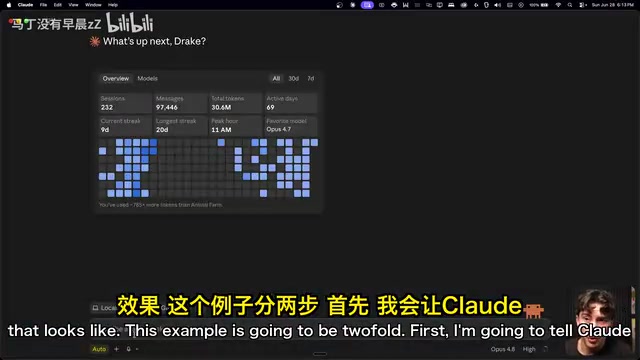
Note that Claude Code is not included in the free plan. You'll need at least a Pro subscription and the Claude desktop app, available at claude.com/download. Claude Code also depends on Git, a local version control tool. If you see a "Git is required" prompt when first launching it, head to git-scm.com to install it — you can simply ask Claude to guide you through the steps, and paste any error messages back for it to troubleshoot.
Git is the world's most widely used distributed version control system, created by Linux creator Linus Torvalds in 2005. Its core value lies in recording a "snapshot" of every file change, letting you roll back to any historical state at any time. Claude Code relies on Git for two key reasons: safety — every time the AI modifies files, it can create a commit (a saved record), allowing one-click rollback if something goes wrong — and as a bridge to cloud deployment. Hosting platforms like Netlify automatically trigger website updates by monitoring changes in a GitHub repository, a mechanism known as CI/CD (Continuous Integration/Continuous Deployment). For non-technical users, all you need to know is: Git is the AI's "safety net" and "conveyor belt" when operating on your files.
The Core Concept: The Folder as Your Unit of Work
Everything Claude Code does is rooted in a folder on your local machine. Think of each folder as a "project" or "environment" where Claude has read, write, and execute permissions. Create a new folder (e.g., name it CC playground), choose "Trust Workspace," and Claude can generate PDFs, Markdown files, images, and more within that directory. This design is the foundation for all the automation capabilities that follow.
Prompting Tips: Treat Claude Like an Assistant with Hands
The biggest difference from ordinary conversation is this: in Claude Code, you should give direct outcome-oriented commands, not ask how to do things.
For example. In Claude Chat you might ask, "How do I rename these files to lowercase?" But in Claude Code, you simply say, "Rename all the files in this folder to lowercase," and let it handle the rest. The tutorial's author demonstrated a great example: dropping six messily named YouTube thumbnail images into a folder, then instructing Claude to "rename each image with a single word that describes the emotion I'm showing in it." Claude read each image, assessed the emotion, and completed all the renaming in under 10 seconds — faster than clicking through them by hand.
Reference Files with @, Use Markdown as Memory
The @ symbol lets you precisely reference any file in your folder, just like tagging someone on social media. Claude reads the full contents of the referenced file as context. For instance, have it create a "business overview" Markdown document, then call it up anytime with @about-my-business.
It's worth understanding what Markdown (.md files) actually does here. Markdown was designed by John Gruber in 2004 — a format that uses a few simple symbols (# for headings, * for lists, ** for bold) to organize plain text, which can be automatically converted to HTML. It's the universal writing format across nearly every technical platform: GitHub, Notion, Reddit, and more. For AI systems, Markdown also has a unique technical advantage: its structured heading hierarchy naturally forms a semantic tree, helping language models parse document structure more efficiently and reducing token consumption. This is the technical reason Claude uses Markdown as its memory system and thinking framework. All the automation files going forward are also Markdown-based, so it's worth getting comfortable with it.
Powerful Slash Commands and Sub-Agents
Claude Code offers several useful slash commands:
/btw: Opens a side conversation during a long-running task without polluting the main context/goal: Sets a goal for Claude to keep working toward until the condition is met (recommended: add "stop after 100 attempts" to prevent infinite loops)/loop: Repeats a prompt at a fixed interval — for example, scanning your inbox every 30 minutes and drafting replies
Even more impressive are sub-agents. A single prompt can spin up multiple Claude instances working in parallel. For example: "Launch four sub-agents, each researching the history of one element and generating a separate Markdown file" — four agents run simultaneously in the background, completely independent of each other.
The technology behind sub-agents comes from the AI field's Multi-Agent System (MAS) architecture. Traditional LLMs are limited by a single context window, making them inefficient at large-scale parallel tasks. Multi-agent architectures break complex tasks into independent subtasks, distribute them to different "worker agents" for parallel execution, and have a "coordinator agent" aggregate the results — similar in spirit to OpenAI's Swarm framework and Microsoft's AutoGen project, making it one of the most active research directions in AI engineering since 2024. The core advantage is compressing task execution time from a serial N×t down to roughly a single t — extremely efficient for use cases like competitive research across multiple players or bulk content production.
Building Your "Claude OS"
As files multiply, organization becomes the biggest challenge. If your folder is a chaotic mess, Claude has to dig through clutter every time, and performance degrades sharply. The key to going advanced is organizing your life or business into a folder structure that Claude can navigate efficiently.

Two Core Files: CLAUDE.md and the Context Folder
The core approach is simple: every folder should contain two things:
- CLAUDE.md: An instruction file that Claude automatically reads every time it enters that folder — think of it as the "chief of staff manual." It explains what this folder is, what role Claude plays here, and how content is organized. Keep it short; it points the way without storing actual knowledge.
- context folder: Where real knowledge lives — your notes, tone of voice, data, processes — all stored as Markdown files.
The design philosophy behind CLAUDE.md maps to an emerging specialty in AI engineering called Context Engineering. Unlike prompt engineering, which focuses on optimizing instructions for a single conversation, context engineering is about systematically managing, compressing, and injecting the background information AI needs across an entire workflow. CLAUDE.md acts as a persistent "system prompt" that gets automatically injected at the start of every session, so the AI never needs to "warm up" again. This pattern aligns closely with the software engineering philosophy of "Convention over Configuration" — reducing repetitive cognitive overhead through predefined structure.
With this setup, each folder functions like a mini-agent. When Claude enters the "Marketing" folder, it automatically reads that folder's CLAUDE.md and switches to the persona and context of a marketing expert. When it enters "Finance," it becomes a different role. You never have to repeatedly tell it, "You are now my marketing specialist."
A single prompt can generate the complete structure: set Claude up as your chief of staff, tell it this system is for your business, the domains you care about (marketing/finance/product), and your current North Star goal (e.g., "grow community to 1,000 members"). Claude will automatically create the top-level folders, CLAUDE.md, and north-star.md — so your entire operation runs from one folder. All work is aligned to your goals and real data, rather than aimless conversation.
Connecting Tools: Let Claude Act on Your Behalf
Local context alone isn't enough. Through the sidebar's Customize → Connectors, you can connect Gmail, Google Calendar, Notion, Slack, GitHub, and many more third-party tools. Once connected, Claude can not only read information but also make decisions within those tools on your behalf.
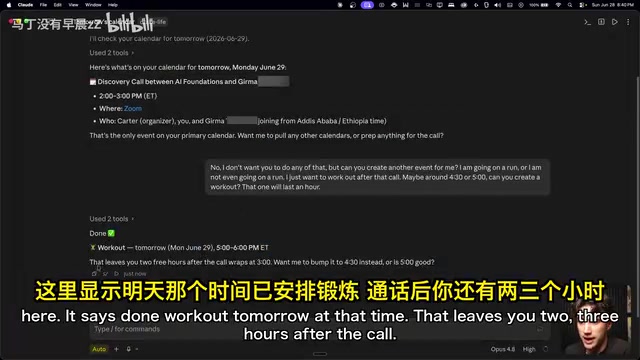
Permission control is granular. Each tool distinguishes between "read tools" and "write tools." For write operations (such as creating or deleting calendar events), you can choose from three permission levels: execute without approval, require your approval, or completely disallow. For example, you might allow it to automatically create calendar events, but require your sign-off before deleting any.
The results are immediately practical: ask "What's on my calendar tomorrow?" and Claude pulls your schedule and proactively asks if you want to prep for an upcoming call. Then in one sentence, tell it to "add a one-hour workout after the call" and Claude creates the event directly in your calendar. With vidIQ connected, it can also pull live YouTube channel data and organize it into a marketing context document stored in your folder.
Building Skills and Automated Routines
What truly sets Claude Code apart from Chat and Co-work is routines — automated workflows that run on a schedule, around the clock.
A single sentence can create a "daily briefing" automation: pull Google Calendar events + yesterday's YouTube data, and generate a brand operations summary. Claude invokes its built-in skill creator, asks when to run it (e.g., 6 AM) and how to deliver it (chat output or email), then generates a SKILL.md file — containing a name, description, and step-by-step instructions. This is essentially a prompt template that gets automatically injected every morning.
Once created, the routine appears in the routines list and runs on schedule every day (as long as your computer is awake). The briefing also automatically checks your progress against your North Star goal, assessing whether the day's schedule supports hitting your target. For truly always-on automation that runs even when your computer is off, you'll need to connect a GitHub repository so the routines execute on a cloud server.
Deploying a Website from Scratch
The tutorial wraps up by showing how a non-technical user can publish a website to the internet. Netlify is the recommended hosting platform (the free plan is sufficient), and it works smoothly with Claude Code.
Netlify is a key driver of the "JAMstack" architecture. JAMstack (JavaScript, API, Markup) is a modern web architecture that fully decouples the frontend from the backend. The resulting websites are essentially static files (HTML/CSS/JS) distributed globally via CDN, with no traditional server to maintain. This means hosting costs are extremely low (Netlify's free tier supports personal websites) and performance is excellent. For non-technical users, the most tangible benefit is this: no server bills to worry about, and virtually zero maintenance once the site is live.
The overall process breaks down as:
- Create a separate project folder (e.g.,
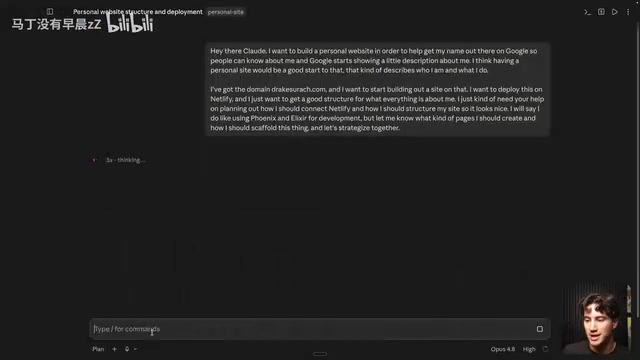
personal-site), isolated from your business OS folder - Enter plan mode and "ramble" your ideas to Claude, letting it work out a plan with you
- Claude will flag technical constraints (e.g., "The Phoenix framework can't be hosted on Netlify") and recommend viable alternatives (switching to Astro) — you don't need to understand any of these terms; this demonstrates an AI agent's ability to reason about solutions within technical feasibility constraints
- Export a brand design package using the Claude Design system, drag it into the conversation, and the site's style becomes polished and professional
- Have Claude "open locally" to preview the result; when satisfied, tell it to "deploy" and it will guide you step-by-step through connecting GitHub and Netlify
GitHub serves as the central code repository here — Claude edits, Netlify deploys, and both read from it, forming a complete modern CI/CD (Continuous Integration/Continuous Deployment) pipeline. The entire process takes just two prompts and about three minutes to get a personal website live on the internet.
The Key Is Mastering the Tools, Not Coding
The most transformative insight in this methodology is: it replaces the barrier of "knowing how to code" with "knowing how to organize folder structures" and "knowing how to give the right instructions". You only need to set up your workspace once, connect the tools you want to use, and then it's just a matter of telling Claude Code what to automate and what to build.
Of course, getting a site deployed isn't a one-prompt magic trick — it's an iterative process. But as the original author put it: "The hardest thing nowadays is just knowing which tools to use. Once you figure that out, building these things becomes simple." For anyone looking to leverage AI for greater productivity in their career or business, this may well be the direction worth investing in.
Key Takeaways
Related articles
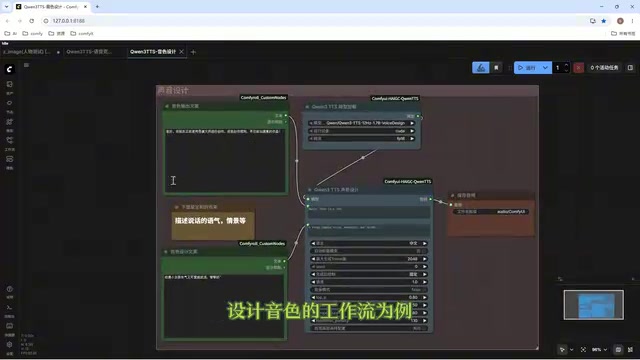
Director Master Tutorial: Full Workflow for AI Character Voice Design and Binding
Based on a Bilibili tutorial, this guide details how to design and bind AI character voices in Director Master: uploading voices, generating them via ComfyUI workflows, producing voice profiles alongside character design, and automatically inheriting voices in storyboard prompts.
3.5 Hours and $47: Building an AI Agent Village Step by Step
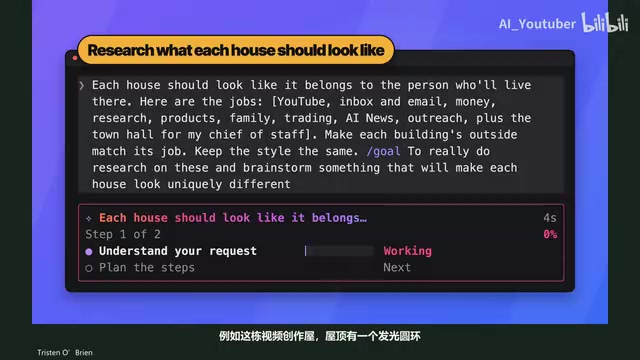
A Bilibili creator built an AI Agent village in 3.5 hours for about $47: Claude Code handles logic and behavior, Higgs Field generates art. Seven steps cover maps and buildings, chief of staff and director roles, walkable areas and behavior rules, connecting to real tools like email and calendars, proving ground meetings, and retaining final human approval—including a cost ledger and prompt design thinking.
WorkBuddy Complete Beginner's Guide: Master Your AI Digital Employee in 7 Days
A detailed breakdown of the WorkBuddy beginner's guide: how this domestic Codex alternative works, its four advantages over traditional AI, and a learning path for newcomers.