No-Code Learning Plan Assistant with Lu Xiaofei: A Desktop Hands-On Guide

Lu Xiaofei generates a learning plan assistant through natural language chat, showing how conversational development lowers coding barriers—and where it falls short.
Based on a hands-on Bilibili video, this article breaks down the full process of building a learning plan assistant with Lu Xiaofei (a conversational development tool): users describe requirements in natural language, the AI automatically generates an app with an interface, and when the first preview test fails, feeding the error message back to the AI and regenerating fixes it. The final app supports task check-offs with real-time progress updates, adjustable plan days and daily time commitment with regenerated schedules. The article argues that such tools let people without coding backgrounds quickly validate ideas and build lightweight tools, greatly lowering the development barrier, but they still have limitations in complex business logic, data persistence, and code maintainability; production-grade applications still require professional development processes.
One Sentence, One App: A Hands-On Test of Lu Xiaofei
If you don't know how to code but want a study planning tool that can automatically schedule tasks and track your progress, Lu Xiaofei (also known as "Lu Xiaofei" on some platforms) might be able to help. Recently, a hands-on video on Bilibili showed how to use natural language conversation to have Lu Xiaofei build a learning plan assistant with a user interface and interactivity. The whole process requires no coding—just describe your needs, click generate, and fine-tune based on error messages. Based on that video, this article breaks down the build process, functional highlights, and key steps of this learning plan assistant, and explores the potential and limitations of this kind of "conversational development" tool.
From Idea to Interface: Building a Learning Plan Assistant in Three Steps
Step 1: Describe Requirements, and the AI Starts Building
In the video, the user first tells Lu Xiaofei "what to do"—a learning plan assistant. Lu Xiaofei then starts automatically building the app, and a preliminary interface appears in real time on the right side of the screen. The core of this step is natural language description: the user doesn't need to understand front-end or back-end technical details, only explain the goal in everyday language. For example, in the video the user mentions "check off tasks and progress updates automatically," which actually defines the app's core interaction logic.
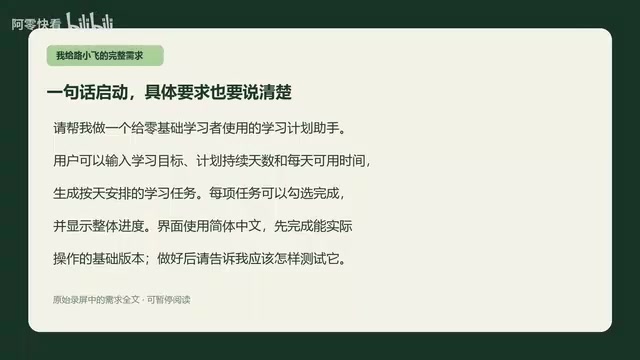
The reason natural language descriptions can drive app generation is that it relies on a large language model's (LLM) ability to understand intent and synthesize code. Everyday language input like "check off tasks and progress updates automatically" is parsed by the model into front-end components (such as checkboxes and progress bars) and state management logic (such as the binding between task completion status and progress calculation). The model also typically combines preset UI frameworks and templates to map semantics into runnable code structures. This process is not creation out of thin air—it is based on learning from large amounts of code and interface patterns, so the more specific the description and the closer it is to common interaction paradigms, the more reliable the generated result.
Step 2: Open the Preview and Test the Generated Logic
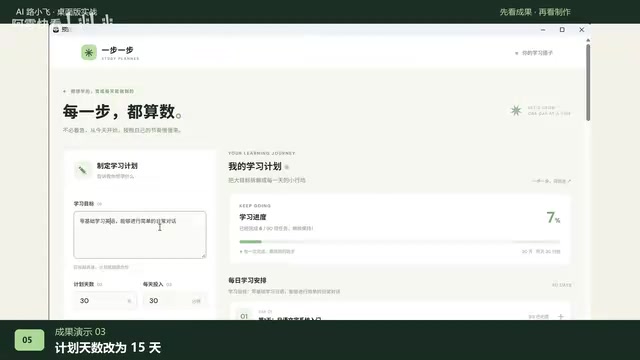
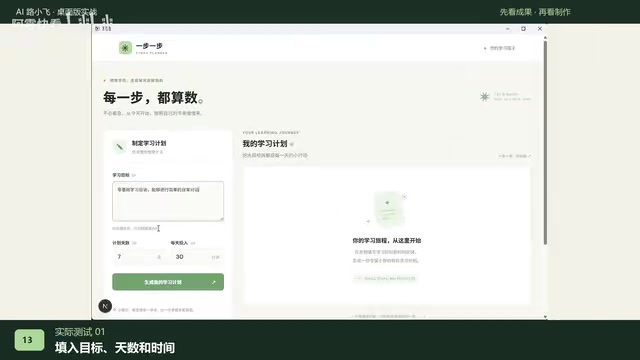
After the interface is generated, the user clicks "Standalone Preview" to enter the actual test environment. In the preview interface, the user enters a learning goal, sets the number of plan days (for example, 30 days) and daily time commitment (for example, 45 minutes), then clicks the "Generate Plan" button. At this point, the system enters a processing state and tries to generate a daily task list based on the parameters.
Step 3: Handle Errors and Regenerate
The first generation was unsuccessful—the task list did not appear. Instead of manually modifying the code, the user returns to the Lu Xiaofei chat interface and asks it to "check the error message." Then they click generate again, and this time the task list appears successfully. In the video, the user also demonstrates changing the plan days to 15 and daily time to 45 minutes; after regeneration, the new daily schedule displays correctly. This shows that the app has parameterized generation capability, and the AI can self-correct based on error feedback.
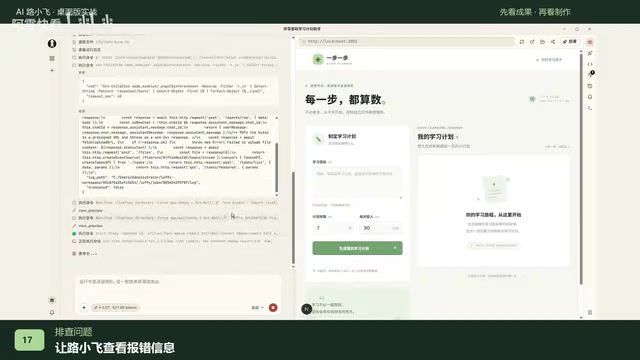
"Check the error message" and letting the AI fix it itself is a typical error-feedback loop in conversational development. Errors generated while the app runs (such as front-end rendering exceptions, API call failures, or state updates not triggering) are captured and shown to the user. The user only needs to send the error text back to the AI, and the model can locate the problem and adjust the generation logic. This mechanism is similar to debugging in traditional development, but shifts the responsibility of "reading errors and changing code" to the AI. Its effectiveness depends on whether the error message is specific enough and whether the model can correctly infer the root cause; for vague or cascading errors, the user may still need to provide additional context.
Core Features of the Learning Plan Assistant: Task Check-Offs and Dynamic Progress
Based on the results shown in the video, this learning plan assistant has several key features: 30 days of learning tasks are scheduled day by day, and when the user completes one and clicks to check it off, the progress bar or progress display updates in real time. The number of plan days can be adjusted (for example, changed to 15 days), and daily time commitment can also be modified (such as 45 minutes); after regeneration, the daily schedule changes accordingly. The app interface is clean and intuitive to operate, and already has the basic form of a lightweight learning management tool.
You may not have noticed that these features are not hard-coded in advance—they are gradually implemented through natural language descriptions and AI generation. Users only need to focus on "what features I want," not "how to implement them." For people without a programming background, this experience greatly lowers the barrier to app development.
Real-time progress updates after checking off tasks involve the front-end development concept of "state management." Simply put, the app needs to maintain a task list data structure where each task has a "completed/incomplete" status; when the user checks a task, the interface triggers a state change and recalculates the proportion of completed tasks to total tasks, thereby updating the progress display. This "data changes drive interface updates" pattern is the core idea of modern front-end frameworks (such as React and Vue). When generating an app, conversational tools automatically implement this binding logic for the user, so users don't need to manually write event listeners or DOM manipulation code.
Lessons from Conversational Development: Lower Barriers, but Iteration Still Needs Guidance
The "conversational development" model represented by tools like Lu Xiaofei is changing the software creation process. Traditional development requires multiple stages such as product design, coding, and testing, but here users directly generate runnable prototypes by describing requirements. The process in the video—where the first generation failed and was fixed through error messages—also demonstrates a typical iteration method in AI-assisted development: users don't need to understand the cause of the error, they just feed it back to the AI and let it adjust itself.
However, this model still has limitations. The video only shows a relatively simple learning plan assistant involving form input, list rendering, and state updates. Whether conversational development can handle more complex business logic, data persistence, or multi-user collaboration scenarios remains unknown. In addition, the quality and maintainability of the generated code depend on the AI's capabilities, and users may need some judgment to assess whether the results are reliable.
Who Is It For? A New Choice in Low-Code and No-Code
For product managers, entrepreneurs, students, or anyone with ideas but lacking programming skills, Lu Xiaofei offers a way to quickly validate ideas. You can describe a tool's requirements in one sentence, see an interactive interface within minutes, and keep adjusting based on feedback. The end of the video also emphasizes: "Turn an idea into an app in one sentence—use Lu Xiaofei to make your first small tool." This may be exactly the core value of such tools—letting creators focus on the idea itself rather than implementation details.
Of course, if you need to develop production-grade applications, it is still advisable to combine professional development processes. But as a way to build prototypes, internal tools, or personal productivity tools, conversational development platforms like Lu Xiaofei have already shown sufficient potential.
Related articles

Gemini 4 Neon Leak: A Potential Strong Contender Against Opus 5.5
A Hacker News thread suggests Gemini 4 Neon looks like an Opus 5.5 competitor. This article unpacks the product positioning behind this community signal, shifts in the top-model competitive landscape, and what it means for developers' model selection strategy.

Claude Fable 5.2's Self-Authored Short Film 'Fable' Sparks Discussion
A short film 'Fable,' credited to Claude Fable 5.2 for script, visuals, and directing, appears on Hacker News. This article analyzes the significance of full-pipeline AI creation, community reactions, and what it means for content creators.

Anthropic IPO Pricing: A Signal of AI Giants Going Public
Anthropic's IPO pricing draws attention. This article analyzes its potential impact on AI industry valuation, commercialization paths, and the competitive landscape, and highlights public-market expectations and challenges for AI companies.