No Code Needed: Build a Daily AI News Digest Email Workflow

Every automation consists of four building blocks—trigger, data, AI, and action—demonstrated through a no-code AI news digest example.
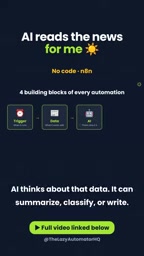
The article proposes that any automation workflow can be broken down into four basic building blocks: Trigger (deciding when to start), Data (what to process), AI (giving it the ability to think), and Action (executing the output). Using a daily AI news digest workflow as an example, a scheduled trigger fires each morning, fetches article data from RSS or a news API, then AI summarizes and ranks by importance before sending the digest to your inbox via email. The entire process requires no coding—just visual configuration on a no-code platform like Zapier, Make, or n8n. This pattern applies not only to news digests but also to email categorization, competitor monitoring, weekly report generation, and more. Mastering the four-block model gives you a universal automation thinking framework.
Every morning at 8 AM, an email arrives in your inbox right on time. AI has already read the latest news, filtered out what truly matters, and condensed it into a summary you can read in 60 seconds. This process requires no coding whatsoever—set it up once and it runs forever. For someone who has never touched automation, this might sound like magic, but the logic behind it is actually quite clear: every automation workflow is made up of four basic building blocks.

The Four Building Blocks of Automation
Whether it's a simple email reminder or a complex multi-step business process, any automation can be broken down into four core components: Trigger, Data, AI processing, and Action. Once you understand how these four modules work together, you've grasped the fundamental logic behind automating almost any task.

Trigger: Deciding When the Workflow Starts
The trigger is the starting point of the entire workflow. It defines the conditions under which the automation begins running. Common triggers include scheduled triggers (e.g., every morning at 8 AM), event triggers (e.g., receiving a new email or a new row added to a spreadsheet), and manual triggers. In the news digest scenario, the trigger is simply a timer set for a fixed time each morning.
Data: What the Workflow Processes
Data is the content that the automation workflow operates on. It can be article links, emails, rows in a spreadsheet, or JSON returned by an API. For the news digest workflow, the data source is typically an RSS feed or news API, which provides the list of raw articles to be processed.

AI: Giving the Workflow the Ability to Think
The AI module is the "brain" of the workflow. It receives data and performs intelligent operations such as summarization, classification, or text generation. In the news digest case, AI reads each article, judges its importance, and generates a concise summary. This step transforms raw data into valuable information.
RSS (Really Simple Syndication) is a standardized format for aggregating updated content from websites. News sites, blogs, or podcasts typically provide an RSS feed (an XML file containing the latest article titles, links, and summaries), and users or programs can subscribe to that feed to get updates without manually visiting each website. In automation workflows, RSS is often used as the starting point for data retrieval because it's well-structured, easy to parse, and supported by most content platforms. Compared to directly scraping web pages, RSS is more stable and compliant, making it suitable for regularly pulling the latest content. For news digest scenarios, combined with an RSS reader or an automation platform's RSS module, it can efficiently collect the list of articles to be processed.
Action: Performing Operations on the Results
The action module defines the final output of the workflow. It can be sending an email, updating a database, posting to social media, or triggering another automation. In the news digest workflow, the action is sending the AI-generated summary to your inbox via email.
No-code automation platforms refer to tools that let you build automation workflows through a visual interface (dragging components, configuring parameters), allowing users to connect different apps and services without writing code. These platforms typically offer hundreds of pre-built integrations (such as connecting Gmail, Slack, Google Sheets, etc.) and include built-in modules for triggers, data retrieval, AI processing, and action execution. Common examples include Zapier, Make, and n8n: Zapier is known for being simple and easy to use, making it great for beginners; Make offers more flexible visual workflow orchestration; and n8n is an open-source solution that supports self-hosting, making it suitable for users with data privacy requirements or deep customization needs. The core value of these platforms lies in lowering the technical barrier to automation, enabling non-developers to quickly build and iterate workflows.
Building Your News Digest Workflow
Once you understand the four building blocks, building the workflow becomes intuitive. You just need to choose a no-code automation platform (such as Zapier, Make, or n8n) and then connect the modules following these steps:
- Set up the trigger: Choose a "Schedule" trigger and set it to run every morning at 8 AM.
- Fetch news data: Add an "RSS" or "HTTP Request" step to pull the latest articles from your preferred news sources.
- Call AI processing: Use the platform's built-in AI step (or connect to an API such as OpenAI) to summarize and rank the articles by importance.
- Send email: Add a "Send Email" action to deliver the processed summary to your inbox.
The entire process requires no coding—all steps are configured through a visual interface. Once set up, the workflow runs automatically at the scheduled time, continuously delivering your daily news digest.
Why This Pattern Is Worth Paying Attention To
This "Trigger-Data-AI-Action" pattern isn't just for news digests—it can be extended to countless scenarios. For example, you can use it to automatically categorize customer emails, monitor competitor activity, generate weekly work reports, or even manage social media posts. Mastering these four building blocks means you possess a universal automation thinking framework that lets you quickly turn repetitive tasks into automated processes.
According to a share from the YouTube channel "AI Alex," this workflow has been running stably for months, delivering summaries right on time every day with zero maintenance required. For individuals or teams looking to improve their information-gathering efficiency, this is a low-barrier, high-reward starting point.
Start Your First Automation
If you've never tried automation before, it's recommended to start with the simplest workflow: pick a small task you repeat every day, break it down using the four building blocks, and then build it on a no-code platform. Once you experience the time savings that automation brings, you'll naturally want to hand more tasks over to machines. Remember, the key isn't the tool itself—it's understanding the logic behind automation: Trigger, Data, AI, Action.
Related articles

Why Does the Tesla Roadster Need to Fly? A Deep Dive into Musk's Wild Demo
Tesla's Roadster launch showed wall-climbing, upside-down driving, and flying stunts—but The Vergecast notes the demo car may lack a battery, the Rocket version is invite-only and not street-legal, and the website terms don't guarantee delivery. After nine years of delays, why does this car still need to exist?

AI Is Not a Replacement: Human-AI Collaboration Through the Lens of Factory Root Cause Analysis
Starting from factory root cause analysis, this article explains how AI accelerates evidence chain construction rather than replacing human experts, exploring the pragmatic implementation logic and business value of 'AI supporting people rather than replacing them.'

AI Agent Decision Auditing: Building an Evidence Chain in Regulated Workflows
Starting from a Reddit discussion, this article analyzes three core issues in AI agent decision auditing within regulated workflows: what fields audit records should contain, how to handle feedback latency for erroneous decisions, and how to continuously calibrate LLM judge consistency with human judgment.