No-Code Smart Dictation Assistant: A WorkBuddy Case Study Breakdown

A WorkBuddy no-code app that uses OCR and TTS to automate kids' dictation practice, freeing parents completely.
This article breaks down a real-world no-code application built with WorkBuddy that solves a common parenting pain point: daily dictation practice. By combining OCR to extract words from a textbook photo and TTS to read them aloud one by one, the app lets children complete dictation independently. The case also explains the underlying tech — OCR, TTS, state management, and PWA — and reflects on how AI tools are lowering the barrier for anyone to build useful apps.
A Real Family Pain Point
Helping kids practice dictation — whether it's Chinese characters, vocabulary, or English spelling — is a daily routine in nearly every household with school-age children. Someone has to sit beside the child and read out each word one by one. In reality, parents often can't spare the time to repeat this highly mechanical task over and over.
This is a textbook "high-frequency, repetitive, automatable" scenario. One creator recognized this pain point and used WorkBuddyAd, an AI application builder, to develop a smart dictation assistant that frees parents from the task entirely. The value of this case isn't in its technical complexity — it's in how it demonstrates that everyday people can use low-code/AI tools to solve real problems around them.
How the Smart Dictation Assistant Works
The core logic of the application is straightforward and can be broken down into three stages: upload image → OCR recognition → text-to-speech playback.
Step 1: Take a Photo or Upload the Dictation Content
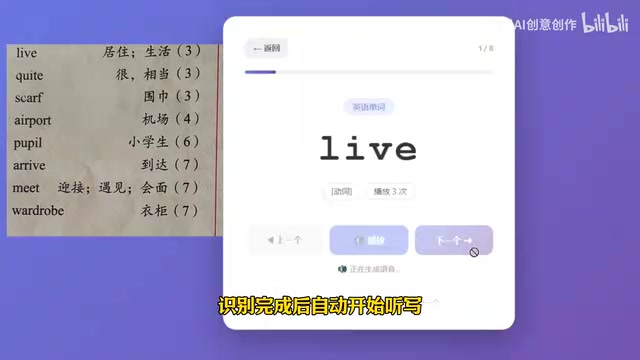
Parents simply take a photo or upload an image of the content. Whether it's a list of Chinese characters from a textbook, a vocabulary list, or an English word sheet, it can all be fed in as an image. This dramatically lowers the barrier to use — parents don't need to type anything manually.
Step 2: OCR Automatically Extracts the Text
After tapping "Start Recognition," the app calls OCR (Optical Character Recognition) to automatically extract the text from the image.
OCR is a technology that converts printed or handwritten text in images into editable digital text, with origins dating back to the 1950s. Its evolution can be divided into three clear paradigm shifts: the early template matching phase (1950s–1980s) relied on predefined font templates for character-by-character comparison, only worked with specific fonts, had low accuracy, and could not handle variations; the statistical machine learning phase (1990s–2010s) introduced Hidden Markov Models (HMM) and Support Vector Machines (SVM), significantly improving accuracy but still constrained by manual feature engineering; and the deep learning phase (2012–present) brought a qualitative leap forward.
Modern OCR engines are typically built on a two-part collaborative architecture: Convolutional Neural Networks (CNN) extract visual features from images, recognizing strokes, contours, and local structures, while the Transformer architecture introduces attention mechanisms to help the model understand contextual relationships between characters — for example, inferring the correct character in Chinese based on surrounding context. It's worth noting that the Transformer was originally introduced by Google in 2017 in the paper Attention Is All You Need for natural language processing, but its powerful sequence modeling capabilities were quickly adapted for image understanding and became a foundational component of modern vision-language multimodal tasks. The CNN + Transformer combination has pushed leading commercial OCR engines — such as Google Vision API, Baidu OCR, and Tencent Cloud OCR — to over 99% accuracy on Chinese and English text, handling complex backgrounds, tilted angles, and printed characters with near out-of-the-box reliability. This maturity is precisely what makes the image-to-text conversion in this case so effortless — transforming unstructured images into a structured, line-by-line text list.

Step 3: TTS Reads Out Each Item Aloud
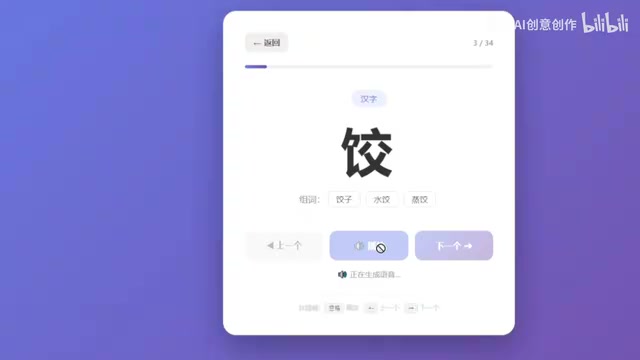
Once recognition is complete, the app enters dictation mode and plays back each item aloud using TTS (Text-to-Speech) technology.
TTS technology has also undergone a fundamental transformation — from rule-based concatenation to deep learning. Early systems relied on concatenative synthesis, stitching together pre-recorded phoneme or syllable segments according to rules. The transitions often sounded robotic, and the system had no ability to express emotional variation. Modern TTS systems achieve near-human audio quality thanks to two landmark deep learning models: WaveNet (introduced by DeepMind in 2016) was the first to model raw audio waveforms directly, predicting waveform sample by sample, which for the first time brought synthesized speech close to human quality in terms of prosody and emotion; Tacotron 2 then built on this by introducing a sequence-to-sequence (Seq2Seq) architecture with attention mechanisms, integrating the conversion from text to acoustic features (mel spectrograms) and a Neural Vocoder into an end-to-end pipeline — text goes in, natural speech comes out, with no need for complex hand-crafted linguistic rules in between. This architecture significantly improved synthesis speed and naturalness, making real-time TTS feasible.
Leading commercial services today — including Microsoft Azure TTS, Google Cloud TTS, and iFlytek TTS — have built further on these models to support multiple languages, voice styles, emotional tone adjustment, and even custom voice cloning, where just a few minutes of recorded audio can generate a personalized voice model via transfer learning. Transfer learning refers to taking a model pre-trained on large-scale datasets and fine-tuning it for a specific small-sample task, achieving high-quality specialized capabilities at very low data cost — which is exactly why voice cloning works with so little sample data. Developers simply pass a text string to the API and receive high-quality audio in return, with no need to train their own models. This makes "getting a machine to read words aloud" an extremely low-cost implementation.
The playback design also mirrors real dictation conventions:
- Chinese character dictation includes compound word hints, e.g., "蒜,大蒜的蒜,蒜瓣的蒜,蒜头的蒜" (garlic, as in 大蒜, as in 蒜瓣, as in 蒜头), helping children pinpoint the meaning;
- Vocabulary dictation repeats each item three times, e.g., "热情,热情,热情," mimicking the rhythm of a human proctor;
- English words are also read multiple times, e.g., "airport, airport, airport."
Product Thinking in the Details
Despite being a small app, the interaction details are thoughtfully designed.
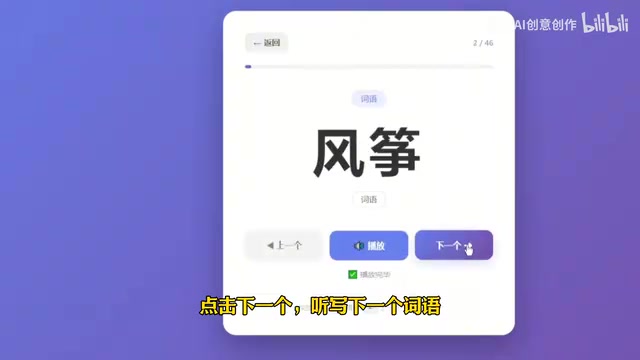
The app provides three core buttons: "Previous," "Next," and "Play":
- When a child finishes writing one item, they tap "Next" to continue;
- If they didn't catch it, they tap "Play" to hear it again;
- If they want to go back and review, they tap "Previous."
Underlying this is a foundational yet important concept in frontend development — State Management: how an application tracks and updates its data state during runtime (e.g., "which item is currently playing" and "what's in the word list"). To understand why state management matters, it helps to understand why "state" is difficult to manage in the first place: in any interactive application, what the interface displays depends on a set of data values that change over time. When multiple components need to read or modify the same data without a unified management mechanism, it's very easy to end up with UI-data desynchronization, operation-order bugs, and other hard-to-trace issues.
In this specific case, each tap of "Next" must increment the current index, check for out-of-bounds conditions, trigger the TTS request for the corresponding item, and synchronously update the display — all of these interdependent steps would need to be written and maintained manually in traditional development. As frontend engineering has matured, React's useState/useReducer, Vue's reactive system, and dedicated state libraries like Redux and Zustand have evolved state management from scattered global variable operations into a structured unidirectional data flow paradigm: data always flows in one direction — from state change to view update — dramatically reducing debugging complexity. The core value of "unidirectional data flow" lies in predictability: any UI change can be traced back to a single state mutation source, eliminating the chaos of multiple components mutating shared data simultaneously. In modern AI application platforms, these common interaction patterns are often further abstracted into visual components or auto-generated by AI, allowing non-technical users to implement complex multi-step interaction logic without understanding the underlying data flow mechanics.
This design gives children full control, letting them complete dictation at their own pace without needing a parent present. In essence, it transforms "dictation" from a two-person collaborative task into a task a child can complete independently — and that's the real key to freeing parents.
Works Anywhere, on Any Device
In terms of practicality, the smart dictation assistant runs not just on computers but also directly on smartphones. Parents take a photo of the day's dictation content and upload it; children can then complete the dictation independently on their phone — at home or on the go.
This also reflects the natural cross-platform advantage of Web-based AI applications: build once, run everywhere, with no need for separate platform adaptations. Unlike native apps that require separate development, review, and distribution for iOS and Android, Web-based applications only need a single link to run in the browser on any device. This is made possible by the maturity of PWA (Progressive Web App) standards and modern browsers.
PWA is a set of Web application specifications popularized by Google around 2015. Its core philosophy is to let Web apps "progressively" acquire native app capabilities without requiring users to download and install anything. "Progressive" means that even in older browsers that don't support all PWA features, the app still works as a normal webpage; in modern browsers that support the latest standards, additional native capabilities are unlocked. Specifically, the Web Audio API allows browsers to handle audio playback and synthesis directly; the Camera API (i.e., MediaDevices.getUserMedia) supports accessing the device camera for photo uploads; and the Service Worker mechanism allows Web apps to cache resources and remain functional offline, and even supports push notifications. A Service Worker is essentially a script thread running independently in the browser background, acting as a proxy layer between the Web app and the network — it can intercept network requests and decide whether to fetch resources from cache or the network, which is the core mechanism enabling PWA offline functionality. The widespread adoption of these standards has continued to narrow the experience gap between Web apps and native apps. For individual developers and small teams, this means lower maintenance costs and faster iteration cycles, with no app store review periods (typically several days to weeks) or the added burden of maintaining separate codebases.
The Barrier to AI Application Development Is Falling
Beyond this specific case, what's more worth noting is the broader trend: with zero-code tools like WorkBuddy, non-professional developers can quickly turn ideas into usable applications.
Low-code and no-code development platforms are a significant trend in the software industry in recent years, aimed at enabling non-programmers to build applications through visual interfaces, drag-and-drop components, or natural language descriptions. The core design philosophy of these platforms is abstraction — encapsulating complex underlying implementations such as database connections, API calls, and UI rendering into modules that everyday users can work with directly, so developers only need to focus on "what I want to achieve" rather than "how it works under the hood."
From a technical evolution perspective, low-code platforms have gone through three clear stages: Phase 1 featured visual form and database tools like Microsoft Access and FileMaker (1990s), enabling business users to build simple data management applications; Phase 2 brought drag-and-drop web and app builders like Wix, Webflow, and Bubble (2010s), visualizing frontend development so users could assemble pages by dragging components and configuring properties; Phase 3 is the current era of LLM-driven AI-native application generation platforms (2023–present), where users simply describe their requirements in natural language and the platform automatically generates page structure, logic flows, and API call code — tools like WorkBuddy, Glide, and Retool fall into this category. The fundamental breakthrough of this phase is that while previous low-code platforms still required users to understand component logic and configuration rules, LLM-driven platforms have also automated the step of "understanding requirements and translating them into technical implementations," truly crossing the threshold from "knowing how to use tools" to simply "describing the problem."
Gartner's concept of the "Citizen Developer" names exactly this trend: non-IT professionals who build applications using low-code/no-code tools in enterprise or personal contexts. Gartner predicts that by 2026, low-code/no-code technologies will account for more than 65% of enterprise application development, with this trend steadily shifting software development power from professional engineers to a broader population of citizen developers.
Building an application with OCR recognition, speech synthesis, and multi-page interaction used to require a complete technical stack — frontend, backend, AI API integration — and at minimum a technically capable team. Now, through describing requirements and iterating on generated output, a parent or teacher with a good idea can do it independently.
The technical combination behind these apps is actually no mystery:
- OCR recognition — converts textbook images into text;
- TTS speech synthesis — reads the text aloud;
- Simple state management — controls the previous/next navigation logic.
The real value lies in combining these capabilities to solve a specific problem. The technical capabilities are generic; what's truly scarce is the insight into the pain point and the product design to address it.
Final Thoughts
What makes this smart dictation assistant case most compelling isn't how advanced the technology is — it's what it proves: AI tools are making "solving your own problems" increasingly accessible. As the development barrier continues to fall, everyone has the opportunity to turn the repetitive frustrations of daily life into a small but elegant automated application.
For parents, this means relief from the tedious dictation routine. For more people, it may be a signal — rather than waiting for someone else to build the right tool, you can go ahead and build one that truly fits your own needs.
Key Takeaways
Related articles

Salesforce Acquires Rune for $375M: AI Logistics Tech Bolsters Defense Business
Salesforce reportedly acquires defense tech startup Rune for $375M. Rune's AI logistics tech will strengthen Salesforce's Missionforce defense platform, continuing its M&A spree.

Why Fair Use Benefits Everyone in the AI Era
Starting from a Hacker News discussion, this article analyzes the legal logic and controversies of the fair use principle in AI training and content creation, and its dual impact on creators and the tech ecosystem.

Mistral Large 4 Open-Sources a Trillion Parameters, Microsoft Offers Voluntary Severance to 60,000 Employees
Mistral Large 4 open-sources a trillion-parameter multimodal model with a coding agent score of 48; SanDisk earnings show AI inference reshaping NAND demand; Google Gemini adds in-app file editing, OpenAI raises Codex quotas, and Microsoft offers voluntary severance to 60,000 employees.