Nocto: Turning the MacBook Notch into a Control Center

Nocto turns the MacBook notch into a hover-based lightweight control center focused on meetings, music, and file staging.
Nocto is a native, lightweight macOS app supporting macOS 14 and above. Its core idea is to turn the MacBook notch into an always-present but on-demand control center. Hover over the notch to view and control music (free forever); a countdown starts ten minutes before meetings, and a Join button appears when they begin, supporting Zoom, Meet, Teams, Webex, and FaceTime. It also integrates a file shelf, clipboard history, and Mac and AirPods battery viewing. Priced as a one-time purchase with a 7-day free trial, it suits Mac users with frequent meetings who prefer buying outright, with limited value for those with an established toolchain or system version below 14.
The MacBook's notch display has been controversial since its introduction—it eats into menu bar space yet remains just a black area in most scenarios. Nocto, ranked #10 on Product Hunt, aims to change that: it turns the notch into a lightweight control center, finally putting this "extra" area to real use.
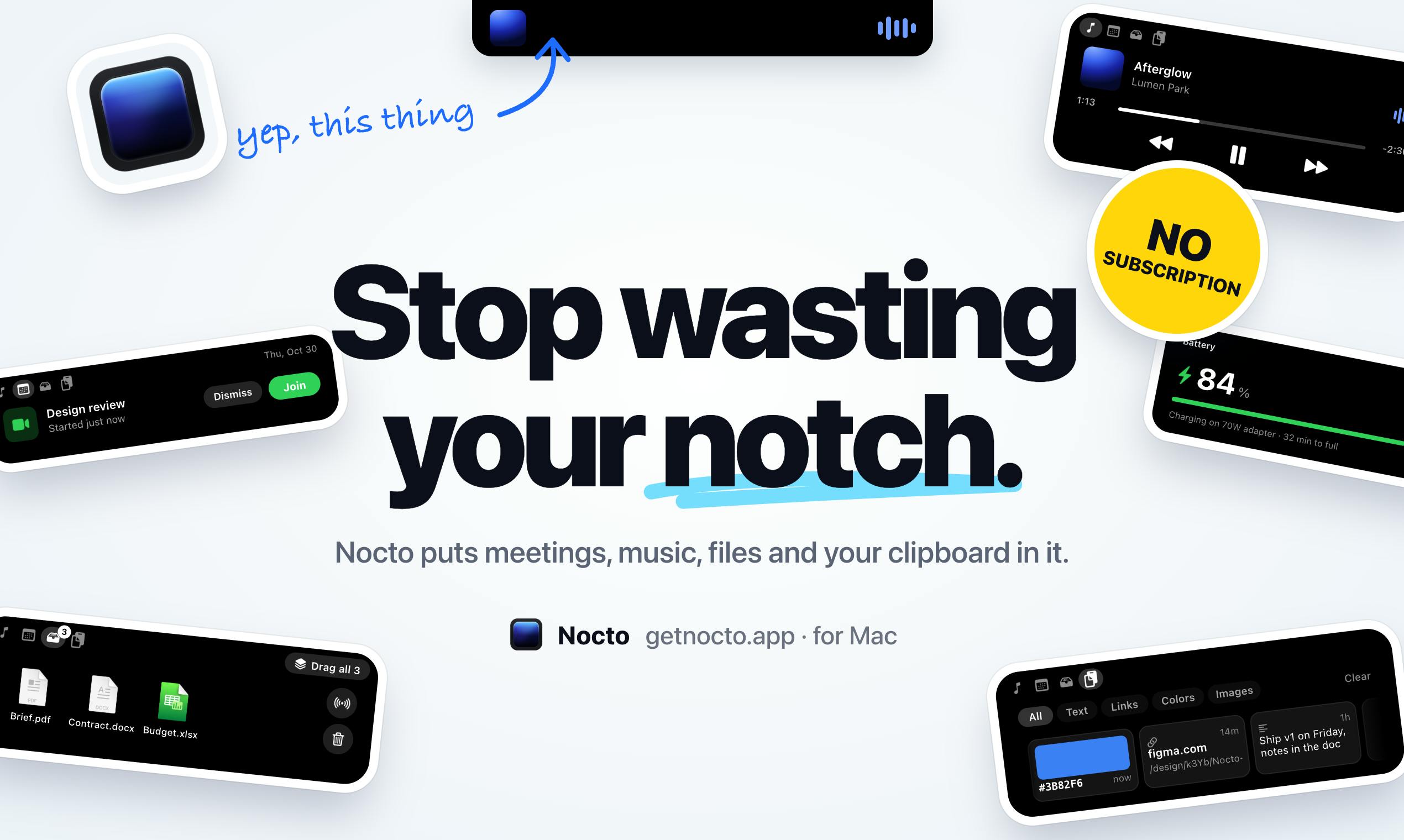
The Notch's Awkwardness and Nocto's Solution
The MacBook's notch design is visually controversial, but the more practical issue is its low functional utilization. Nocto's approach is straightforward: since the notch always occupies the top center of the screen, why not turn it into an always-present entry point for information and actions? According to the official description, Nocto is a native, lightweight macOS app that supports macOS 14 and above, uses a one-time purchase model, offers a 7-day free trial, and keeps music-related features free forever.
Its interaction logic revolves around "hovering": move the mouse to the notch area to expand the currently playing music info and switch tracks. This design doesn't change the original menu bar layout; instead, it treats the notch itself as an expandable overlay that appears when needed and hides when not.
Since macOS 11 Big Sur, the macOS menu bar has adopted a semi-transparent style that adapts to the wallpaper's color tone. On MacBooks with a notch, the menu bar's left side has less physical space for status icons because the notch occupies it. When too many menu bar apps are open, the system hides the excess, and users need third-party tools (like Bartender) to access the collapsed icons. Nocto's hover overlay doesn't take up menu bar icon slots—it uses the area below the notch that normally displays the menu bar background—so it doesn't worsen menu bar crowding.
Core Features: From Meeting Reminders to Clipboard History
Nocto's features cover several high-frequency scenarios, each corresponding to a lightweight interaction in the notch area.
Meeting Countdown and One-Click Join
Ten minutes before a call starts, Nocto begins a countdown reminder; when the meeting officially begins, the notch expands and shows a Join button, supporting Zoom, Meet, Teams, Webex, and FaceTime. For professionals who jump between multiple meeting links every day, this eliminates the repeated steps of digging through calendars and links, condensing the join action into a single click at the top of the screen.
Nocto's meeting reminders rely on reading meeting links from system calendar events. On macOS, calendar invitations from services like Zoom, Google Meet, and Microsoft Teams typically write the join URL into the event's "URL" field or notes. Nocto needs calendar access permission to parse these links and present the Join button at the right time. This also means its meeting feature depends somewhat on the consistency of link formats in the calendar—if a meeting link exists only in the email body rather than in the calendar event, Nocto cannot recognize it automatically.
Music Control and File Shelf
Hover over the notch to see what's playing and switch tracks; music features are free. Nocto also offers a "file shelf" feature for temporarily parking files; clipboard history lets you retrieve anything you've copied before; and you can check the battery levels of your Mac and AirPods at a glance. Individually, none of these features are novel, but integrated into the fixed notch position, they form a lightweight, always-at-hand entry point.
The "file shelf" is a common type of temporary staging area in macOS productivity tools: users drag files onto the shelf for temporary storage, then drag them to the target app or folder, avoiding repeated switching between windows. macOS's built-in Stage Manager doesn't provide a cross-app persistent staging area, so third-party shelf tools like Yoink and Dropover have maintained steady demand. Nocto's difference is fixing the shelf entry to the notch position, summoned by hovering rather than a keyboard shortcut or drag hotspot.
Product Positioning and Trade-offs
Nocto positions itself as a "small control center" rather than an all-in-one productivity tool. It doesn't try to replace Spotlight or window management software; instead, it focuses on the lightweight interactions the notch's physical space can support. Native development, a lightweight footprint, and a one-time purchase model all point to the same type of user: Mac users who care about system smoothness and don't want to keep paying for subscription tools.
Notably, music features are free forever, while the overall product uses a one-time purchase plus a limited-time trial. This pricing strategy is uncommon among productivity tools and has some appeal for users who dislike subscriptions.
One-time purchases were long the mainstream among independent macOS tools, but in recent years subscriptions (independent subscriptions outside of Setapp, for example) have gradually increased, because ongoing system compatibility and feature iteration require stable revenue. Nocto's choice of a one-time purchase plus a limited-time trial, with free music features as a draw, essentially covers development costs with a one-time payment and lowers the barrier to trying it with free features. The risk of this model is whether major version upgrades will be charged again—the original text doesn't specify its upgrade policy, so it's worth confirming before purchasing.
Who Nocto Is For
If you have multiple online meetings every day, habitually listen to music with the Mac's built-in or third-party player, and often need to temporarily store files or retrieve clipboard contents, Nocto can concentrate these actions in the notch area, reducing the distance your eyes and mouse travel. But if you already have a mature set of productivity tools, or you're using a macOS version below 14, its incremental value will be relatively limited.
The notch display was once one of the most criticized parts of the MacBook design. Nocto represents a pragmatic product approach: rather than complaining about that black area, let it take on some real functionality. Whether this "notch as entry point" interaction can become a habit still depends on whether users are willing to allocate attention to the top center of the screen over the long term.
One-line Summary
Nocto turns the MacBook notch into a hover-based lightweight control center focused on meetings, music, and file staging.
Paragraph Summary
Nocto is a native, lightweight macOS app that supports macOS 14 and above. Its core idea is to transform the MacBook notch area into an always-present but on-demand control center. Hover over the notch to view and control the currently playing music; music features are free forever. A countdown starts ten minutes before a meeting, and when it officially begins the notch expands with a Join button, supporting Zoom, Meet, Teams, Webex, and FaceTime. It also integrates a file shelf, clipboard history, and Mac and AirPods battery level viewing and other high-frequency small features. The product uses a one-time purchase plus a 7-day free trial and positions itself as a "small control center" rather than an all-in-one productivity tool. It suits Mac users with frequent meetings who prefer one-time purchases, and offers limited incremental value to those with an established toolchain or a system version below 14.
Related articles

A New Paradigm for Text Editing in Compose: TextFieldState Replaces the Old API
Jetpack Compose introduces the TextFieldState API to fix dropped characters and cursor jumps from async input. The old value/onValueChange callbacks will be deprecated in 1.13. This article covers InputTransformation, OutputTransformation, four state hoisting patterns, and new formatted text editing capabilities.

Remote Compose: A New Document-Driven Paradigm for Cross-Platform UI on Android
Remote Compose transmits compact binary documents instead of screen pixels, enabling efficient UI rendering on remote surfaces like Wear OS and widgets. This article covers its document creation API, expression animations, size optimization techniques, and Wear OS progress.

How Crashlytics Eliminates Android Memory and Responsiveness Issues
Through the Chroma Clip case study, this article explains how Firebase Crashlytics uses Application Exit Info, Profiling Manager, GWP ASAN, and ARM MTE to pinpoint ANRs, OOMs, memory limit terminations, and native memory corruption—solving the challenge of stack traces that don't point to the real culprit.