NotchDrop v2 Review: Turning the MacBook Notch into a Productivity Hub

NotchDrop v2 turns your MacBook's notch into a full-featured productivity hub.
NotchDrop v2 reimagines the MacBook notch as a comprehensive productivity center, featuring a built-in screen recording editor, file sharing via AirDrop and LAN, system monitoring, and customization options. This review breaks down its core features, ideal user profiles, and product philosophy to help you decide if it's worth installing.
When the Notch Is No Longer Just a "Nuisance"
Ever since the MacBook Pro introduced its screen notch design in 2021, the controversy surrounding it has never died down. Compared to the interactive innovation that the Dynamic Island brought to iPhone, the Mac's notch has long been nothing more than a black area that "takes up space," serving virtually no practical purpose beyond housing the camera.
NotchDrop is a third-party tool built to fill exactly this gap. Drawing inspiration from iPhone's Dynamic Island concept, it transforms this wasted screen real estate into an interactive, extensible workspace. NotchDrop v2, which recently launched on Product Hunt, earned 81 upvotes and landed at #19 on the product leaderboard, further refining this vision.
NotchDrop v2: Core Features Breakdown
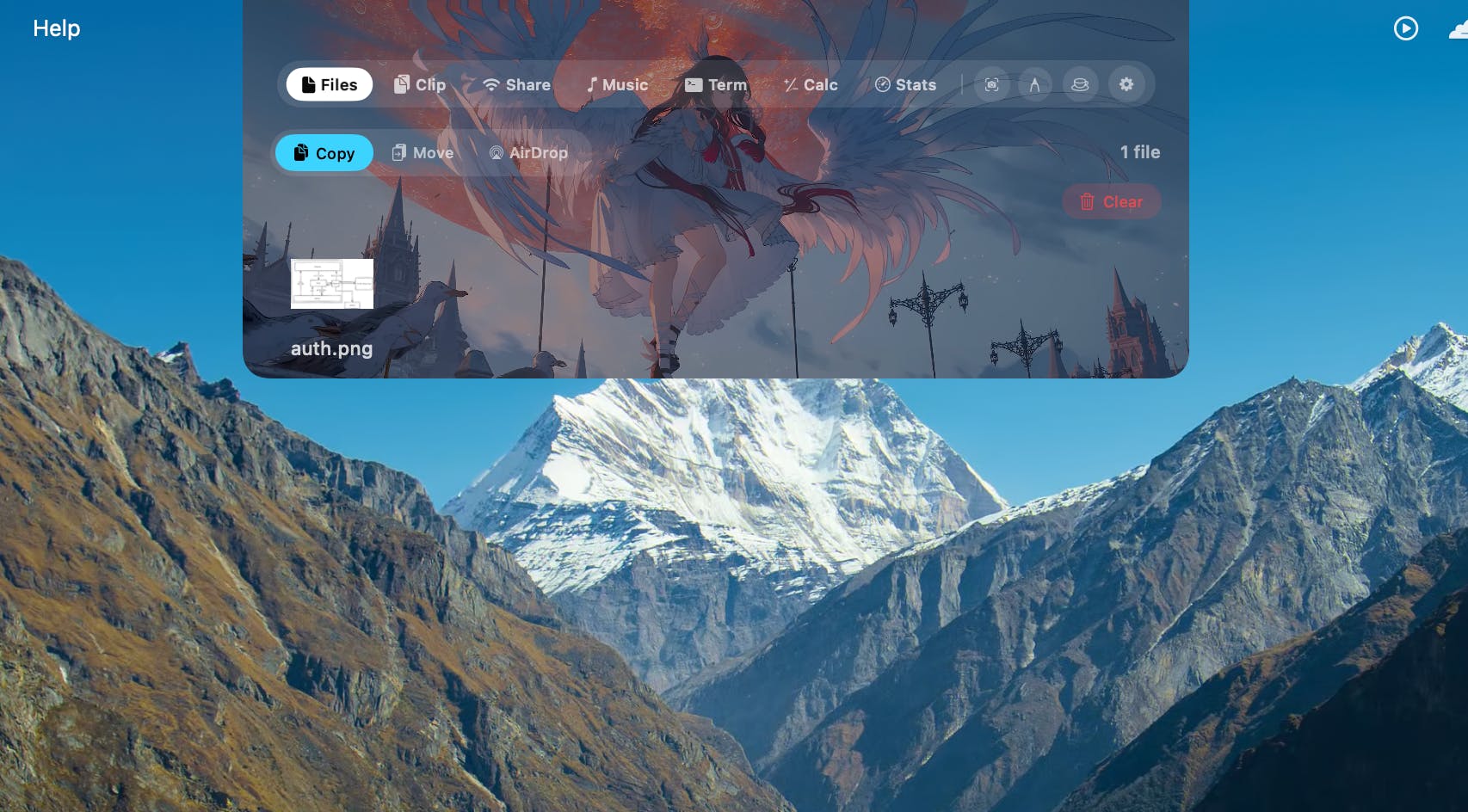
Unlike many similar MacBook notch tools that focus solely on "drag-and-drop file" functionality, NotchDrop v2 positions itself as a comprehensive productivity hub. Users can access a suite of tools directly from the notch area, spanning the following categories:
Feature Matrix at a Glance
- NotchDrop Studio: The highlight of this update — a built-in screen recording editor that lets you trim and edit recordings right after capture, with no need to switch to another app.
- Enhanced File Sharing: Supports AirDrop and local network transfers, turning the notch into a temporary file transfer station.
- System Monitoring: Displays real-time system stats like CPU and memory usage.
- Handy Utilities: Includes commonly used components such as a calendar, calculator, and terminal tool.
- Personalization Options: Live Wallpaper, Draw Signature, Keep Awake (prevents screen sleep), and customizable themes.
NotchDrop's product philosophy is "small but comprehensive" — aggregating the fragmented, high-frequency tools users need daily into a location that's always within reach, reducing the cost of constantly switching between the Dock, menu bar, and standalone apps.
Product Logic: Why the Notch as an Interaction Entry Point
The notch's physical position gives it unique value: it's always at the top center of the screen, and no matter what the user is doing, their eyes and cursor can easily reach it. This aligns perfectly with the design philosophy behind iPhone's Dynamic Island — leveraging an "inevitable hardware limitation" to create added-value experiences.
NotchDrop turns this area into an expandable floating panel. When you hover or click, the notch "expands" into a feature panel displaying various tools; when not in use, it shrinks back to its original form without interfering with normal operations. This interaction model maximizes space utilization while avoiding the problem of permanently occupying screen real estate.
How It Differs from macOS System Solutions
You may not have noticed, but Apple itself has not provided any Dynamic Island-like official interaction for the notch on macOS. This opens the door for third-party developers, but it also means these tools are limited by system APIs, making certain deep features (like real-time integration with background tasks) significantly harder to implement. The screen recording editor introduced in NotchDrop v2 is essentially pushing the boundaries of what third-party Mac tools can achieve.
Who Should Use NotchDrop
Based on its feature set, NotchDrop is best suited for these types of Mac users:
- Content Creators: The built-in screen recording + editing features are extremely handy for those making tutorials and demo videos.
- Heavy Multitaskers: People who frequently transfer files between apps and check system status can save quite a few steps.
- Desktop Customization Enthusiasts: Features like live wallpapers and custom themes cater to those who care about desktop aesthetics.
That said, for users who only need basic office functionality, this kind of tool may feel like "feature overkill." And as an app that runs persistently in the background, its impact on system resources and battery life is also a factor worth considering.
Conclusion and Outlook
NotchDrop v2 represents a product trend worth watching: using software innovation to address controversial hardware design choices. The notch has gradually evolved from a widely criticized element into an interaction entry point with untapped potential.
However, the long-term value of such third-party tools carries some uncertainty. If Apple natively integrates Dynamic Island-style interactions into macOS in the future, the survival space for products like this would be dramatically compressed. But until that happens, NotchDrop genuinely delivers real efficiency gains — especially with v2 integrating "heavy features" like screen recording and editing, signaling that the developer isn't content with building a simple drag-and-drop widget but aims to create a true Mac productivity platform.
If you've been ignoring the MacBook's notch all along, it might be time to take another look at this overlooked space — it could be far more useful than you think.
Related articles

Why Does the Tesla Roadster Need to Fly? A Deep Dive into Musk's Wild Demo
Tesla's Roadster launch showed wall-climbing, upside-down driving, and flying stunts—but The Vergecast notes the demo car may lack a battery, the Rocket version is invite-only and not street-legal, and the website terms don't guarantee delivery. After nine years of delays, why does this car still need to exist?

AI Is Not a Replacement: Human-AI Collaboration Through the Lens of Factory Root Cause Analysis
Starting from factory root cause analysis, this article explains how AI accelerates evidence chain construction rather than replacing human experts, exploring the pragmatic implementation logic and business value of 'AI supporting people rather than replacing them.'

AI Agent Decision Auditing: Building an Evidence Chain in Regulated Workflows
Starting from a Reddit discussion, this article analyzes three core issues in AI agent decision auditing within regulated workflows: what fields audit records should contain, how to handle feedback latency for erroneous decisions, and how to continuously calibrate LLM judge consistency with human judgment.