NVIDIA Free DeepSeek V4 Pro Tutorial: API Key Setup & Programming Tool Integration

Access DeepSeek V4 Pro and Flash for free via NVIDIA NIM with OpenAI-compatible API integration.
DeepSeek V4 launches with the flagship 1.6 trillion parameter Pro and lightweight 284 billion parameter Flash, both MoE models supporting 1 million token context windows. Developers can get free API keys through NVIDIA NIM for prototyping, with full OpenAI compatibility enabling direct integration with Cursor, Kline, and other coding tools. The reasoning effort parameter allows flexible depth adjustment, with Pro suited for complex reasoning and agentic coding, and Flash ideal for fast lightweight tasks.
DeepSeek V4 has officially launched, bringing two models: the flagship V4 Pro and the lightweight V4 Flash. What's even more exciting for developers is that both models can be called virtually for free through the NVIDIA NIM platform—no self-hosted GPU environment needed, and no immediate per-token billing. This article provides a detailed walkthrough of DeepSeek V4's model characteristics, the API key acquisition process, and practical integration methods for mainstream programming tools.
DeepSeek V4 Model Comparison: Pro vs Flash
V4 Pro: A Flagship Model with 1.6 Trillion Parameters
DeepSeekAd V4 Pro uses a Mixture of Experts (MoE) architecture with a total parameter count of 1.6 trillion, approximately 49 billion active parameters, and supports a context window of up to 1 million tokens. This scale is quite impressive, making it ideal for scenarios demanding peak performance: complex reasoning, coding, long-context processing, agent workflows, tool calling, and document analysis.
Mixture of Experts (MoE) is a sparsely-activated neural network architecture whose core idea is to split the model into multiple "expert" sub-networks, activating only a small subset of experts for each inference pass. This is why V4 Pro has 1.6 trillion total parameters but only about 49 billion active parameters—a Gating Network dynamically selects the most relevant combination of experts based on the input. The advantage of this design is that the model can possess massive knowledge reserves (reflected in total parameters) while maintaining reasonable computational overhead (reflected in active parameters). Google's Switch Transformer and Mixtral use similar architectures. The challenge with MoE lies in training stability and expert load balancing—if certain experts are overused while others sit idle, model efficiency suffers significantly. DeepSeek did extensive optimization work in this area during the V3 era, including introducing auxiliary loss functions to ensure experts are called evenly.
V4 Flash: The Lightweight Speed Champion
V4 Flash has a total parameter count of 284 billion, approximately 13 billion active parameters, and also supports a 1 million token context window, but is designed with a stronger emphasis on speed and efficiency. It's ideal for lightweight tasks like document summarization, small script writing, quick conversational responses, and routing.

In simple terms: Choose Pro for best quality, choose Flash for speed and low cost. Not every task requires a 1.6 trillion parameter model—if you're just summarizing documents or writing a small script, Flash is likely the smarter choice. But for large codebase investigation, tricky bug debugging, complex planning, or agentic programming, Pro is the way to go.
Getting a Free API Key Through NVIDIA NIM
NVIDIA NIM (NVIDIA Inference Microservices) is an inference service platform launched by NVIDIA in 2024, designed to let developers deploy and call various AI models in a standardized way. NIM packages models as optimized container images with built-in inference acceleration engines like TensorRT-LLM, achieving near hardware-limit inference performance on NVIDIA GPUs. build.nvidia.com is its cloud-hosted version, allowing developers to call models via API without configuring their own GPU servers. NVIDIA provides free developer program credits, essentially to promote its GPU ecosystem and inference technology stack—once developers validate their prototypes, they naturally consider purchasing NVIDIA GPUs or using its commercial inference services for production.
Registration Process and Key Acquisition Steps
The entire process is straightforward:
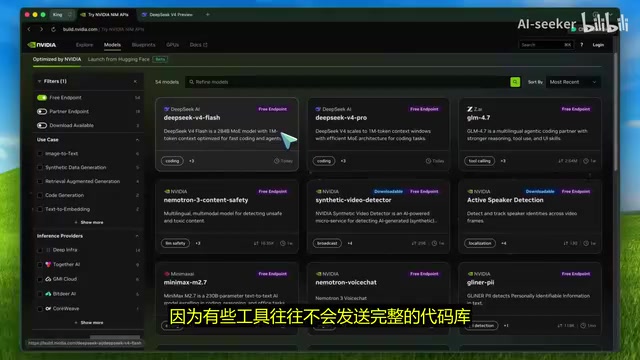
- Visit build.nvidia.com and search for "DeepSeek V4"
- You'll see two model cards: DeepSeek V4 Pro and DeepSeek V4 Flash
- Click to enter the model page (if there's a third-party model warning, read and proceed)
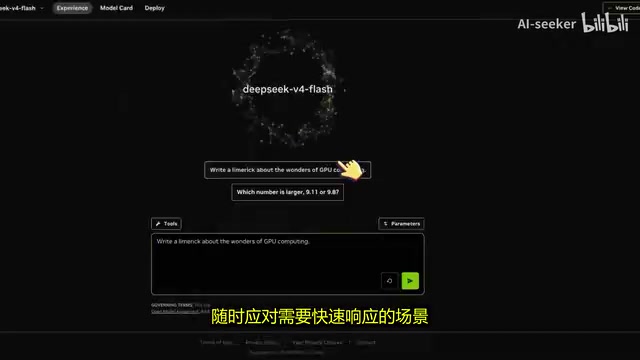
- You can test the model directly in the browser first to confirm it's working
- Click "Get API Key"—the system will prompt you to log in or register an NVIDIA account
- This automatically enrolls you in the NVIDIA Developer Program with free development access
- Copy the API key and store it securely
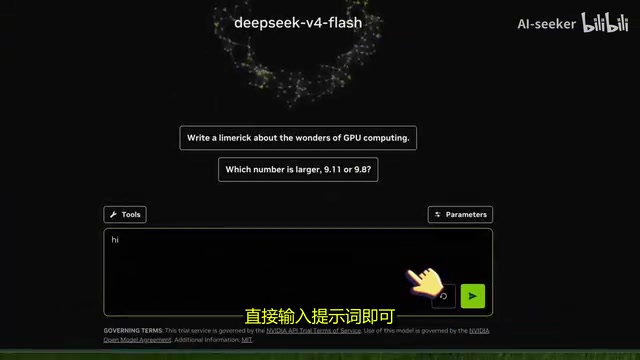
It's important to emphasize that NVIDIA defines this as free access to NIM endpoints for prototyping through the Developer Program. This means it's perfectly suited for testing applications, building workflows, or creating demos, but should not be used as an unrestricted production backend. The model availability, rate limits, and terms of service for the free API may change at any time.
API Call Method (OpenAI-Compatible)
The API is fully compatible with the OpenAI interface standard, meaning you can call it directly using the OpenAI SDK:
- Base URL:
integrate.api.nvidia.com/v1 - Chat Completions Endpoint:
integrate.api.nvidia.com/v1/chat/completions - Model Names (NVIDIA platform):
deepseek-ai/deepseek-v4-proanddeepseek-ai/deepseek-v4-flash
OpenAI's Chat Completions API format (including the /v1/chat/completions endpoint, messages array structure, role/content fields, etc.) has become the de facto standard in the large language model industry. Nearly all major LLM providers—including Anthropic (via adapter layers), Google Gemini, Mistral, and various open-source model hosting services—offer OpenAI-compatible APIs. The benefits of this standardization are enormous: developers only need to write integration code once and can freely switch between different models without rewriting call logic. Middleware projects like LiteLLM and OpenRouter are built on this standard, further simplifying the complexity of multi-model management.
⚠️ Note the naming difference: On DeepSeek's official API, model names are deepseek-v4-pro and deepseek-v4-flash; on NVIDIA NIM, model names include a provider prefix. If names are entered incorrectly, tools may throw errors or fail to recognize the model.
Reasoning Effort Parameter Explained
This is a highly practical parameter supported by DeepSeek V4 endpoints, allowing flexible adjustment of reasoning depth without switching models:
| Value | Description | Use Cases |
|---|---|---|
| None | Disables thinking process, fastest response | Flash lightweight tasks |
| High (default) | Standard reasoning capability | Daily coding, general tasks |
| Max | Strongest reasoning performance, but slower | High-difficulty reasoning, complex debugging |
The underlying mechanism of the reasoning effort parameter is closely related to Chain-of-Thought (CoT) reasoning. When set to Max, the model performs a longer, more in-depth internal reasoning process before generating the final answer, similar to how humans spend more time thinking through difficult problems. This feature originates from the reinforcement learning training paradigm introduced by DeepSeek R1—by rewarding the model's step-by-step analytical abilities during reasoning, the model learned to "think slowly." When set to None, it skips this reasoning process and directly generates an answer, dramatically improving response speed but sacrificing accuracy on complex problems. This parameter essentially provides an adjustable knob between reasoning quality and latency, allowing developers to avoid deploying different models for tasks of varying difficulty.
The same model can flexibly adjust its performance based on different reasoning effort values. For Flash, typically choose None or High; for Pro, set it to High for regular code and Max when facing difficult problems.
A Note on Token Limits
While the models support a 1 million token context window, the NVIDIA endpoint currently caps output tokens at 16,384. Different hosting platforms may offer different limits, even if the underlying model supports much larger contexts.
A 1 million token context window means the model can theoretically process approximately 750,000 English words or millions of lines of code in a single pass. However, in practice, multiple limitations exist. First is computational cost: the attention mechanism's computational complexity scales quadratically with context length (despite mitigation techniques like FlashAttention and Ring Attention), and inference time and GPU memory consumption for ultra-long contexts are considerable. Second is the "needle in a haystack" problem—research shows that when context is too long, the model's attention to information in the middle positions decreases (the "Lost in the Middle" phenomenon). Additionally, hosting platforms typically set practical limits far below the theoretical maximum for cost and stability reasons.
AI coding tools typically don't send entire codebases; instead, they use file chunking, context summarization, or prompt length limits—essentially a RAG (Retrieval-Augmented Generation) strategy that sends only the most relevant code snippets to the model. Therefore, the 1 million context should be viewed as the theoretical ceiling for this model series, with actual usage constrained by tools and endpoints.
Integrating DeepSeek V4 in Programming Tools
Kline CLI Integration
The simplest approach:
- Open Kline CLI and run the configuration command
- Select NVIDIA as the provider
- Paste your NVIDIA API key
- Run the Models command and select DeepSeek V4 Pro or V4 Flash
Once connected, you can freely switch between models.
Universal Integration Method (For Cursor, Roo Code, Aider, etc.)
If a tool's built-in NVIDIA interface hasn't yet updated its model list, you can manually configure it using OpenAI-compatible mode:
- Base URL:
integrate.api.nvidia.com/v1 - API Key: Your NVIDIA Key
- Model:
deepseek-ai/deepseek-v4-proordeepseek-ai/deepseek-v4-flash
This method works for all tools that support custom OpenAI-compatible endpoints, including Cursor, Roo Code, Aider, LiteLLM, and more. This is precisely the core value of OpenAI-compatible APIs—though the models and vendors differ, the integration method is completely consistent. For developers, this means the cost of evaluating new models is extremely low: just modify the Base URL and model name without changing any business code.
V4 Pro vs V4 Flash: Use Case Selection Guide
Typical Scenarios for V4 Flash
- Quick codebase interpretation, tweaking code snippets
- Summarizing documents, writing simple test cases
- Generating Git commit messages
- Extracting key content from long texts
- Serving as a routing model to dispatch complex tasks to Pro
Typical Scenarios for V4 Pro
- True agentic programming: reviewing projects, mapping architecture, understanding existing patterns
- Implementing complete features and running tests
- Debugging tricky issues (complex bugs spanning files and modules)
- Processing massive context: lengthy design docs, API documentation, multilingual files
Comparison Testing Recommendations
To truly understand the difference between the two models, don't just casually ask a question. Put them through the same real-world workflow: have them implement the same feature, fix the same bug, summarize the same long document, then compare speed, accuracy, and how much follow-up effort is needed for corrections. This is far more meaningful than simply running benchmarks.
Why the DeepSeek V4 Release Matters
DeepSeek was founded by Chinese quantitative investment firm High-Flyer and has rapidly risen since 2023 to become one of the world's most influential open-source AI labs. Its development trajectory is highly significant: DeepSeek V2 first demonstrated the enormous potential of MoE architecture in reducing inference costs; V3 achieved GPT-4-level performance at an extremely low training cost (reportedly around $5.5 million), shaking the entire industry; R1 proved that reinforcement learning could enable models to autonomously develop reasoning capabilities, with its open-source weights being widely used in academic research and commercial applications. Each DeepSeek release challenges an industry assumption—that only companies with multi-billion-dollar budgets can train top-tier large models. This "efficient training" approach creates significant competitive pressure on giants like OpenAI and Google, while providing the global developer community with high-quality alternatives.
From V3 and R1 fundamentally shifting market dynamics, to V3.2 improving long-context and attention mechanism performance, to V4 shifting focus toward long-context agents, code generation, tool calling, and complex reasoning workflows—each step pushes the industry forward.
NVIDIA's hosting of the model through NIM makes testing incredibly simple. Developers don't need to wait for various programming tools to individually adapt to DeepSeek V4—as long as a tool supports OpenAI-compatible endpoints, it can typically connect directly. For students, independent developers, and teams wanting to quickly validate ideas, this is an excellent opportunity to try top-tier large models at zero cost.
Key Takeaways
- DeepSeek V4 launches Pro (1.6 trillion parameters) and Flash (284 billion parameters), both supporting 1 million token context windows
- Both models can be called for free via the NVIDIA NIM platform, suitable for prototyping and testing but not for production use
- The API is fully OpenAI-compatible and works directly with mainstream programming tools like Cursor, Kline, and Roo Code
- The Reasoning Effort parameter (None/High/Max) allows flexible adjustment of reasoning depth and response speed on the same model
- NVIDIA endpoint output token limit is 16,384; be aware of platform-specific limitations in actual use
Related articles
 Tutorials
ChatGPT Plus Subscription Guide: Are GPT-5.5, image-2, and Codex Worth the Upgrade?
A detailed look at ChatGPT Plus features — GPT-5.5, image-2, and Codex — with a Plus vs Pro comparison and a complete step-by-step subscription guide for users outside the US.
 Tutorials
Harness AI Engineering in Practice: Using Claude Code to Master Enterprise-Level E-Commerce Development
Deep dive into Harness AI Engineering: master enterprise e-commerce development with Claude Code using the Rules, Skills, Wiki, and Changes framework.
 Tutorials
Cursor + Codex Dual-IDE Collaboration: A Practical Methodology for Open-Source Project Customization
A complete methodology for open-source project customization based on real-world experience, detailing the Cursor+Codex dual-IDE workflow, seven-stage process, MVP validation, and AI source code reading techniques.